


The cost of Claude Code is the money you pay to use Anthropic's programming agent, and there are two main paths: pay a fixed amount each month through a Claude subscription plan (Pro, Max, Ultra, Team, Enterprise) with usage limits based on time windows, or pay by actual tokens used through an Anthropic Console account (API). According to Claude Code's cost documentation page (read on 03/11/2026), Claude Code is charged by token consumption, and the cost per person varies widely depending on the model, source code size and work habits. This post only uses prices read directly from the official pricing page claude.com/pricing on 03/11/2026, does not include taxes and can change at any time. The post will not give financial advice, will not say which plan is "worth the money" for you, and will not disclose which plan OPCAIOS uses or how much it costs. The post will contain: table of plans and API prices, how to read usage limits, commands to view costs, official ways to reduce tokens, and a sample calculation example. The general introduction to Claude Code is in the post Claude Code là gì.
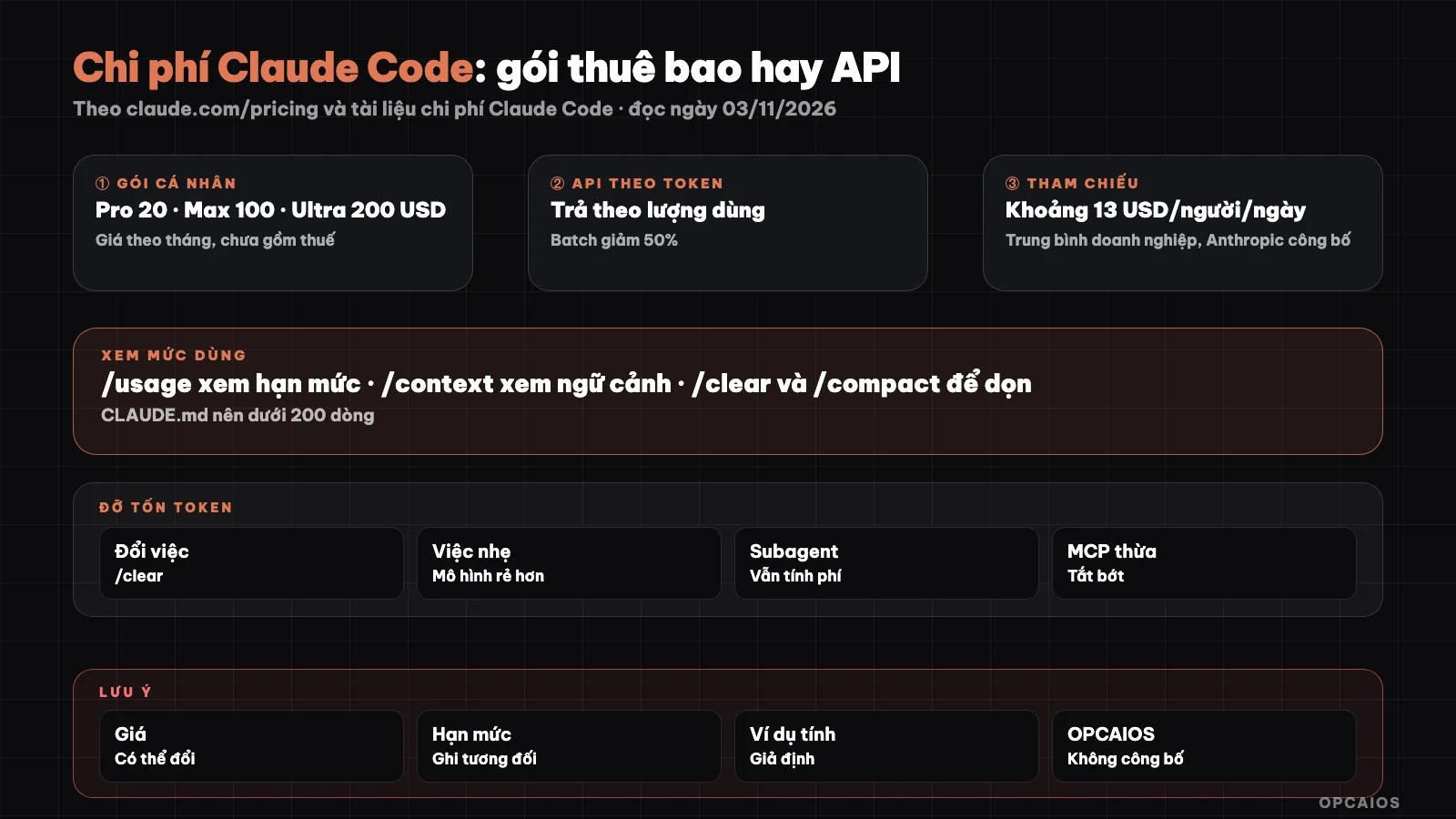
Two ways to pay for Claude Code and adjustment knobs to reduce tokens according to official documentation. Diagram: OPCAIOS.
What are the ways to pay for Claude Code?
Claude Code has two payment methods: Claude subscription plan or pay-per-token through API. With a subscription plan, you log into Claude Code using your claude.ai account; usage counts toward your plan's limit, refreshes per 5-hour window and per week, and overages are only available if you turn on "usage credits" (buy extra). With API, you log in using your Anthropic Console account, each input token, output token and cache read-write token are charged by model pricing, no fixed cap unless you set a spending limit for your workspace yourself. According to Claude Code's cost documentation (read on 03/11/2026), when you authenticate for the first time using Console, the system automatically creates a workspace named "Claude Code" to aggregate costs, and workspace admins can set spending limits for this workspace. Claude Code also runs on Amazon Bedrock, Google Cloud and Microsoft Foundry, in which case the invoice is with the cloud provider. The Free plan does not include Claude Code. If you are not sure what tokens are, see the posts LLM là gì and API là gì.
What is the pricing table for Claude subscription plans today?
According to the claude.com/pricing page read on 03/11/2026 (USD, before tax, subject to change), the plans that include Claude Code display as follows:
| Plan | Displayed Price | Usage Limit per Pricing Page |
|---|---|---|
| Free | 0 USD | Claude Code not included |
| Pro | 20 USD/month billed monthly, or 17 USD/month billed annually (200 USD paid upfront) | More than Free, calculated per 5-hour window and per week |
| Max | 100 USD/month | 5 times Pro |
| Ultra | 200 USD/month | 10 times Pro per week; no 5-hour limit for verified accounts |
| Team, Standard seat | 25 USD/seat/month billed monthly, 20 USD billed annually | More than Pro; groups from 2 to 150 people |
| Team, Premium seat | 125 USD/seat/month billed monthly, 100 USD billed annually | 5 times Standard seat |
| Enterprise | 20 USD/seat/month billed annually, minimum 20 seats, plus usage fees at API pricing | By model and task |
Important note: the pricing page only lists limits in relative form ("5 times Pro"), not specific token or message counts, so we cannot convert plans to token numbers. According to the cost documentation, with Team and Enterprise, each seat's limit is shared across Claude chat, Claude Code and Cowork; one debugging session with Claude Code can cost more than a whole day of regular conversation.
What is the API pricing per token for each model?
API pricing is calculated per million tokens (MTok), and varies by model and token type. According to the pricing table on claude.com/pricing as of 03/11/2026 (USD per million tokens, before tax):
| Model | Input | Output | Write Cache | Read Cache |
|---|---|---|---|---|
| Fable 5.1 | 10 | 50 | 12.50 | 0.25 |
| Opus 5.5 | 4 | 20 | 5 | 0.20 |
| Sonnet 5.5 | 2 | 10 | 2.50 | 0.10 |
| Haiku 5.5 (prompt up to 100k tokens) | 0.10 | 0.50 | 0.125 | 0.01 |
| Haiku 5.5 (prompt over 100k tokens) | 0.50 | 2.50 | 0.625 | 0.05 |
The pricing page notes that cache pricing applies for a 5-minute lifespan; batch processing reduces costs by 50%; running inference only in the US costs 1.1x; and Opus 5.5's fast mode costs 2x. Two easy-to-miss points: "thinking" tokens are charged as output tokens according to the cost documentation, and cache reads are cheaper than standard input by roughly 20x for both Opus 5.5 and Sonnet 5.5. This is why a long session can still be cheap if cache is used well, and becomes expensive very quickly if cache is lost.
How much do businesses typically spend on Claude Code?
Claude Code's cost documentation (as of 03/11/2026) provides one reference figure: on enterprise deployments, average costs are around $13 per developer per working day, roughly $150 to $250 per person per month, and 90% of users stay below $30 per working day. This figure is an enterprise average, not a forecast for solo workers, and Anthropic recommends starting with a small pilot group to get your own baseline. The unusual cost drivers mentioned in the documentation are long sessions that never clear context, and using Opus as the default model for everything. If you're weighing the cost of AI tools in general against hiring staff, see the articles cost of AI tools replacing 3 staff and auditing AI tool costs.
Which commands let me see costs and context in Claude Code?
According to the official documentation as of 03/11/2026, these commands help you track where your money is going:
/usage: the Session block shows total estimated cost, time, and tokens by model (input, output, read and write cache). The figure is calculated locally using list prices, so it's only an estimate. With Pro, Max, Ultra, Team, or Enterprise plans,/usagealso displays usage tier progress, percentage breakdown by skill, subagent, plugin, or MCP server, and reduction suggestions; pressfto have Claude Code apply the suggestions it can implement./context: see what is currently occupying your context window./insights: an HTML report on your work patterns and common misunderstandings; the command itself also costs tokens./usage-credits: manage overage purchases when you exceed your tier limit (only when logged in with claude.ai)./modeland/effort: switch models and thinking level during a session.
For subscription plan users, the documentation makes clear that the dollar amount in the Session block does not count toward your invoice; check your tier progress bar instead.
How to reduce Claude Code tokens according to official documentation?
Reducing tokens means keeping context small, since Claude Code sends back the entire conversation with each request. According to Claude Code's pricing page (read on 03/11/2026), the main ways are:
- Delete context between unrelated tasks using
/clear. Old context wastes tokens on every message after;/clearcosts nothing. Name the session using/renamebefore deleting so you can return using/resume. - Intentional compression using
/compact, with instructions on what to keep. Note: compressing a large context is itself a large request. - Choose the right model for the job. Sonnet handles most programming work well and is cheaper than Opus; save Opus for complex architecture decisions; subagents for simple tasks can set
model: haiku. - Keep CLAUDE.md under about 200 lines, move specialized instructions to skills since skills only load when needed. See What is CLAUDE.md.
- Turn off unused MCP servers via
/mcp, prefer command-line tools likeghwhen available. - Lower thinking level using
/effortfor simple tasks. - Use output filtering hooks for long output, for example return only error lines from a test instead of thousands of lines of logs.
- Write specific requests and use plan mode for large tasks to avoid rework.
How does prompt caching help and why is cache lost?
Prompt caching is a mechanism Claude Code turns on automatically so repeated parts (system prompt, conversation history) are charged at the cache read rate instead of the input rate. The documentation states that the first message after a long break longer than cache lifetime will reprocess the entire context. So /compact or /clear before leaving the machine for a long time.
Do subagents cost extra?
Yes. Subagents help keep long output (running tests, reading logs) outside the main conversation, but subagent requests still count toward your usage. The documentation also notes that agent teams cost about 7 times the tokens of a regular session when members run in plan mode. See What are subagents.
Example cost calculation for a hypothetical workday
The following example is hypothetical, not real data from anyone or from OPCAIOS. Suppose a workday using API with Sonnet 5.5 uses: 1.8 million cache read tokens, 200 thousand non-cache input tokens, 100 thousand cache write tokens, 50 thousand output tokens (including thinking tokens). According to pricing read on 03/11/2026:
| Item | Sonnet 5.5 | Opus 5.5 |
|---|---|---|
| Cache read 1.8 million | 0.18 USD | 0.36 USD |
| Input 200 thousand | 0.40 USD | 0.80 USD |
| Cache write 100 thousand | 0.25 USD | 0.50 USD |
| Output 50 thousand | 0.50 USD | 1.00 USD |
| Total | 1.33 USD | 2.66 USD |
Without cache, 2.1 million input tokens with Sonnet 5.5 would already be 4.20 USD, plus output makes 4.70 USD, roughly 3.5 times more. Multiplied by 20 days, the Sonnet with cache plan comes to about 26.6 USD/month; but cannot be directly compared with the Pro plan at 20 USD, since the plan has usage limits by time window which the pricing page does not convert to tokens. Practical approach: use one plan for a few weeks, check /usage, then decide.
OPCAIOS's experience
OPCAIOS does not disclose which plan we use or how many tokens we spend, so this section only mentions habits, no numbers. The website opcaios.org is built by one person using many programming agents, including Claude Code. What we actually do relating to costs:
- Assign long work to subagents in small batches, for example each subagent writes two blog posts to its own folder, so the main session does not have to contain all content. This post was written that way. We know subagent requests still count toward usage.
- Convert repeated processes into skills (skill for blog writing has workflow, scoring script, diagram building) instead of pasting long instructions into each session.
- Keep notes as many small files with one index file, so each session only reads what's needed.
- Do check usage tracking commands and context when a session runs long, but we have not measured systematically how much we save.
We have not compared costs between subscription plans and API on the same workload. Comparing tools by workflow is in the post Claude Code, Cursor or Codex CLI.
Frequently Asked Questions
What's the cheapest Claude Code plan?
According to claude.com/pricing as of 03/11/2026, the cheapest plan with Claude Code is Pro at $20/month when billed monthly or $17/month when billed annually ($200 upfront), before tax. The Free plan doesn't include Claude Code. Via the API route, there's no fixed fee—you pay per token, so using very little in a month could be cheaper, while heavy use could be much more expensive. Prices can change, so check the pricing page again before purchasing.
Should I choose a subscription plan or pay per API?
I don't advise on finances and don't know your workload volume. On mechanics: a subscription gives fixed costs but has usage caps within a 5-hour and weekly frame; when you hit the cap you wait or buy more. The API has no hard ceiling, you pay for what you use, and suits automation or uneven usage, but you need to set a workspace spending limit yourself. The safe way is to try for a month, read /usage, then compare against the pricing table.
Why does Claude Code's usage cap run out fast even though I ask so little?
According to cost documentation as of 03/11/2026, Claude Code sends back the entire conversation on each request, so a one-liner question in a session open all day still counts against the full history. Other causes: cache expiring after long idle time, periodic runs in the session when you're not there, subagent and agent teams sending separate requests, and context-compacting commands. Run /usage to see which part uses the most and follow the suggestions.
How do /compact and /clear differ?
/clear starts a brand new context with no token cost, suited when switching to unrelated work; the total session cost in /usage also resets to 0. /compact summarizes the history to preserve your work thread—you can add instructions on what to keep—but summarizing a large context is itself a big request. Quick rule: switching tasks then clear; long task needing to keep the thread then actively compact before the context fills up.
Does switching to a cheaper model make results worse?
Maybe, depending on the task. Claude Code documentation says Sonnet handles most programming well and save Opus for complex architecture decisions or multi-step reasoning; Haiku suits subagents doing simple work. I don't have quality metrics between models so I can't state the gap. The practical way is to try the same small task on two models and compare yourself. To learn how to use programming agents efficiently and safely, see OPCAIOS's AI application training course.
Source: claude.com/pricing page (plans and API pricing) and Claude Code docs at code.claude.com: "Manage costs effectively", "How Claude remembers your project" (read 03/11/2026); price before tax, may change; each plan's cap is only listed on the pricing page as relative, not verified by token count; examples are assumptions. Experience is OPCAIOS's.
Translated from Vietnamese with AI. Read the original.
Want to apply this in your business?
Book a free 30-minute call (Vietnam time, in English or Vietnamese).