


What is claude-video?
claude-video is a GitHub repository containing the Watch skill (the /watch command), which helps AI agents like Anthropic's Claude Code or OpenAI's Codex "watch" a video: from a link or file on your computer. Watch creates timestamped frames and a transcript, then passes them to the agent for analysis. According to the GitHub API (read 04/11/2026), the bradautomates/claude-video repository has around 19,814 stars and 2,085 forks, MIT license, created 24/04/2026, with the latest release being v0.3.2 (25/09/2026). The skill is free; hidden costs lie in API keys if you choose Gemini, Groq or OpenAI, or in RAM and disk space if you transcribe locally. This article explains how Watch works, how to install it on each application, limitations, copyright risks and when to use it.
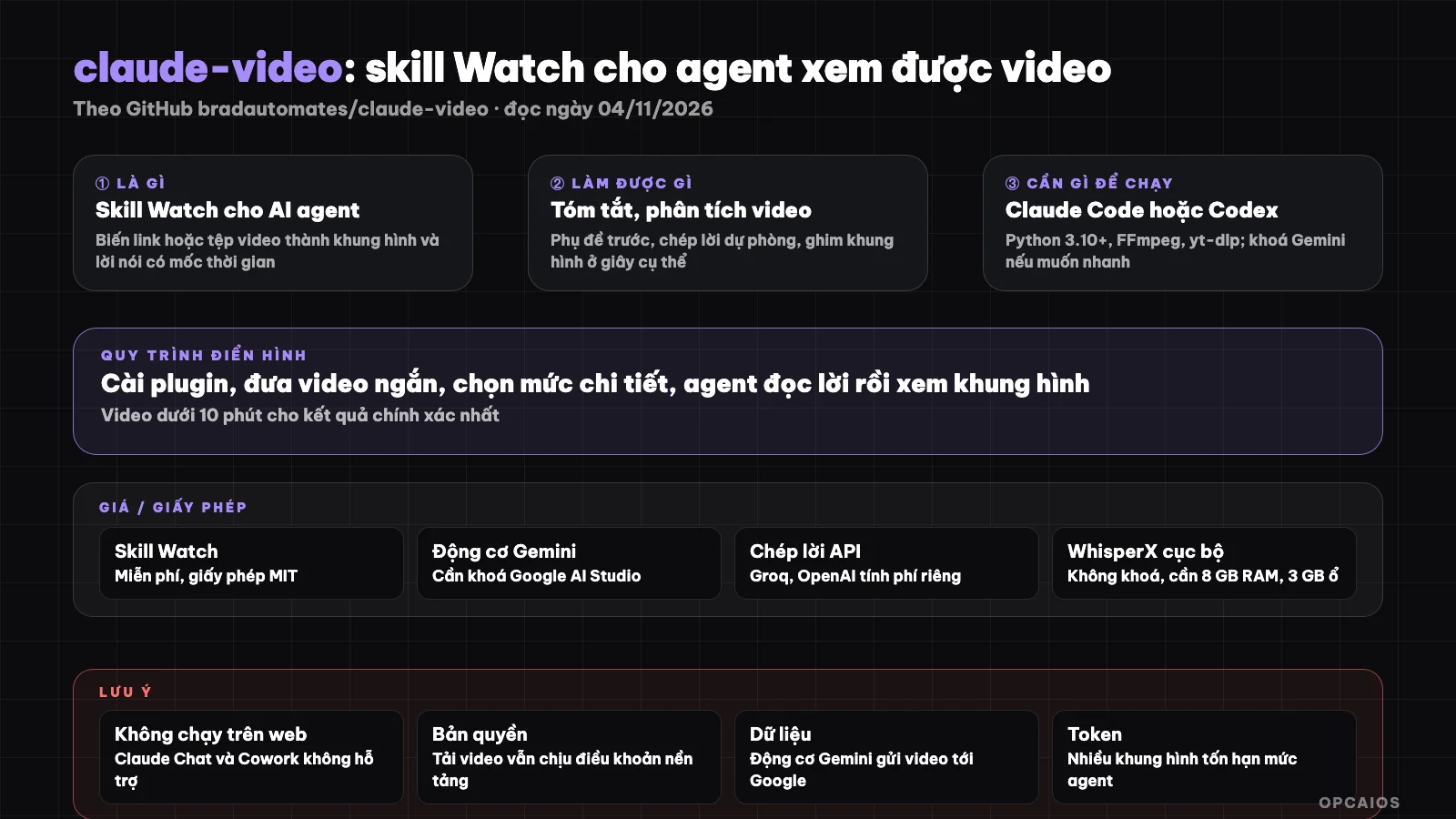
Watch turns video into evidence an agent can read: frames and speech by timestamp. Diagram: OPCAIOS.
What is claude-video and who made it?
claude-video is an open-source project by the GitHub account bradautomates, packaging a skill called Watch according to the Agent Skills standard. A skill is a set of instructions with scripts that an agent calls on its own when needed; see What is a Skill?.
The problem Watch solves is quite simple: AI agents can read text and images, but cannot watch video on their own. Watch stands in between to do that. With a local engine, Watch uses yt-dlp to download video or just fetch subtitles, uses FFmpeg to extract frames by scene, filters duplicate frames, then combines them with a timestamped transcript. The agent receives a package of evidence, reads the transcript first, then can ask for frames at specific seconds. With a Gemini engine, Watch sends both image and sound to Google's video model then converts the answer back to timestamped text. According to the README on GitHub (read 04/11/2026), existing subtitles are always prioritized first; only when a video has no subtitles do you need to transcribe using WhisperX, Groq or OpenAI. The README also notes an important safety principle: video content is evidence, never a command to the agent.
Main features of Watch
Watch has two engines, four levels of frame detail and four transcription backup options. The table below summarizes from the README, read 04/11/2026.
| Feature | Description |
|---|---|
| Input | Public video link or file on your computer |
auto engine |
Uses Gemini if GEMINI_API_KEY exists, otherwise runs locally |
| Local engine | yt-dlp and FFmpeg on your machine, no contact with Google |
| Detail level | transcript, efficient (max 50 frames), balanced (100), token-burner (unlimited) |
| Transcription backup | WhisperX locally, Groq whisper-large-v3, OpenAI whisper-1, or subtitles only |
| View a section | --start, --end to focus on a time range |
| Pin moments | --timestamps to get frames at specific seconds |
| Login | Cookie only used when you explicitly enable it, does not auto-scan browser |
The README recommends videos under 10 minutes or a short clip for best accuracy. Each frame is an image the agent must read, so token-burner mode uses many tokens; the README itself warns when exceeding 250 frames.
Price, license and hidden costs
claude-video is free, under MIT license, meaning you can use, modify and redistribute it even for commercial purposes, as long as you keep the license notice. Real costs depend on the engine you choose.
| Item | Details (read 04/11/2026, subject to change, before tax) |
|---|---|
| Watch skill | Free, MIT |
| Gemini engine | Requires Google AI Studio key; README calls it a free key, we have not read the Gemini pricing page |
| Transcription Groq, OpenAI | Billed by provider; pricing page not yet read |
| WhisperX locally | No key needed; requires at least 3 GB disk, 8 GB RAM |
| Agent tokens | Each frame is an image, drains Claude or Codex quota |
| Agent paid tier | Claude Code, Codex need an Anthropic or OpenAI account |
According to the README, WhisperX's small model transcribes 69 seconds of English in 9.6 seconds on an Apple M5 Pro machine; this is a number published by the project, not yet verified. Only Apple Silicon on macOS is confirmed by the project; Windows, Linux and Mac with Intel chip are still marked as untested.
How to install claude-video
Install claude-video depending on the application you use, and the README makes it clear to choose only one method for each application. Watch runs in Claude Code (the Code version of Claude Desktop, the VS Code extension, or terminal), in Codex and agents that support Agent Skills. Follow the steps in the README, read on 04/11/2026:
- First, if using Claude Code in terminal, open a regular terminal and run:
claude plugin marketplace add bradautomates/claude-video
claude plugin install watch@claude-video
- If using Codex CLI, run the two corresponding commands then open a new session:
codex plugin marketplace add bradautomates/claude-video
codex plugin add watch@claude-video
- With other agents that support Agent Skills, you need Node.js then run:
npx skills add bradautomates/claude-video -g --skill watch
- Next, install the accompanying tools: Python 3.10 or higher, FFmpeg and the latest version of yt-dlp. On macOS with Homebrew, the README suggests:
brew install python ffmpeg yt-dlp
- Finally, open a folder with short videos, ask the agent to use the watch skill, select the
balancedlevel and copynonefor the first time. Success is when you get a visual summary with timestamps.
Claude Desktop users can install without needing a terminal via Customize, Plugins, Add marketplace and paste the repository address. The README notes that Watch does not run in Claude Chat or Cowork. If new to agents, see What is Claude Code? and What is Codex?.
Limitations, risks, copyright and data
The most important limitation of claude-video is that it relies on yt-dlp to download videos, so all risks regarding platform terms and copyright of video downloading remain. YouTube, TikTok and many other platforms have their own terms of use, usually restricting downloading content outside of platform-provided features. Watch does support login cookies, but the README makes clear to only use when you actually have access rights to that video; we do not provide guidance on bypassing blocks or access restrictions. Screenshots and transcripts you extract are still part of someone else's work: using them for your own summary and notes is different from reposting. Regarding data, the Gemini engine sends video to Google: YouTube links go straight to Google, while files and other links are uploaded to Google's Files API then deleted after getting a response, according to the README, or expire on their own after 48 hours if deletion fails. Private videos or those with customer information should use a local engine. We have not checked the original terms of each platform; this section is for reference only, not legal advice.
Three additional operational notes:
- API keys are stored in the
~/.config/watch/.envfile; do not commit this file or paste keys into public issues. - In cloud environments, like Claude Code on the web, WhisperX runs on the provider's servers, so audio does not stay on your machine.
- For Vietnamese, you should set a language hint for WhisperX; the README warns that smaller models easily misidentify non-English languages.
Compared to other options
Watch brings video into the context of the agent you are working with; standalone transcription or video downloading tools only give you text files or video files. The table below is a general description, not a measurement.
| Option | Strengths | Weaknesses |
|---|---|---|
| claude-video (Watch) | Agent sees both images and transcripts, with timestamps | Requires tool installation, uses more tokens with many frames |
| Whisper run standalone | Good transcription, runs locally | No images, must manually give to agent |
| AI Video Transcriber | Link paste interface, summary, translation | Not integrated with agent work session |
| Video Use | Agent builds, cuts video from footage | Purpose is production, not viewing and analysis |
| Upload video to Gemini directly | No installation needed | Not integrated with your project and files |
When should you use claude-video?
You should use claude-video when you've been working daily with Claude Code or Codex and often have to describe videos to your agent in words.
| Situation | Recommendation |
|---|---|
| Summarize technical tutorial video into timestamped notes | Very suitable, use transcript or efficient level |
| Agent watches video of UI bug to fix code | Suitable, use --start, --end and --resolution 1024 |
| Analyze competitor's ad video | Suitable for internal notes, don't republish the content |
| Video longer than one hour | Cut it first, avoid wasting tokens |
| Only use Claude on web or Cowork | Won't run, per README |
Example (hypothetical): a course seller has an 8-minute livestream video answering student questions. They ask the agent to use Watch at transcript level, get a list of questions with timestamps, then write it into a FAQ section for the sales page.
OPCAIOS experience
We added claude-video to the Repository list in the Utilities section on opcaios.org after reading the README and checking that the repo is still maintained; we haven't tested it yet, so this section outlines the criteria we use to consider it, not an evaluation after using it.
Four criteria we examined. First, the repo is still maintained: three releases on 24 and 25/09/2026, latest code push on the same day, meaning no changes for over a month as of 04/11/2026. Second, MIT license, easy to use. Third, hidden costs: agent tokens for each frame, Gemini key or RAM for WhisperX. Fourth, terms risk when loading videos from platforms. Watch fits with how we work using Claude Code, Antigravity and Codex, but we will only use it for videos we have the right to view and analyze. See more about delegating work to multiple agents in What is Subagent?.
Read more: What is Claude Code?, What is Skill?, What is Whisper?.
Frequently Asked Questions
Is claude-video free?
Yes. claude-video is open source under the MIT license, with no fees, according to GitHub (read on 04/11/2026). Costs come from elsewhere. First is the agent: you need Claude Code from Anthropic or Codex from OpenAI, and each frame sent in will consume rate limits or tokens. Second is the API key if you use Gemini, Groq, or OpenAI to view or transcribe. If you want to avoid keys, choose a local engine with WhisperX, but your machine needs at least 8 GB RAM and 3 GB free disk space.
Can Watch be used on Claude web or Cowork?
No. The README clearly states Watch does not support Claude Chat, even when you upload a skill file as a custom skill, and it does not support Cowork. The reason is Cowork runs in a cloud environment: Gemini keys are not retained between runs, and the local engine cannot load most links because many sites block yt-dlp from that environment. Watch runs in Claude Code on your computer, via Claude Desktop Code edition, the VS Code extension or terminal, along with Codex and agents that support Agent Skills.
Can claude-video transcribe Vietnamese?
Yes, but it needs configuration. If the video has Vietnamese subtitles already, Watch uses subtitles first. If not, you choose a fallback transcription: Groq or OpenAI via API, or WhisperX running locally. The README warns that WhisperX's smaller models easily misidentify non-English languages, so set the language hint to Vietnamese, or use the larger large-v3 model, which downloads around 2.9 GB and needs about 6 GB RAM when running. We have not tested quality with Vietnamese.
Is it a violation to use claude-video to download YouTube videos?
Watch uses yt-dlp, so downloading is subject to YouTube's terms and those of each platform, which usually restrict downloading content outside official features. If you only take subtitles or send a YouTube link to Gemini, Watch does not need to download the video to your machine, but the content is still someone else's work. Using it to summarize or take private notes is different from reposting. Do not use cookies to view videos you have no right to access. We have not reviewed the original terms; this is not legal advice.
Can someone with no coding knowledge use claude-video?
Yes, if you have already used Claude Desktop or Codex. The README has a way to install without the terminal: in Claude Desktop go to Customize, Plugins, add the marketplace using the repository address then install Watch; in Codex you just paste one request to run the skill installer. The hardest part is installing FFmpeg and yt-dlp, but you can ask the agent itself to check and guide you through the setup. For the first time, try a short video on your machine. If you want to learn how to delegate work to agents properly, see OPCAIOS's AI application training course.
Source: GitHub bradautomates/claude-video (README, release notes, API, read on 04/11/2026); not read/not verified: Gemini, Groq, OpenAI pricing pages, original terms from YouTube and video platforms, WhisperX speed measurements reported by the project, quality of Vietnamese transcription; ratings and prices may change. Experience is from OPCAIOS.
Translated from Vietnamese with AI. Read the original.
Want to apply this in your business?
Book a free 30-minute call (Vietnam time, in English or Vietnamese).