



What is Video Use?
Video Use is an open source skill from the Browser Use team that allows coding agents like Claude Code or Codex to build videos from raw footage: cutting from filler and silence, color grading, adding captions and animations, then exporting final.mp4. According to the GitHub API (read on 04/11/2026), the browser-use/video-use repository was created on 12/4/2026, has around 30,483 stars and 3,540 forks, MIT license, with the most recent code push on 8/10/2026. The code is free and runs on your machine, but requires an ElevenLabs API key to transcribe speech; the cloud version on video-use.com just opened its waitlist. This post explains how Video Use "reads" video, how to install it, hidden costs, risks, and when you should use it.
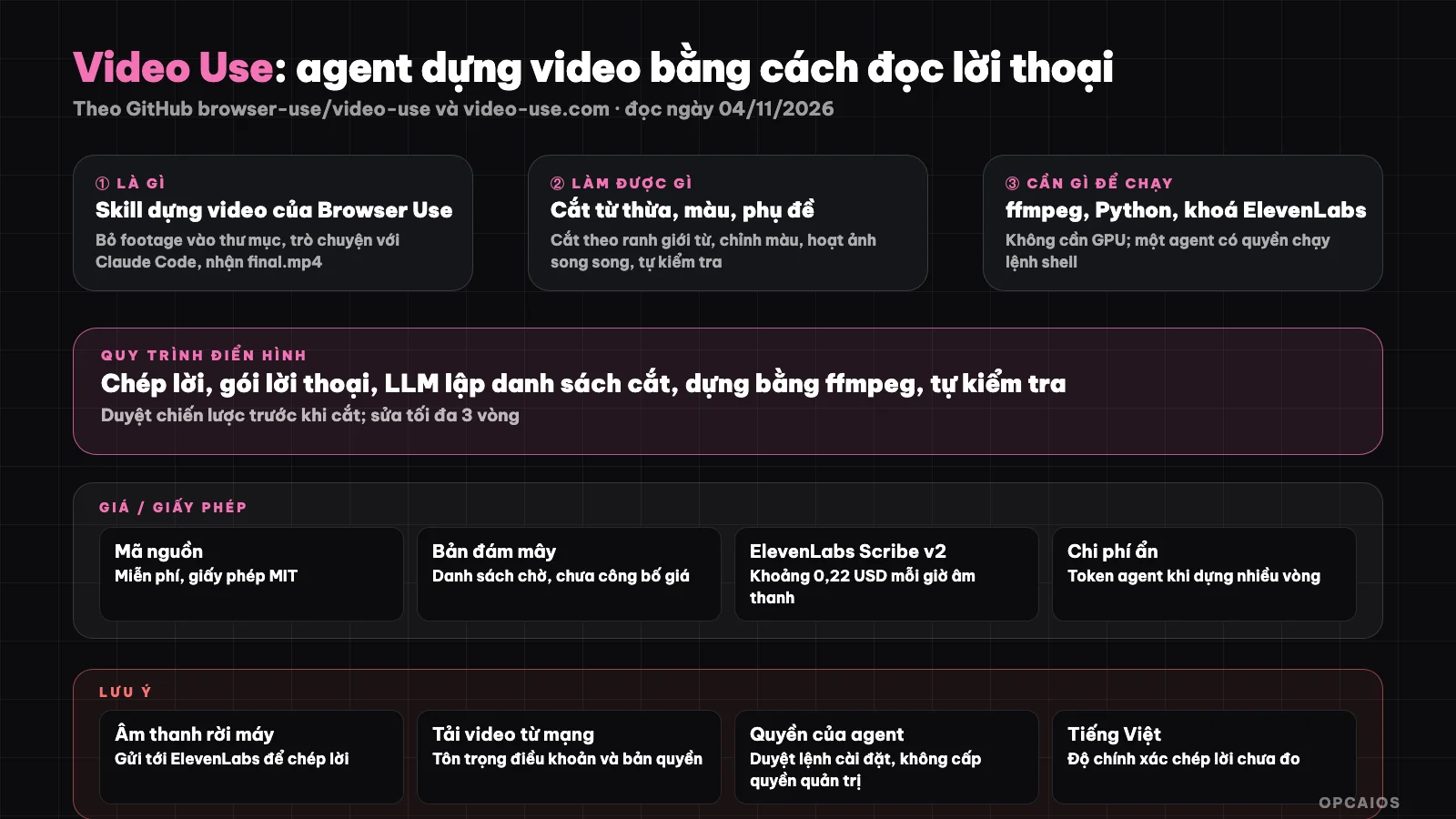
Video Use lets agents read the transcript instead of viewing each frame, then self-check before handing it over. Diagram: OPCAIOS.
What is Video Use and who made it?
Video Use is a skill—a set of instructions and scripts that an agent reads and follows, not video editing software with a draggable timeline. The repository belongs to the browser-use organization on GitHub, the same group that made Browser Use, a library for AI to control browsers. The README on GitHub (read on 04/11/2026) describes the process very simply: put footage in a folder, chat with Claude Code, get back final.mp4.
The core idea is like Browser Use. Browser Use gives the model the structure of a web page instead of screenshots; Video Use gives the model a timestamped transcript instead of thousands of frames. The README says the skill works with voiceover content, synthetic video, tutorials, travel or interviews, no presets needed. If you're new to the concept of skills, see What is a Skill?.
What can Video Use do?
Video Use handles rough editing and basic finishing of a video with voiceover, based on the transcript to decide where to cut. According to the README on GitHub (read on 04/11/2026), the main features are as follows.
| Feature | Description from README |
|---|---|
| Cut filler and silence | Remove "um", "uh", flubbed lines and dead space between takes |
| Auto color grade | Each segment a different look, or a self-chosen ffmpeg command chain |
| De-clip audio | Fade the sound 30 milliseconds at each cut point |
| Burned-in captions | Default 2-word chunks in caps, style customizable |
| Overlay animations | Built with HyperFrames, Remotion, Manim or PIL, each animation a parallel subagent |
| Self-check the edit | Review each cut point on the exported version before showing you |
| Remember the session | Write to project.md so you can pick it up next time |
The way Video Use "reads" video is the most noteworthy point. First, each source file is sent once to ElevenLabs Scribe to get timestamps for each word, identify speakers and audio events like laughter or applause. Next, all takes are packaged into a text file around 12KB called takes_packed.md, which is what the model reads mainly. When it needs to decide on something unclear, the agent calls the timeline_view tool to create a composite image with frame strips, waveform and word labels for the right time range. The README compares: the naive way is 30,000 frames times 1,500 tokens, around 45 million tokens, while Video Use only needs 12KB of text and a few images (per the project's claim, not yet verified). Finally, the agent builds a cut list, renders with ffmpeg, then self-checks the output, fixes and re-renders up to 3 times. Because cuts happen at word boundaries, Video Use works well with videos that have lots of speech.
Is Video Use Free, and Where Are the Real Costs?
Video Use's code is free under the MIT license and runs on your machine without needing a GPU. The real costs come from ElevenLabs' transcription service and the agent package you use to control the skill. The cloud version doesn't have public pricing yet.
| Item | Information | Source, date read |
|---|---|---|
| Source code | Free, MIT | GitHub API, 04/11/2026 |
| Cloud version | Waitlist open, no price announced | video-use.com, 04/11/2026 |
| ElevenLabs Scribe v2 transcription | Around 0.22 USD per hour of audio via API | elevenlabs.io/pricing/api, 04/11/2026 |
| Control agent | Claude Code package, Codex, or similar agent, billed separately | Per provider |
| Your machine | ffmpeg required, Python, yt-dlp optional | README, install.md |
Prices don't include tax and may change. ElevenLabs' API pricing page has a free tier, but we haven't pinned down exactly how many hours come with each package, so we're not quoting numbers. The biggest hidden cost is usually agent tokens when building many loops and when animating with multiple subagents in parallel.
How Do I Install and Run Video Use?
Installing Video Use has four steps: clone the repo, install Python libraries, install ffmpeg, and set your ElevenLabs key. The README offers two ways: paste a setup prompt snippet for the agent to do it, or install by hand. Per the README and install.md on GitHub (read 04/11/2026), installing by hand for Claude Code goes like this:
- First, clone the repo to a fixed location and link it into your skills directory:
git clone https://github.com/browser-use/video-use ~/Developer/video-use
ln -sfn ~/Developer/video-use ~/.claude/skills/video-use
- Next, install libraries and ffmpeg:
cd ~/Developer/video-use
uv sync
brew install ffmpeg
- Copy
.env.exampleto.envand fill in yourELEVENLABS_API_KEY. - Open a terminal in your footage folder and run
claude(orcodex). - Give a command, for example "edit these clips into a product intro video".
- Review the editing strategy the agent proposes; the result is in
edit/final.mp4next to your original footage.
Example (hypothetical): you shoot five takes of a two-minute course intro, stumbling over words in places. Video Use transcribes, suggests keeping the best take for each sentence, waits for your approval, then cuts and adds captions. The setup prompt in the README is for your agent; like any command from the Internet, read it carefully and review each line, especially system package install commands.
Video Use's Limits, Risks, and Legal Notes
The main risks with Video Use are audio leaving your machine, rights over materials, and the agent running commands on your computer. The editing runs locally, but audio is sent to ElevenLabs for transcription, and the transcript feeds into your agent model's context.
- Personal data: footage with people's voices and faces is personal data; get permission from anyone in it before sending to outside services.
- Downloading video from the web: install.md mentions yt-dlp as optional for grabbing sources from URLs. Only download content you have rights to use; respect YouTube, TikTok, and other platforms' terms; don't use it to bypass download restrictions.
- Music and image rights: background music, inserted images, and clips from others need licenses.
- Agent permissions: the skill lets the agent run ffmpeg, Python, and possibly install packages; use command review mode, not admin access.
- Quality depends on speech: video with little narration, like scenic travel footage without voiceover, gives few signals for cutting; Scribe's timing can drift 50–100 milliseconds per SKILL.md.
These legal points are general reference only, not legal advice; we haven't cross-checked ElevenLabs' terms and source legal texts. The README doesn't say how well Scribe handles Vietnamese, and we haven't measured it.
Video Use vs. Other Options
Video Use differs from traditional editing software in that you give commands in words and an agent decides where to cut based on speech. The table below is general description, not measurement.
| Option | Strengths | Weaknesses |
|---|---|---|
| Video Use | Edit by voice, cut at word boundaries, self-checks | Needs agent, ElevenLabs key, terminal knowledge |
| OpenCut | Editing interface, open source | You cut by hand |
| Remotion | Build video with code, good for animation and loops | Not focused on cutting speech footage |
| AI transcription editing software | Familiar interface, edit video by text | Usually subscription, data on their cloud |
When Should You Use Video Use?
Video Use is a good fit for people who make lots of videos with speakers, tutorials, or interviews and are already comfortable working with agents in the terminal. It's less suitable for image-heavy videos, ones with little dialogue, or when you need to edit individual frames by hand.
| Situation | Recommendation |
|---|---|
| Speaker videos, multiple takes, or fumbles | Excellent fit, this is the use case the README targets |
| Need captions and quick animation for short video | Good fit, but verify Vietnamese captions carefully |
| Travel video without dialogue, edited to music | Worth trying, but few cues for cutting |
| Sensitive material that can't be sent outside | Not suitable because audio goes to ElevenLabs |
| Never used terminal before | Learn Claude Code first |
OPCAIOS's Experience
We added Video Use to the Repo directory in the Utilities section on opcaios.org after reading the README and checking that the repository is still being maintained; we haven't run it yet, so this section lays out the criteria we use to decide, not an evaluation after using it. The criteria have four points. First, the repository is still being maintained: the most recent code push was 8/10/2026 according to GitHub API. Next, the MIT license is clear. Third, the hidden costs are ElevenLabs API key and agent tokens, not GPU. Finally, can it replace tools we already use: we run opcaios.org with AI agents like Claude Code, Antigravity, and Codex, so a video editing skill that runs right inside an agent is worth considering, as long as Vietnamese transcription is accurate enough.
Read more: Browser Use is what?, Subagent is what?, Vox Director is what?, Skill is what and how to use it?, 6 best automatic short video editing tools 2026.
Frequently Asked Questions
Can Video Use see images in videos?
Yes, but only when needed. According to the README on GitHub (read on 04/11/2026), the main layer that the model reads is the timestamped transcript created by ElevenLabs Scribe, with word-level timing. The second layer is a composite image created by timeline_view, containing frame strips, audio waveforms, and word labels, and is only called at decision points like unclear pauses, comparing two takes, or checking edit points. This approach saves tokens compared to feeding individual frames to the model, but it also means Video Use works best with videos that have speech.
Does Video Use need a GPU?
No. Video Use is built with ffmpeg and lightweight Python scripts like librosa, matplotlib, and Pillow, according to install.md on GitHub (read on 04/11/2026). Transcription runs on ElevenLabs servers, and inference runs on the model your agent uses. A regular personal computer with ffmpeg is enough, though building long, high-resolution videos will be slower on weak machines. Animation tools like Remotion or Manim are only installed when a real project needs them, so the first time you use animation may take extra time for setup.
Can I use Video Use with Codex or other agents?
Yes. The README on GitHub (read on 04/11/2026) shows a setup prompt that can be pasted into Claude Code, Codex, Hermes, Openclaw, or any agent that can run shell commands. install.md explains how to connect the skill to the ~/.claude/skills/ folder for Claude Code or ~/.codex/skills/ for Codex. The parallel animation building feature uses a subagent creation tool, so experience may differ between agents. We haven't tested it on any agent yet, so we can't compare quality between them.
Does Video Use transcribe Vietnamese accurately?
We haven't measured it. The README doesn't list supported languages; transcription is handled by ElevenLabs Scribe, so Vietnamese accuracy depends on Scribe, not Video Use. Since Video Use cuts at word boundaries, if transcription is wrong, edit points and subtitles will be wrong too. A simple way to check is to build a short test video around 2 minutes, read back the takes_packed.md file and subtitles, then use it for longer videos. Record cleanly with little background noise to improve accuracy.
Can someone who doesn't know how to code use Video Use?
Possibly, if you're willing to get familiar with the terminal and an agent. You don't have to write code: the agent reads SKILL.md, runs scripts, and asks you to review the strategy before cutting. But you still need to open the terminal in the right folder, set your ElevenLabs key, approve or reject install commands, and understand basic error messages. Beginners should start with their own footage, short videos, and track API costs. If you want to learn working with agents in a structured way, see OPCAIOS's AI application training course.
Source: GitHub browser-use/video-use (README, install.md, SKILL.md, API, read on 04/11/2026), video-use.com (read on 04/11/2026), ElevenLabs API pricing page elevenlabs.io/pricing/api (read on 04/11/2026); not read or verified: cloud pricing, ElevenLabs exact free tier limits, Vietnamese transcription accuracy, the 45 million token figure cited by the project; star count and pricing may change. Experience is from OPCAIOS.
Translated from Vietnamese with AI. Read the original.
Want to apply this in your business?
Book a free 30-minute call (Vietnam time, in English or Vietnamese).