


What Is AI Video Transcriber?
AI Video Transcriber is an open-source tool that runs on your machine: paste a video or podcast link from YouTube, TikTok, Bilibili, Apple Podcasts and over 30 other platforms, or upload a file, to get a transcript, AI-corrected text, translation and summary. According to the GitHub API (read 04/11/2026), the wendy7756/AI-Video-Transcriber repository has 3,389 stars, Apache-2.0 license, created 28/08/2025 and most recent code push 11/10/2026. This is the open core of the paid service sipsip.ai, with plans from 0 to 49 USD per month (read 04/11/2026). This post explains what the tool does, real costs, how to install it, limitations with Vietnamese and notes on platform terms, copyright.
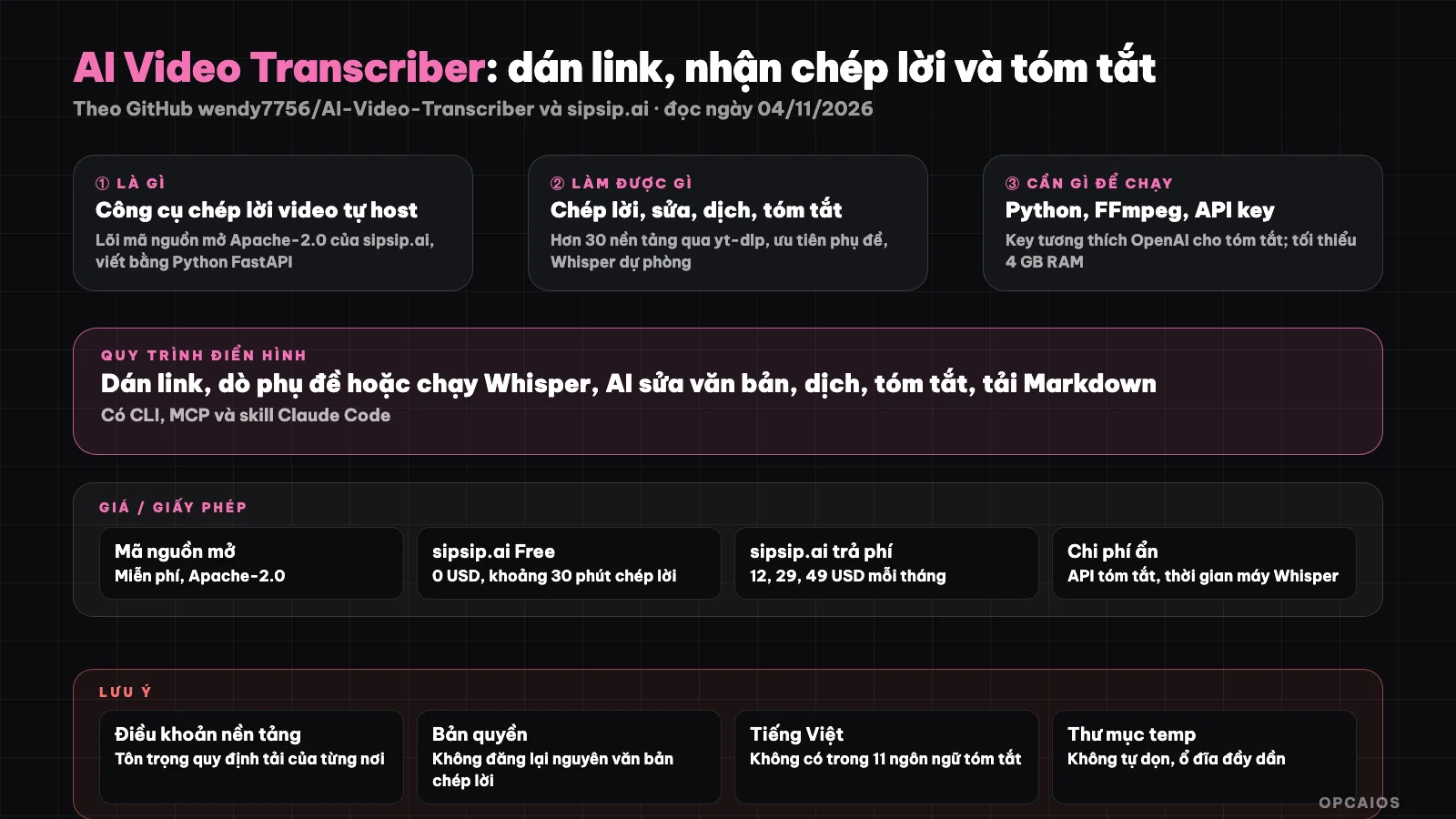
Prioritize existing subtitles, only use Whisper when no subtitles exist, then have AI correct, translate and summarize. Diagram: OPCAIOS.
What Is AI Video Transcriber and Who Created It?
AI Video Transcriber is a small web application written in Python (FastAPI), made by an independent developer named Wendy (GitHub account wendy7756). The README makes clear this is the open-source part of sipsip.ai, a service for summarizing videos, podcasts and sending daily newsletters.
How it works has three steps. First, the tool uses yt-dlp to check if the video has existing subtitles. If it does, as most YouTube videos have automatic subtitles, the transcript is obtained almost instantly without needing to download audio. Next, if there are no subtitles, the tool downloads audio, normalizes it with FFmpeg then transcribes using Faster-Whisper running on your machine. Finally, an AI model compatible with OpenAI's API standard (OpenAI, OpenRouter or a local model) corrects spelling, segments paragraphs, translates when needed and writes a summary.
Results appear in three tabs: transcript, summary and translation, each tab can be downloaded as Markdown. If you haven't heard of Whisper yet, see What Is Whisper?.
What Are AI Video Transcriber's Main Features?
AI Video Transcriber bundles the steps of fetching subtitles, transcribing, correcting text, translating and summarizing into one web interface, plus command line, MCP server and skill for Claude Code. The table below summarizes the README on GitHub, read 04/11/2026.
| Feature | Short Description |
|---|---|
| Many platforms | All platforms yt-dlp supports: YouTube, TikTok, Facebook, Instagram, X, Bilibili, SoundCloud... |
| Prioritize subtitles | If subtitles exist, fetch them immediately, Whisper is only a fallback |
| Upload local files | Accepts .txt, .mp3, .mp4, .m4a, .wav, .webm, .mkv, .ogg, .flac, default max 200 MB |
| Transcribe with Faster-Whisper | Runs on your machine, choose model size from tiny to large |
| Correct text with AI | Fix spelling, complete sentences, segment paragraphs |
| Summarize and translate | Summarize in 11 languages, auto-translate when summary language differs from source |
| Choose your model | Enter Base URL and API key of any OpenAI-compatible provider right in the interface |
| Keep original video | Option to download video (default max 720p) in parallel with transcribing |
| CLI, MCP, skill | Command transcribe.py, MCP server transcribe_video, skill for Claude Code and Codex |
According to the README, the transcription part supports over 100 languages thanks to Whisper. But the list of 11 languages for summarizing and translating includes English, Chinese, Japanese, Korean, Spanish, French, German, Italian, Portuguese, Russian, Arabic, no Vietnamese. We have not yet tried to see if we can force Vietnamese summaries.
How much does AI Video Transcriber cost, what's the license, and what are the limits?
The open source version of AI Video Transcriber is free with an Apache-2.0 license, which allows commercial use as long as you keep the copyright notice and license. Hidden costs include API charges for the editing, translation, and summarization features, plus compute time when transcribing with Whisper.
| Option | Price (checked 04/11/2026, monthly, before tax, subject to change) | Notes |
|---|---|---|
| Self-hosted open source | 0 USD for software | You pay for model API, you manage the server |
| sipsip.ai Free | 0 USD | About 30 minutes of transcription, 3 tracking channels |
| sipsip.ai Hobby | 12 USD | 100 credits, about 200 minutes of transcription |
| sipsip.ai Standard | 29 USD | 500 credits, about 1,000 minutes of transcription |
| sipsip.ai Pro | 49 USD | 1,000 credits, about 2,000 minutes of transcription |
The sipsip.ai pricing page also lists yearly plans at 25% discount. Hardware requirements per the README: minimum 4 GB RAM and dual-core CPU, recommended 8 GB RAM. Timing estimates from the project—I haven't verified them—a 15-minute video with subtitles takes about 15 seconds, while going through Whisper takes 5 to 15 minutes. No subtitles and no GPU means long videos will be slow. The temp/ folder doesn't clean itself either, so your disk will gradually fill up if you keep the original videos.
How do I install AI Video Transcriber and get started?
Installing AI Video Transcriber requires Python 3.8 or higher, FFmpeg, and an OpenAI-compatible API key (the key is optional if you only need transcription). The README gives three ways: automatic script, Docker, or manual install. The fastest way per the README (checked 04/11/2026):
- First, clone the code and run the install script:
git clone https://github.com/wendy7756/AI-Video-Transcriber.git
cd AI-Video-Transcriber
chmod +x install.sh
./install.sh
- Next, start the service. For videos 30 minutes or longer, the README recommends production mode:
python3 start.py --prod
- Open
http://localhost:8000, click AI Settings, enter your Base URL and API key, and click Fetch to load the model list. - Paste a video link or drag a file in, pick a summary language, and toggle Keep original video on or off.
- Finally, click Transcribe and watch the progress; the label will tell you whether it's using the subtitle route or the Whisper route.
If you only need transcription without calling AI, there's a --no-llm flag:
venv/bin/python transcribe.py talk.mp4 -l zh --no-video
venv/bin/python transcribe.py notes.txt --no-llm
If you're using OpenRouter as your model gateway, see What is OpenRouter?.
What risks does AI Video Transcriber have around terms of service, copyright, and data?
AI Video Transcriber uses yt-dlp to download subtitles, audio, and sometimes the original video, so the main risk lies with platform terms and copyright. YouTube, TikTok, Facebook, Instagram all have their own terms of service about downloading content outside their official features. We haven't cross-checked the original text of each of these terms in this post; this section is for reference only, not legal advice.
The safe principle is to only process content you own, have permission to use, or use for personal learning and research. A transcription and summary of someone else's video is still a derivative work: re-posting the transcript verbatim on your blog or social media could infringe copyright. Don't try to circumvent a platform's download limits. If you get blocked, stop rather than switching proxies constantly.
On data, the README says the API key you enter on the interface is saved in your browser's localStorage and only sent to the provider you choose. The transcribed text is sent to that model for editing and summarization. With internal meetings or recordings with personal data, use a local model or the --no-llm mode. Finally, if you install on a server, don't expose port 8000 to the internet without an authentication layer, because the README doesn't describe a login mechanism.
How does AI Video Transcriber compare to other options?
AI Video Transcriber is lightweight and fast when videos have subtitles, but has fewer post-processing features. The table below is a general description, not a measurement.
| Tool | Strengths | Things to consider |
|---|---|---|
| AI Video Transcriber | Paste a link and go, prioritizes subtitles, has CLI and MCP | Summary doesn't have Vietnamese in the language list |
| sipsip.ai | Hosted service, no install needed, has daily digest | Charges by credits, data on their servers |
| Whisper | Original transcription model, flexible | You have to chain together downloading, translation, summarization yourself |
| VideoLingo | Focuses on translation and subtitling, voice dubbing | Heavier if you only need summarization |
| NotebookLM | Q&A across multiple sources, has YouTube links | Doesn't download videos, no self-hosted option |
When Should You Use AI Video Transcriber?
AI Video Transcriber is suitable when you frequently need to quickly take notes from long videos, podcasts, or webinars, and want to choose your own AI model. If you need subtitles with proper timestamps for posting videos, a dedicated subtitling tool would be more appropriate.
| Situation | Recommendation |
|---|---|
| Quick notes from YouTube videos with subtitles | AI Video Transcriber, subtitle track very fast |
| Recording internal meetings that need to stay confidential | --no-llm mode or local model |
| Want an AI agent to automatically transcribe on demand | Register an MCP server with Claude Code or Codex |
| Need Vietnamese subtitles with timestamps | VideoLingo or dedicated subtitling tool |
| Don't want to install anything | sipsip.ai free plan |
Example (hypothetical): a content creator pastes a 40-minute English webinar link, receives the English transcript and summary, then asks an AI assistant to write the main points in Vietnamese with author attribution, following the method described in turning YouTube videos into 10 articles.
OPCAIOS Experience
We added AI Video Transcriber to the Repo list in the Utilities section on opcaios.org after reading the README and checking that the repository is still maintained; we haven't tested it ourselves yet, so this section outlines the criteria we use to consider it, not an evaluation based on actual use.
Four criteria we looked at. First, is the repository still being maintained: the most recent commit was 11/10/2026, no official release yet on GitHub. Next, the license: Apache-2.0, clear for both commercial use. Third, hidden costs: API fees for the summarization part and machine time running through Whisper. Finally, terms of service risks: the tool downloads content from platforms, so we only consider using it for internal research and always cite the original author. We use 9Router as our model routing gateway, so a plus point is that the tool accepts any OpenAI-compatible endpoint.
Read more: What is Whisper?, What is VideoLingo?, What is MCP?, What is 9Router?, 6 best speech-to-text tools 2026.
Frequently Asked Questions
Is AI Video Transcriber free?
The open-source code on GitHub is free under Apache-2.0 license, according to GitHub's API as of 04/11/2026. You only pay for AI models if you use the text editing, translation, and summarization steps via OpenAI, OpenRouter, or other providers. The transcription part using Whisper runs on your machine, so it doesn't cost API money—just your time and electricity. The sipsip.ai service by the same author has a limited free plan and paid plans at 12, 29, and 49 USD per month (as of 04/11/2026, before tax, subject to change).
Can AI Video Transcriber transcribe Vietnamese?
The transcription part uses Whisper, which the README says supports over 100 languages with automatic detection, so in theory it can transcribe Vietnamese videos. For YouTube videos with Vietnamese subtitles already available, the tool will use those subtitles. However, the list of 11 languages for summarization and translation in the README doesn't include Vietnamese. We haven't tested it, so we don't know how good Vietnamese transcription quality is, especially with smaller models like tiny or base. For better accuracy, you can choose a larger Whisper model, but it will run slower.
Do I need a GPU to run AI Video Transcriber?
Not required. The README lists minimum specs as 4 GB RAM and a dual-core CPU, recommends 8 GB RAM, and ideally 16 GB with an SSD. Videos with subtitles already included barely stress the machine. Only when going through Whisper does the machine work hard, and processing time increases with video length and model size. According to a table published by the project—not verified by us—a 30-minute video or longer could take 15 to 60 minutes without subtitles. Smaller models run faster but are less accurate.
Is it legal to download videos from YouTube, TikTok using AI Video Transcriber?
It depends on each platform's terms, the video's copyright, and the laws where you live. Large platforms usually restrict downloading content outside official features, and we haven't reviewed the specific terms. The safe approach is to turn off the option to keep the original video when you only need the text, only process content you own or have permission to use, and don't republish someone else's full transcription. Don't use proxies or tricks to bypass restrictions. This is reference information, not legal advice.
Can someone who doesn't know how to code use AI Video Transcriber?
Yes, if you're willing to run a few terminal commands. The install.sh script handles the installation, then everything happens on a web interface: paste a link, choose a language, click a button. The hard part is installing FFmpeg and Python correctly and getting API keys for the summarization part. You can ask Claude Code to help, since the repository already has Claude Code skills. If you don't want to install anything, sipsip.ai is the service version by the same author. To learn how to integrate AI tools into your work, check out OPCAIOS's AI application training course.
Source: GitHub wendy7756/AI-Video-Transcriber (README, API, accessed 04/11/2026), sipsip.ai homepage and pricing page (accessed 04/11/2026); not reviewed/not verified: Chinese README, sipsip.ai terms of service and privacy policy, original YouTube and TikTok terms, processing times published by the project, Vietnamese transcription quality; star count and pricing may change. Experience is from OPCAIOS.
Translated from Vietnamese with AI. Read the original.
Want to apply this in your business?
Book a free 30-minute call (Vietnam time, in English or Vietnamese).