


What is a Client Portal?
A client portal is a separate, access-protected page where each client logs in or opens a secret link to view their project progress on their own, download deliverables, review drafts, see quotes, invoices, and their own payment schedule. For freelancers and solo service providers, a client portal replaces scattered messages across Zalo, email, and Google Drive with a single place where the client can check things themselves. This post does not promise that a client portal will bring you more clients or help you collect payment faster; we haven't measured that, and the reduction in progress-check messages only happens if you update the portal regularly. The post covers what a portal should have, ways to grant access, security points not to skip, comparing ready-made tools versus building your own, and how OPCAIOS has set up our project portal.
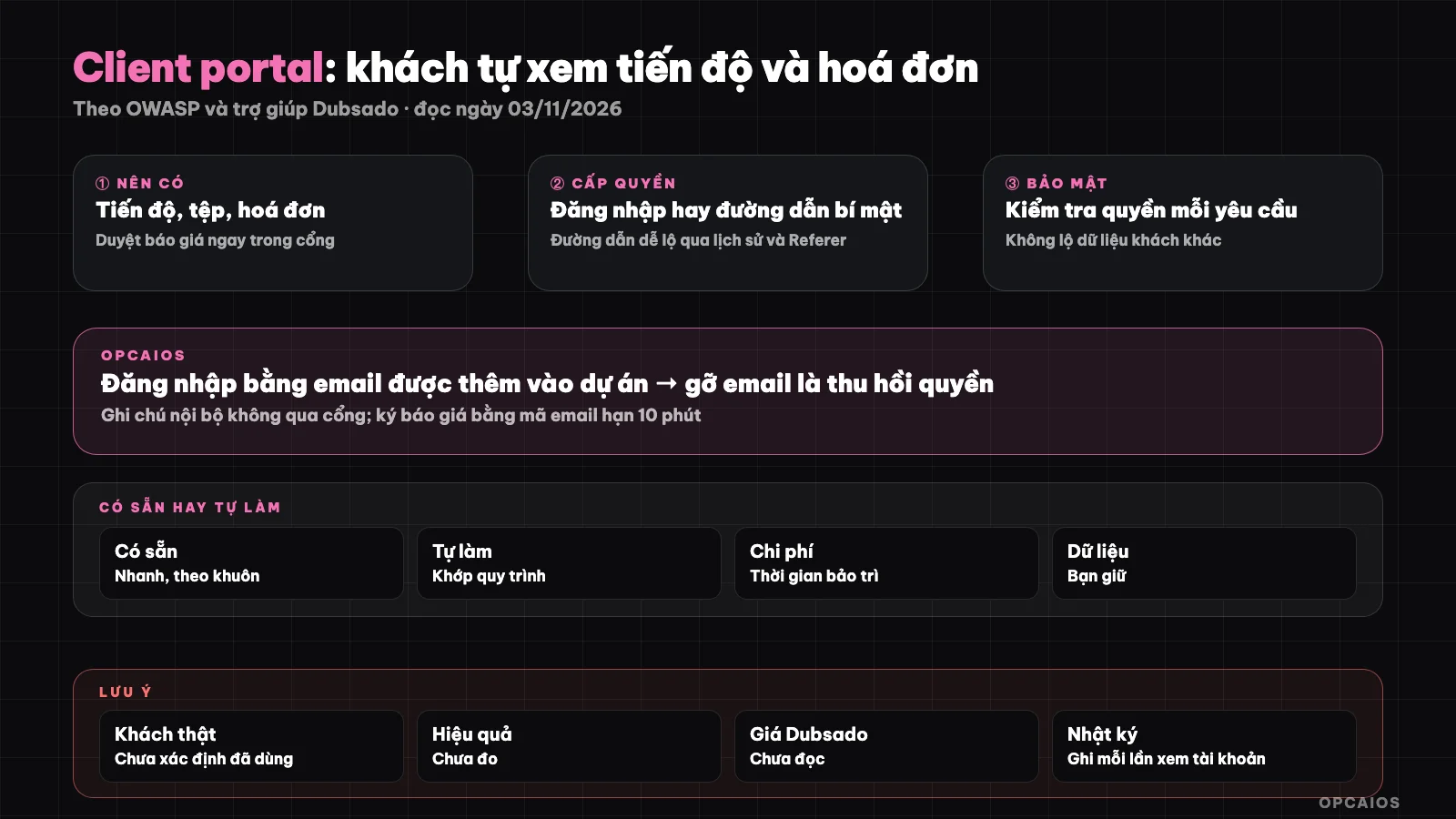
Client only sees their own project; internal notes and costs stay on the service provider's side. Diagram: OPCAIOS.
What benefits does a client portal bring to a freelancer?
A client portal brings two main benefits: the client can answer their own question "where are we at", and both sides see the same source of truth about scope, files, and money. The first benefit is fewer interruptions: instead of answering each "is it done yet" message, you update once and the client checks for themselves. The second benefit is transparency: the quote the client accepted, the design the client approved, and the payment schedule they paid all have timestamps, so disputes about "you never agreed to this" go down. For these benefits to work, the portal must actually be kept updated; an empty portal for two weeks is worse than no portal at all, because the client will think the project is stalled. See also how to package your service to make progress easier to report in the post what is a productized service.
What parts should a client portal have?
A client portal should have five parts, ranked by how often clients look for them:
- Progress: major milestones and current work, each milestone with a status and target date.
- Deliverables: drafts, final versions, guides, clearly marking which version is locked in.
- Review requests: each piece of work has an "approve" or "needs revision" button with notes, so feedback doesn't get lost in messages.
- Quotes, invoices, and payment schedule: quote shows status as sent, accepted, or rejected; each payment has an amount, due date, and method.
- Chat and support: project-based comments or support tickets, replacing a shared group chat.
Do not put in the portal: internal notes, hours worked, costs, profit margins, draft versions you don't want the client to see yet. If you split the project into multiple payment phases, read more in installment quotes and cash flow for solo service.
How should you grant access to the portal?
There are three common ways to grant access to the portal, differing in convenience and security:
| Access method | Pros | Cons | Good for |
|---|---|---|---|
| Secret link | Client clicks and enters, no account needed | Anyone with the link can see; link easily forwarded | Low sensitivity info, quick viewing |
| Email login (link or code sent to email) | Tied to one person, no password to remember | Depends on the client's inbox | Most freelance projects |
| Password account | Familiar, good control | Client often forgets password | Long-term client work |
One example with public docs: Dubsado's help page "What are client portals" (read 03/11/2026) describes portals protected by password, off by default until the service provider turns it on for each client; the private link from the project logs the client in via email without a password, while the shared portal link requires a password. Whichever method you use, set an expiry: secret links end after the project closes, codes sent by email work for only a few minutes.
What should you pay attention to when securing a customer portal?
Customer portal security has one core principle: the server must check permissions every time data is read, never rely on the interface "hiding" a button. Five things to do:
- Don't expose other customers' data: every query filters by the project that the logged-in account owns; changing the project code in the address bar should not open another person's project.
- Secrets long and random enough: don't use sequence numbers or customer names as codes.
- Be careful with secrets in the URL path: OWASP, the page about information leakage through query strings in URLs (read 03/11/2026), lists places where URLs are logged: browser history, server logs, Referer headers sent to other pages, third-party tracking tools; HTTPS doesn't solve everything. So secret links should only open less sensitive information.
- Revoke immediately: remove email from the project, change the code or turn off the portal when the contract ends or the customer changes contact person.
- Keep logs: who viewed the handover account, who signed the quote, when; this is evidence if there's a dispute.
Handover passwords should be encrypted when stored. See more at 5 rules for securing business data when using AI.
Should you use an existing tool or build your own customer portal?
Use an existing tool when you're just starting out and unclear on the process, and only build your own when the process is stable and existing tools don't fit. There are three directions:
- Shared general tools: a Notion page or Drive folder shared with each customer. Cheap and fast, but manual permissions, easy to share by mistake, and no review or payment built in.
- Service management software with a customer portal: for example Dubsado has a portal with invoices, forms, appointments, project information; according to Dubsado's help page, tasks, notes and internal fields don't show to customers. We don't quote prices because we haven't read the official pricing page, and we haven't verified the features of other software mentioned in this post.
- Build your own: attach it to a website or CRM you already have. The advantage is it fits your process exactly, domestic payment like QR transfer, Vietnamese interface; the cost is maintenance time and security responsibility falls on you.
On collecting money from self-confirming transfers, see collecting digital product money via QR transfer SePay.
How do you get customers to actually use the portal?
Customers actually use the portal when it's the only place with the latest answers, and when you actively guide them in. Four habits help:
- Send the portal link when signing the contract, with a three-line guide.
- Each time a customer asks about progress via message, give a short answer and link them to the right section in the portal.
- Send email when there's a draft to review or a new payment due, since few customers check on their own.
- Update on a fixed schedule, for example send a report Friday afternoon.
Fixed update schedule is also part of a standard process; see SOPing your company to run itself while traveling.
OPCAIOS's experience
OPCAIOS has a project portal for customers in the account section of the learning site, built by a coding agent when merging a separate management app into the main admin area. The way permissions work is login: the person adds the customer's email to the project, when the customer logs in with the account with that email, the Projects section shows up; removing the email revokes access. The server checks whether the customer belongs to the project with each request. The customer can see milestones and tasks, comments without internal marks, handover files, activity logs without internal ones, review requests, sent reports, forms the customer needs to submit, support tickets, quotes and payment schedules. Approving a quote requires entering the signer's name, checking agreement and a confirmation code sent to email, the code lasts 10 minutes and limits wrong attempts; the quote content at signing time is saved with a hash. Payment schedules have a self-confirming QR transfer link. Handover accounts only show when marked as shared, and each time the customer views they are logged. Internal notes, hours, costs and drafts don't go through the portal. Only the referral partner portal uses a secret-code URL, no login, and the buyer's name is partially hidden. We couldn't determine whether the project portal has been used with real customers: the source code and project notes don't say, so we don't claim any customers are using it.
Frequently Asked Questions
Do new freelancers need a client portal?
Not right away if you only have one or two projects at a time and your clients are happy with how you currently communicate. A client portal becomes valuable when the number of parallel projects grows and you start losing time answering progress questions, hunting for old files, or checking which payment installments clients have already made. To start, you could just create a page for each client with progress, files, and payment schedule, updated weekly. Once this habit feels solid, you can move to software with a built-in portal or build one yourself.
Are secret links safe enough?
Safe enough for non-sensitive information like general progress, but not for detailed invoices, contracts, or handover passwords. Anyone with the link can see it, and OWASP notes that links can end up in browser history, server logs, or be sent to other sites through the Referer header. If you use secret links, make sure the code is long and random, set expiration dates, allow code changes, and keep sensitive information behind an email login layer.
Should clients be able to upload files to the portal?
Yes, if the project requires clients to send materials like logos, content, or product photos. Collecting materials in the portal helps you track what clients sent, when they sent it, and what's still missing, instead of digging through messages. You should set file size limits, only accept the file types you need, and have statuses for each submission like waiting for client, received, or needs resubmission. Files clients upload belong to them: use them only for the project and delete them according to your agreement when the project ends.
What do you do with the portal when a project ends?
When a project ends, move it to a completed status, send the client a final summary with deliverable files and the invoice, then decide whether to keep or revoke access. If there's a maintenance package, keep access so clients can open support tickets. If not, remove access or disable the link after a period you've announced in advance, like 30 days, so clients have time to download their files. Don't leave the portal open indefinitely, especially when a client's contact person changes or old employees leave.
Should you use AI in a client portal?
You can, but in a supporting role with limits. AI works well for summarizing weekly progress into a few easy-to-read sentences, drafting notification emails, or answering client questions based on that specific project's data. AI should not make its own delivery promises or change pricing, and should not read data from other projects. Always check permissions on the server before passing project data to a model, and set daily question limits. If you want to learn how to build portals, CRMs, and service automation using AI, check out OPCAIOS's AI application training course.
Sources: Dubsado Help Center, "What are client portals" page (read 03/11/2026); OWASP, page on information disclosure through query strings in URLs (read 03/11/2026); pricing and features of other client portal software have not been verified, and Dubsado's pricing page has not been read; the effectiveness of client portals has not been measured by OPCAIOS, and it cannot be confirmed whether OPCAIOS's project portal has actually been used with real clients. The experience is OPCAIOS's own.
Translated from Vietnamese with AI. Read the original.
Want to apply this in your business?
Book a free 30-minute call (Vietnam time, in English or Vietnamese).