



What is Coolify?
Coolify is an open-source, self-hosted platform for deploying applications, databases, and services to your own servers, serving as a replacement for services like Heroku, Netlify, and Vercel. According to the GitHub repository (read on 25/10/2026), Coolify is Apache-2.0 licensed with around 63.7 thousand stars; you only need one server accessible via SSH (VPS, physical server, or even a Raspberry Pi) and run a single installation command. Coolify builds applications from Git, provides HTTPS, manages databases, backups, and multiple servers through one dashboard. According to the pricing page, the self-hosted version is free; Coolify Cloud (where Coolify manages the infrastructure while you still rent servers) starts from $5 per month for 2 servers. Hypothetical example: 1 VPS renting for $10 per month plus the free self-hosted package costs $10, while Cloud adds another $5 for $15 total. This article explains what Coolify is, its features, pricing, how to install it, operational risks, when to use it compared to Vercel, manual VPS, or Dokploy, and OPCAIOS's experience.
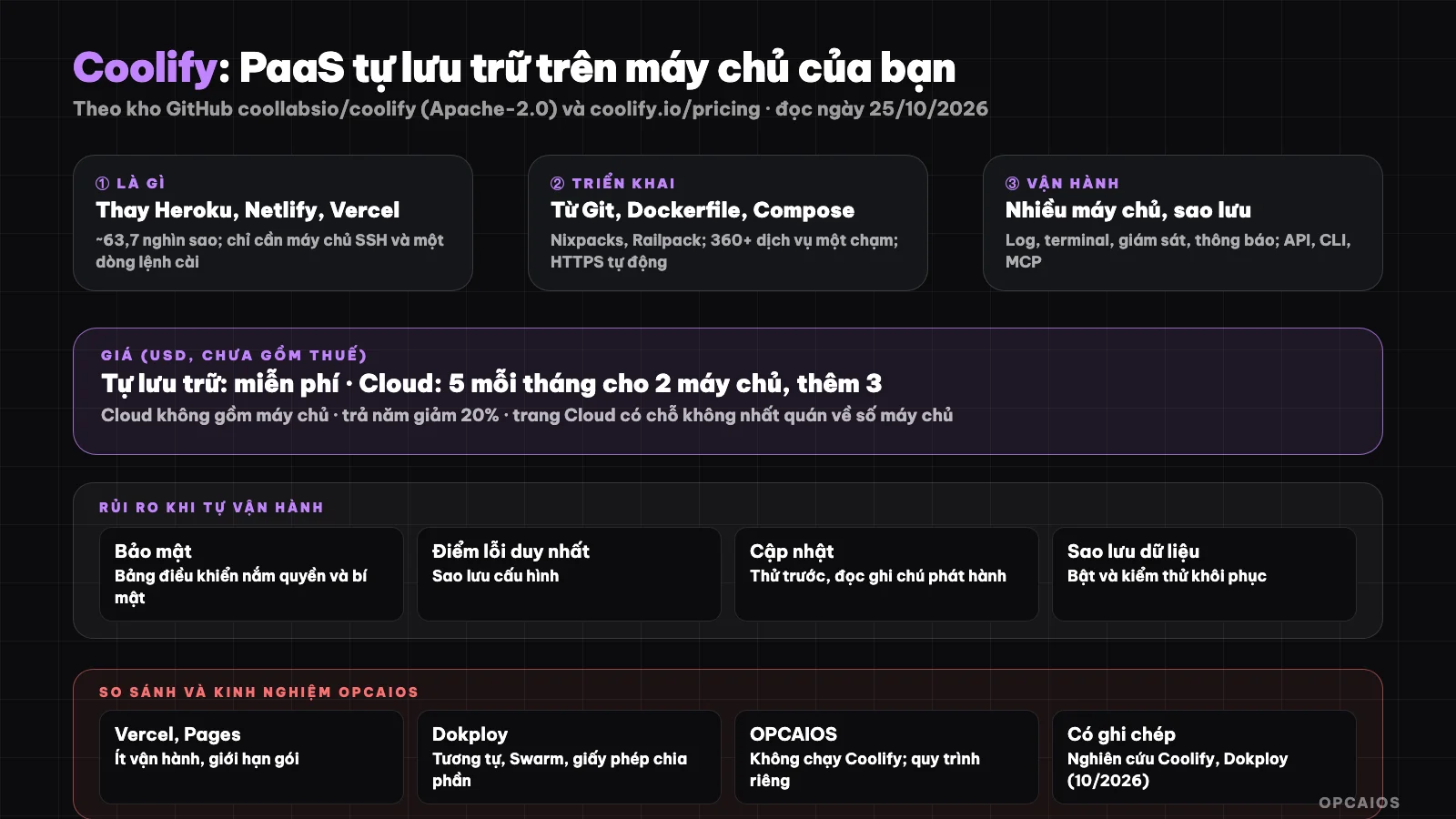
Coolify turns your server into a deployment dashboard; you take responsibility for operations. Diagram: OPCAIOS.
What exactly can Coolify do?
Coolify is a deployment dashboard running on your server, and according to the GitHub repository page (read on 25/10/2026), features are divided into four groups:
- Deployment: build applications from GitHub, GitLab, Bitbucket, or Gitea using Nixpacks, Railpack, Dockerfile, Docker Compose, or pre-built images; includes managed databases and over 360 services installable with one click with persistent storage and auto-generated credentials.
- Automation: deploy on code push, preview builds for pull requests, deployment webhooks, and rollback to retained application images.
- Networking and security: custom domains, automatic HTTPS certificates, reverse proxy, health checks, container networking.
- Operations: multiple servers, deployment logs, container terminal, resource monitoring, backups, scheduled tasks, secrets, notifications; access via dashboard, API, CLI, MCP, and group-based permissions.
Hypothetical example: pushing code 3 times per day, each deployment taking about 2 minutes, with Docker Compose for 1 application and 1 database. Configuration lives on your server; according to the page, if you stop using Coolify, the resources currently running continue to run. OPCAIOS cannot read the detailed limits and system requirements section on this page. The platform runs on Docker and VPS servers.
How do you install and get started with Coolify?
Installing Coolify is running one command on a Linux server with SSH then configuring through the dashboard. Steps according to the repository:
- Prepare a Linux server with SSH (read requirements in Coolify's installation guide).
- Run the installation command from the repository:
curl -fsSL https://cdn.coollabs.io/coolify/install.sh | bash. Please read the script contents before running any command downloaded from the Internet. - Create an admin account, add a server, connect a Git repository.
- Choose a build method, set environment variables and secrets, attach a domain; enable HTTPS.
- Enable database backups and test restore.
According to the page, the recommended setup is one server running Coolify and one or more servers for deployed resources. Hypothetical example: a small project using 1 server with 2 GB RAM, installation takes about 30 minutes, database backup once per day.
How much does Coolify cost?
Coolify has two pricing models. According to the official pricing page (read on 25/10/2026, before tax), the self-hosted version is free ($0), while Coolify Cloud starts at $5 per month for 2 servers, then $3 for each additional server, with a 20% discount for annual billing. For example: 4 servers on Cloud costs $5 + 2 x $3 = $11 per month, not including server rental. First, choose self-hosted if you're comfortable with operations. Next, choose Cloud if you want Coolify to handle Coolify's own storage and backups. Finally, add server rental and operations costs to get the true cost.
| Model | Price | Details |
|---|---|---|
| Self-hosted | Free | Unlimited features; you own and manage the server; community support (over 20,000 Discord members) |
| Coolify Cloud | $5 per month (2 servers), $3 per additional server | Coolify hosted by them, with backups and setup; server not included; unlimited deployments; email notifications; limited community and email support; 20% discount for annual billing |
The Cloud page has an inconsistency: it lists pricing by number of servers but also states "unlimited server connections"; we can't explain this, so check when you sign up. True cost includes server rental and operations.
What risks should I watch out for when self-hosting Coolify?
The risk of self-hosting is that all security, updates, and backups fall on you. Example scenario: a 2 GB RAM server running an application build can use 90% of memory in 5 minutes, and a $10/month server package that small easily crashes. First, six key points:
- You own the security: the dashboard has deployment permissions and knows secrets; set strong authentication, limit access (VPN or allowlist), update regularly.
- Single point of failure: if the Coolify server breaks, management stops (though apps still run per page); you need config backups.
- Updates: the platform changes fast, updates can break things; read release notes and test first.
- Database backups: enable and test recovery; don't trust promises.
- Server resources: building apps consume CPU and RAM; separate build servers from running servers if needed.
- AI tools and MCP: if you let AI agents use Coolify's API or MCP, grant minimum permissions (see What is MCP?).
Should I choose Coolify or other deployment approaches?
Coolify fits when you run many services on your own server and want a PaaS-like interface; Vercel is good for fast launch, while manual VPS gives maximum control. Example scenario: 5 small apps on 1 VPS at $20/month might cost less than 5 separate paid services at $20 each, but you manage 100% of operations. Quick comparison:
| Approach | Good for | Watch out for |
|---|---|---|
| Vercel or Cloudflare Pages | Fast launch, minimal operations | Package limits, vendor lock-in; see What is Vercel? and What is Cloudflare Pages? |
| Coolify | Many services on your own server, want PaaS-like interface | Self-hosting security, updates |
| Dokploy | Similar, lighter, Docker Swarm | License split; see separate post |
| Manual VPS (nginx, pm2, scripts) | Maximum control, fewer components | Write your own deployment process; see What is Nginx? |
OPCAIOS experience
We don't run Coolify: our website and services deploy via our own process (rsync source to server, build new version in parallel then switch without downtime, manage processes with pm2, nginx in front). We once documented research on Coolify and Dokploy in our knowledge base (comparing pros and cons) and considered Coolify for a website plan, but haven't deployed it yet. So this post is based on open source code and the official pricing page. What we learned from our own approach: custom deployment process gives high control but requires discipline (check before deploy, build in parallel, backup); Coolify or Dokploy bundle much of this into an interface, in exchange you add another component to secure.
Read more: 6 best website deployment platforms in 2026 for non-specialists.
Frequently Asked Questions
What is Coolify?
It's an open source self-hosted platform to deploy applications, databases and services to your server, replacing the Heroku, Netlify, Vercel style.
Is Coolify free?
The self-hosted version is free with no feature limits; you rent the server yourself. Coolify Cloud starts from $5 per month for 2 servers.
What do you need to install Coolify?
A Linux server with SSH access and run the installation command; read the system requirements guide.
How is Coolify different from Dokploy?
Same self-hosted PaaS direction; see What is Dokploy?. We haven't done a direct comparison by testing.
Should you use Coolify for real products?
Yes if you're ready to handle security, updates, backups yourself. Want to learn how to deploy and run safely, check out OPCAIOS's AI application training course.
Source: coollabsio/coolify GitHub repo and coolify.io/pricing, read 25/10/2026; stars change quickly; couldn't read detailed system requirements. Price excludes tax and may change. Experience is from OPCAIOS.
Translated from Vietnamese with AI. Read the original.
Want to apply this in your business?
Book a free 30-minute call (Vietnam time, in English or Vietnamese).