



What is EchoMimicV3?
EchoMimicV3 is an open source AI model from Ant Group (Alipay) used to create videos of speaking and moving people from a still image and audio track, with just 1.3 billion parameters, combining multiple tasks (face, upper body, object interaction) into one model. According to GitHub API (read 04/11/2026), the antgroup/echomimic_v3 repository was created on 24/7/2025, has around 1,115 stars, Apache 2.0 license, with the most recent code push on 18/3/2026. The accompanying paper was accepted to the AAAI 2026 conference according to the README. This post explains what the model does, how much GPU it needs, how to install it according to official documentation, limitations and legal risks when creating videos of real people, then compares it with other options in the same group.
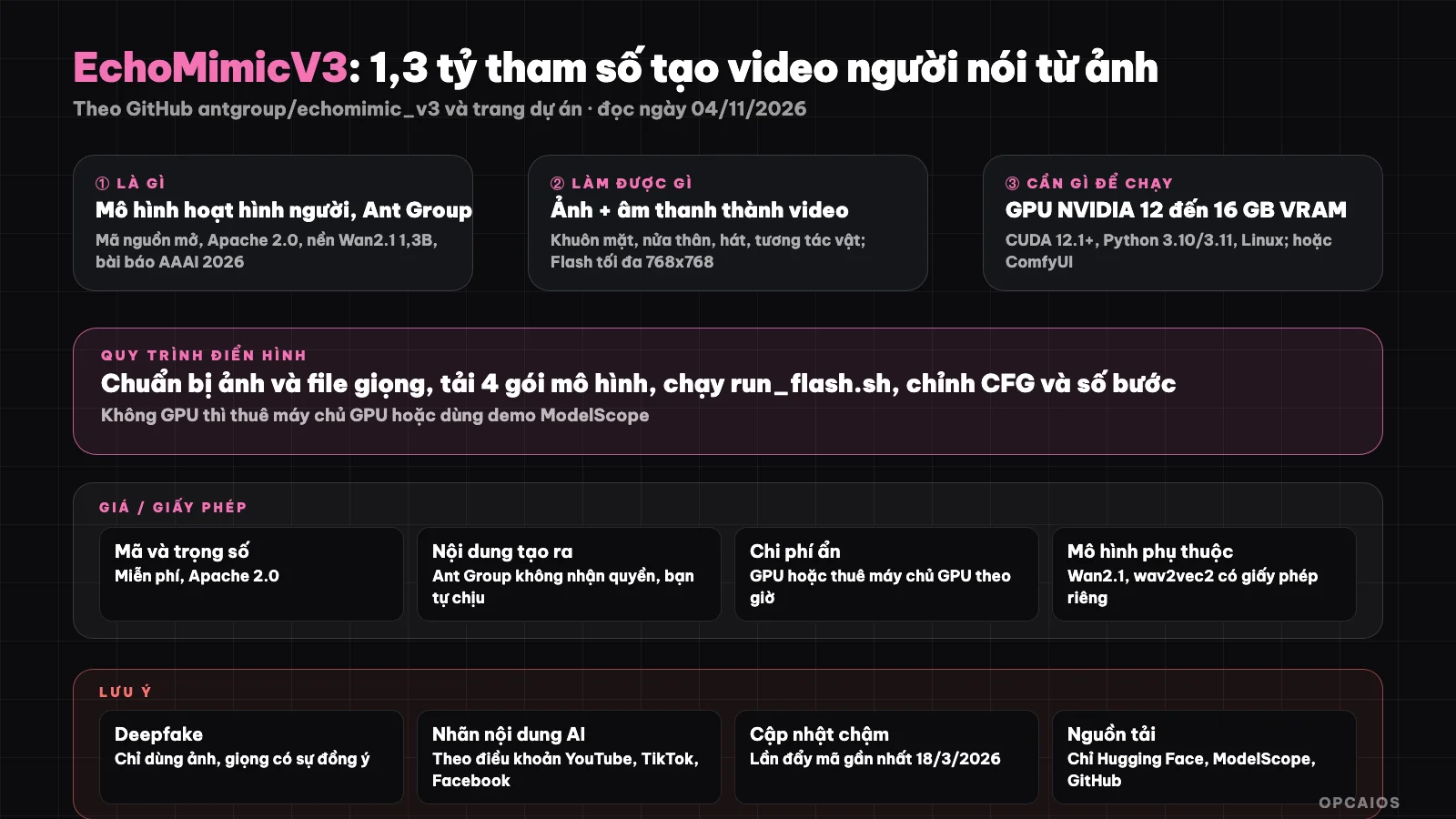
EchoMimicV3 takes image, audio and text, returns video of a person moving in sync with voice. Diagram: OPCAIOS.
What is EchoMimicV3 and who created it?
EchoMimicV3 is the third version in the EchoMimic line from the Terminal Technology Department of Alipay, Ant Group. The paper title captures the message: 1.3 billion parameters are enough for multi-modal, multi-task human animation.
According to the README and project page (read 04/11/2026), the author team includes Rang Meng (main contributor), Yan Wang, Weipeng Wu, Ruobing Zheng, Yuming Li and Chenguang Ma. The paper was posted on arXiv on 08/7/2025 (code 2507.03905), source code and weights released on 08/8/2025, accepted to AAAI 2026 on 09/11/2025. The model is built on top of Wan2.1-Fun-V1.1-1.3B-InP, a video generation model from Alibaba PAI, then adds custom mechanisms: "Soup-of-Tasks" using multi-task masks so one model learns multiple animation styles, "Soup-of-Modals" using combined and separated cross attention blocks to feed audio, text and image. These technical names are announced by the project, we have not verified their real-world effectiveness.
What can EchoMimicV3 do?
EchoMimicV3 creates videos of people speaking or singing in sync with lip movements and gestures to audio, from an input image and text prompt, for both talking head and talking body. The project page showcases examples in Chinese, English, singing, animated characters and human-object interaction.
| Feature | Description from README (read 04/11/2026) |
|---|---|
| Input | Reference image, audio file, text prompt; preview version also needs face mask |
| Output | Video of person moving to audio; Flash version max 768x768 |
| Two versions | EchoMimicV3-preview (wav2vec2-base-960h audio encoder) and EchoMimicV3-Flash (chinese-wav2vec2-base, released 22/1/2026) |
| Flash | 8 sampling steps, no face mask needed, around 12 GB VRAM according to project announcement |
| Interface | GradioUI quantized version (app_mm.py) around 12 GB VRAM; ComfyUI via ComfyUI_EchoMimic community node around 16 GB |
| Fine-tuning | audio_guidance_scale 1.8 to 2 (higher gives better lip sync, lower looks better); guidance_scale 3 to 6; TeaCache 0 to 0.1 |
| Number of steps | 5 for face, 15 to 25 for upper body |
| Long video | Over 138 frames use Long Video CFG; low VRAM machines reduce partial_video_length to 81, 65 or lower |
The VRAM numbers, step counts and resolution are announced by the project, not yet verified. The project page says the model achieves "competitive" results in quantitative and qualitative evaluation but the comparison section we could read has no specific numbers.
Does EchoMimicV3 Have a Free Version? Licensing and Hidden Costs
EchoMimicV3 is free under the Apache 2.0 license for both code and weights, but the real cost lies in the GPU: you need an NVIDIA card with 12 to 16 GB VRAM or higher, or rent a GPU server by the hour. There is no paid version and no official API.
| Item | Status (README, read on 04/11/2026) |
|---|---|
| Source code and weights | Free, Apache 2.0; download from Hugging Face or ModelScope |
| Generated content | README states Ant Group does not claim rights to generated content; users are responsible for legal compliance |
| GPU | Tested on A100 80 GB, RTX 4090D 24 GB, V100 16 GB; around 12 GB with quantization or Flash |
| Software | CUDA 12.1 or higher, Python 3.10 or 3.11, Linux (CentOS 7.2, Ubuntu 22.04 tested) |
| Dependent models | Wan2.1-Fun-V1.1-1.3B-InP, wav2vec2-base-960h or chinese-wav2vec2-base, EchoMimicV3 weights; we have not measured their size |
| Rented GPU server | Hourly pricing varies by provider; we do not list it because we have not read any pricing table for this article |
| Demo version | Gradio demo on ModelScope, free but with a queue; we have not tried it |
GPU rental service prices do not include taxes and change over time. Those wanting to avoid installation can use the online demo but should consider uploading your images and voice to a third-party server.
How to Install EchoMimicV3
Installing EchoMimicV3 according to the README involves creating a Python environment, installing dependencies, downloading four model packages into the correct folders, then running a script for either the Flash or preview version. We have not run it ourselves; the steps below follow the official documentation (read on 04/11/2026).
- First, on a Linux machine with an NVIDIA GPU and CUDA 12.1 or higher, create an environment:
conda create -n echomimic_v3 python=3.10
conda activate echomimic_v3
pip install -r requirements.txt
- Next, download the background model Wan2.1-Fun-V1.1-1.3B-InP (Hugging Face, alibaba-pai), the audio encoder (wav2vec2-base-960h for preview; chinese-wav2vec2-base for Flash) and the EchoMimicV3 weights (Hugging Face BadToBest/EchoMimicV3 or ModelScope), place them in the
./flash/or./preview/folder according to the diagram in the README. - Run the Flash version with
bash run_flash.sh, the preview version withpython infer_preview.py, or the quantized Gradio interface withpython app_mm.py. Sample data is indatasets/echomimicv3_demos. - Finally, adjust audio_guidance_scale, guidance_scale, number of steps, and partial_video_length according to the table above until lip-sync and image quality are balanced.
Windows users: The README links a one-click installer package for the quantized version, stored on Baidu Netdisk and requiring an access code; we have not downloaded it and do not recommend downloading binary packages from file-sharing sources unless you can verify the contents. ComfyUI users can use the community node smthemex/ComfyUI_EchoMimic; see What is ComfyUI?. No local GPU? Rent a GPU server by the hour, but remember the cost mentioned above.
Limitations, Risks, and Legal Issues When Creating Real Person Videos
The biggest risk of EchoMimicV3 is creating videos of real people saying things they never said: that is a deepfake if you do not have consent. The project allows commercial use but bans use to harm people, spread misinformation, or target vulnerable groups. This section is not legal advice.
- Consent and personal images: only use images and voice of yourself or someone who has consented in writing. Images and voice are personal data; Vietnamese law has provisions on image rights and personal data protection, but we have not cross-checked the original text for the AI video case.
- AI content labels: many platforms (YouTube, TikTok, Facebook) require labeling synthetic content; read your platform's terms before posting.
- Audio copyright: cloned voice or background music has an owner; songs used for demo "singing" need usage rights.
- Technical limits: Flash maximum resolution is 768x768; longer videos need more configuration; the README has no separate limits section so typical errors (hands, teeth, scene transitions) are not listed by the project.
- Update pace: the latest code push was on 18/3/2026, over seven months from the read date; the repository is not archived but the update pace has slowed.
- Weight downloads: only download from official Hugging Face, ModelScope, or GitHub.
EchoMimicV3 vs Other Options
EchoMimicV3 sits in the group of open models that create speaking people from images and audio, competing with models based on Wan and commercial services. The table below is a general description, not a measurement.
| Option | Strengths | Things to Consider |
|---|---|---|
| EchoMimicV3 | Small (1.3 billion parameters), around 12 GB VRAM, Apache 2.0, half-body and physical interaction | Slow updates since 3/2026; technical setup |
| Wan 2.1 InfiniteTalk, 14 billion parameter models | Higher quality by general perception | Much larger VRAM requirement |
| WanGP | Interface for Wan models on consumer GPUs; see What is WanGP? | Still needs GPU |
| LatentSync, lip-sync only tools | Lightweight, fixes lips on existing video | Does not generate body gestures |
| HeyGen, cloud service | No GPU needed, easy to use | Pay per plan, data goes to cloud; see Create TikTok Shorts channel with HeyGen, Suno, CapCut |
To have Vietnamese voice input, you need a text-to-speech model or your own voice cloning; see What is OmniVoice? and What is VibeVoice?.
When to Use EchoMimicV3?
Consider EchoMimicV3 when you have a GPU with 12 GB VRAM, are okay with command-line setup, and want to own the process of creating speaking person videos without paying per video. Not suitable for people who only need a few videos per month and don't want to touch the technical side.
| Situation | Suggestion |
|---|---|
| Creating AI characters speaking Vietnamese for short-form channels, large volume | Fits if you already have GPU or GPU server; combine with Vietnamese voice model |
| Need a few intro videos per month | Cloud service costs less than setup effort |
| Person with no coding knowledge | Try ModelScope or ComfyUI demo with ready workflows; still need setup support |
| Need resolution above 768x768 | Choose a larger model or upscale video after |
| Real person video without consent | Don't use, even though the model technically allows it |
Read more: Building a viral AI character, What is ComfyUI?, 7 best AI tools for creating speaking person videos 2026.
OPCAIOS Experience
We added EchoMimicV3 to the Repo list in the Tools section on opcaios.org after reading the README and checking that the repository is still maintained; we have not run it ourselves, so this section outlines the criteria we use to consider it, not an evaluation after use. Four criteria: update rhythm (last code push on 18/3/2026, slower than other repositories we follow); Apache 2.0 license allows commercial use; hidden cost is GPU around 12 to 16 GB VRAM; and ability to replace the tool we are currently using. On the last point, we have an existing speaking person video pipeline running on a rented GPU server, where OmniVoice handles Vietnamese voice cloning. EchoMimicV3 is a candidate for the rendering step because it is lightweight, but we have not tried it and have not measured lip-sync quality with Vietnamese, so we have not changed anything in our current pipeline yet.
Frequently Asked Questions
What is EchoMimicV3?
EchoMimicV3 is an open-source model by Ant Group (Alipay) that creates videos of speaking and moving people from a still image, an audio file, and a text prompt, with 1.3 billion parameters on the Wan2.1-Fun-V1.1-1.3B-InP foundation. The model combines multiple tasks (face, torso, object interaction) into one architecture; the paper was accepted to AAAI 2026. According to GitHub (read 04/11/2026), the repository has around 1,115 stars and is licensed under Apache 2.0.
How much GPU does EchoMimicV3 need?
According to the README (as published by the project, unverified by us), the Flash version and quantized Gradio interface run on around 12 GB VRAM, the ComfyUI version around 16 GB; the authors tested on A100 80 GB, RTX 4090D 24 GB, and V100 16 GB. It requires CUDA 12.1 or later and Python 3.10 or 3.11 on Linux. Without a GPU, you can rent a GPU server by the hour or use the demo on ModelScope, but you must accept uploading images and audio to a third party.
Is EchoMimicV3 free for commercial purposes?
The code and weights are under Apache 2.0, which permits commercial use; the README states that Ant Group does not claim rights to generated content and users are responsible for complying with the law, not using it to harm people, spread misinformation, or target vulnerable groups. Note that the Wan2.1 foundation model and various audio codecs have their own licenses, which you need to read individually; we have not cross-checked them. This is not legal advice.
How does the Flash version differ from the preview version?
The preview version (08/8/2025) uses wav2vec2-base-960h and requires a face mask; the Flash version (22/1/2026) uses chinese-wav2vec2-base, requires only 8 sampling steps, no face mask, around 12 GB VRAM, and maxes out at 768x768. Both share the same 1.3 billion parameter architecture but differ in audio encoder and weights. The numbers are as published by the project; we have not compared the quality of the two versions.
Can someone without coding knowledge use EchoMimicV3?
It's difficult if you set it up yourself: you need Linux, an NVIDIA GPU, conda, to download several model packages into the right folders, and adjust parameters via command line. An easier way is the Gradio demo on ModelScope, or asking someone to set up ComfyUI with the ComfyUI_EchoMimic node and then use an existing workflow. For content channels that need many videos, investing once in this pipeline may be worthwhile, but try it on a few videos first. If you want to learn how to combine voice, image, and script into a working process, see OPCAIOS's AI application training course.
Source: GitHub antgroup/echomimic_v3 (README, API, read 04/11/2026), project page antgroup.github.io/ai/echomimic_v3 (read 04/11/2026); not read/unverified by us: arXiv paper 2507.03905, evaluation metrics, weight file size, Windows installer on Baidu, licenses for Wan2.1 and the audio codecs; star count and prices may change. Experience is from OPCAIOS.
Translated from Vietnamese with AI. Read the original.
Want to apply this in your business?
Book a free 30-minute call (Vietnam time, in English or Vietnamese).