



What is FluidVoice?
FluidVoice is an open-source speech-to-text application for macOS that recognizes speech on your machine and types text into any input field with a keyboard shortcut. According to the GitHub API (accessed 04/11/2026), the altic-dev/FluidVoice repository was created on 21/09/2025, has approximately 12,753 stars, is written in Swift and uses the GPL-3.0 license; the latest release is v1.6.12 from 22/10/2026. The application is free, and the official site altic.dev/fluid reports over 350,000 downloads, a figure announced by the project and unverified. This post explains what FluidVoice can do, what machine you need, whether it works with Vietnamese, what data leaves your machine and when you should choose it over macOS's built-in speech-to-text feature.
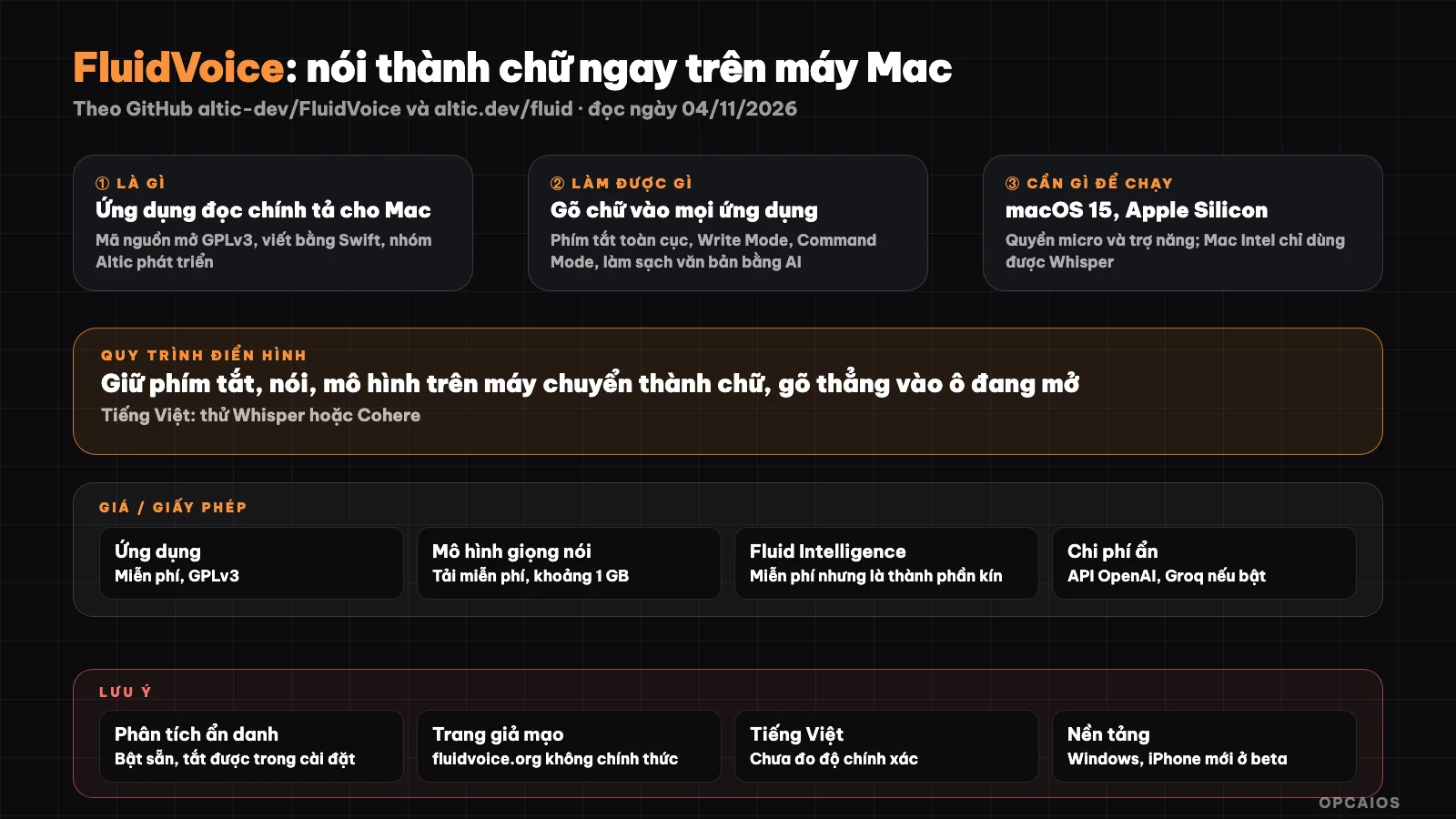
FluidVoice recognizes speech on your machine, cleans text if you enable it, then types into the app you're using. Diagram: OPCAIOS.
What is FluidVoice and who made it?
FluidVoice is a local speech-to-text application for Mac developed by the Altic team, posted on GitHub under the altic-dev account. The repository description calls FluidVoice a local-running alternative to Whisper Flow, a commercial speech-to-text application.
The idea is very simple: you hold a keyboard shortcut, speak normally, and text appears in email, documents, chat boxes, terminal or code editors. The recognition part runs on your Mac, no internet needed. The README says the project follows GPLv3 as of 23/02/2026; earlier versions followed Apache 2.0. What's important to understand is that Fluid Intelligence, the AI layer that cleans text locally, is described in the README as a separate component maintained privately by the team and not part of the open source code. The core speech-to-text part is open and free. If you're not familiar with speech recognition concepts, read What is Whisper?.
What are FluidVoice's main features?
FluidVoice has three main modes of use: speech-to-text, Write Mode for writing or rewriting text, and Command Mode for controlling your Mac with your voice. The table below summarizes the README as read on 04/11/2026.
| Feature | What FluidVoice does |
|---|---|
| System-wide speech-to-text | One global keyboard shortcut, types text into any input field via macOS accessibility API |
| Live preview | Text display layer appears as you speak, matching MacBook's notch area |
| Write Mode | Write new text or select existing passages to rewrite in any application |
| Command Mode | Open applications, run Shortcuts, trigger system actions by voice |
| Multiple speech models | Nemotron Speech 3.5, Parakeet, Cohere Transcribe, Apple Speech, Whisper |
| AI text cleaning | Optional: Fluid Intelligence locally, or OpenAI, Groq, custom providers |
| Per-application configuration | Each app gets its own prompt set, for example formal for email, casual for chat |
| Sound history | Optional local recording storage, volume limited, export as ZIP |
| Hold Space to mute | Temporarily mute the microphone while thinking, release to speak and continue the same recording |
An example scenario: a programmer holds the keyboard shortcut, speaks a bug fix request in English, FluidVoice types directly into Claude Code in the terminal. The official site has exactly this kind of illustration, see What is Claude Code?.
Is FluidVoice free? Where are the hidden costs?
FluidVoice is free and open source under GPLv3; the site altic.dev/fluid (accessed 04/11/2026) says free forever, no tiers. The project receives funding via GitHub Sponsors. The table below summarizes what you need to know, excluding tax and subject to change.
| Item | Cost and conditions |
|---|---|
| FluidVoice application | 0 đồng, download from GitHub Releases or Homebrew |
| Speech models | Free, download to your machine; around 1 GB storage per README |
| Fluid Intelligence | Free, optional; around 3.5 GB storage per README |
| Text cleaning via OpenAI, Groq | You pay the API provider yourself, per their pricing |
| Computer | Mac running macOS 15 or later; Apple Silicon for all models |
The real hidden cost is hardware. The README says all models need Mac Apple Silicon; Intel Macs can only use the Whisper model group from version 1.5.1 onwards. If you enable text cleaning via OpenAI or Groq, your text is sent to that service and you pay per token; see What is AI Token?.
How to install FluidVoice and get started?
The quickest way is to install it via Homebrew, or download the latest version from the Releases section of the official GitHub repository. According to the Quick Start section in the README (read on 04/11/2026), the process is as follows:
- First, install the application using the Homebrew command below or download from GitHub Releases.
- Next, grant microphone permissions and Accessibility permissions; both are required to listen and type into other applications.
- Select a global keyboard shortcut in the settings section.
- Go through the initial setup to choose a voice model by language and desired latency.
- Optionally, download Fluid Intelligence to clean up text right on your machine.
- Finally, if you want, add your API key from OpenAI, Groq, or a custom provider; the README states that keys are stored in macOS Keychain.
brew install --cask fluidvoice
Developers can build it themselves using Xcode from the source code; the README instructs you to clone the repository and then open the Xcode project, with dependencies managed by Swift Package Manager.
Can FluidVoice be used for Vietnamese?
It's possible, but it depends on which model you choose. According to the model table in the README (read on 04/11/2026), Whisper supports up to 99 languages and Cohere Transcribe lists Vietnamese among its 14 languages. Parakeet TDT v3 has 25 European languages, no Vietnamese; Parakeet v2 and Parakeet Flash are English only. Apple Speech depends on the language recognition that macOS has on your machine. Nemotron Speech 3.5 lists around 40 languages but the README doesn't detail them. We haven't tested FluidVoice with Vietnamese, so we can't speak to accuracy or latency; if you want to be sure, try Whisper or Cohere Transcribe with your own voice and microphone. It's also unclear from the README whether the Fluid Intelligence cleaning layer handles Vietnamese well.
Limitations, risks, and privacy
FluidVoice is designed with a local-first priority: the README says voice, audio, and text don't leave your machine unless you actively enable a cloud AI provider. That said, there are four things to know.
First is anonymous analytics. The README says the application logs an anonymous activity signal each day consisting of a random setup code, date, version, and platform, sent in aggregate weekly; detailed anonymous analytics (feature usage level, model, onboarding progress) is turned on by default and can be disabled in settings. According to the README, the application does not collect voice, text, prompts, or typed content. Next is Accessibility permission: this permission allows the application to type into all programs, so only install from an official source. The README warns that the domain fluidvoice.org is not the official site; the official site is altic.dev/fluid, along with fluidvoice.com and fluidvoice.app. Third, when you enable OpenAI or Groq, text is subject to those providers' data terms. Finally, if you read aloud content containing information about customers or others, comply with the personal data protection regulations where you work; this is a general note, not legal advice.
FluidVoice versus other options
FluidVoice sits between macOS's free dictation feature and commercial cloud-based dictation applications. The table below is a general description, not a measurement.
| Option | Strong in | Weak in |
|---|---|---|
| FluidVoice | Free, open source, runs locally, many models, Command Mode | macOS only as official version; requires Apple Silicon for most models |
| macOS built-in dictation | No extra installation needed | Less customizable, no AI cleaning layer per application |
| Wispr Flow (commercial) | Finished commercial product | Closed source; we haven't read their pricing page and data policy |
| Run Whisper yourself | Full control | Must assemble your own interface, shortcuts, typing |
When should you use FluidVoice?
FluidVoice suits people who type a lot on Mac and want to keep their data on the machine. The table below suggests by situation.
| Situation | Suggestion |
|---|---|
| Write long prompts for Claude Code, Codex, Cursor | FluidVoice with a fast model, turn on Write Mode |
| Take sensitive notes, don't want to send to the cloud | FluidVoice, turn off cloud AI providers |
| Dictate in Vietnamese | Try Whisper or Cohere Transcribe in FluidVoice first before relying on it |
| Use Windows or a phone | Wait for official versions; the homepage says Windows and iPhone are in beta |
| Old Intel Mac | Can only use the Whisper model group |
OPCAIOS's Experience
We recently added FluidVoice to the Repo list in the Utilities section on opcaios.org after reading the README and checking that the repository is still being maintained; we haven't run a test yet, so this section outlines the criteria we use to consider it, not an evaluation after use. OPCAIOS operates using AI agents like Claude Code, Antigravity and Codex, so giving commands by voice instead of typing is a topic we care about. Four criteria we looked at: whether the repository is still maintained (v1.6.12 on 22/10/2026); the license (GPLv3 for the core, but Fluid Intelligence is a proprietary component); hidden costs (Apple Silicon hardware, APIs if using the cloud); and whether it can replace the tools we're currently using, which for Vietnamese writers depends entirely on the accuracy of the model, something we haven't measured yet.
Read more: What is Voicebox?, What is VoiceStudio?, What is LLM?, 6 best speech-to-text tools 2026.
Frequently Asked Questions
Is FluidVoice free?
Yes. FluidVoice is open source software under the GPLv3 license, and the official page altic.dev/fluid (read on 04/11/2026) states free forever, no tiers. Voice models and Fluid Intelligence can also be downloaded for free. The only cost that might come up is when you choose to use OpenAI, Groq or a custom provider to clean up text: then you pay their API according to their pricing. Beyond that you need a powerful enough Mac, because most models require Apple Silicon. The project receives voluntary funding through GitHub Sponsors.
Does FluidVoice send my voice over the internet?
According to the README (read on 04/11/2026), by default it does not. Voice, audio and text are processed on your Mac, unless you actively enable a cloud AI provider like OpenAI or Groq. The application does send anonymous analytics: a daily activity signal consisting of a random installation code, date, version and platform, sent in aggregate weekly. More detailed analytics on feature usage and which models are enabled can be turned off in settings. The README says it does not collect voice, text, prompts or typed content. This is the project's commitment; we have not verified actual network traffic.
Can FluidVoice run on Windows?
The official version in the README is currently macOS. The README says iOS and Windows versions are in development and have waitlists; the altic.dev/fluid page (read on 04/11/2026) states Windows and iPhone are in beta, while Android and Linux have just opened waitlists. The requirement on Mac is macOS 15 Sequoia or later. Apple Silicon Macs can use all models; Intel Macs can only use the Whisper model group, from version 1.5.1. If you use Windows, follow the official GitHub repository and only download from there, because the README warns there are fake pages claiming to be the official site.
How is FluidVoice different from Whisper?
Whisper is a speech recognition model released by OpenAI; it only converts audio to text. FluidVoice is a complete Mac application that uses many models, including Whisper, and adds global keyboard shortcuts, direct text viewing, typing straight into the application you have open, Write Mode, Command Mode and an AI text cleaning layer. In other words, Whisper is the engine, and FluidVoice is the assembled car. If you need Vietnamese, Whisper is one of two models in FluidVoice that list Vietnamese according to the README, alongside Cohere Transcribe. We have not measured the accuracy of these two models.
Can someone who doesn't know code use FluidVoice?
Yes. You don't need to write any code: install via Homebrew or download the installer from GitHub Releases, grant microphone and accessibility permissions, choose a keyboard shortcut and then select a voice model in the initial setup. The README says the core spelling recognition experience runs immediately without any additional configuration beyond permissions and hotkeys. The part that needs a bit of technical understanding is adding your OpenAI or Groq API key, and that's optional. If you want to learn how to use voice and AI agents to work faster in a one-person business, check out OPCAIOS's AI application training course.
Source: GitHub altic-dev/FluidVoice (README, API, read on 04/11/2026), official page altic.dev/fluid (read on 04/11/2026); not read/not verified: accuracy with Vietnamese, actual network behavior of the application, OpenAI and Groq pricing, the 350,000 download count claimed by the project; star count and pricing may change. The experience is OPCAIOS's.
Translated from Vietnamese with AI. Read the original.
Want to apply this in your business?
Book a free 30-minute call (Vietnam time, in English or Vietnamese).