


What is VoiceStudio?
VoiceStudio is an open-source application running locally to clone voices, design voices by description, dub videos, read spellings, transcribe speech, and create audiobooks. It presents itself as an alternative to ElevenLabs running entirely on your machine. According to the GitHub API (read on 04/11/2026), the debpalash/VoiceStudio repository was created on 09/04/2026, has 100,215 stars and 11,095 forks, was last updated on 04/11/2026, and is licensed AGPL-3.0; the latest release is v0.5.7 from 26/10/2026. The application is free; the voicestudio.sh site has an additional paid Pro package for commercial licenses, priced at 99 USD per person per year (read on 04/11/2026). This post covers features, hardware requirements, pricing, installation, legal risks when cloning voices, and when to use it.
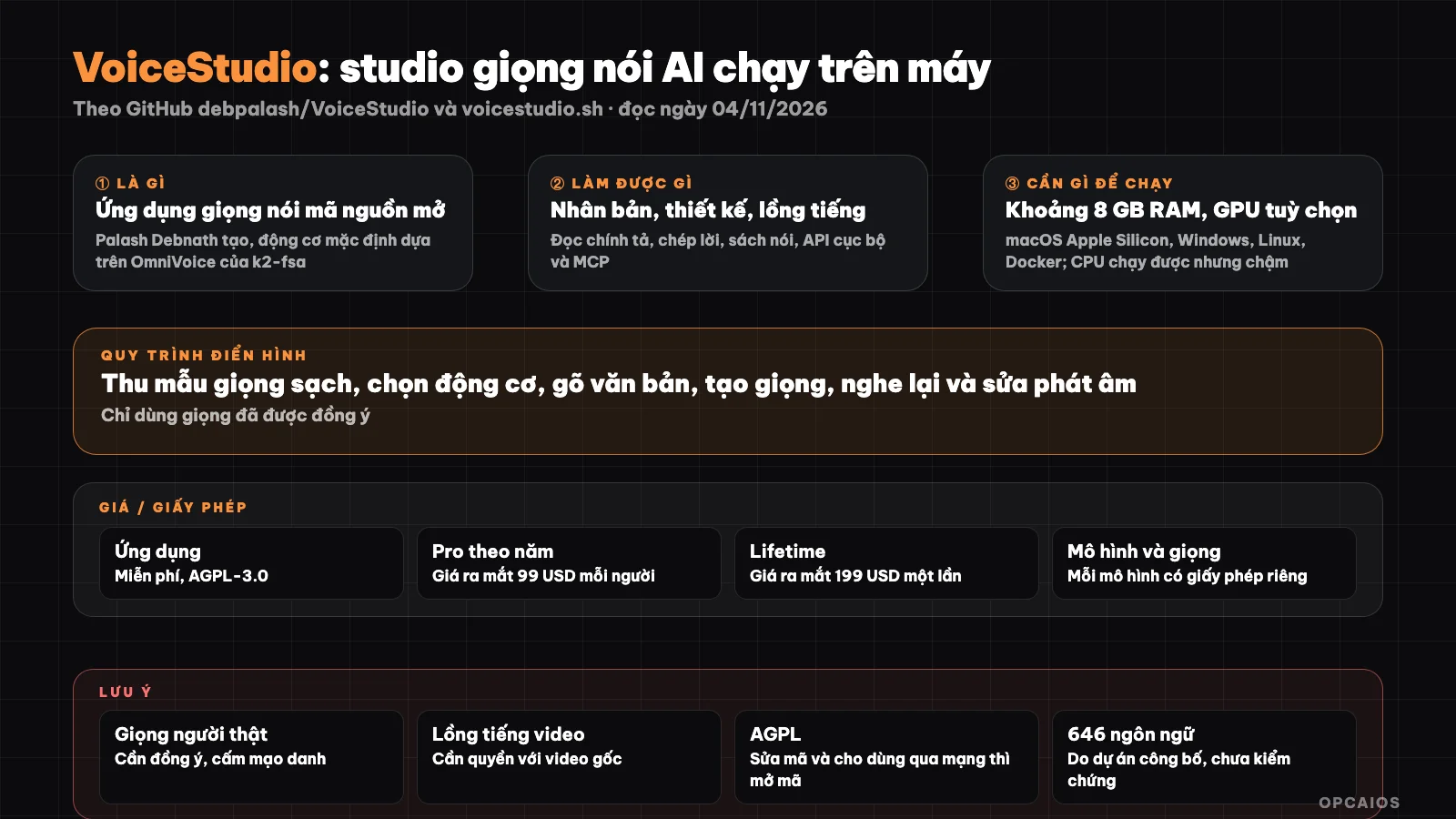
VoiceStudio runs speech models right on your machine, audio data doesn't need to go to the cloud. Diagram: OPCAIOS.
What is VoiceStudio and who made it?
VoiceStudio is an AI voice studio created by Palash Debnath (GitHub account debpalash, based in India according to his GitHub profile), with Shimul Debnath in the core team. The application's default engine is based on the OmniVoice model from the k2-fsa team, and users can choose from several other engines.
Essentially, VoiceStudio is an interface layer and workflow wrapper around open-source text-to-speech (TTS) and voice recognition models. According to the README on GitHub (read on 04/11/2026), the application supports 646 languages (as claimed by the project, unverified), runs on laptops, desktops, servers, phones, and tablets. The Model Manager lets you load only the models you need; the engine list in the project documentation includes OmniVoice, CosyVoice 3, IndexTTS 2.5, MOSS-TTS, and many others. The desktop application is written in Electron, the processing part in Python. The Docker image name on Docker Hub is still omnivoice-studio, showing close ties with OmniVoice. If you want to understand the underlying model separately, see What is OmniVoice.
What can VoiceStudio do?
VoiceStudio brings six groups of voice tasks into one application, plus a local API and MCP server to connect with agents. The table below rephrases information from the README, read on 04/11/2026.
| Feature | Short description |
|---|---|
| Voice cloning | From a clean reference recording, read text in a familiar voice |
| Voice design | Describe a voice in words (gender, age, pitch, accent) then create it |
| Video dubbing | Translate and dub, sync timing to original speech, multi-speaker support |
| Spelling reading, transcription | Floating spelling widget, local transcription |
| Storytelling, batch processing | Stories, audiobooks, job queue |
| Connection, automation | Local API, MCP, reusable templates, watched directories |
The connection part is noteworthy for automation builders: with MCP, agents like Claude Code can call VoiceStudio to generate speech within a longer workflow. The project also has Agent Skills installable via npx skills add debpalash/VoiceStudio. On MCP, see What is MCP.
Is VoiceStudio free, and what hardware do I need?
The VoiceStudio open-source application is free under AGPL-3.0; the official site also sells a Pro version with closed source code and commercial licensing. The main hidden cost is hardware: it runs on CPU without a GPU but slower.
| Item | According to official sources (read 04/11/2026) | Notes |
|---|---|---|
| Open-source application | Free, AGPL-3.0, including commercial use under AGPL terms | No account needed |
| Pro (per year) | Launch price 99 USD per person per year, list price 199 USD | Closed source, commercial license, 3 devices |
| Lifetime | Launch price 199 USD one-time, list price 499 USD | Per Pro page, currently taking invite signups |
| Models and voices | Each model has its own license | Model Manager displays each model's license |
| Hardware | Around 8 GB RAM to start per homepage | NVIDIA GPU, Apple Silicon faster |
Prices above do not include tax and may change; the homepage notes Pro is "coming soon", the Pro page takes invite signups and states a 7-day refund policy. On platforms, the README states: macOS 13.3 or later on Apple Silicon (using Metal); Intel Mac runs only the interface and connects to another VoiceStudio server; Windows 10/11 x64 with optional NVIDIA CUDA, AMD ROCm or CPU; Linux x64; Docker for CPU, CUDA, ROCm; Android 10 or later and iOS 17 or later in preview. Models must download on first use, so you need extra disk space and stable internet.
How do I install VoiceStudio?
Installing VoiceStudio has many ways: download the installer from the Releases page on GitHub, use a package manager, or run from source. After installation, the app asks before downloading models.
- First, on Mac with Apple Silicon, install via Homebrew per the README:
brew tap debpalash/tap
brew trust --cask debpalash/tap/voicestudio
brew install --cask debpalash/tap/voicestudio
- Next, on Linux with snapd, you can install via Snap and grant microphone permission:
sudo snap install voicestudio
sudo snap connect voicestudio:audio-record
- On Windows, download the installer from the official Releases page or use the PowerShell command in the README.
- Open Voice cloning, pick a built-in voice or add a clean reference recording, type text and create.
- Finally, check the license of your chosen model in Model Manager before using the output for commercial work.
The README also has a one-liner install command that downloads and runs a script directly via shell. This is convenient but you should open and read the script first, and only download from voicestudio.sh or the official GitHub repo.
Example use (hypothetical): someone making an online course records 30 seconds of their own voice in a quiet room, uses VoiceStudio to read narration for 10 lecture videos, then listens to each segment to fix mispronounced names.
Legal and ethical risks when cloning a voice with VoiceStudio
The biggest risk of VoiceStudio is using someone else's voice wrongly. The project states clearly that you clone a voice only with the owner's permission, and the official site bans impersonation and fraud.
Voice cloning means recreating someone's voice from a sample recording, and voice ties to identity, so this is legally sensitive. First, use only your own voice or someone who agreed in writing, stating the purpose. Second, do not use a cloned voice to impersonate a real person in a call, ad, or voice message; in many places this may be fraud. Third, when dubbing someone else's video, you need rights to that video itself, because translation and dubbing create a derivative work. Fourth, AGPL-3.0 means if you modify the code and give it to others over a network, you must publish the modified code; licenses for models, sample voices, and outputs are separate. Finally, you should note for listeners when content uses an AI voice. We have not cross-checked Vietnamese law on rights to images and voice; this is reference information, not legal advice.
On data, voicestudio.sh says the app needs no account and only goes online to check updates or download models. This helps when handling a customer's voice, but we have not independently checked the app's network traffic.
VoiceStudio vs Other Options
VoiceStudio puts itself against ElevenLabs: it runs on your machine instead of in the cloud. The table below is a general description, not a measurement.
| Option | Strengths | Weaknesses |
|---|---|---|
| VoiceStudio | Free, runs locally, many engines, has dubbing and MCP | Needs a powerful machine, new project, different model licenses |
| ElevenLabs (cloud) | No hardware needed, easy to use | Pay per credit, audio uploaded to server |
| Running OmniVoice directly | Deep control, easy to add to pipeline | Must use command line, no dubbing interface |
| Voicebox | Also a local voice studio, MIT license | Different feature set and engines, see separate post |
When Should You Use VoiceStudio?
Use VoiceStudio when you need voice reading or dubbing regularly, want to keep audio on your machine, and have enough RAM or a GPU. The table below suggests by situation.
| Situation | Suggestion |
|---|---|
| Making tutorial videos in your own voice | Good fit, record clean samples and review carefully |
| Dubbing video into another language | Try the dubbing feature, check rights with original video |
| Need voice reading in an automated process | Use local API or MCP, combine with n8n |
| Weak machine, no GPU, need it now | Use cloud service or accept slow running on CPU |
| Selling voice reading service to clients | Read AGPL carefully, model licenses and consider Pro version |
OPCAIOS Experience
We added VoiceStudio to the Repo list in the Utilities section on opcaios.org after reading the README and checking that the repository is still updated; we have not run VoiceStudio itself yet, so this section sets out the criteria we use to consider, not an evaluation after use. What is true is that we use OmniVoice, VoiceStudio's default engine, to clone a Vietnamese voice in a talking-head video production process running on a rented GPU server. The result sounds natural in Vietnamese but needs clean samples; we have not measured it with numbers. With VoiceStudio, we look at four criteria. First, the repository updates very closely, dated 04/11/2026. Next, the AGPL license and license for each model. Third, hidden cost is GPU or wait time on CPU. Finally, whether the dubbing interface can replace the current manual step in our pipeline.
Read more: What is OmniVoice, What is Voicebox, What is VideoLingo, 7 best AI voice cloning tools 2026 for Vietnamese.
Frequently Asked Questions
Does VoiceStudio support Vietnamese?
According to the README read on 04/11/2026, VoiceStudio supports 646 languages, and the default OmniVoice engine from k2-fsa has Vietnamese in its language list; the VoiceStudio README also has a Vietnamese translation. The number 646 is from the project's announcement and hasn't been verified. Vietnamese quality depends on which engine you choose and how clean your voice sample is. From our experience using OmniVoice directly, we found Vietnamese voices sound quite natural when the sample is recorded in a quiet room with no background music. Proper nouns and English loanwords should be listened to and corrected segment by segment.
Does VoiceStudio require a GPU?
Not required. The README states the application works completely on CPU, just slower, and the voicestudio.sh homepage says around 8 GB of RAM is enough to get started (read on 04/11/2026). A GPU helps create voices much faster: on Windows and Linux, NVIDIA CUDA is supported, AMD ROCm is an option, and some GGUF-format engines work with Vulkan; on Mac you need Apple Silicon. Intel Macs can only run the interface and must connect to another machine for processing. If you're doing large volumes, renting a GPU server might be cheaper than buying a new card.
Can I use voices created by VoiceStudio for commercial purposes?
Yes, but you need to check three layers of licenses. The first layer is the application: AGPL-3.0 allows commercial use under its terms, while the Pro version comes with a separate commercial license. The second layer is the model: each model and voice sample has its own license, shown in the Model Manager, and commercial use conditions may differ between models. The third layer is rights to the voice: you need the voice owner's consent. Record the model, version, and license for each audio product. This is not legal advice.
How is VoiceStudio different from OmniVoice?
OmniVoice is a TTS model released by the k2-fsa group, used via Python and command line. VoiceStudio is a complete application that uses OmniVoice as its default engine, then adds a user interface, model manager, video dubbing, text-to-speech reading, audiobooks, local API and MCP, plus many other engines like CosyVoice or IndexTTS. In other words, OmniVoice is the engine, VoiceStudio is the car. People comfortable with code and wanting to put voices into an automated pipeline can use OmniVoice directly. People who want a click-and-choose interface are better suited to VoiceStudio.
Can someone who doesn't know how to code use VoiceStudio?
Yes. VoiceStudio has installers for macOS, Windows, Linux and preview builds for Android and iOS, so you don't need the command line if you download the installer from the official Releases page. After opening the application, you select a voice or add a voice sample recording, type text, and press create; the application asks before downloading a model. The hard part for new users is choosing a suitable engine, understanding model licenses, and handling errors when your machine runs low on RAM. If you want to learn how to safely use voice and video AI tools in your work, check out OPCAIOS's AI application training course.
Sources: GitHub debpalash/VoiceStudio (README, feature catalog, API, Releases page, read 04/11/2026), voicestudio.sh and voicestudio.sh/pro (read 04/11/2026); not read/not verified: the 646 language count and download numbers announced by the project, license text for each model, actual network behavior of the application; voicestudio.sh homepage showed a lower star count than the GitHub API on the same date; stars and prices may change. Experience is from OPCAIOS.
Translated from Vietnamese with AI. Read the original.
Want to apply this in your business?
Book a free 30-minute call (Vietnam time, in English or Vietnamese).