


What are HTTPS and TLS? TLS (Transport Layer Security) is a protocol that helps clients and servers communicate securely over untrusted networks; its most common application is protecting HTTP, creating HTTPS. According to MDN documentation (read 25/10/2026), TLS provides three things: encrypting data in transit, data integrity and identity authentication, and TLS 1.3 (RFC 8446) is the current, most widely used version. This post explains what HTTPS and TLS are, how certificates work, which versions to use, how to check, and OPCAIOS's experience.
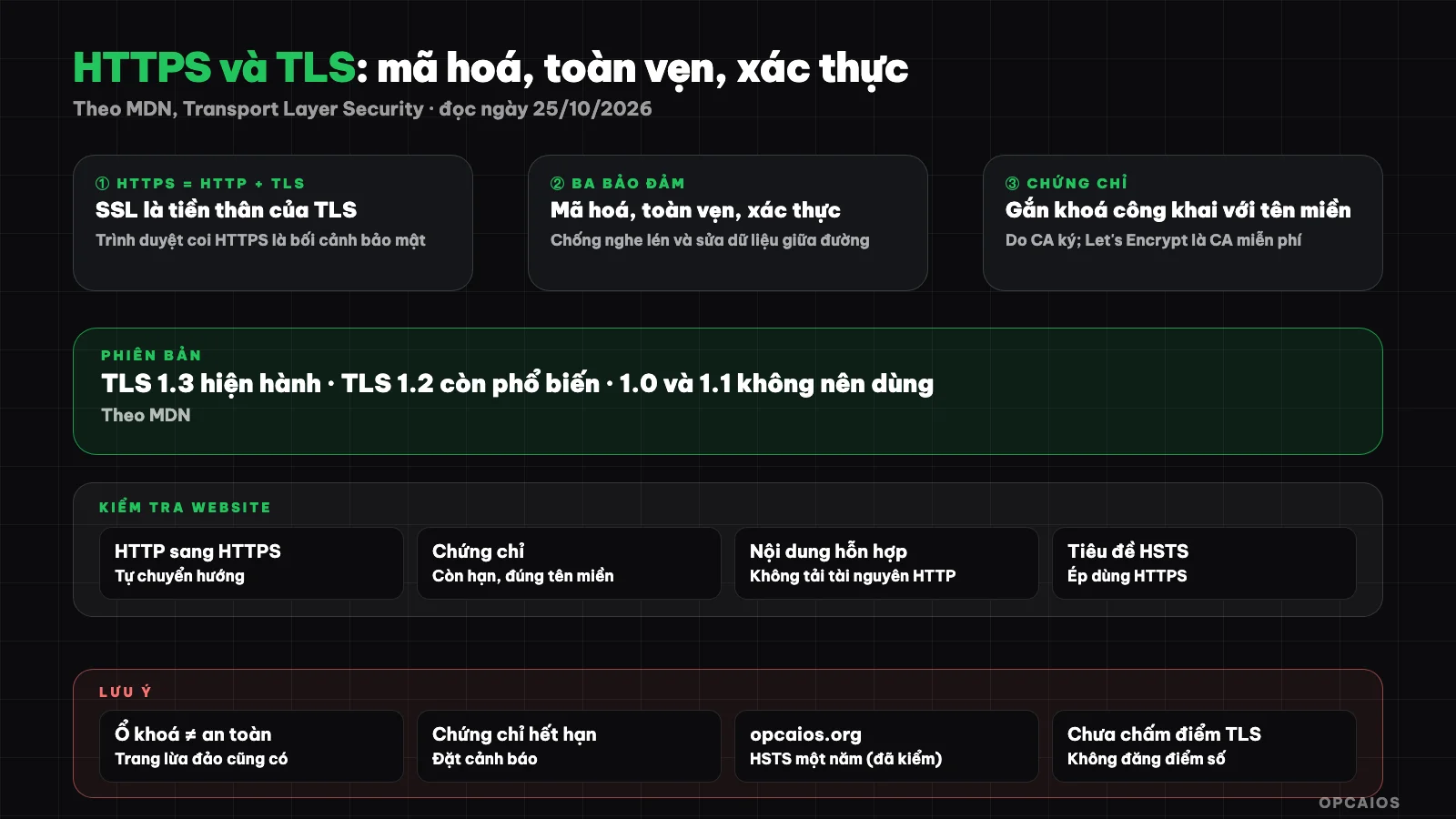
HTTPS is HTTP running over TLS: encryption, integrity and authentication. Diagram: OPCAIOS.
What are HTTPS and TLS, what is SSL?
HTTPS is HTTP protected by TLS. SSL is the predecessor of TLS; today people still call it "SSL certificate" even though the actual protocol in use is TLS. Browsers treat HTTPS pages as a "secure context" and many web features only run over HTTPS.
According to MDN, HTTPS protects against man-in-the-middle attacks: someone in the middle of the transmission cannot read or modify data without being detected. For any website with login, payment or forms, HTTPS is nearly mandatory.
What does TLS protect?
TLS protects three things: encryption (eavesdroppers cannot read), integrity (data cannot be modified without being detected) and authentication (parties prove their identity). On the web, usually only the server authenticates with the client, the reverse is rare.
| Guarantee | Meaning for your website |
|---|---|
| Encryption | Passwords, forms cannot be read in transit |
| Integrity | Page cannot be injected with ads, malware in transit |
| Authentication | You are talking to the right domain |
HTTPS protects the transmission, it does not guarantee the website content is safe or trustworthy: a scam page can still have a lock.
How do certificates work?
A server proves its identity with a digital certificate, binding its public key to a domain name; the certificate is signed by a Certificate Authority (CA). According to MDN, Let's Encrypt is a free CA widely used.
When you visit a page, the browser checks whether the certificate is signed by a trusted CA, has not expired and matches the domain name, then both sides agree on a key to encrypt the session. An expired or mismatched certificate will show a warning, and this is a common operational error for people who self-manage servers. Certificates are usually issued based on DNS records or verification of domain control.
Which version should I use?
According to MDN, TLS 1.3 is the current and most widely used version; TLS 1.2 is still common; TLS 1.1 and 1.0 should no longer be used. Server configuration should disable old versions.
For added assurance, you can enable the HSTS header to force the browser to always use HTTPS with your domain. This is general knowledge from OPCAIOS; the MDN page I read does not discuss HSTS.
How to check if your website uses HTTPS correctly
Open the page, look at the lock icon and check the certificate information (expiry, domain, CA). For more thorough checking, use command-line tools to see response headers and public TLS configuration checking services.
curl -sI https://your-domain.vn | head -20
Things to check: HTTP redirects to HTTPS, certificate has not expired, no mixed content (HTTPS page loading HTTP resources), and security headers like HSTS. See more at website security audit.
OPCAIOS's experience
The website opcaios.org returns an HSTS header with a one-year timeout (max-age=31536000); we checked it with the curl -I command on 25/10/2026, and it goes through Cloudflare. According to our internal security audit notes from 17/10/2026, we have handled tightening old protocols on the origin server; see What is Nginx and What is Cloudflare.
Limitations: we do not disclose the specific TLS configuration of the origin server in this post, and have not run a third-party TLS scoring service to provide scores. Certificate renewal is automated; if you self-manage, set an alert before expiry.
Frequently Asked Questions
Does an HTTPS lock mean the website is safe?
Not necessarily. It only tells you that the transmission is encrypted and you're connecting to the correct domain name; the content can still be fraudulent.
How are SSL and TLS different?
SSL is the predecessor of TLS. Today the protocol used is TLS even though many people still call it SSL.
Does an HTTPS certificate cost money?
There are free CAs like Let's Encrypt according to MDN; some providers charge for other types of certificates. Prices vary.
Can TLS 1.2 still be used?
According to MDN, it's still common; TLS 1.0 and 1.1 should not be used.
Where should I start?
Enable HTTPS, redirect HTTP to HTTPS, and set up alerts for certificate expiration. Need support, see AI application training services.
Source: MDN Web Docs, "Transport Layer Security", read on 25/10/2026; have not read RFC 8446 and HSTS documentation. HSTS header of opcaios.org checked by OPCAIOS on 25/10/2026. Experience is from OPCAIOS.
Translated from Vietnamese with AI. Read the original.
Want to apply this in your business?
Book a free 30-minute call (Vietnam time, in English or Vietnamese).