


What is LongCat-Video?
LongCat-Video is an open source video generation model released by Meituan's LongCat team (China), combining three tasks in one model: creating video from text, creating video from images, and concatenating existing videos to produce long videos lasting many minutes. According to the README on GitHub (read 04/11/2026), the model has 13.6 billion parameters, weights under MIT license. According to the GitHub API on the same date, the meituan-longcat/LongCat-Video repository has around 9,340 stars, created on 25/10/2025 and the most recent code push was 27/05/2026. The model is free, but the real cost lies in GPU. This post explains what LongCat-Video can do, the Avatar branch for creating speaking person videos from audio, how to install it, required hardware, legal risks, and when to try it.
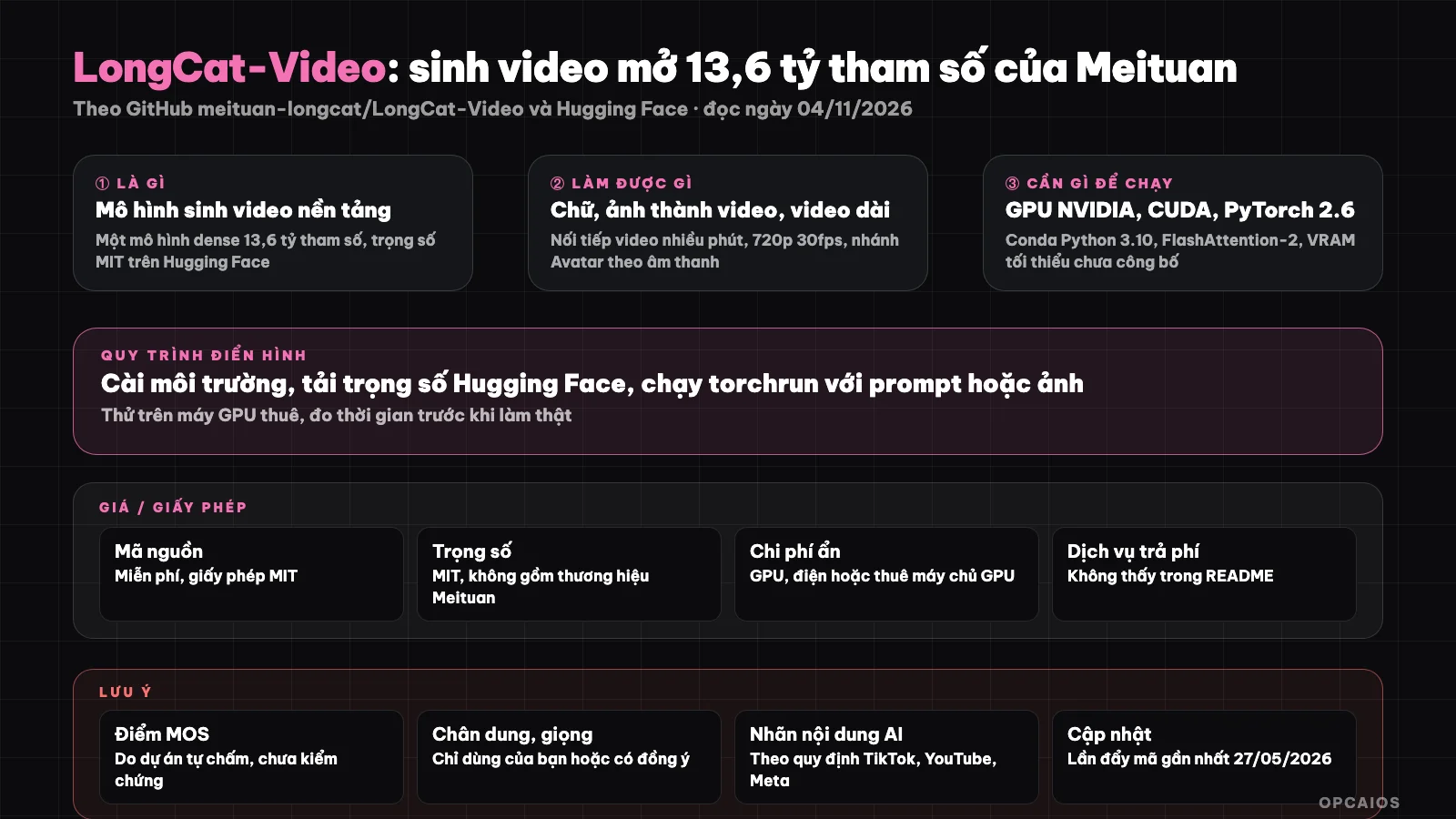
One model for three tasks: text to video, image to video, and video concatenation. Diagram: OPCAIOS.
What is LongCat-Video and who developed it?
LongCat-Video is a foundational video generation model from Meituan LongCat Team, announced on 25/10/2025 with technical report on arXiv (code 2510.22200) and weights on Hugging Face. The development team calls this the first step toward a "world model", that is a model that understands and simulates the world through video.
Meituan is a large Chinese technology conglomerate, and LongCat is their line of AI models, including the LongCat-Flash language models. According to the README (read 04/11/2026), LongCat-Video is a dense model, meaning all 13.6 billion parameters participate in each computation, unlike MoE style that only activates some parameters. The model is pretrained on the video concatenation task, so according to the project it can generate long videos lasting many minutes without color drift or quality degradation; this is what the project claims, unverified. The code inherits much from the open ecosystem: the README thanks Wan, UMT5-XXL, Diffusers, and Hugging Face. If you're not familiar with AI model concepts, see What is LLM? to understand the common foundation.
What are LongCat-Video's main features?
LongCat-Video does five main tasks with one model: text to video, image to video, video concatenation, long video generation, and interactive video generation. The Avatar branch adds the ability to create speaking characters from audio. The table below summarizes according to the GitHub README, read 04/11/2026.
| Feature | Short description |
|---|---|
| Text-to-Video | Write a description in text, model generates corresponding video clip |
| Image-to-Video | Provide a static image, model makes the image move |
| Video-Continuation | Concatenate an existing video clip, create foundation for long video |
| Long video | Long video lasting many minutes, according to the project without color drift (unverified) |
| Performance | 720p, 30 frames per second "in a few minutes", thanks to rough generation then refinement and Block Sparse Attention |
| LongCat-Video-Avatar | Audio plus text or image becomes speaking character video, one or two voices (16/12/2025) |
| Avatar 1.5 | Whisper-large-v3 audio encoder, distillation down to 8 steps, INT8 support to reduce VRAM (21/05/2026) |
The README also has a Streamlit interface to try it through a web browser, and the community has a CacheDiT project that speeds things up about 1.7x according to CacheDiT's own announcement, unverified.
Is LongCat-Video better than other models?
According to the MOS score table on Meituan's internal evaluation set, LongCat-Video ranks near commercial models but not outstandingly. This is data disclosed by the project, scored on their private dataset, unverified independently, so should only be viewed as reference.
For text to video, the overall quality score according to the README (read 04/11/2026) is 3.38 for LongCat-Video, compared to 3.48 for Veo3 (Google), 3.36 for PixVerse-V5, and 3.35 for Wan 2.2-T2V-A14B. For image to video, LongCat-Video scores 3.17, lower than Seedance 1.0 (3.35), Hailuo-02 (3.27), and Wan 2.2-I2V-A14B (3.26), though the individual image quality score is 3.27, highest on the table. MOS score is the average score given by raters on a subjective scale, so differences of a few percent don't say much. Practical meaning: LongCat-Video is one option alongside Wan 2.2, with strengths the project emphasizes being long video and video concatenation. We have not yet measured quality or speed on real machines.
Is LongCat-Video free, and what about the license?
LongCat-Video is free: both code and weights are under MIT license, which allows commercial use. But "free" is only the software. Real costs include GPU, electricity or GPU server rental fees, storage for weights, and setup time. The information below was read on 04/11/2026 and may change.
| Item | Details |
|---|---|
| Source code | MIT, per README and GitHub API |
| Model weights | MIT, downloaded from Hugging Face; no grant of trademark usage or patent rights from Meituan |
| Official paid service | Not seen in README; we have not read any pricing page |
| Hidden costs | NVIDIA GPU with CUDA, GPU server rental if your personal machine is insufficient, disk space for weights |
| Minimum VRAM | README and Hugging Face model card do not specify; Avatar 1.5 has INT8 option to reduce VRAM |
License note: the README clearly states that MIT license does not grant rights to use Meituan's trademark. You can sell videos you create, but should not advertise the product as if it were sponsored by Meituan. GPU rental prices vary by provider and we do not state figures; calculate based on your expected trial run hours, before tax.
How do I install and run LongCat-Video?
Installing LongCat-Video requires Linux or an environment with an NVIDIA GPU, conda, Python 3.10, PyTorch 2.6 for CUDA 12.4, and FlashAttention-2. Then download weights from Hugging Face and run demo scripts using torchrun. The commands below are from the README (read on 04/11/2026); we have not run them ourselves.
- First, clone the repository and create a Python 3.10 conda environment.
- Next, install PyTorch in the correct version for your machine's CUDA, then FlashAttention-2 and packages in
requirements.txt; if using Avatar also install librosa, ffmpeg, andrequirements_avatar.txt. - Download weights using
huggingface-cli. - Finally, run the demo script for each task, on one GPU or multiple GPUs.
git clone --single-branch --branch main https://github.com/meituan-longcat/LongCat-Video
cd LongCat-Video
conda create -n longcat-video python=3.10
conda activate longcat-video
pip install torch==2.6.0+cu124 torchvision==0.21.0+cu124 torchaudio==2.6.0 --index-url https://download.pytorch.org/whl/cu124
pip install ninja psutil packaging
pip install flash_attn==2.7.4.post1
pip install -r requirements.txt
Download weights and test text-to-video on one GPU:
pip install "huggingface_hub[cli]"
huggingface-cli download meituan-longcat/LongCat-Video --local-dir ./weights/LongCat-Video
torchrun run_demo_text_to_video.py --checkpoint_dir=./weights/LongCat-Video --enable_compile
The README has similar scripts for image-to-video, video continuation, long video, and interactive video, along with the streamlit run ./run_streamlit.py command to open a web interface. Avatar 1.5 example commands in the README all run two GPUs. People unfamiliar with the command line can wait for the community to add the model to interfaces like ComfyUI or Wan2GP; we have not checked whether these two tools already support LongCat-Video.
What legal and content risks does LongCat-Video have?
The main risks of LongCat-Video lie in the content it creates: deepfake videos of real people, using images or voices of others without permission, and labeling AI content on platforms. This section is for reference only, not legal advice, and we have not cross-checked the original legal texts.
- First, face and voice: the Avatar branch creates videos of a speaker from an image and audio. Only use images and voices of yourself or people who have agreed in writing. Using someone else's face may violate personal rights under Vietnamese law.
- Next, input copyright: images and videos fed into the model must be owned by you or you must have permission to use them.
- Further, platform rules: TikTok, YouTube, and Meta have policies on AI-generated content, often requiring labeling when content looks realistic. Read the current terms of each platform.
- Finally, model limitations: the README reminds us the model has not been evaluated for all applications, and users are responsible for complying with laws on data, privacy, and content safety.
One small point about data: running locally means images, audio, and scripts stay on your machine; renting a GPU server means data sits on the provider's machine and should be deleted after use.
How does LongCat-Video compare to other options?
LongCat-Video is in the group of open-source video generation models running on private GPU, alongside Wan 2.2. Unlike commercial services like Veo3, you handle the hardware yourself but keep your data and pay no per-video fees. The table below is a general description, not a measurement.
| Criteria | LongCat-Video | Wan 2.2 (open) | Closed services (Veo3, Seedance) |
|---|---|---|---|
| License | MIT | Open, terms not yet verified | Service terms |
| Where it runs | Your GPU | Your GPU | Provider's servers |
| Project's stated strengths | Long videos, video continuation, one model for multiple tasks | Has MoE variant with 14 billion active parameters | High quality, no hardware needed |
| Cost | GPU, electricity, setup time | GPU, electricity, setup time | Pay per use or subscription |
| Talking head video | Has Avatar branch | Not in scope here | Depends on service |
If you need talking head video, see also What is EchoMimic? and What is OmniVoice? for voice work.
When should I use LongCat-Video?
LongCat-Video suits people with a strong GPU or willing to rent GPU servers, wanting to try long video generation or talking head video using an open model with MIT license. Someone needing a few short clips per month and unfamiliar with command line might save time with a service that has a UI.
| Situation | Suggestion |
|---|---|
| Need a few short clips, no GPU | Use a service with UI, read the output copyright terms |
| Have NVIDIA GPU, want to try long or continuing videos | Try LongCat-Video following the README, start with one GPU |
| Want to make talking character videos in your own voice | Try Avatar 1.5 branch, combine with voice cloning tools you have consent for |
| Mass production for clients | Test on rented servers first, measure time per video, then quote |
| Not comfortable with command line | Wait for community UI, or learn to use AI agents that help with setup |
OPCAIOS's experience
We added LongCat-Video to the Repo list in the Tools section on opcaios.org after reading the README and checking the repository is still maintained; we have not tested it yet, so this section describes the criteria we use to consider it, not an evaluation after use. There are four criteria. First, is the repository still being updated: the latest code push was 27/05/2026, about five months before the read date, so we need to watch if the project continues developing. Second, the license: MIT for code and weights is a big plus compared to many models with custom licenses. Third, hidden costs: the 13.6 billion parameter model needs an NVIDIA GPU, the README does not state minimum VRAM, so we have to test on rented servers to know the cost per video. Finally, ability to replace current tools: we are using OmniVoice to clone Vietnamese voice in our talking head video production workflow running on one rented GPU server; the Avatar branch of LongCat-Video is a candidate to consider for the video part, but we haven't tested it so can't compare yet.
Read more: What is ComfyUI?, What is Wan2GP?, What is EchoMimic?, What is OmniVoice?, 7 best AI talking head video tools 2026, 5 best open source AI video creation tools 2026.
Frequently Asked Questions
What is LongCat-Video?
LongCat-Video is an open-source video generation model with 13.6 billion parameters from the LongCat team at Meituan, released on October 25, 2025. A model that does three things: generate video from text, generate video from images, and extend existing video, which allows it to create videos several minutes long. According to the README on GitHub read on November 4, 2026, the model generates 720p video, 30 frames per second for several minutes; this is a figure announced by the project and not yet verified. Code and weights are under the MIT license, available on Hugging Face.
Is LongCat-Video free and can it be used commercially?
Yes. LongCat-Video code and weights are under the MIT license, according to the README and API on GitHub read on November 4, 2026, so you are allowed to use, modify, and use it for commercial purposes. The license does not grant rights to use Meituan's trademarks or patents. What costs money is the hardware: NVIDIA GPU, electricity, or GPU server rental fees, plus installation time. With the videos you create, you still need to respect the copyright of input material and the portrait rights of people appearing in the video. This is for reference only, not legal advice.
What GPU do I need to run LongCat-Video?
The README and model card on Hugging Face, read on November 4, 2026, do not specify minimum VRAM or specific GPU models. The README only provides instructions for installing PyTorch 2.6 with CUDA 12.4 and FlashAttention-2, with commands for running on one GPU and multiple GPUs. With a dense model of 13.6 billion parameters, you should plan for NVIDIA GPUs with large memory or rent a GPU server to try it out. The Avatar 1.5 branch has an INT8 option to reduce VRAM, but the sample commands in this branch all run two GPUs. We have not measured on actual hardware, so we are not providing numbers.
What is LongCat-Video-Avatar?
LongCat-Video-Avatar is a branch for generating talking character videos synchronized to audio, released on December 16, 2025. You provide audio with a text description or an image, and the model generates video of a person speaking with lip-syncing, supporting one or two voice streams. Avatar 1.5 released on May 21, 2026 switched the audio encoding to Whisper-large-v3 for more accurate lip-syncing, and uses 8 steps for faster inference and supports INT8, according to the README on GitHub. Only use images and voices of yourself or people who have clearly consented.
Can someone without coding knowledge use LongCat-Video?
It's difficult if installing from scratch. LongCat-Video currently only has command-line scripts and a simple Streamlit interface, requiring conda, PyTorch with the correct CUDA version, FlashAttention-2, and downloading weights from Hugging Face. Someone without coding knowledge has two options: wait for the community to integrate the model into interfaces like ComfyUI, or ask an AI agent like Claude Code to guide you step by step on a rented GPU server and review all commands before running them. If you want to learn how to work with AI agents safely and systematically, see OPCAIOS's AI application training course.
Source: GitHub meituan-longcat/LongCat-Video (README, API, read on November 4, 2026), Hugging Face model card meituan-longcat/LongCat-Video (read on November 4, 2026); not read/not verified: arXiv technical report 2510.22200, project page, VRAM requirements, MOS scores (announced by the project on internal evaluation sets), license terms of Wan 2.2; star counts may change. Experience is from OPCAIOS.
Translated from Vietnamese with AI. Read the original.
Want to apply this in your business?
Book a free 30-minute call (Vietnam time, in English or Vietnamese).