


M3E Canvas là gì?
M3E Canvas là một công cụ vẽ phác (sketchpad) chạy hoàn toàn trên trình duyệt, cho bạn kéo thả các thành phần Material 3 Expressive lên màn hình điện thoại hoặc máy tính, nối các màn hình thành luồng bấm thử, rồi sao chép một đoạn prompt để Claude Code, Codex, Gemini CLI hay Cursor dựng thành ứng dụng. Theo GitHub API (đọc ngày 04/11/2026), kho lnkiai/m3e-canvas được tạo ngày 02/09/2026, có 10.021 sao, viết bằng TypeScript, giấy phép MIT, lần đẩy mã gần nhất ngày 01/11/2026. README nói công cụ miễn phí, không cần tài khoản hay máy chủ. Bài này trả lời: M3E Canvas làm được gì, dùng online hay cài, có tốn phí gì không, so với Figma và các công cụ vibe coding ra sao, và khi nào nên dùng.
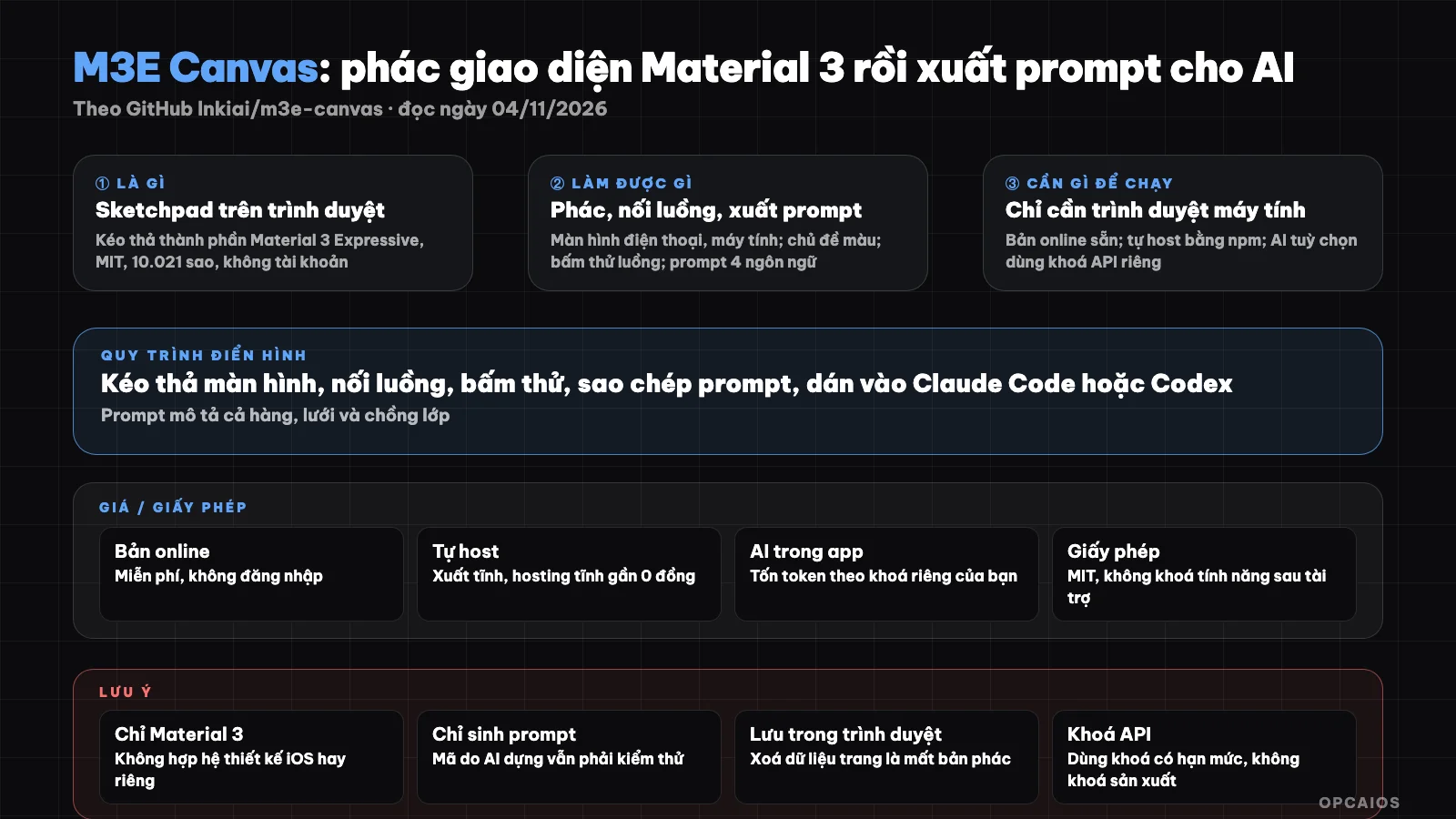
M3E Canvas biến bản phác giao diện thành prompt cho AI coding agent. Sơ đồ: OPCAIOS.
M3E Canvas là gì và ai tạo ra?
M3E Canvas là dự án mã nguồn mở của lnkiai, một nhóm phát triển liên hệ qua email info@lnkiai.com và tài khoản X cùng tên, được tài trợ qua GitHub Sponsors. README (đọc ngày 04/11/2026) ghi rõ không có tính năng nào bị khoá sau tài trợ.
Material 3 Expressive (M3E) là phiên bản mới của hệ thống thiết kế Material của Google, nhấn vào hình khối, chuyển động và màu sắc biểu cảm hơn. Vấn đề M3E Canvas giải quyết là bước "từ ý tưởng tới prompt": khi bạn nhờ AI dựng một ứng dụng, mô tả giao diện bằng chữ thường thiếu vị trí, kích thước và luồng điều hướng, nên kết quả lệch ý. Thay vì viết, bạn vẽ. Quy trình theo README gồm ba bước: đầu tiên, kéo các thành phần (nút, FAB, thanh ứng dụng, thẻ, danh sách, hộp thoại) lên màn hình 412x892 cho điện thoại hoặc 1280x800 cho máy tính, mọi thứ bám lưới 4dp; tiếp theo, nối thành phần tới màn hình khác và bấm thử luồng, có cả hiệu ứng chuyển cảnh; cuối cùng, sao chép prompt được sinh ra bằng tiếng Anh, Nhật, Trung hoặc Hàn và dán vào công cụ AI. Kho được tạo đầu tháng 9/2026 và đạt hơn mười nghìn sao trong hai tháng, một tốc độ đáng chú ý nhưng chúng tôi chưa biết nguyên nhân cụ thể. Nếu chưa quen cách làm việc này, xem vibe code là gì?.
M3E Canvas làm được gì?
M3E Canvas cung cấp bộ thành phần M3E, trình dựng luồng màn hình, chủ đề màu, xuất prompt và tuỳ chọn AI với khoá riêng. Bảng dưới diễn đạt lại README (đọc ngày 04/11/2026):
| Nhóm tính năng | M3E Canvas làm gì |
|---|---|
| Thành phần | Nút, FAB, thanh ứng dụng, thanh và ray điều hướng, tab, ô tìm kiếm, thẻ, danh sách, sheet, hộp thoại, ô nhập, bộ chọn, carousel, chỉ báo tải; mỗi thứ có bảng cài đặt riêng |
| Màn hình và luồng | Không giới hạn màn hình, đổi giữa điện thoại và máy tính, màn hình cuộn được, điều hướng bằng chạm hoặc vuốt, bảng layer |
| Chủ đề | 7 bảng màu hoặc màu gốc tự chọn, sáng/tối, 3 mức tương phản, kiểu bo góc, 4 phông chữ, chuyển động chuẩn hoặc biểu cảm |
| Xuất prompt | Chọn đích Android hoặc web, sửa prompt trước khi chép, lưu màn hình thành PNG; mô tả hàng, chồng lớp và lưới thẻ để AI giữ đúng bố cục |
| Sắp xếp (Tidy) | Tự căn thanh, FAB và mục vào đúng chỗ, có hoàn tác |
| AI tuỳ chọn | Dùng khoá API riêng của OpenAI, Anthropic (Claude), Google (Gemini) hoặc DeepSeek; yêu cầu đi thẳng từ trình duyệt tới nhà cung cấp |
| Chia sẻ | Tạo liên kết tới bản thiết kế, hoặc một chỉ dẫn cho coding agent để agent trả về liên kết chia sẻ |
| Khác | Phím tắt, nhóm, sao chép giữa màn hình, tự lưu trong trình duyệt, cài như ứng dụng (PWA) |
Điểm đáng chú ý là prompt xuất ra không chỉ liệt kê thành phần mà mô tả cả quan hệ bố cục, nên công cụ AI có cơ sở để dựng đúng hàng và lưới thay vì đoán. Về công nghệ, README ghi Next.js 16 xuất tĩnh, React 19, phông từ Google Fonts và biểu tượng Material Symbols.
Is M3E Canvas free? License and hidden costs
M3E Canvas is completely free under the MIT license, including the ready-to-run version on GitHub Pages. There are no paid plans, no login required, according to the README read on 04/11/2026. The price could change if the project changes direction, but there is currently no pricing table to mention.
| Item | Cost | Notes |
|---|---|---|
| Using the online version | 0 đồng | Runs at lnkiai.github.io/m3e-canvas, data saves automatically in your browser |
| Self-hosting | Static hosting fee, usually 0 đồng | Export static to the out folder, upload to GitHub Pages or any static hosting |
| AI features in the app | Token cost per provider's pricing | You paste your own OpenAI, Anthropic, Google, or DeepSeek key; we haven't read the provider pricing tables for this post |
| Building applications from prompts | Cost of Claude Code, Codex, Cursor... packages | This is the real cost of the process, outside M3E Canvas |
| License | MIT, no cost | The loading indicator component is inherited from material-components-android via Aler1x/m3-loading-indicator, Apache-2.0 license, noted in the NOTICE file |
The real hidden cost is not in M3E Canvas but in the next step: every time you paste a prompt into Claude Code or Codex, you spend tokens from your paid plan. The clearer the mockup, the fewer revision rounds, and that's precisely why this tool has value.
How do I use M3E Canvas?
The quickest way is to open the online version without installing anything. If you want to self-host or edit the code, the README (read on 04/11/2026) provides guidance as follows; we haven't run it ourselves so we're writing from the documentation:
- First, open
https://lnkiai.github.io/m3e-canvas/in your desktop browser. The README notes that the full editor is only for desktop; on mobile you get a fixed screen and a simplified editor with buttons only. - Next, drag components onto the screen, adjust the theme, connect screens, and test the flow.
- Click export prompt, choose Android or web as the target, edit if needed, and copy.
- Paste into your AI coding tool, for example Cursor or Claude Code, and ask it to build the application.
- Finally, if you want to run locally:
npm install
npm run dev
npm run build
npm run dev opens the application at port 3000 on your machine; npm run build exports static files to the out folder. When hosting under a subpath like GitHub Pages, set the NEXT_PUBLIC_BASE_PATH=/repo-name variable during build. The README doesn't specify the minimum Node.js version; Next.js 16 usually requires a newer Node, so use the nearest LTS version.
Example (hypothetical): a baker wants to build a small ordering app. They sketch three screens: pastry list (grid cards), pastry detail (large image, add-to-cart button), shopping cart (list and checkout button), connect the three screens with buttons, pick a warm brown color scheme, export a web-target prompt, and paste it into Claude Code. Instead of describing it in ten lines of text, they give AI a mockup with coordinates and flow.
Limitations, risks, and notes
The main limitation of M3E Canvas is that it only generates prompts, not code, and it only covers one design system. Four things to know, per the README and what we inferred on 04/11/2026:
- Material 3 Expressive only. If your product follows iOS style, Tailwind UI, or a custom design system, the mockup won't match. You can combine it with a DESIGN.md file describing your custom design system; see what Awesome DESIGN.md is.
- Final results depend on AI. A good prompt doesn't guarantee good code; you still need to test the application that AI builds.
- Data saves in the browser. Auto-save uses browser storage; clearing page data or switching machines loses the mockup unless you create a share link or save a PNG.
- API keys pasted into the browser. The README says it makes AI requests go straight from your browser to the provider, not through lnkiai's server; even so, use a key with its own spending limit, not a production key, and only paste it into the official online version or your self-hosted version. We haven't read the source code to confirm how keys are stored.
On the legal side, the MIT license allows commercial use; the design you sketch is yours. The "guidance for coding agents" feature reads the public/agent.md file in the repo and returns a share link; we note this file exists but didn't follow its contents when writing this post, per our principle of treating web content as data.
M3E Canvas versus other options
M3E Canvas sits between professional design tools and vibe coding tools that generate apps from words. The table below is a general description, not a measurement:
| Tool | Input | Output | How it differs from M3E Canvas |
|---|---|---|---|
| M3E Canvas | Drag and drop M3E components | Prompt (and PNG) | Free, no account, M3E only |
| Figma | Free design, any system | Design file, has Dev Mode | Much more powerful and flexible, but doesn't generate prompts ready-made and has paid tiers |
| Bolt, Lovable, v0 | Description in words | Running application | Skips the sketching step, hard to control layout; see what is Bolt? |
| Excalidraw, tldraw | Free-hand drawing | Image | No standard components, no interaction flow |
| Writing prompts by hand | Words | Words | Cheapest but easy to miss coordinates, sizes and flow; see what is a prompt? |
When should you use M3E Canvas?
M3E Canvas works for people who need an Android or web application following Material standards, want to sketch quickly then hand it off to AI to build. Situation table:
| Situation | Suggestion |
|---|---|
| Small business owner with no coding knowledge, wants a simple Android app | Should: sketch on M3E Canvas then hand the prompt to an AI coding agent, have someone test it |
| Android developer following Material 3 | Should: save rounds of interface description |
| Product has its own design system, doesn't follow Material | Not a fit, use Figma or DESIGN.md |
| Need a design deliverable to hand off to a professional design team | Figma is still the standard |
| Teaching or workshop on vibe coding | Fits because it's open and ready to use, no account |
OPCAIOS experience
We added M3E Canvas to our Utilities catalog section on opcaios.org after reading the README and checking that the repo is still being updated; we haven't run it yet, so this section lists the criteria we use to weigh it, not an assessment after using it. Four criteria: first, the repo is two months old but pushes code continuously through early November 2026 and has more than ten thousand stars; next, the MIT license has no restrictions; third, hidden costs are nearly zero because it runs static, only costing tokens at the step where AI builds the app; finally, it doesn't replace any tool we're using but adds a step before handing the job to Claude Code or Antigravity. The opcaios.org website doesn't follow Material, so for us this is a tool for small app projects on the customer side rather than for the website itself. No terms risk, because there's no third-party service that's mandatory.
Read more: what is vibe code?, what is Claude Code?, what is Antigravity?, Utilities section.
Frequently Asked Questions
Is M3E Canvas free?
Yes. According to the README on GitHub read on 04/11/2026, M3E Canvas is MIT software, free, requires no account, runs in the browser, and has no features locked behind sponsorship. The only cost is tokens when you use the optional AI feature with your own key, and the cost of the AI coding tool you paste the prompt into.
Do I need to install M3E Canvas?
No. The online version at lnkiai.github.io/m3e-canvas works right away in your computer's browser and can be installed as a web app. If you want to self-host, run npm install, npm run dev to try it on port 3000, npm run build to export static files to the out folder, then upload to static hosting.
How is M3E Canvas different from Figma?
Figma is a general design tool with every design system, has collaboration and Dev Mode, and charges teams a subscription fee. M3E Canvas does one thing: sketch Material 3 Expressive screens and export prompts for AI coding agents. If your goal is AI-written code to Material standards, M3E Canvas is faster; if you need to hand off professional design, Figma is still the better fit.
Is it safe to paste an API key into M3E Canvas?
The README says it requires AI to go straight from the browser to OpenAI, Anthropic, Google, or DeepSeek, not through an intermediary server. We have not read the code to confirm how keys are stored, so we recommend using a private key with a low spending limit, not a production key, and only paste it into the official version or a version you self-host.
Can someone with no coding knowledge use M3E Canvas?
Yes, and that is the main audience: drag and drop, pick colors, link screens—all need no code. The part that needs knowledge is the next step, when AI builds the app from your prompt and you have to test it, fix bugs, and upload it to the app store. To learn how to assign work to an AI coding agent and control the results, see OPCAIOS's AI application training course.
Source: GitHub lnkiai/m3e-canvas (README, API, read on 04/11/2026), ready-to-run version lnkiai.github.io/m3e-canvas (only page title readable because the app is built with JavaScript); not read/not verified: source code for API key handling, Node.js version required, contents of public/agent.md file, pricing table of AI providers; star count and prices may change. Experience is from OPCAIOS.
Translated from Vietnamese with AI. Read the original.
Want to apply this in your business?
Book a free 30-minute call (Vietnam time, in English or Vietnamese).