


Zapier is a cloud service that helps applications automatically exchange data with each other without writing code: when an event happens in one application, Zapier automatically performs an action in another application. Each process is called a Zap, consisting of one triggering event (trigger) and one or more actions (action). According to their website, Zapier connects over 9,000 applications and offers a free plan with 100 tasks per month, making it the easiest way to try automation if you don't have a technical person.
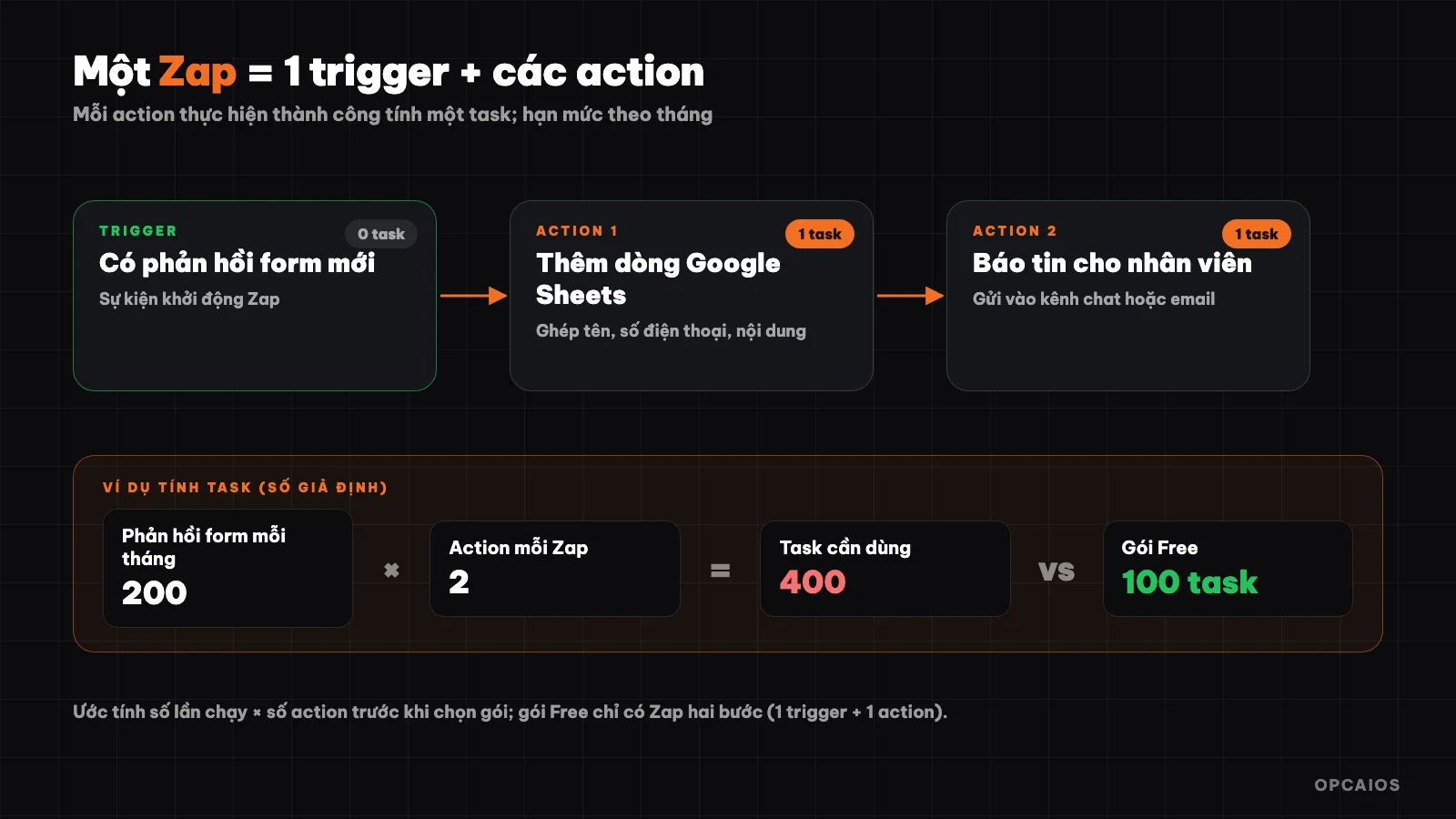
A basic Zap: one trigger and consecutive actions. Diagram: OPCAIOS.
What is Zapier?
Zapier is a no-code automation platform that runs entirely on the cloud, connecting popular applications like Gmail, Google Sheets, Slack, HubSpot, Salesforce and thousands of other applications. You don't install anything on your server: sign up for an account, choose applications, choose events and Zapier runs the process for you.
Besides Zap, the official website now introduces additional components: Tables (store data for Zap to read and update), Forms (forms that trigger processes), Agents (AI assistants that work on tools), Chatbots, and Zapier MCP so AI assistants like Claude or ChatGPT can use Zapier's connections. Large enterprises also get permissions, activity logs and security certifications like SOC 2 Type II.
How does a Zap work?
A Zap is a sequence consisting of exactly one trigger and one or more actions, running in order from top to bottom. Three concepts you need to understand:
| Concept | Meaning | Example |
|---|---|---|
| Trigger | The event that starts a Zap | New form response, new email, new row in spreadsheet |
| Action | What Zap does after that | Add row to Google Sheets, send Slack message, create contact in CRM |
| Task | Unit of measurement for limits | Each successful action Zap performs counts as one task |
Data from the trigger is "mapped" to the actions: you drag the form's "customer name" field into the CRM's "name" field. Besides trigger and action, a Zap also has supporting steps like filters (filter), data formatting (formatter) and branching by condition (Paths).
Zapier also receives webhooks through a dedicated trigger, so systems that send events themselves like websites can be connected. If you're not familiar with this concept, read the posts What is a Webhook? and What is an API?.
Is Zapier free and what is a task?
Zapier has a permanent free plan: according to their official pricing page, the Free plan includes unlimited Zaps, Tables and Forms but only 100 tasks per month and can only use two-step Zaps (one trigger and one action). The paid Professional plan starts at 19.99 USD per month when paid annually, unlocking multi-step Zaps and Paths (conditional branching). Prices and limits may change, so check the current pricing page before deciding.
Task is the unit of measurement for limits: each successful action performed by a Zap counts as one task. The limit is per month so the more a Zap runs, the more actions it performs, the more tasks it uses.
Example calculation (hypothetical numbers for illustration): a form has 200 responses each month, the Zap has two actions: add row to Google Sheets and send a notification. Each response uses 2 tasks, total 400 tasks per month, exceeding the Free plan's 100 tasks. So don't just look at the price per month; estimate the number of runs times the number of actions before choosing a plan. According to Zapier's documentation, some supporting steps like filters don't count as tasks, so filtering out unneeded data early helps save your limit.
How do I create my first Zap?
The process of creating a Zap consists of six steps, the same for all applications. Example of the most common use case: when someone fills out a contact form, write it to Google Sheets and notify the staff member.
- Create a Zapier account (Free plan is enough to try).
- Choose a trigger: the form application you use and the event "new response".
- Add an action: Google Sheets, action "add row".
- Map fields: drag name, phone number, content from the form to the corresponding columns.
- Test each step with sample data. Note that test data may differ from real data.
- Turn on the Zap. Zap only processes data that occurs after you turn it on.
With the Free plan, adding the notification step requires upgrading because Zap only has two steps. Cost-saving approach: have one application handle both tasks, for example the spreadsheet automatically sends a notification when there's a new row.
How Zapier Differs from Make and n8n
Zapier, Make, and n8n all connect applications through automated workflows, but they differ in ease of use, where they run, and how they charge.
| Criteria | Zapier | Make | n8n |
|---|---|---|---|
| Where it runs | Zapier's cloud | Cloud | Self-hosted or cloud |
| Ease for beginners | Easiest, step-by-step interface | Intuitive, needs more familiarization | Requires more conceptual understanding |
| Number of built-in apps | Over 9,000 | Many | Over 1,500 (per README) |
| Pricing model | Per task | Per plan and operation volume | Self-hosted: server costs |
| Code writing, technical freedom | Limited | Moderate | High |
Choose Zapier if you want to get running in minutes, have little technical expertise, and use many popular apps. Choose n8n if you need data control or handle large volumes; see the post What is n8n?. Brief information on each tool is in the library: Zapier, Make, n8n.
Who Should and Shouldn't Use Zapier?
Zapier works well when you want to automate repetitive tasks between familiar apps with minimal technical effort, and your workflow volume is moderate. Typical use cases for small businesses:
- Capture leads from forms into your CRM and notify the person in charge.
- Log new orders into a spreadsheet for tracking.
- Send notifications to chat channels when there's an order, review, or support request.
- Add an AI step to summarize or categorize requests, then route them to the right person.
Zapier is less suitable when: your task volume is large and costs per task pile up quickly; you have sensitive data you want to keep entirely on your own infrastructure (since workflows run on the provider's cloud); or your workflow needs complex code processing. The Free plan also has latency: according to the pricing page, Zapier checks for new trigger data about every 15 minutes on Free, 2 minutes on Professional, and 1 minute on higher plans, so it doesn't work for real-time responses.
How Does Zapier Connect to Your Website?
The most flexible way is using webhooks: your website sends an event to Zapier the moment it happens, instead of waiting for Zapier to check periodically. For example, opcaios.org's website could send a webhook when there's a new form submission or a paid order, with a signature so the recipient can verify it; details are in the post What is a Webhook?. Zapier receives webhooks with a dedicated trigger, and to verify the signature you need to add a processing step.
If you need Zapier to actively pull data, use an API: your website has a REST API to fetch posts, customers, and orders, using API keys with read-only or read-write permissions. If you want an AI assistant to use Zapier's connections, read more in What is MCP?.
Tips for Using Zapier Effectively and Saving Costs
A few habits help your Zaps run smoothly and avoid wasting tasks:
- Start with a two-step Zap for one simple repetitive task, then expand later.
- Name your Zap after the business process, for example "Contact form → Sheets → notification", to keep it easy to manage when you have dozens of Zaps.
- Filter early: set a filter right after the trigger so unnecessary data stops there, not consuming tasks.
- Track your task count weekly during the first few months to know which plan fits your needs.
- Test with real data after turning it on, because sample data can differ from actual data.
- Set error alerts: when a Zap fails, you should be notified right away instead of discovering it days later.
Frequently Asked Questions
Is Zapier free?
There's a Free plan with 100 tasks per month, two-step Zaps, and unlimited Zaps, Tables, and Forms. The Professional plan starts at $19.99 per month when paid annually. Pricing changes over time, so check the official pricing page for current rates.
What is a task in Zapier?
A task is the unit that measures your quota, corresponding to successful actions that a Zap performs. The more times a Zap runs and the more actions it has, the more tasks you use in a month.
Do I need to know how to code to use Zapier?
No. Zapier is designed for non-coders: you select apps, choose events, and map data fields through the interface. Knowing how to read JSON data helps when working with webhooks or APIs.
Should I use Zapier or n8n?
Choose Zapier if you want the easiest option with minimal technical management. Choose n8n if you need data control, high volume, or the ability to inject code. Many people start with Zapier and then switch to a self-hosted tool as they scale.
Where can I learn Zapier quickly?
Use the Zap templates available on the official website and follow Zapier's "Create Zaps" documentation. If you want to build automation workflows for your small business, check out OPCAIOS's AI application training course.
Source: Zapier homepage and official pricing page (checked 22/10/2026); pricing and quotas may change.
Translated from Vietnamese with AI. Read the original.
Want to apply this in your business?
Book a free 30-minute call (Vietnam time, in English or Vietnamese).