



Posting to Facebook Page with n8n: Workflow with Human Review
Posting to a Facebook Page with n8n is a workflow in n8n that calls Meta's Graph API to create a post on a Page (Page, not a personal account), usually through a Facebook Graph API node or an HTTP Request node. The difficult part is not in n8n but on Meta's side: which applications are allowed to post, which token to use, and when to go through App Review. This post is based on official Meta and n8n documentation read on 04/11/2026. We have not run this n8n workflow on our system, so this is guidance from documentation, not tested in practice. This post does not promise to increase engagement or customers, does not guide automatic posting without human review, and clearly states when you don't need n8n.
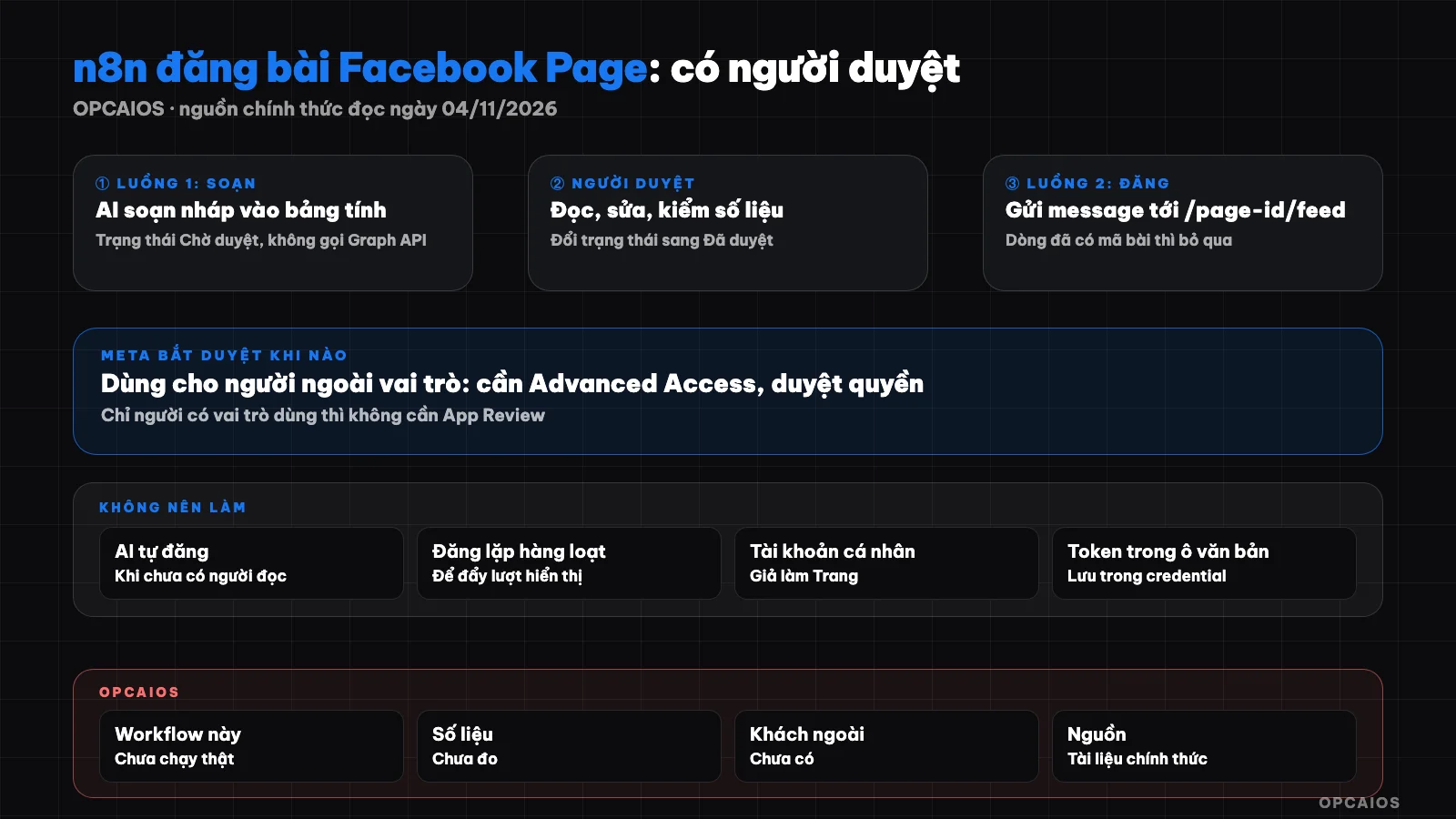
Posting workflow with human review: AI only drafts, n8n only posts rows that have been approved. Diagram: OPCAIOS.
What does posting to Facebook Page with n8n require?
Posting to a Facebook Page with n8n requires four things: a Meta application (Business type) that you create, a Facebook account with a role on that Page, a valid Page access token, and a node that sends a POST request to the /{page-id}/feed address of the Graph API. According to Meta's Pages API documentation, a post is created with the message parameter, and you can add link; images use the /{page-id}/photos address with the url parameter. The application user must have CREATE_CONTENT, MANAGE, and MODERATE tasks on the Page. The permissions listed in the documentation are pages_manage_posts, pages_manage_engagement, pages_read_engagement, and pages_read_user_engagement, plus publish_video if posting video. The pages_manage_posts permission also depends on pages_read_engagement and pages_show_list. In n8n, the Facebook Graph API node lets you choose the default server or video server, the GET, POST, or DELETE method, then enter the node and edge. Input field names may differ between n8n versions, so check your interface against the documentation.
When does Meta require app review?
Meta only requires app review when someone without a role on the application will use that application. According to the App Review page read today, an application used only by people with a role (Administrator, Developer, Tester) does not need review. The access level page says permissions at Standard Access level can only be requested from people with a role, and a Business application itself has Standard Access for permissions that fit the application type. This means if you create your own application and are an admin of your own Page, you can use it in Development mode without going through App Review. Conversely, an application that posts for someone else's Page, like an agency doing it for clients, needs Advanced Access: granted per permission through App Review, and from 02/01/2023 must be linked to a verified business (Business Verification). The limits of this conclusion: the two pages above apply to all permissions in general, not specifically pages_manage_posts; the permissions section only mentions the application file includes a description of purpose and a screenshot. Meta does not state review time on the pages read, so we do not provide a number. Conditions may change, so check your App Dashboard again before you proceed.
Safe workflow: from AI draft to post on Page
The workflow should have two separate flows, so AI never has a shortcut to the publish button. Flow one drafts, flow two posts. The table below is the workflow diagram in text form.
| Step | Who does it | Task | Write to spreadsheet |
|---|---|---|---|
| 1 | You or schedule | Choose topic, paste real data | Topic column, source |
| 2 | AI through n8n | Draft according to brand voice | Draft column, status "Waiting for review" |
| 3 | Reviewer | Read, edit, check data, change status | Status "Approved" |
| 4 | n8n by schedule | Get "Approved" rows that don't have a post ID | No change |
| 5 | n8n through Graph API | Send message to /{page-id}/feed |
Post ID, posting time, "Posted" |
| 6 | n8n | If error: stop, log error, notify you | Error column, status "Error" |
The post ID column at step 5 is the lock against duplicate posting: rows with an ID are skipped by flow two. Flow one absolutely does not have a node that calls Graph API. If you want n8n to hold the post in Meta's hand rather than timing it yourself, the documentation allows setting published to false with scheduled_publish_time; the scheduled time must fall between 10 minutes and 30 days from when the request is sent. For draft content, run content audit before posting at step 3, and see how OPCAIOS drafts in the post creating content with AI.
Page Token: How to Get It and When Does It Expire?
Page access token is the key to posting on behalf of a Page, and it is generated from a user token. According to Meta's documentation, you exchange a short-lived user token for a long-lived one by making a request to oauth/access_token with grant_type=fb_exchange_token; the long-lived token lives for about 60 days. Then you call /{user-id}/accounts using that long-lived token, and the caller must have a role on the Page; Meta then returns a Page token which the documentation says has "no expiration date". Also according to the documentation, the token can still be invalidated under certain conditions, so the workflow should treat token errors as something that will happen. Error code 190 means the token has expired; code 102 or subcodes 458 to 467 mean an invalid session; subcode 492 means the person behind the token no longer has the appropriate role on the Page. How to handle it: catch the error, stop, report to you, do not retry indefinitely. With n8n, the credential documentation provides two authentication methods: OAuth2 (requires adding the Facebook Login for Business product) or app access token. In Development mode only people with login roles can use it; to let others use it you must enter a privacy policy URL and then switch to Live. The n8n page does not list specific permissions, so the permission list is taken from Meta.
Common Errors and How to Handle Them
Most errors come from tokens and permissions, not from n8n. The table below contains only error codes found on Meta's error handling page as read on 04/11/2026.
| Sign | Cause According to Documentation | How to Try |
|---|---|---|
| Code 190 | Token expired | Issue a new token, update credential |
| Code 10 or 200 to 299 | Missing or revoked permission | Check permissions granted, log in again to grant |
| Subcode 492 | Person behind token no longer has a role on the Page | Reassign the role or use a different account |
| Code 80001 | Called Page too many times using Page token | Wait; see header X-Business-Use-Case-Usage |
| Code 506 | Post duplicate content | Edit content and send again |
Regarding rate limits, Meta provides this formula: Page calls in 24 hours equal 4,800 times the number of people who interacted with the Page in the past 24 hours. We have not calculated this for any specific Page and have not measured it.
When You Don't Need n8n?
You don't need n8n if you only want to schedule posts for one or a few Pages. Meta Business Suite already has built-in features to draft, save as draft, and schedule posts for Pages, according to Meta's help center; you only need a role that allows creating posts. No app review needed, no token management. Also don't use n8n if you don't yet have a content review process: automation only replicates existing habits. The post best social media scheduling tools compares available options. n8n is worth using when you need to connect many sources: draft sheets, a separate review step, logs, error alerts to your phone, or posting to multiple channels at once. If you are new to n8n, see what is n8n and install n8n on VPS first.
Things You Should Not Do
- Do not let AI post on its own when you don't yet have readers: one sentence making up numbers posted publicly is hard to take back.
- Do not post duplicate content in bulk to push impressions; see the post hacking Facebook organic reach with AI.
- Do not use a fake personal account as a Page, do not create a fake Page.
- Do not paste Page token into a text field of a workflow; save it in credential and rotate the token if you suspect it's leaked.
OPCAIOS's Experience
We have not run this n8n workflow to post on Facebook; the post is based on official documentation and has not been tested on our systems. What is true: the opcaios.org website has a dashboard orchestrating Facebook content production through stages from idea to posted, and the review step is always a manual action. Posting goes through a third-party scheduling service that the website calls directly, not through n8n, by decision of the system owner. According to notes made when building it (14/10/2026), this part has not been tested with a real service, so we do not confirm it actually posted a real article today. Our blog also only creates drafts awaiting review, it does not auto-publish. We have not measured the impact of automatically posted articles on engagement or customers.
Frequently Asked Questions
Can n8n post to a personal Facebook page?
This article only covers Pages. Meta's Pages API documentation describes posting via /{page-id}/feed using a Page token. We don't provide guidance on posting to a personal page through automation and haven't found an official path for it in the documentation we've read.
Do I need App Review to post to my own Page?
According to the App Review page read on 04/11/2026, an application used only by people with a role on the application doesn't require review. If you create the application, are an admin of the Page, and only use it for that Page, you typically fall into this case. Posting to someone else's Page requires Advanced Access and business verification. Check your App Dashboard again since conditions can change.
Do Page tokens expire?
Meta's documentation says Page tokens derived from long-lived user tokens have "no expiration date," but they can still become invalid under certain conditions, for example if the person behind the token loses their role on the Page. Long-lived user tokens last about 60 days. Your workflow should catch error 190 and invalid session codes, then alert you instead of retrying forever.
Meta Business Suite or n8n, which should I choose?
If you just need to schedule posts for a few Pages, choose Meta Business Suite: it's built in, you don't need to manage an application or tokens. Choose n8n when you need custom approval steps, multiple data sources, logging, or integration with other channels.
Should AI post to Facebook on its own?
We don't recommend it. AI can fabricate data or get the tone wrong, and once a post is public it's hard to take back. Keep AI at the drafting step, keep people at the approval step, keep n8n at the posting step for approved text.
Next Steps
If you want to discuss a posting process with human approval for your Page, schedule a discussion with us.
Source: Pages API documentation (posting), access levels, permissions, App Review, application modes, long-lived tokens, error handling, rate limits, and platform terms from Meta for Developers; Facebook Graph API node and credential pages from n8n; Meta Business Suite help center; read on 04/11/2026. Not verified: App Review timeline, public display of posts in Development mode, exact names of input fields in each n8n version, Business Suite scheduling time limits, and the entire workflow on a live system. The experience is OPCAIOS's.
Translated from Vietnamese with AI. Read the original.
Want to apply this in your business?
Book a free 30-minute call (Vietnam time, in English or Vietnamese).