


n8n connects to Zalo OA by having n8n act as a middleman: Zalo sends a customer's message to an n8n webhook, n8n asks an AI model to draft a reply, then calls Zalo's API to send it back. This is a guide to building a Zalo chatbot using n8n through Zalo Official Account (OA)'s official API, not using a personal Zalo account. The post does not promise a chatbot that answers every question correctly and does not recommend automatic replies before anyone reviews. We have not run this workflow: every step is based on Zalo for Developers and n8n official documentation as read on 04/11/2026, untested on our system. The post includes an 8-step flow table, how to refresh the token, review steps, and common errors.
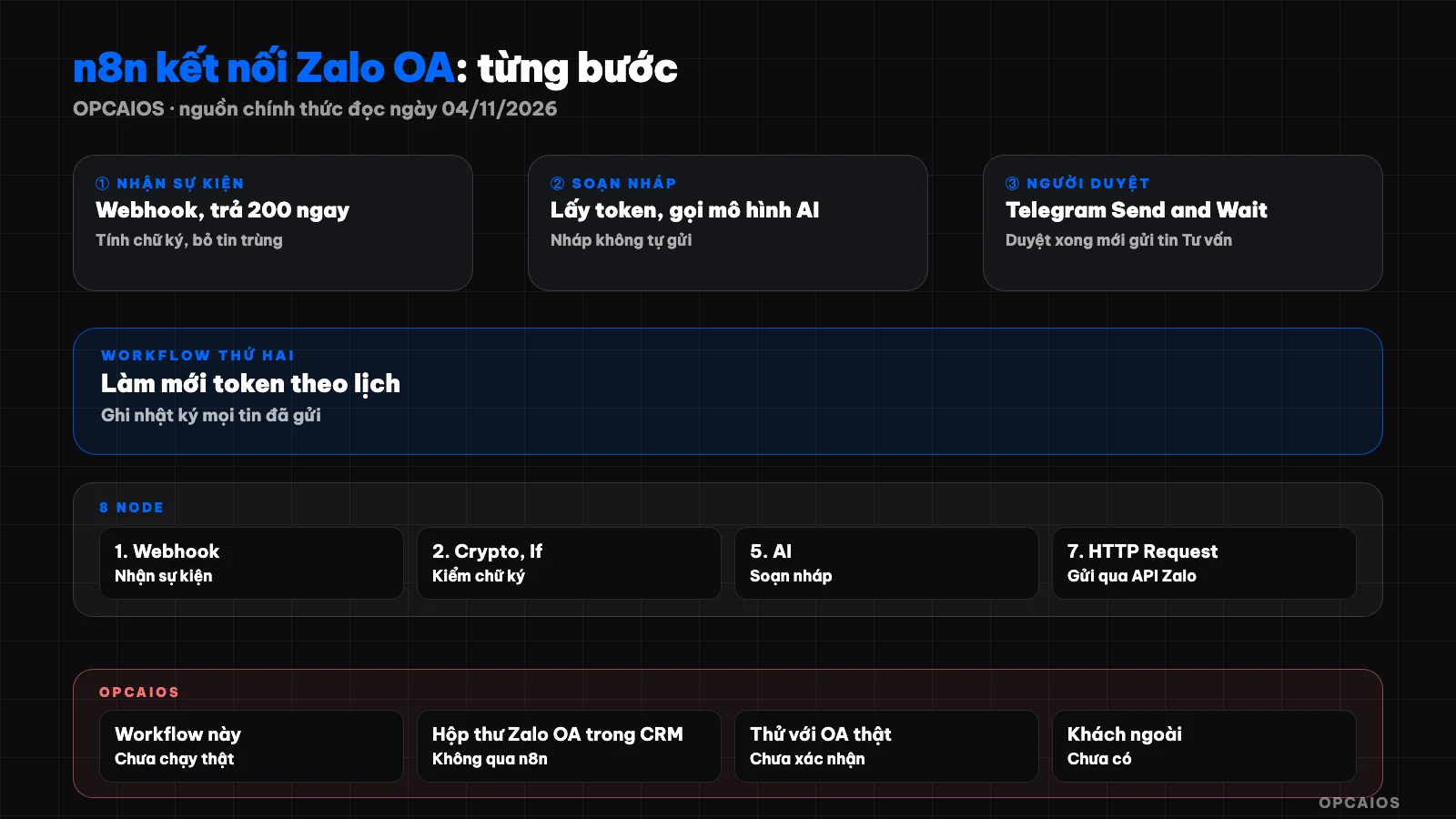
Flow from customer message to reviewed reply. Diagram: OPCAIOS.
What do I need to prepare before connecting n8n to Zalo OA?
You need a business OA, an application on the Zalo platform, an n8n with public HTTPS, and an API key for an AI model. According to the Discover page, Zalo charges no integration fee but you may have to pay for an OA package and some features; the post does not list prices since we have not read the price table. The n8n documentation index we read has no dedicated Zalo node, so Zalo calls use the HTTP Request node. Choose direction in the post Integrate ChatGPT into Zalo, design the OA in the post AI assistant answers Zalo for solo workers, concepts in the post What is Zalo OA, install n8n in the post Install n8n on VPS.
What nodes does the Zalo chatbot workflow in n8n include?
The workflow has two workflows: message handling (table below) and scheduled token refresh.
| Step | n8n Node | Task |
|---|---|---|
| 1 | Webhook (POST) | Receive event from Zalo, return 200 immediately |
| 2 | Crypto and If | Calculate signature, compare with X-ZEvent-Signature header |
| 3 | If, Data Table | Keep user_send_text, discard duplicate messages (msg_id) |
| 4 | Data Table | Get current access token |
| 5 | HTTP Request or AI node | Draft reply |
| 6 | Telegram (Send and Wait) | Reviewer approves or rejects |
| 7 | HTTP Request | Send Advisory message via Zalo API |
| 8 | Data Table | Log entry |
How do I create a Zalo application and get an access token?
Create an application on the Zalo for Developers page using a Zalo account, link it to the OA and grant permission to send messages and notifications through the OA, as described on the Initialize Application page. An access token lets the application call APIs on behalf of the OA and is valid for 25 hours. According to the Authentication and Authorization page, each access token comes with a refresh token valid for 3 months; a refresh token can only be used once, after use Zalo returns a new refresh token and the old access token expires immediately.
The first time, an administrator can use Zalo for Developers' API Explorer tool to get both tokens, then copy them into an n8n Data Table. The full OAuth v4 method (PKCE, authorization code valid for 10 minutes) is only needed when setting up an OA for someone else.
The refresh workflow consists of a Schedule Trigger, an HTTP Request, then saving the new token to a Data Table. We suggest every 12 hours, lower than 25 hours (this number is our choice, not Zalo's). Requirements per documentation: POST as form to oauth.zaloapp.com/v4/oa/access_token, header secret_key is the application's secret key, body contains app_id, grant_type=refresh_token and refresh_token.
Biggest risk: if the save step fails after Zalo has already swapped the refresh token, you lose the chain and must reauthorize; add an Error Trigger workflow to be notified. The Data Table documentation says nothing about encryption, so treat tokens as stored in plain text.
How do I register a webhook to receive messages on Zalo?
A webhook is the URL address that receives Zalo's POST each time a customer messages the OA. In application settings, enter the Webhook URL and enable the events you want; use an HTTPS domain name, not a server IP and port format. If "Syntax Filtering" is enabled, the webhook only receives text messages starting with "#", so turn it off if you want to receive all messages. See also What is a webhook.
Zalo requires you to return status code 200 within 2 seconds maximum; if not, the application administrator receives an error notification. Failed events (connection cannot be opened) are resent after 30 seconds, 5 minutes, 15 minutes, 30 minutes, 1 hour, with num_retry header; if still broken, the webhook is disabled and you must request to receive events again in application settings.
How to configure n8n's Webhook node and verify the signature?
The Webhook node has a Test address (runs when you click Listen for Test Event) and Production (registered when you publish). Paste the Production address into Zalo, set POST, use a hard-to-guess path, and choose Respond as Immediately to return the code right away, meeting the 2-second requirement. If n8n sits behind a reverse proxy, set N8N_WEBHOOK_URL to the public address (older versions use WEBHOOK_URL; the docs note the change from version 2.35.0). Message events have event_name as user_send_text, the sender is at sender.id, the content is at message.text, and the message code is at message.msg_id.
Zalo's X-ZEvent-Signature header equals the sha256 of the app_id, JSON data string, timestamp, and OA secret key concatenated. Turn on Raw Body to get the exact original string (reconstructing JSON may differ by a character), then use the Crypto node (Hash, SHA256) and If node to compare. Zalo's docs don't specify the output encoding; I haven't tried it on n8n, so verify it against real events. If the signature is wrong, stop and don't call AI. After the signature, keep user_send_text and look up msg_id in Data Table: if it exists, stop; if not, record it.
How do I call an AI model to draft a response?
Send the message content along with a rule block to the model via an AI node or HTTP Request to your chosen provider's API, and only allow answers from documents you provide. Sample rule block:
You draft a reply from [business name] to a Zalo customer.
Use only information in DOCUMENTS. If you don't have it, write exactly: TRANSFER TO AGENT.
Don't set prices, refunds, result guarantees, or legal advice on your own.
Maximum 600 characters.
DOCUMENTS: [frequently asked questions and approved policies]
CUSTOMER MESSAGE: [content]
The model can still go wrong. Customer messages go to the model provider, so don't send extra data; see 5 data security rules when using AI.
How does the reviewer approve before sending?
Use the Send and Wait for Response action of the Telegram node, type Approval (how to create a Telegram bot is in the n8n and Telegram post in this series): n8n sends you the customer's message with the draft and pauses until you approve or reject, with an option to set a wait timeout. If rejected, you reply by hand using OA Manager, a message-sending tool in Zalo's docs. We suggest reviewing everything in the first few weeks; questions about price, refunds, complaints are always for the person replying. This is OPCAIOS advice, not measured yet.
How do I reply to customers via the Consultation Message API?
Consultation messages are for responding to customers. Requirements per the docs: the app has sending permission enabled, the customer interacted with the OA within 7 days and hasn't blocked the OA. Within 48 hours of the last interaction, consultation messages are free; after that, they follow Zalo's rate table (not verified yet). Call via HTTP Request:
curl -X POST -H "Content-Type: application/json" \
  -H 'access_token: <current access token>' \
  -d '{"recipient":{"user_id":"<sender.id>"},"message":{"text":"<approved content>"}}' \
  "https://openapi.zalo.me/v3.0/oa/message/cs"
Text is maximum 2,000 characters; trim with a Code node before sending. Don't use consultation messages for bulk ads: Zalo self-limits noisy flows. Finally, log each message: message code, sender, question, draft, decision, send result. Save only data you need and set a delete deadline; the legal part about personal data is for reference only, not legal advice.
Common errors when building a Zalo chatbot with n8n
| Symptom | Likely cause | Fix |
|---|---|---|
| No events | Syntax filter on, missing permission, webhook disabled | Turn filter off, check permission, request reactivation |
| Zalo says webhook down | Response over 2 seconds | Respond as Immediately |
| Customer gets two replies | Zalo resends event, or Test and Production both run | Dedupe by msg_id |
| Send fails after a day | Access token expires after 25 hours | Check workflow to refresh |
| Refresh fails | Refresh token used, expired, or not saved | Reauthorize via API Explorer |
OPCAIOS's experience
We haven't run this n8n workflow; the guide is based on official docs. What's real: OPCAIOS.org's internal CRM has a Zalo OA inbox, written straight in the website, not via n8n, and verifies event signatures by the formula above. In the build notes, this inbox was only tried locally with simulated events; we haven't confirmed it runs with a real OA, have no efficiency data, and no outside customers use it yet.
Frequently Asked Questions
Does n8n have a built-in Zalo node?
As of November 4, 2026, in the n8n documentation I read, there is no dedicated Zalo node. The way to do it is with a Webhook node to receive events and an HTTP Request node to call the Zalo API, like in this post. If there are community nodes, we have not verified them, and we have not read their code. If you use one, consider it third-party software that can access tokens and customer messages.
Can a chatbot automatically reply to Zalo messages without needing human review?
Technically yes: you can skip the review step and connect the draft directly to the API for sending messages. We do not recommend it in the early stage because the model may make up prices or misunderstand the customer's intent. Please review by hand, keep a log, and only let it send automatically for a group of repetitive questions with clear documentation. Questions about price, refunds, complaints, and legal matters should always be answered by a person.
Why does the customer not receive a message even though n8n reports success?
Check three things according to Zalo documentation: has the customer interacted with your OA in the last 7 days, have they blocked the OA, is the access token still valid. Read the API response in the log instead of just looking at the node status; the specific error code table I have not verified here, so check the official Zalo documentation. If all three are fine, try sending with the API Explorer to separate n8n errors from Zalo errors.
What are the costs of running this chatbot?
They include the OA package and messages after 48 hours if any, a server or n8n plan, API fees for the AI model, and the time of the reviewer, which is the easiest cost to forget. I have not verified the numbers for each item and have not measured them. Estimate based on the number of messages customers send each day, then compare it with having one person on duty.
I don't know how to code. Can I do this?
You can do part of it: n8n nodes are drag-and-drop, but you still need to read API responses, handle tokens, and fix webhook errors. If you want to check the need first, list the 10 most common questions customers ask along with your standard answers, then try to write them with a regular AI model. If you don't have a technical person, you should ask them to build a test version on a test OA instead of your selling OA.
Next Steps
If you want to see whether this approach suits your OA, schedule a consultation with us.
Source: Zalo for Developers documentation (Explore, Create Applications, Authentication and Authorization, Webhook, Messages, Advisory Messages) and n8n documentation (Webhook, Crypto, Telegram, Data tables, Webhook URL), read on November 4, 2026. Not verified: pricing of OA packages and messages after 48 hours, API call limits, error code table, maximum number of applications per OA, signature encoding format, Data Table encoding, community nodes. Not tested: workflow on OPCAIOS system; experience is from OPCAIOS.
Translated from Vietnamese with AI. Read the original.
Want to apply this in your business?
Book a free 30-minute call (Vietnam time, in English or Vietnamese).