


Integrating ChatGPT into Zalo means creating an AI model that reads Zalo messages from customers and then composes or sends replies, usually through the model's API rather than through the ChatGPT application on a phone. There are three main approaches: using a Zalo Official Account (OA) with the official API, using a tool running on a personal Zalo account, or using a pre-built chatbot platform. The three approaches differ most in risk, not in the intelligence of the AI. This article does not promise that AI will answer every question correctly, does not promise that any method is completely safe, and we have not measured any business results from this. Content about Zalo is taken from the Zalo for Developers documentation and the Zalo Service Terms of Use read on 04/11/2026.
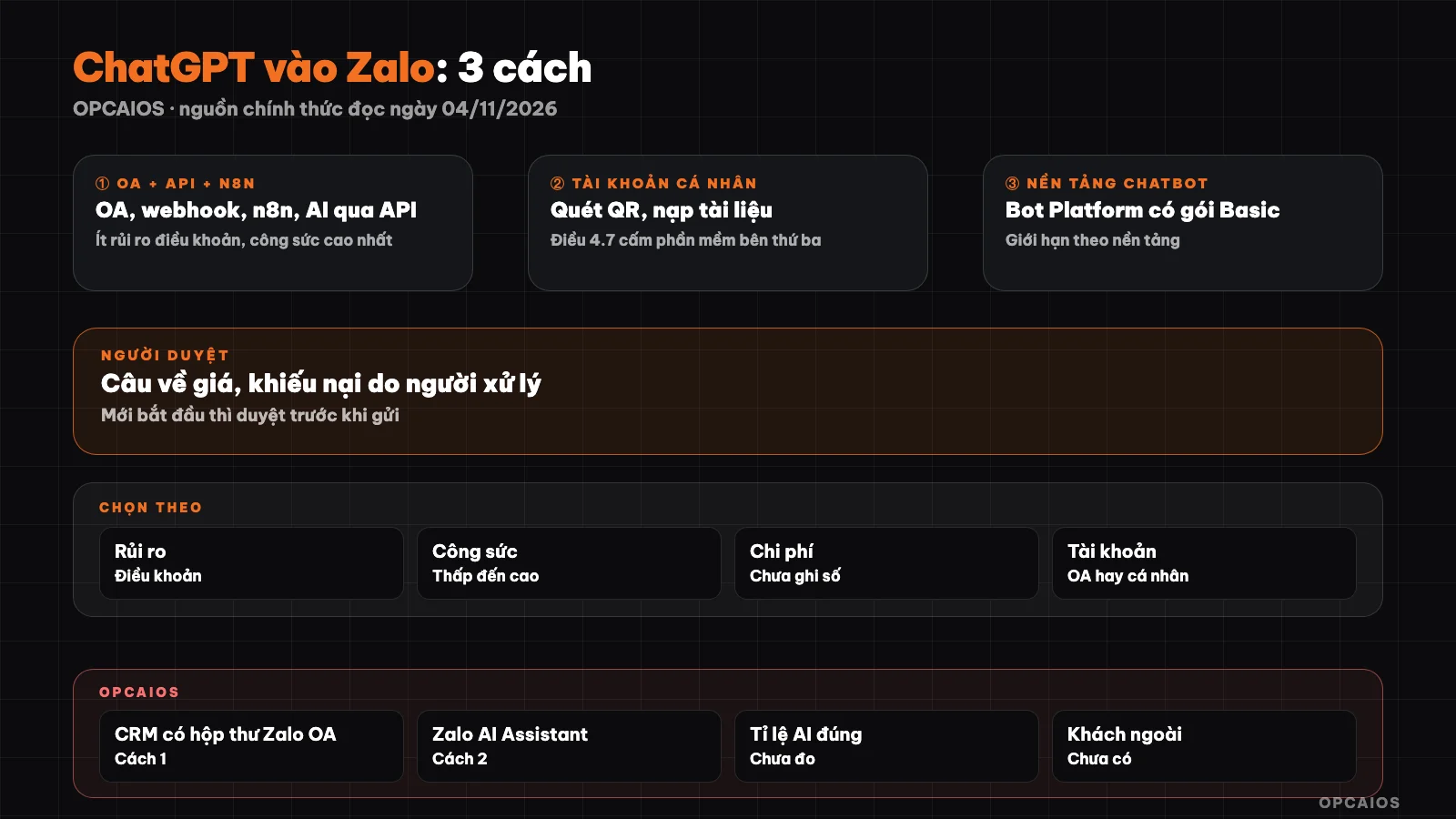
Three ways to connect AI to Zalo and the main differences. Diagram: OPCAIOS.
What does integrating ChatGPT into Zalo actually mean?
Integrating ChatGPT into Zalo actually means building a path for messages: Zalo sends the content of a customer's message to a system of yours, the system calls an AI model with your documents and rules, then returns the reply back to Zalo. The model could be from OpenAI, Gemini, or Claude, chosen by API key. The point often misunderstood is that the ChatGPT paid subscription package is not used to run this: according to OpenAI's help center, API usage is billed separately, apart from the ChatGPT subscription package (we read this from search results, haven't opened the original article directly because the page is blocked). The difficult part lies at both ends: how you are allowed to receive and send Zalo messages, and who reviews the replies, when to hand over to a real person. Therefore this post is divided by connection method to Zalo. This article discusses choosing the method; deep design of the OA mailbox with n8n is in AI assistant answering Zalo for solo workers, and the concept of platforms see What is Zalo OA.
How does Method 1: Zalo OA, official API and n8n work?
Method 1 is using a business Zalo Official Account, registering an application on Zalo for Developers, then receiving messages via webhook and sending replies via API. According to Zalo documentation, Zalo does not charge for integration, but businesses may have to pay for OA packages and some features; this article does not list prices as we haven't read the pricing table. The basic flow includes the following steps:
- Create an OA, create an application on Zalo for Developers, grant permissions to the application and get an access token.
- Declare the webhook URL (documentation recommends using a domain with HTTPS). When a customer sends a text, Zalo sends a POST with the
user_send_textevent, containing the sender's ID and content. - Return HTTP 200 within a maximum of 2 seconds. If slow or error, Zalo sends again after 30 seconds, 5 minutes, 15 minutes, 30 minutes, 1 hour, and may cancel the webhook registration.
- In the downstream branch, the system (for example n8n with Webhook and HTTP Request) calls the AI model to compose a reply.
- Send back using the Advisory text message API, maximum 2,000 characters per message.
Real limits to know: Advisory messages can only be sent when the customer has interacted with the OA within 7 days and has not blocked the OA; within 48 hours from the last interaction, Advisory messages are free, after 48 hours billed according to Zalo's pricing table. Zalo also self-restricts sending flows that cause annoyance. Because of the 2-second limit, confirm the webhook immediately then call AI. The webhook has the signature X-ZEvent-Signature, so verify the signature before trusting the data.
Method 2: Is it safe to use tools running on a personal Zalo account?
Method 2 is software that logs into your personal Zalo account and reads and replies to messages on your behalf; this is not entirely safe and may result in your account being restricted or locked. The reason lies in the terms of service: Zalo's service terms (last updated 28/08/2026) in Section 4.7 prohibit logging in and using the service through third-party compatible software or systems that Zalo has not developed, authorized, or approved. Section 14.2 allows Zalo to restrict features, temporarily lock, or lock an account if there is evidence of violation; a locked account also cannot log into third-party services using that account. The terms do not explicitly mention bots or automated messages, so we cannot assert that all tools violate them, but this is a clear risk area. An example is OPCAIOS's Zalo AI Assistant: a macOS application (Apple Silicon), login via QR code, one-time purchase of 999,000đ, with review before sending. The product page itself notes that the application uses unofficial libraries, Zalo may restrict or lock the account, cannot guarantee absolute safety, and you should try it on a secondary account first.
Method 3: Is a chatbot platform the easiest choice?
Method 3 is using a pre-built chatbot platform to avoid building your own system, and it is the easiest to start with but you accept that platform's conditions. There are two groups. The first group is Zalo Bot Platform, operated by Zalo Platforms Company Limited: this page describes it as a place to create Zalo bots, mentions connecting AI Agents, the free Basic plan with a maximum of 3 bots, each bot maximum 50 users, 3,000 messages per month, group chat still in Beta form, and a Pro plan listed as coming soon (read on 04/11/2026). These numbers can change, please revisit the page before deciding. The second group is multi-channel chatbot providers or third-party Zalo integration partners. We have not read official sources from each provider so we do not name them; ask them whether they connect Zalo via Official Account or personal account, where customer data is stored, and who is responsible if your account is restricted.
Comparison table of three methods by risk, effort, and reviewer
| Criteria | Method 1: OA + API + n8n | Method 2: tool on personal Zalo | Method 3: chatbot platform |
|---|---|---|---|
| Main risk | Lower terms risk; still has content errors and slow webhooks | Section 4.7; account may be restricted or locked | Depends on platform conditions and limits |
| Effort to build | Highest: OA, application, token, webhook, n8n workflow | Low: install application, scan QR, upload documents | Low to medium |
| Cost | OA plan, fees after 48 hours, API fees, n8n server (not specified) | Tool fee one-time or monthly plus model API fees | By platform pricing, limited free plans available |
| Suitable account | Business OA | Personal or group Zalo | Depends on platform |
| Need a reviewer? | Review price questions, complaints; self-reply repeated questions with documents | Should enable review before sending, at least in early stages | Depends on platform support |
Which method should you choose based on your situation?
Weight risk above effort. Three questions are enough to decide:
- Which account do customers message? If your business already has an OA or needs long-term customer care, Method 1 is the most sustainable path even though it takes effort to build.
- Can you afford to lose your Zalo account in use? If it's your main number holding all your customers, don't run Method 2 on it; if you try, use a secondary account and enable review before sending.
- Do you know how to build webhooks? If not and you only want to try, Method 3 with a free plan helps you check your needs before investing.
With any method, keep three rules: AI only answers from documents you provide; questions about price, refunds, legal matters go to a real person; tell customers they are talking to an AI assistant. Customer data is personal data, see 5 rules for data security when using AI; this is not legal advice.
OPCAIOS's experience
OPCAIOS has an internal CRM with a Zalo OA inbox, and n8n self-hosted to create workflows like the above; this connection method belongs to Method 1. We do not have figures on AI answer accuracy rate, so we publish no numbers. Zalo AI Assistant belongs to Method 2; we do not yet have external customers who have verified it. Our principle: start with manual review, only relax gradually as you have read enough real answers. On shared inbox, see caring for Zalo OA and Messenger customers with AI.
Frequently Asked Questions
Can I integrate ChatGPT Plus into Zalo directly?
Not directly. ChatGPT Plus is a subscription product for end users, while integrating into Zalo requires calling the model's API, which is charged separately according to OpenAI's help center (read through search results). Choose a workflow that allows you to switch models and check API fees on the official pricing page at the time you use it. See more at What is LLM.
Does Zalo OA allow AI to reply to customers automatically?
Zalo's documentation describes OA as connectable to external systems like CRM, chatbot, and sending Advisory messages via API when customers interact within 7 days. We did not find in the pages we read a specific clause about content composed by AI. Follow OA's interaction policy and check the latest documentation before deploying.
Can I get my account locked if I use tools on a personal Zalo account?
We don't know the probability and have no data. What we read: Section 4.7 prohibits using the service through third-party compatible software that Zalo does not approve, and Section 14.2 allows restricting or locking an account in case of violation. The risk is real. If you try, use a secondary account and enable review before sending.
Should AI send every reply automatically?
Not at this early stage. Models can make up facts or misunderstand customers. Start by reviewing before sending, record replies that need fixing, then only enable auto-sending for repeated questions with clear documentation. Questions about price, refunds, complaints, and legal matters should always go to a real person.
I don't know how to code, where should I start?
Start by writing down the 10 most frequently asked customer questions along with your standard answers, because that's documentation that every approach needs. Then try Method 3 with the free package to check real demand; when the need is clear and you feel you need more control, then consider OA and n8n, see What is n8n. If you know someone technical, ask them to build a test OA workflow on a test OA.
Next Steps
If you want to try Method 2 on a secondary Zalo account with review before sending, check the Zalo AI Assistant page and carefully read the risk warning section before purchasing.
Source: Zalo for Developers documentation (Official Account: Discover, Message Overview, Advisory Message Sending Conditions, Send Advisory Text Messages, Webhooks and User Message Events); Zalo Service Terms of Use at zalo.vn/dieukhoan; Zalo Bot Platform page; Zalo AI Assistant product page on opcaios.org; OpenAI help center on ChatGPT and API fee separation (all read on 04/11/2026, OpenAI read via search results); not verified: OA package pricing and messages after 48 hours, specific policy on AI-composed content, terms of chatbot providers. Experience is from OPCAIOS.
Translated from Vietnamese with AI. Read the original.
Want to apply this in your business?
Book a free 30-minute call (Vietnam time, in English or Vietnamese).