



What is a prompt?
A prompt is the text (and sometimes images or files) you give to an AI model so it knows what to do, how to do it, and with what data. According to Anthropic's prompt engineering documentation (read on 25/10/2026), before refining your prompt you need clear success criteria, a way to test against those criteria, and a first draft prompt. This article explains what a prompt is, the structure of a good prompt, techniques you should use, common mistakes, when you shouldn't try to fix a prompt, and OPCAIOS's experience.
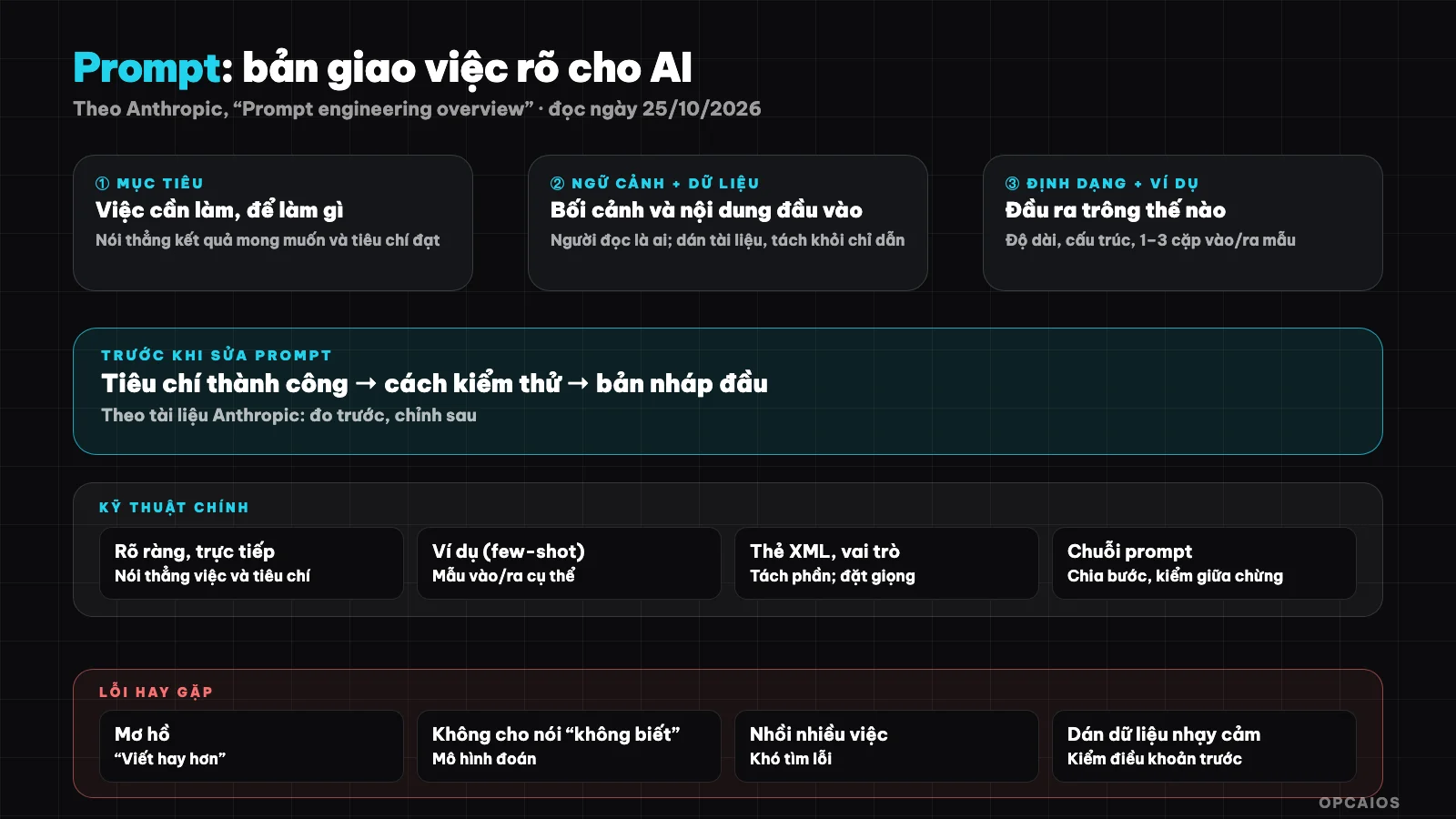
A good prompt is a work order: objective, context, constraints, format and how to check it. Diagram: OPCAIOS.
What is a prompt and why does it matter?
A prompt is all the text input you send to a large language model, including instructions, context, data and examples. The model doesn't know your intention, only what's in the prompt, so output quality depends strongly on how clear your input is.
Think of a prompt like a task assignment to a smart but new colleague who doesn't know anything about your company. Without context, the result is generic; without criteria, nobody knows when it's "done". If you need background, read What is an LLM first.
What does a good prompt consist of?
An effective prompt usually has six parts: objective, context, input data, constraints, output format and examples. Not every prompt needs all of them, but important or repeated work should be written in full and saved as a template.
| Part | What question it answers | Short example |
|---|---|---|
| Objective | What needs to be done, what for | "Summarize a complaint email so the manager can decide on a refund" |
| Context | Who will read this, what's the setting | "Digital course shop, customers in Vietnam" |
| Data | Content to process | Paste email, table, paragraph |
| Constraints | What not to do, limits | "Don't make up order numbers; if information is missing, ask again" |
| Format | What the output looks like | "3 bullet points + 1 recommendation sentence, under 80 words" |
| Examples | Sample output you want | 1–3 input → output examples |
Separating data from instructions (for example, wrapping data in clear tags) helps the model not confuse the content to process with the command.
Techniques you should know for writing prompts
Anthropic's documentation lists the main techniques: write clearly, give examples, structure with XML tags, assign a role, let the model think step by step, and chain multiple prompts together. More important than any individual tip is discipline: measure results before and after you make changes.
- Clear and direct: say straight what needs doing, what counts as done, length, tone. Avoid "write better" without saying what better is.
- Examples (few-shot): 1–3 sample input/output pairs usually improve format and voice more than many lines of description.
- Structure with tags: wrap
<document>,<request>to separate sections. Just a convention, not forced syntax. - Role: "You are an editor..." sometimes helps tone, but doesn't replace real context.
- Step-by-step thinking: for work that needs reasoning, ask to list steps before concluding; many newer models have their own reasoning mode.
- Prompt chains: break big work into small steps, each checkable. This is also the foundation of AI Agents and workflows.
Optimization guidance for each model changes by version; Anthropic treats the "Prompting best practices" page as living documentation to check.
Common prompt writing mistakes
The most common mistakes are vague requests, missing background data, and no way to check results. The model will fill gaps with guesses, and plausible-sounding guesses are where AI hallucinations come from.
- Vague: "Write something about AI" versus "Write an 800-word article for a small shop owner, 3 automation examples, no jargon".
- No permission to say "I don't know": if you don't allow it, the model tends to guess. Write clearly "if not in the document, answer that there's no information".
- Too much in one prompt: split steps so you can find errors easily.
- Pasting sensitive data: don't put passwords, API keys, customer data into a service you haven't checked the terms for. See data security when using AI.
- Trusting results without checking: see audit AI content before posting.
When to revise a prompt, when to try a different approach
Revising a prompt works well when the error sits in how I'm asking: wrong format, wrong tone, missing steps. If the error comes from lacking data, a model that's too weak, or too expensive, Anthropic notes that switching models or adding lookup often improves things faster than rewriting the prompt.
| Symptom | Direction |
|---|---|
| Wrong format, verbose | Revise prompt: format + examples |
| Making up information about private documents | Add lookup (RAG), allow "don't know" |
| Slow or expensive | Try a smaller model (choosing AI model) |
| Many steps, easy to break the chain | Split sequence, add checks in between |
| Repeats daily | Save as template or Skill |
OPCAIOS experience
We save prompts we use repeatedly as templates with checking criteria attached (for example, a checklist for blog posts: definition in the opening paragraph, every number has a source, no made-up customers). Templates that matter get wrapped into a Skill so the agent runs the right process.
What we learned: write the checking criteria first, then write the prompt, so I know when to stop tweaking. The catch: we haven't run controlled comparisons between prompt styles, so this post doesn't give you "increases by X percent." Every suggestion here is practice, not measured results.
Common questions
Is prompt engineering still needed when models keep getting smarter?
Still needed, but leaning more toward describing context and criteria than tricks. A stronger model depends less on exact wording, still can't guess what you haven't said.
Is a longer prompt better than a short one?
Not necessarily. Long because it has enough context and examples: good. Long because of repeated ideas and contradictions: bad. Measure by results on your test set.
Should I use "prompt templates" downloaded from the web?
Use them as a starting point, but test on your own data. A prompt written for a different task and model usually doesn't fit right away.
How do system prompt and user prompt differ?
System prompt sets stable rules for the whole session (role, limits); user prompt is each turn's request. How you split them depends on the platform you use.
How do I learn to write prompts fast for my work?
Pick one repeating task, write what's right and wrong, try 5–10 real examples and revise gradually. If you need hands-on training for your team, see AI application training service.
Source: Anthropic, "Prompt engineering overview" (platform.claude.com), read 25/10/2026; haven't read the full "Prompting best practices" page so the technique list comes from the introduction. Tables and examples are OPCAIOS practice, not measurement. The experience is OPCAIOS's.
Translated from Vietnamese with AI. Read the original.
Want to apply this in your business?
Book a free 30-minute call (Vietnam time, in English or Vietnamese).