


Collecting payments with QR transfer codes using Next.js, Postgres and SePay webhooks
Collecting payment via QR transfer code means the customer scans a VietQR code that already contains the amount and transfer description, transfers from their banking app into your account, and an intermediary service like SePay reads the balance change then calls a webhook (an automatic HTTP request) to your website to confirm the order and deliver the product. That's how OPCAIOS built the payment section using Next.js for the document store, courses and membership packages, intended for customers using banks in Vietnam. The honesty part: this post is not tax or legal advice, OPCAIOS does not disclose revenue, and according to OPCAIOS's latest notes, the SePay webhook channel has never recorded an actual customer transaction at the check times (end of September and early October 2026). There have been no re-checks since October 2026 so the post makes no further claims. SePay's fees and packages also have not been read from the official page so the post does not state numbers. The website runs on Next.js and data lives in Postgres. Read also what is a webhook if you are not yet familiar with the concept.
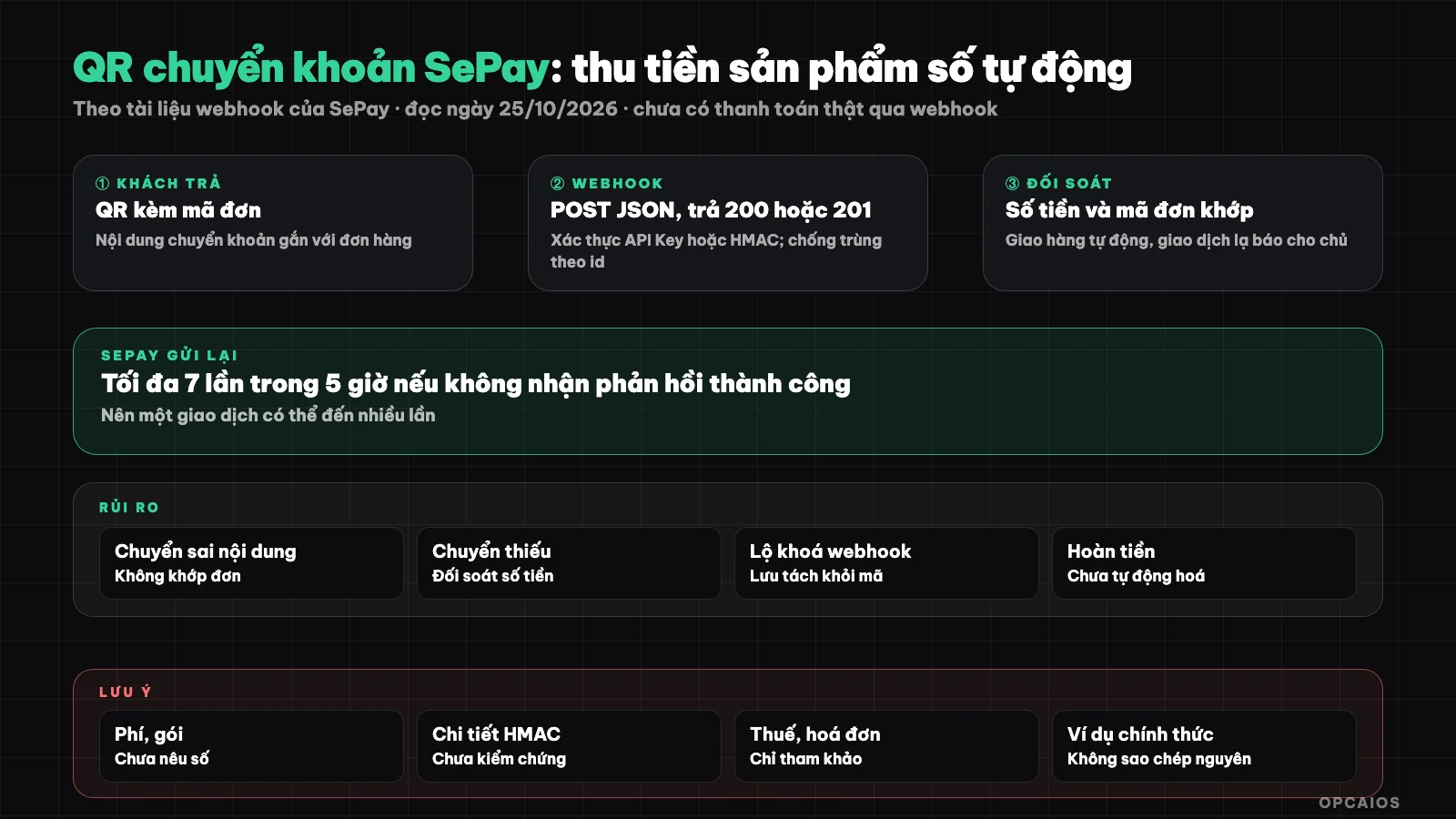
Payment flow with QR transfer code and webhook. Diagram: OPCAIOS.
What are the steps in the QR transfer payment flow?
The QR transfer payment flow has 6 steps, from when the customer selects a product until the website delivers it. Example scenario: a customer buys a document priced at 199.000 đồng on your Next.js store in Vietnam.
- Customer selects a digital product. Website creates an order with a unique order code and fixed amount.
- Payment page displays a QR code containing the receiving account, amount and transfer description with the order code.
- Customer scans the QR with their banking app and transfers money.
- SePay detects the incoming transaction and sends a webhook to the address you configured.
- Website checks the webhook is genuine, has not been processed before, finds the order code in the description, compares the amount, then marks it as paid and delivers the product (shows download content, sends email, grants permission).
- Website returns a success response so SePay stops resending. According to SePay (documentation read on 25/10/2026), webhooks are resent up to 7 times and stop after 5 hours.
The deciding point is step 5, because at step 5 the real money is reconciled against the order before the product is delivered to the customer in Vietnam.
What is VietQR and how do you create a transfer QR code?
VietQR is the standard for inter-bank transfer QR codes in Vietnam, and SePay provides a service to create QR images according to the VietQR standard. According to SePay's developer documentation (read on 25/10/2026), the service takes a few parameters: account number, bank, amount (optional, integer VND) and transfer description (optional, needs URL encoding). Leave the amount blank and the customer enters it themselves. First, you pass the account number and bank (step 1). Next, you add the amount and description (step 2). Finally, you embed the QR image in the payment page. OPCAIOS uses exactly the method described: QR with amount and description containing the order code, so the customer hardly has to type. Example scenario: a document order priced at 199.000 đồng will have a QR carrying 199000 already and the description is the customer's order code, so the customer just needs to scan and confirm. The documentation also mentions test mode has separate limits on amount and description length. OPCAIOS does not use test mode so has not verified further. The list of supported banks and specific error cases have not been verified, please read SePay's documentation directly before building.
What is an Order Code and Why Is It the Key to Reconciliation?
An order code is a unique string of characters attached to each order, and the transfer content must contain the order code for the website to recognize the transaction. The way OPCAIOS does it at the conceptual level: each product type (course, shop, membership, payment link for B2B customers) has its own prefix for the order code, so a single webhook address can classify which workflow the transaction belongs to. For example: an order code starting with the shop prefix will be routed to the document delivery workflow. The content processing procedure consists of 3 steps:
- Normalize uppercase letters, remove strange characters and spaces, because banks and applications sometimes cut or change the content.
- Find the order code by prefix in the normalized content.
- Match the found code with the order in the database.
The order code should be easy to read, exclude characters that are easily confused like the letter O with the number 0, and random enough to not be guessable. According to SePay (documentation read on 25/10/2026), the transfer content is sent to the website in the content field of the webhook, so an order for 199,000 đồng with its own code will match immediately when the customer transfers the full amount.
How Does SePay's Webhook Work According to Official Documentation?
SePay's webhook is a POST request containing JSON, sent to the address you set each time there is a transaction. OPCAIOS read SePay's documentation on 25/10/2026 (the webhook integration pages) and verified 5 main points. First, the website must return HTTP code 200 or 201 with a JSON body containing success: true, within 30 seconds. Next, if no correct response is received, SePay resends up to 7 times according to an increasing schedule and stops after 5 hours from the first error. Third, a transaction can arrive multiple times, so the website must check by id and use a unique constraint. Fourth, there are four authentication options: HMAC-SHA256, API Key, OAuth 2.0 or no authentication. Finally, you can restrict by SePay's IP address, because the documentation page lists the IP addresses. The main fields of the webhook include transaction id, bank, time, account number, payment code, content, transaction type (money in or out), amount and reference code. With API Key, SePay sends the key in the Authorization header as Authorization: Apikey <key>, and OPCAIOS's website written in Next.js reads the Authorization header. OPCAIOS has not read in detail how to sign HMAC (header name, format) so I don't describe it; OPCAIOS uses API Key and the source code only supports the API Key method. If you choose HMAC, please read the official page correctly. A sample page in the documentation still accepts requests without authentication to illustrate, but the documentation page recommends restricting by IP or choosing an authentication type: don't copy the example as-is into production.
Four Layers of Website Verification
This is the part that deserves the most careful attention, because real money passes through here.
1. Webhook Key Verification
Webhook key verification is the first layer of protection, because the webhook address is a public address that anyone can try to call. The key is stored as a secret separate from the source code, in an environment variable on the server. According to SePay (documentation read on 25/10/2026), the API Key is sent in the header of each webhook. When a webhook arrives, the website compares the key in the Authorization header with the stored key using a constant-time comparison operation. A missing or incorrect key results in rejection with code 401. If the server has not configured a key, it rejects all requests, rather than accepting them all. For example, a forged request sent to the webhook address without an Apikey header will receive code 401 and will not create any paid order in Postgres. Additionally, you can add an extra layer of restriction based on the IP address that SePay publishes, since IP restriction is a second layer independent of the key. The webhook key should not be pasted into chats, screenshots, or Git repositories, and should be changed immediately if suspected of being exposed.
2. Deduplication
Deduplication means the same SePay transaction is processed exactly once, even if the webhook arrives multiple times. Each SePay transaction has its own id. OPCAIOS records the event by id, and if it has already seen it, returns "duplicate" without reprocessing. The event is recorded before marking as processed, using an insert operation with a unique constraint in Postgres through Next.js, so two simultaneous sends cannot both go through. If the delivery step fails, the record is deleted so SePay's retry can reprocess it, and the website returns code 500 so SePay will try again. According to SePay, the retry schedule lasts a maximum of 7 times over 5 hours, so deleting the record prevents the order from getting stuck. Hypothetical example: in an order in Vietnam, the webhook arrives 2 times within the same second due to slow network, the second time hits the unique constraint and is skipped, so the customer does not receive goods twice.
3. Order and Amount Reconciliation
Reconciliation is the step of comparing the actual money received with the order amount before delivery. After finding the order code, the website checks 4 things in order (steps 1 to 4): whether the order exists, whether the order is already paid or cancelled, whether it is money in or money out (money out is ignored), and whether the amount received is equal to or greater than the amount due. If the amount is lower, no delivery occurs and the result is recorded as "insufficient funds". Hypothetical example: an order for 199,000 đồng but the customer transfers 150,000 đồng, the website records "insufficient funds", does not deliver, and notifies the website owner. OPCAIOS chose to accept an equal or greater amount, this is a design choice of our own, not a SePay recommendation. All unmatched transactions, including no code, no order, or insufficient funds, are still recorded in Postgres and reported to the website owner for manual handling. First, the website owner reads the notification. Next, contact the customer via email. Finally, transfer compensation or refund manually.
4. Response and Delivery
When everything is fine, the website marks the order as paid and runs the delivery steps, then returns success: true with the result. On the customer side, the payment page polls the order status periodically to switch to the success screen when the webhook has been processed. For digital products, delivery content is kept private on the server and only shown to authenticated buyers, not embedded in public page code.
Risks and Mitigations
| Risk | Consequence | Mitigation |
|---|---|---|
| Customer transfers wrong content | Cannot match the order | Show pre-filled QR code content, have manual processing screen for owner, report unusual transactions |
| Customer transfers insufficient amount | Order not delivered | Do not auto-deliver, notify and guide customer to transfer additional amount or request refund |
| Customer transfers excess amount | Money discrepancy | Clear policy: handle manually, refund excess if needed |
| Refund | Money already collected | Refund is a separate outgoing transaction: requires manual process and notes in the order |
| Webhook key exposed | Attacker forges payment | Key stored outside code, not pasted into chats or screenshots, change key when suspected, combine with IP restriction |
| Duplicate transaction | Deliver twice | Use transaction id as unique constraint |
| Webhook does not arrive | Customer pays but no delivery | Have manual reconciliation tool, monitor webhook logs |
| Lose money due to fake account | Fraud | Only post QR code on your page, verify correct receiving account |
Refunds are the part we have not automated: it is manual work and is recorded.
Taxes and Invoices (Reference Only)
Receiving money through bank transfers does not change your tax obligations or invoicing requirements. Regulations on business households, taxes, and electronic invoices change and depend on your business form, so this is only a suggestion for you to ask an accountant or tax authority, not advice. See the legal checklist for business registration for solopreneurs for a starting point.
Checklist for Solo Workers
- Each order has its own code, fixed amount, and transfer note containing the code.
- Webhook has authentication, secret key stored separately, rejects when key is missing.
- Prevent duplicates by transaction id before delivery.
- Compare the amount with the order; send you a notification for unknown transactions.
- Test with a small amount from your own account (SePay also has a test button) before opening sales.
- Have a manual refund process and clearly note the policy for customers.
OPCAIOS Experience
We use one webhook address for courses, shop, membership packages, and customer payment links, categorized by order code prefix. We use API Key authentication and have verification layers on top. What needs to be clear: our notes record that there has been no actual customer payment through this channel at the time of checking, only local testing with fake keys and one test link for the website owner. So don't treat this as "proven at scale". We also haven't automated refunds yet. See more on data security when using AI and packaging and selling AI prompts, n8n templates.
Frequently Asked Questions
Can a bank transfer QR code automatically confirm payment?
A QR code only helps the customer transfer the correct amount and note. Automatic confirmation requires a service that reads account balance changes like SePay and a webhook to your website, or you reconcile manually.
What if the webhook is sent multiple times?
According to SePay documentation, one transaction can arrive multiple times. Save the transaction id with a unique constraint and skip when you've already seen it.
What if a customer transfers less or the wrong note?
Don't auto-deliver. Log the unknown transaction, notify you, then contact the customer to transfer the difference or refund manually.
How do I know the webhook is real?
Use an authentication method that SePay supports (API Key, HMAC-SHA256, or OAuth 2.0), keep the key secret, and you can limit by SePay's published IP. Read the official page to know the exact format.
What else should I learn to build a digital shop myself?
Learn how to design order flow and safety check before opening sales. You can see OPCAIOS's AI application training course.
Source: SePay developer documentation on webhook integration and QR code creation (docs.sepay.vn, developer.sepay.vn, read 25/10/2026), OPCAIOS internal notes and source code; not verified: SePay fees and plans, HMAC signing details, bank list, tax/invoice rules, and whether real transactions occurred after the check time; Experience is OPCAIOS's.
Translated from Vietnamese with AI. Read the original.
Want to apply this in your business?
Book a free 30-minute call (Vietnam time, in English or Vietnamese).