


AI Assistant Replying on Zalo is a process that automatically receives messages from customers, uses a language model to draft replies based on your knowledge documents, then sends them back through Zalo, ideally after someone reviews them. This post describes a design based on the official documentation of Zalo Official Account (OA) and n8n, read on 04/11/2026. Something to say upfront: this is a reference design, we have not confirmed that any OPCAIOS n8n workflow connecting to Zalo is currently running with real customers, and we have not measured its effectiveness. The post also distinguishes Zalo OA from the official API and automation of personal Zalo accounts. A reviewer before sending is the default.
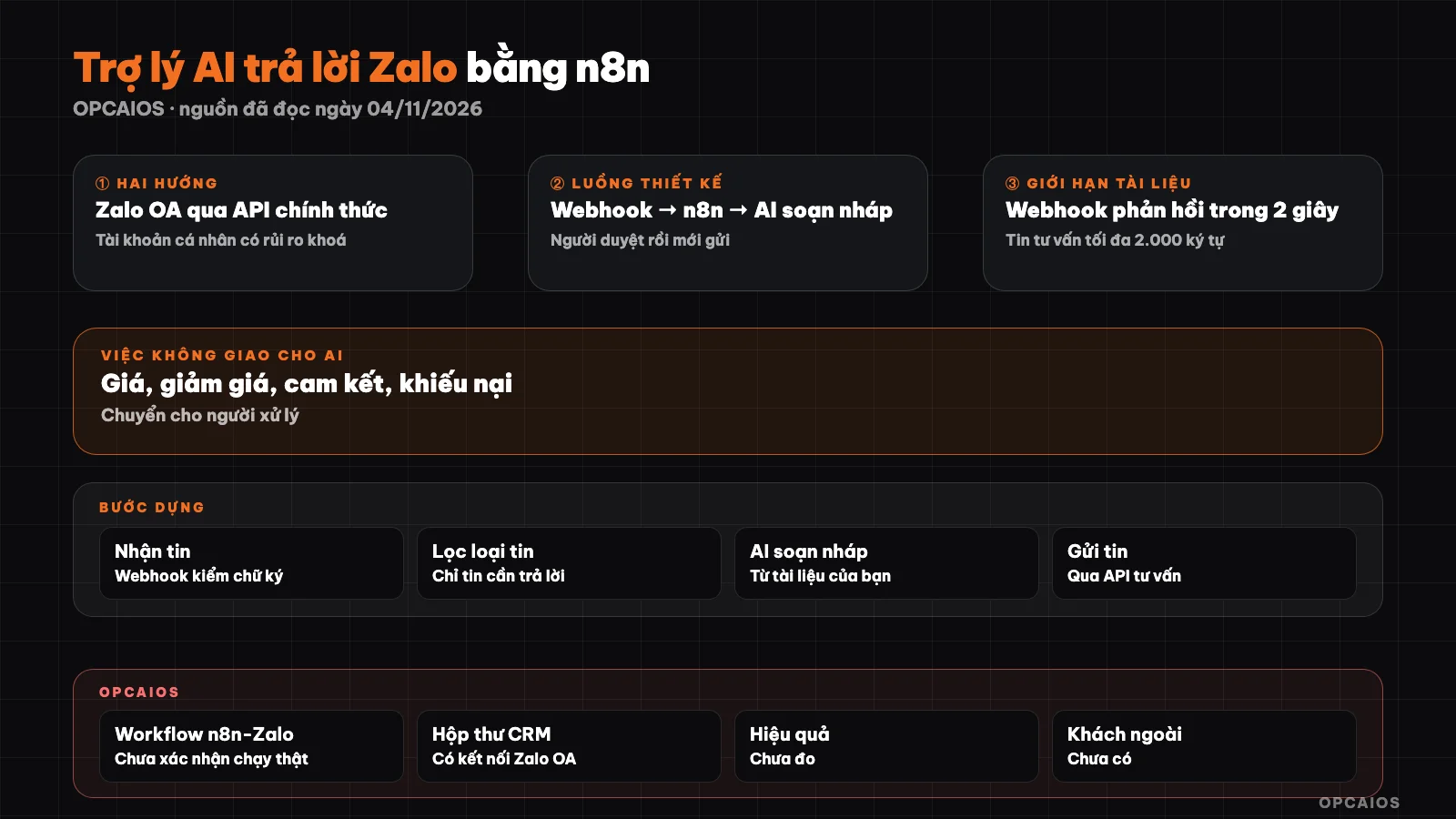
Flow design: Zalo OA, n8n, AI draft, reviewer, send. Diagram: OPCAIOS.
Problem: replying to Zalo customers when working alone
The problem is customers message at any time, but you are just one person doing work and replying. Most messages repeat: business hours, how to book, service package content, order status. AI assistant drafts for these so you just read and click approve, not replacing you on decisions that need judgment. We have not measured how much time it saves. If you are not familiar with the OA concept, read first What is Zalo OA; about shared inbox across channels, see caring for Zalo OA and Messenger customers with AI.
Two different directions: Zalo OA and personal Zalo account
Zalo OA is the official account of a business, with an API set provided by Zalo. A personal account is the one you use every day. Zalo for Developers documentation has chatbot auto-reply guidance that only supports integration with OA accounts. Tools for replying on personal Zalo usually log in with QR code and use unofficial libraries.
On terms, we read Zalo Service Terms of Use at zalo.vn on 04/11/2026. Section 4.7 is in the list of strictly prohibited behaviors and talks about logging in, using the service with third-party software or systems not developed, authorized or approved by Zalo. Section 14.2 lists enforcement measures, including restricting features, temporarily blocking or permanently blocking the account. Whether a specific application falls under section 4.7, we do not assert, because we are not lawyers and have not asked Zalo. With the personal direction, consider it a real risk to your account.
Architecture: Zalo OA, n8n, AI, reviewer
The architecture consists of seven blocks in sequence; this is a reference design, not confirmed running with real customers.
- Customer sends message to OA. Zalo sends a POST request to your application's webhook.
- n8n webhook receives, verifies signature, returns 200 right away.
- Filter: only text messages go to AI; images, files, voice, location go straight to the person.
- Knowledge retrieval: pricing table, frequently asked questions, chat history.
- Language model drafts, with a "needs person" flag when unsure.
- Reviewer: edits, approves or discards the draft.
- Send advisory message via API, log entry.
Zalo documentation lists message event types including text, image, link, audio, video, sticker, location, contact and file; only user_send_text is text for AI to read directly, so the filter at step 3 is mandatory.
Build step by step
Reference order; we have not yet verified each step on a real customer OA.
Step 1: OA, application and permissions. Create an OA, create a Zalo App, then have the OA admin grant permissions to the application. The permission groups needed include sending messages and notifications via OA, managing user messages, and receiving message management events. We have not yet verified the requirements for OA type or service plan to use our API.
Step 2: token. Zalo uses OAuth v4 with PKCE. Access token is valid for 25 hours, refresh token for 3 months and can only be used once; when a new token is issued, the old token becomes invalid immediately. Consequence for n8n: one separate workflow to refresh the token on schedule, store the token securely, don't let two workflows refresh it at the same time. How to install n8n, see install n8n on VPS.
Step 3: webhook. The documentation requires a webhook to return HTTP 200 within a maximum of 2 seconds, use HTTPS domain name instead of host with port. If not met, Zalo resends the event after 30 seconds, 5 minutes, 15 minutes, 30 minutes, 1 hour; if errors continue, the webhook is disabled and you must request permission again to receive events. Since AI takes a few seconds, set the n8n Webhook node to respond immediately (the "Immediately" option in the n8n documentation) then process further. Check the signature: the X-ZEvent-Signature header is sha256 of app id, JSON content, timestamp and the OA's secret key; the Webhook node has a Raw Body option, but we have not yet tested whether it gives the correct original string to calculate the signature. See more at what is a webhook.
Step 4: draft. Provide the message template and related knowledge segments, not the entire document store. Request short answers, don't promise prices or offers beyond the data, and flag "needs person" when lacking evidence.
Step 5: review and send. Push the draft to where you review fastest (a Telegram message with a button, or a node that waits for approval). When approved, call the consulting message API: POST, access_token header, body includes recipient.user_id and message.text (maximum 2,000 characters).
curl -X POST -H "Content-Type: application/json" -H 'access_token: <token>' \
  -d '{"recipient":{"user_id":"<user_id>"},"message":{"text":"..."}}' \
  "https://openapi.zalo.me/v3.0/oa/message/cs"
Work not to delegate to AI
Don't delegate to AI work where one mistake loses a customer or creates legal trouble, including: quotes, discounts, timeline commitments; complaints, refunds, disputes; medical, legal, financial advice; receiving or handling payment information and identity documents; any non-text messages; and any messages where the customer is upset. Pass these to a person, don't draft.
On data, messages from the customer are personal data. The Law on Personal Data Protection 91/2025/QH15 (effective 01/01/2026) requires processing data by AI for the correct purpose, within the necessary scope (Article 30), and treats using a platform outside the territory to process data collected in Vietnam as cross-border data transfer (Article 20). We read the law through a summary page, have not read the guiding decree, so have not concluded on your obligations; consult a lawyer. You should clearly tell the customer that there is an AI assistant and a person reviewing.
Errors and how to handle them
The risks below are inferred from the documentation, not errors we have encountered.
| Risk | Cause per documentation | How to reduce |
|---|---|---|
| Webhook disabled | Does not return 200 within 2 seconds | Respond immediately, process later |
| Lost API call permission | Token expires after 25 hours; refresh token used once | One workflow refreshes token, has alert |
| API refuses | Over 4,000 requests per minute per application (code -32) | Spread out calls |
| Send error or charge | Outside frame: customer interacts within 7 days, free within 48 hours | Review fast, check frame |
| Duplicate reply | Event sent again | Deduplication by msg_id |
| AI answers wrong | Missing or outdated knowledge | Flag "needs person", review knowledge |
Deduplication by msg_id is our proposal, not a requirement in the documentation.
Real costs (read 04/11/2026)
Costs include three items; we have not measured cost per message yet. One, Zalo: consulting messages within 48 hours from the customer's last interaction are free, after that calculated by price table which we have not read so do not state the amount; OA plan and authentication fee not yet verified. Two, n8n: self-install then pay for server, use cloud version then by n8n price table (not yet read). Three, language model: charged by text volume processed, price depends on provider (not yet read).
OPCAIOS Experience
We have not confirmed that any n8n workflow connecting Zalo at OPCAIOS is actually running with customers. What is real: OPCAIOS's internal CRM inbox has a Zalo OA connection part following the documentation steps above, including receiving webhooks with signature verification, saving messages, notifying when new messages arrive, linking messages to customer profiles when customers leave phone numbers or emails, and replying from the inbox via the advisory message API. There is an "AI draft" button that creates a draft, the person on duty clicks send; the draft prompt warns against promising prices or discounts outside of data, and when sending fails, the inbox reminds that the customer's last message was over 48 hours ago. We have not measured response time or draft accuracy, and have not confirmed that the inbox actually receives messages from customers.
On the product side, Zalo AI Assistant is a macOS application going in the direction of personal accounts: log in to Zalo with a QR code, connect Dify, Gemini or OpenAI, preview before sending, hand over to people, and webhook to n8n. The product page lists a one-time purchase of 999,000đ (read 04/11/2026) and self-warns that the application uses unofficial libraries, Zalo may restrict or lock accounts using automated tools, so try with a secondary account.
Frequently Asked Questions
Does an AI assistant answering Zalo via n8n need a Zalo OA?
With the official API approach, yes: Zalo documentation only supports chatbot integration with OA accounts. An application that logs in with a personal account does not need an OA, but that is a different approach and has account risks as mentioned. Which OA type or package is needed to use the API, we have not checked.
Should I let AI send automatically without review?
Default is no. Run review mode for a while, see how many drafts get edited, then consider auto-sending for very narrow question groups like business hours. We don't have data on AI error rates so we won't give a "safe enough" threshold. Pricing, refunds and complaints always need a person.
Can I reply if the customer messages after two days?
Per documentation, advisory messages can be sent if the customer has interacted with the OA within 7 days and hasn't blocked the OA; free if within 48 hours of last interaction, then charged per a price table we haven't read. This rule may change, check the documentation again before building.
Can I use a personal Zalo account to auto-reply?
We can't confirm it. Zalo's terms of service have a clause prohibiting login via third-party software without Zalo's authorization or approval, with enforcement measures like account lockout; this applies to each tool and may require asking Zalo or a lawyer. If you try, use a secondary account. See also 24/7 AI agent system for business owners.
How do I know if the assistant is effective?
We don't have OPCAIOS numbers to cite. You can measure yourself before and after turning it on: time to first response, ratio of drafts edited heavily, number of messages handed to people, number of customers leaving phone numbers. Record from the first week to have a baseline.
Next Steps
If you want to try a ready-made tool instead of assembling an OA and n8n yourself, check out Zalo AI Assistant and read the account risk warnings carefully on the page.
Sources: Zalo for Developers, Official Account pages on messaging, advisory messages, webhooks, authentication and authorization, rate limiting, permission groups, chatbot guide (read 04/11/2026); Zalo Service Terms of Use at zalo.vn (sections 4.7, 14.2; read 04/11/2026); n8n Webhook node documentation (read 04/11/2026); Zalo AI Assistant product page on opcaios.org (read 04/11/2026); Law on Personal Data Protection 91/2025/QH15 (Articles 20, 30; summary page, not cross-checked with original). Not verified: advisory message pricing table and OA packages, OA type conditions for API use, OA interaction policies, actual behavior of Raw Body option, AI labeling regulations, decree guiding personal data law; not confirmed which OPCAIOS workflows actually run with customers. This post is for reference only, not legal advice. Experience is OPCAIOS's.
Translated from Vietnamese with AI. Read the original.
Want to apply this in your business?
Book a free 30-minute call (Vietnam time, in English or Vietnamese).