


What is VideoLingo?
VideoLingo is an open-source tool that combines voice recognition, subtitle sentence segmentation, translation via large language models (LLM), and voice synthesis into one process, running on a Streamlit web interface right on your machine. According to GitHub (API, accessed 04/11/2026), the Huanshere/VideoLingo repository was created on 09/08/2024, has approximately 19,056 stars, uses the Apache-2.0 license, and is written in Python; the latest release is v3.1.1 from 27/09/2026. Alongside the self-hosted version, the development team offers a paid service at videolingo.io with a free tier of 15 minutes of video per month. This article explains what VideoLingo does, which GPU and API keys you need, real costs, how to install it, and copyright risks when retranslating other people's videos.
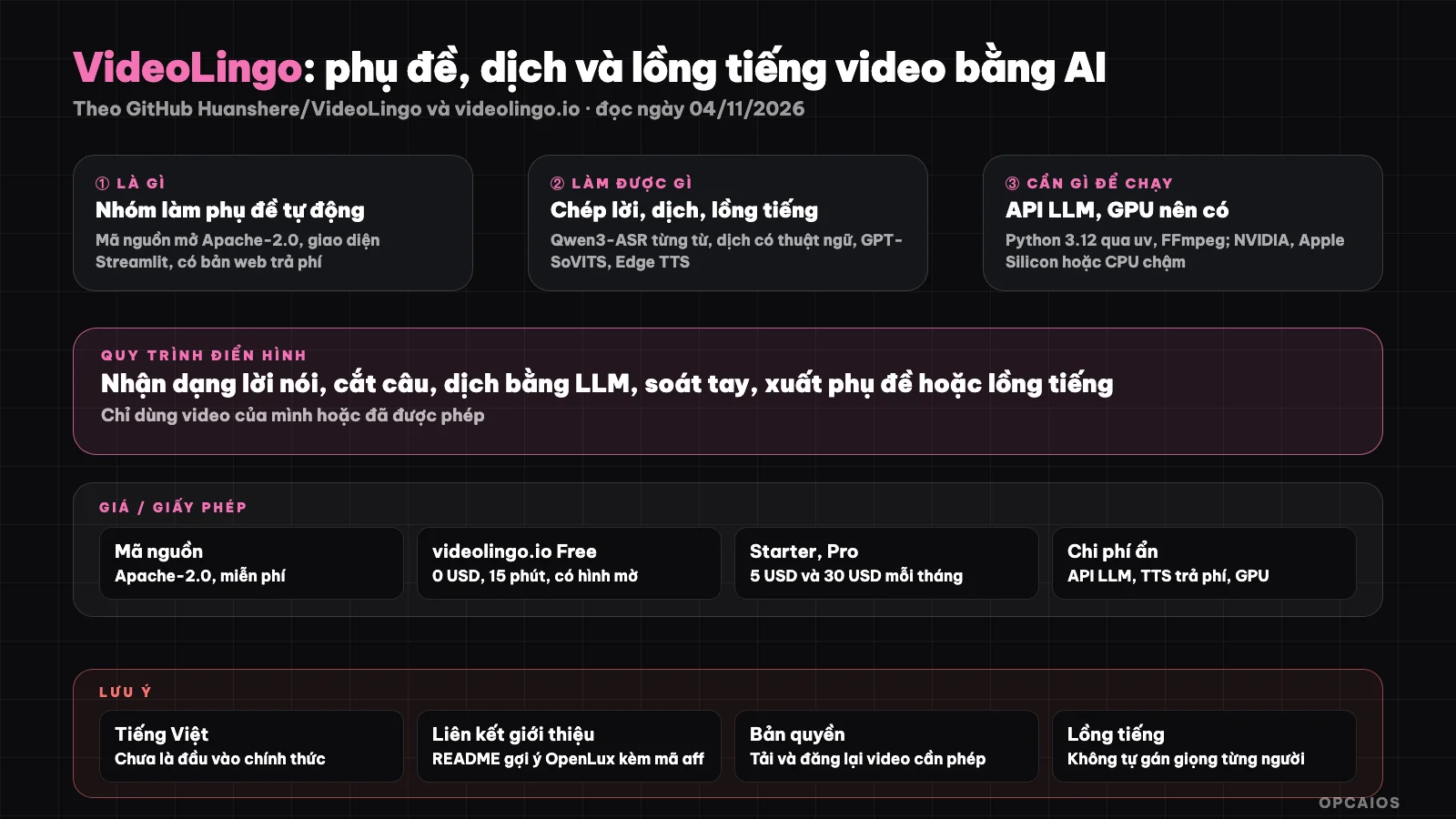
VideoLingo connects voice recognition, translation via LLM and voice synthesis into one process. Diagram: OPCAIOS.
What is VideoLingo and who made it?
VideoLingo is a project initiated by an author with the GitHub name Huanshere, aimed at automating the work of a subtitle team: segmenting sentences, translating, syncing timing, and voice synthesis. The outputs are subtitle files, videos with hard-coded subtitles, or dubbed videos.
The description on GitHub (accessed 04/11/2026) claims subtitle segmentation and translation quality on par with Netflix; this is a self-published project claim and has not been independently verified. The English README section is more cautious: translation quality depends on the original audio, language, and model you choose. The project comes in two forms of use. First is the open-source version you install yourself on Windows, macOS (Apple Silicon or Intel), or Linux. Next is the web service videolingo.io run by the team, currently in Beta status. Finally, there is documentation at docs.videolingo.io, available in English and Chinese.
The repository is regularly updated: the most recent code push was on 30/09/2026, with three releases v3.0.4, v3.1.0, and v3.1.1 in September 2026 (GitHub API, accessed 04/11/2026). The repository is not in archived status.
What can VideoLingo do?
VideoLingo completes an entire chain: load video, recognize speech with word-level timestamps, segment subtitle sentences, translate with terminology, then voice synthesize. Each step can be paused, resumed, or stopped, and logs help you restart from the failed step.
| Feature | Description from README (accessed 04/11/2026) |
|---|---|
| Load YouTube video | Via yt-dlp library |
| Voice recognition | Qwen3-ASR and Qwen3-ForcedAligner run locally, word-level timestamps |
| Cloud-based recognition (optional) | ElevenLabs or MAI-Transcribe-2 via Azure or OpenRouter |
| Subtitle segmentation | Combines NLP and LLM, can set line length limits |
| Translation | Direct translation, includes self-review and rewriting steps for naturalness, terminology table |
| Voice synthesis | GPT-SoVITS, OpenAI TTS, Edge TTS, Fish Audio, CosyVoice2, F5-TTS, custom converter |
| Interface and API | One-click Streamlit, local HTTP API for agents and scripts |
For languages, the README lists eight input languages: English, Russian, French, German, Italian, Spanish, Japanese, and Chinese. Vietnamese is not on this list. The installation documentation states that Auto mode can recognize languages outside the list, including Vietnamese, and auto-select sentence segmentation methods, but that is not an officially supported language. The common translation direction for Vietnamese users is English or Chinese videos to Vietnamese subtitles; translation is handled by the LLM you choose, we have not yet tested this direction. Voice synthesis languages depend on the TTS service.
How much does VideoLingo cost and what GPU and API keys do I need?
The self-hosted VideoLingo version is free under Apache-2.0, but you pay for the LLM API to translate, and possibly also for TTS and speech recognition through the cloud. The videolingo.io service has three monthly plans. The prices below do not include tax and may change.
| Item | Status (as of 04/11/2026) |
|---|---|
| Source code | Apache-2.0, free |
| videolingo.io Free | 0 USD/month, 15 minutes, English and Chinese video only, 480p, watermarked |
| videolingo.io Starter | 5 USD/month, 60 minutes, 8 input languages, 1080p, basic voice-over |
| videolingo.io Pro | 30 USD/month, 360 minutes, Fish Audio voice cloning, voice separation, API |
| Hidden costs for self-hosting | OpenAI-compatible LLM API, paid TTS if chosen, electricity and GPU |
| Hardware | NVIDIA GPU for speed; Apple Silicon uses MLX; CPU works but slow |
For the LLM, VideoLingo needs a provider that follows OpenAI's Chat Completions standard and returns properly structured JSON. The README and documentation recommend the OpenLux relay service and include a referral link, so this advice is not entirely neutral; you can use another compatible provider. With Fish Audio, the documentation notes that the API charges based on usage. When you enable ElevenLabs or MAI-Transcribe-2, audio is sent to the provider and may incur fees. The documentation does not specify minimum VRAM requirements; if you get an out-of-memory error, the documentation suggests switching to the Qwen3-ASR 0.6B model.
How to install and get started with VideoLingo
The fastest way to install VideoLingo on Windows is to download the source code from the latest release and run OneKeyStart.bat; on the first run, this file automatically installs uv, Python 3.12, libraries, and FFmpeg. On macOS and Linux, you clone the repository and run it with uv.
- First, if you have an NVIDIA GPU, install a compatible driver beforehand, following the installation documentation.
- Next, on Windows: download "Source code (zip)" from the Releases page, unzip it, double-click
OneKeyStart.batand keep the window open. On macOS, Linux, or Windows from the command line:
git clone https://github.com/Huanshere/VideoLingo.git && cd VideoLingo
uv run start.py
- When the interface opens in your browser, enter the API address, API key, and LLM model name in the sidebar.
- Finally, if you want to call it from a script or agent, configure
config.yamland then run the HTTP API mode:
uv run start.py --api
The README also includes Docker instructions for Linux with NVIDIA GPU and NVIDIA Container Toolkit. For example (a hypothetical example): a lecturer has an English-language lecture that they recorded themselves and wants to add Vietnamese subtitles. They have VideoLingo recognize the speech, translate using the LLM, and then manually edit specialized terminology before exporting hardcoded subtitles.
Limitations, risks, and legal considerations when using VideoLingo
VideoLingo's technical limitations lie in the quality of the original audio, the LLM's ability to return JSON correctly, and the quality of voice-over synchronization. The biggest legal risk is translating and re-uploading someone else's video: this requires the permission of the owner, and the tool does not grant you that permission.
The README lists five current limitations. First, background noise reduces recognition accuracy and timing; numbers and symbols may be out of sync and need to be reviewed. Second, the LLM output must be in valid JSON format; when there is an error, check output/gpt_log/error.json and do not immediately delete the entire output folder. Third, voice-over quality and synchronization depend on the translation, the TTS service, and the speech rate. Fourth, each audio segment can only have one main language, so mixed-language speech tends to be inaccurate. Finally, voice-over does not automatically assign different voices to different speakers.
On the legal side, the project's Chinese-language description mentions "搬运" video, that is, moving video from one platform to another. Downloading videos from YouTube using yt-dlp may violate YouTube's terms of service, and re-uploading a translation without permission may violate copyright. Voice-over using a cloned voice of a real person requires that person's consent. Sending audio to a cloud service is also data sharing if the video contains other people. This is for reference only, not legal advice; we have not cross-checked the original terms and conditions of YouTube or Vietnamese law as of the date this post was written.
VideoLingo versus other options
VideoLingo is strong in that it combines the entire chain of subtitles, translation, and voice dubbing into one self-installable tool with an API. If you only need transcription or just need a voiceover, more specialized single-purpose tools are simpler. The table below is a general description, not a measurement.
| Option | Strengths | Considerations |
|---|---|---|
| VideoLingo | Complete chain of subtitles, translation, voice dubbing; Apache-2.0; has HTTP API | Requires paid LLM, Vietnamese not yet an official input language |
| Whisper | OpenAI's transcription model, supports Vietnamese | Transcription only, must manually add translation step |
| Voice-Pro | Gradio interface for TTS, voice cloning, translation, voice dubbing | Need to manually evaluate quality of each step |
| AI Video Transcriber | Paste link to get transcription, translation, summary | Text-focused, no voice dubbing |
| Commercial services like HeyGen | Clean interface, voice cloning available | Paid, data goes to the cloud |
When should you use VideoLingo?
Use VideoLingo when you have your own video or have permission to use it, need bilingual subtitles or a dubbed version, and are willing to pay for LLM API costs. If you're just trying one video, the free plan at videolingo.io is faster than self-installing.
| Situation | Recommendation |
|---|---|
| My English lecture, need Vietnamese subtitles | Self-install version, manually review terminology before export |
| Quick test of a short English or Chinese video | Free plan on videolingo.io, accept watermarked output |
| Process multiple videos using an agent or script | HTTP API mode, run sequentially |
| Video with Vietnamese speech as input | Try Auto mode, review carefully or use Whisper |
| Translate someone else's video to repost | Get permission from the owner first, don't rely on the tool |
OPCAIOS experience
We recently added VideoLingo to the Repo list in the Utilities section on opcaios.org after reading the README and checking that the repository is still being maintained; we have not yet run a test, so this section outlines the criteria we use to consider it, not an evaluation after using it. Four criteria:
- Is the repository still being updated: yes, three releases in September 2026.
- License: Apache-2.0, can be used for commercial work if the license notice is retained.
- Hidden costs: LLM API and TTS, plus GPU if you want speed. Since VideoLingo accepts APIs following the OpenAI standard, in theory you can route through a model routing gateway like 9Router that we are using; we have not yet tried this integration.
- Terms of service risk: only use it for your own videos or videos you have permission to use, because the YouTube download and reposting of translations can easily infringe copyright.
Read more: What is OmniVoice?, What is Whisper?, Turn a YouTube video into 10 blog posts, What is LLM?, 6 best speech-to-text tools in 2026.
Frequently Asked Questions
Is VideoLingo free?
The self-hosted VideoLingo is free under the Apache-2.0 license, but you have to pay for the LLM API used for translation, and possibly also for dubbing or cloud-based speech recognition if you choose them. The videolingo.io web service, as read on 04/11/2026, has a Free plan at 0 USD with 15 minutes per month, a Starter plan at 5 USD with 60 minutes, and a Pro plan at 30 USD with 360 minutes. Prices exclude tax and may change.
Does VideoLingo support Vietnamese?
The README as read on 04/11/2026 lists eight input languages, and Vietnamese is not among them. Auto mode may recognize Vietnamese and automatically choose sentence segmentation, but this is not official support. The more common direction is English or Chinese videos translated into Vietnamese subtitles; quality depends on which LLM you choose. Vietnamese dubbing depends on the TTS service. We haven't tried it, so run a sample video first.
Do I need a GPU to run VideoLingo?
Not mandatory, but it's recommended. According to the installation documentation as read on 04/11/2026, Windows or Linux machines with an NVIDIA GPU run Qwen3-ASR via CUDA, Mac with Apple Silicon use MLX, and machines without NVIDIA run on CPU but slowly. The documentation does not specify minimum VRAM; if you run out of GPU memory, you can switch to the 0.6B model or use speech recognition via ElevenLabs. The translation part runs over API so it doesn't consume your GPU.
Is it legal to translate and repost YouTube videos using VideoLingo?
The tool doesn't determine legality; the video owner's rights do. Downloading videos using yt-dlp may violate YouTube's terms, and reposting someone else's video translation without permission could infringe copyright. Cloning a real person's voice requires their consent. The safest approach is to use it on your own videos or with clear authorization. This is reference information, not legal advice.
Can someone with no coding knowledge use VideoLingo?
Yes, especially on Windows: download the source code, double-click OneKeyStart.bat, then enter your API key in the web interface. The hard part for beginners is choosing an LLM provider, getting an API key, and handling errors when the model returns the wrong structure. If you just want to try it, the free plan on videolingo.io requires no installation. If you want to learn how to chain AI tools into a content workflow, check out OPCAIOS's AI application training course.
Source: GitHub Huanshere/VideoLingo (README, installation documentation start.en-US.md, API, release notes, read on 04/11/2026), videolingo.io (homepage, pricing page, read on 04/11/2026), docs.videolingo.io (homepage, read on 04/11/2026); not read/not verified: videolingo.io's terms of service and privacy policy, Vietnamese translation quality, user reviews on the website, YouTube's original terms of service; star ratings and prices may change. Experience is from OPCAIOS.
Translated from Vietnamese with AI. Read the original.
Want to apply this in your business?
Book a free 30-minute call (Vietnam time, in English or Vietnamese).