


Voice-Pro là gì?
Voice-Pro là một ứng dụng web mã nguồn mở chạy trên máy cá nhân (giao diện Gradio) do ABUS, một công ty khởi nghiệp nhỏ ở Hàn Quốc, phát triển, gom bốn việc vào một chỗ: tải video YouTube, nhận dạng giọng nói bằng Whisper, dịch phụ đề và tạo hoặc nhân bản giọng (F5-TTS, CosyVoice, kokoro, Edge-TTS). Theo GitHub (API, đọc ngày 04/11/2026), kho abus-aikorea/voice-pro được tạo ngày 29/7/2024, có khoảng 13.400 sao, giấy phép GPL-3.0, lần đẩy mã gần nhất 13/7/2026. README nói dự án hoàn toàn miễn phí, nhưng cần máy Windows có GPU NVIDIA và khoảng 10 GB mô hình tải về. Bài này nói về tính năng, chi phí ẩn, cách cài và rủi ro bản quyền.
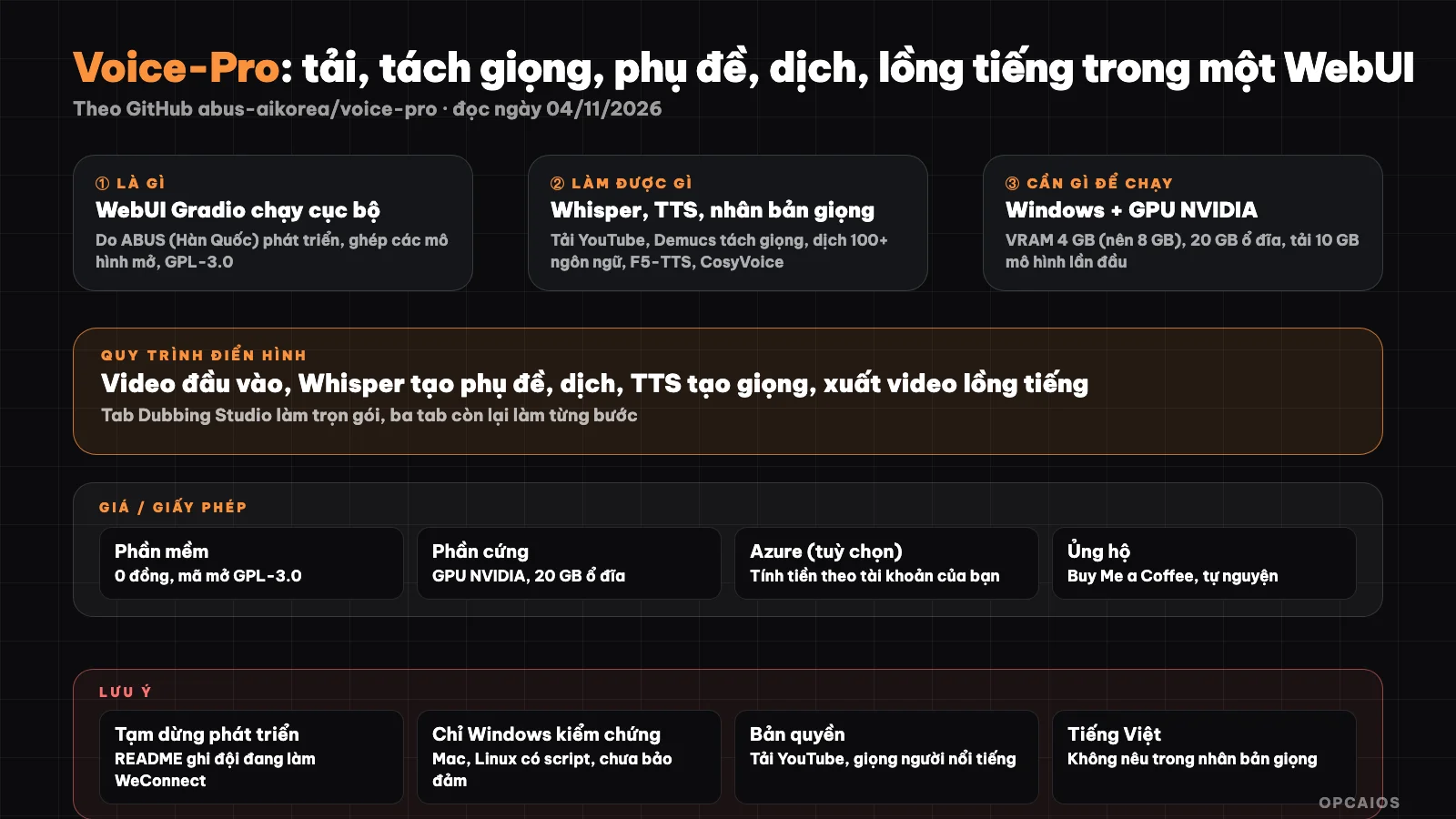
Voice-Pro nối chuỗi tải video, tách giọng, nhận dạng, dịch và tạo giọng trong một giao diện web cục bộ. Sơ đồ: OPCAIOS.
Voice-Pro là gì và ai tạo ra nó?
Voice-Pro là bộ công cụ xử lý âm thanh và video chạy cục bộ, do ABUS (Hàn Quốc) phát triển, tự mô tả là lựa chọn mã nguồn mở thay cho ElevenLabs. Nó không huấn luyện mô hình mới mà ghép các dự án mở có sẵn thành một giao diện Gradio.
Theo README trên GitHub (đọc ngày 04/11/2026), ABUS là một đội nhỏ, trang chủ tiếng Hàn là wctokyoseoul.com. Điểm cần biết trước khi gắn bó: README ghi rõ việc phát triển Voice-Pro đang tạm dừng vì đội đang dồn sức cho WeConnect, một ứng dụng giao lưu văn hoá. Dù vậy, bản v4.0.0 (13/7/2026) vừa chuyển sang uv, Python 3.12 và Gradio 6, nên kho chưa bị bỏ hoang. Bản v3.2.0 là mốc dự án mở mã và miễn phí hoàn toàn.
Voice-Pro làm được những gì?
Voice-Pro có bốn tab chính: Dubbing Studio (lồng tiếng trọn gói), Whisper Caption (phụ đề), Translate (dịch) và Speech Generation (tạo giọng). Mỗi tab gọi một nhóm mô hình mở khác nhau, theo README (GitHub, đọc ngày 04/11/2026):
| Nhóm tính năng | Chi tiết theo README |
|---|---|
| Nhận dạng giọng nói (STT) | Whisper, Faster-Whisper (large-v3-turbo, distil-large-v3.5), Whisper-Timestamped; có mức khử ồn và tô sáng từng từ |
| Tạo giọng (TTS) | Edge-TTS (hơn 100 ngôn ngữ, hơn 400 giọng), kokoro, Azure TTS nếu tự nhập khoá |
| Nhân bản giọng zero-shot | F5-TTS (có mô hình cộng đồng nhiều ngôn ngữ), E2-TTS, CosyVoice (tuỳ chọn Fun-CosyVoice3-0.5B) |
| Dịch | Deep-Translator qua điểm cuối Google miễn phí, tuỳ chọn Azure Translator; hỗ trợ SRT, ASS, SSA |
| Tải và tách | yt-dlp tải video, Demucs tách giọng khỏi nhạc nền; xuất WAV, FLAC, MP3 |
| Kho giọng mẫu | Giọng người nổi tiếng tiếng Anh, Trung, Hàn, Nhật; xin thêm qua GitHub Issues |
README ghi nhận dạng và dịch hỗ trợ hơn 100 ngôn ngữ, CosyVoice3 hỗ trợ 9 ngôn ngữ, mô hình cộng đồng F5-TTS có 9 ngôn ngữ khác. Tiếng Việt không được nêu trong danh sách nhân bản giọng; chúng tôi chưa thử.
Voice-Pro có miễn phí không? Chi phí ẩn là gì?
Voice-Pro miễn phí về phần mềm: README gọi dự án là "completely free" và tệp LICENSE trong kho là GPL-3.0 (đọc ngày 04/11/2026). Chi phí thật nằm ở phần cứng, dung lượng và các dịch vụ tuỳ chọn bạn tự cắm vào.
| Khoản | Mức theo tài liệu chính thức (đọc ngày 04/11/2026) |
|---|---|
| Giá phần mềm | 0 đồng, GPL-3.0; ủng hộ tự nguyện qua Buy Me a Coffee |
| GPU | NVIDIA, driver 570 trở lên; có chế độ CPU nhưng chậm |
| VRAM | Tối thiểu 4 GB, nên 8 GB; khử ồn mức 2 cần từ 8 GB |
| Ổ đĩa | Trên 20 GB trống; lần chạy đầu tải khoảng 10 GB mô hình |
| Hệ điều hành | Windows 10/11 64-bit đã kiểm chứng; Linux và Mac có script nhưng README ghi chưa kiểm chứng |
| Dịch vụ tuỳ chọn | Azure Speech và Azure Translator tính tiền theo tài khoản Microsoft của bạn |
Giá dịch vụ bên ngoài chưa gồm thuế và có thể thay đổi. Tệp LICENSE ghi GPL-3.0 trong khi siêu dữ liệu README ghi LGPL; chúng tôi lấy tệp LICENSE làm chuẩn. GPL-3.0 nghĩa là sửa rồi phân phối thì phải mở mã; dùng nội bộ để làm video thì không vướng gì. Phần này không phải tư vấn pháp lý.
How to Install Voice-Pro?
Installing Voice-Pro on Windows takes three steps and doesn't require you to install CUDA Toolkit or Visual Studio Build Tools separately, since PyTorch comes with CUDA runtime. The steps follow the README (GitHub, read on 04/11/2026):
git clone https://github.com/abus-aikorea/voice-pro.git
- First, get the source code: run the clone command above or download "Source code (zip)" from the Releases page.
- Next, run
configure.bat(optional): installs git and ffmpeg system-wide, requires admin rights. If you don't have admin rights, skip it;start.batwill download a portable ffmpeg instead. - Run
start.bat: the script installs uv, Python 3.12 and dependencies, then downloads around 10 GB of models. When done, the interface opens at a local address. To force GPU or CPU, set theGPU_CHOICEvariable (G or C). - Finally, maintenance:
update.batsyncs the environment again;uninstall.batonly deletesinstaller_files. If you hit strange errors, deleteinstaller_filesand runstart.batagain.
Mac and Linux have configure.sh and start.sh but the README doesn't guarantee they work. To use Azure, copy .env.example to .env and fill in your key; don't push the .env file to GitHub.
Limits, risks and legal notes when using Voice-Pro
The biggest risk of Voice-Pro isn't technical but copyright and voice rights: the tool downloads YouTube videos and clones the voices of famous people. This section is for reference only, not legal advice; we haven't checked the original terms text.
- Downloading YouTube videos: Voice-Pro uses yt-dlp. YouTube's terms restrict downloading content outside official features; only download videos you own or have permission to use, and don't use tools to bypass technical controls.
- Voice cloning: the voice sample library includes voices of famous people, the README doesn't state their consent. Using a real person's voice for commercial content or to mislead could violate personality rights. Only clone your own voice or someone who has agreed in writing.
- Data leaving your machine: the translation tab by default calls Google endpoints; Azure is cloud-based; subtitles will go outside if you use these channels.
- Project on pause: new bugs may not be fixed quickly; yt-dlp needs regular updates to keep working.
Voice-Pro versus other options
Voice-Pro is an "all-in-one" package that runs locally, so the fairest comparison is with single-purpose tools or cloud services. The table below is a general description, not a measurement:
| Option | What's different from Voice-Pro | Good for |
|---|---|---|
| VideoLingo | Focuses on subtitles, translation and voiceover following a Streamlit workflow | Multi-language video, see What is VideoLingo? |
| OmniVoice | Only TTS and voice cloning, over 600 languages, doesn't download video | Natural Vietnamese voices, see What is OmniVoice? |
| ZeroTTS | Vietnamese TTS running real-time on CPU | No GPU machine, see What is ZeroTTS? |
| Direct Whisper | Speech recognition only, command line | Programmers, see What is Whisper? |
Voice-Pro wins on convenience, loses on flexibility if you want to automate with scripts or run on Linux servers.
When should you use Voice-Pro?
Voice-Pro is right for content creators with a Windows machine with NVIDIA GPU who want to dub and subtitle their own videos without paying per minute.
| Situation | Suggestion |
|---|---|
| Making subtitles and translations for my videos, machine has 8 GB VRAM | Use Voice-Pro, start from the Whisper Caption tab |
| Dubbing videos to English, Japanese, Korean | Use Dubbing Studio with F5-TTS or CosyVoice |
| Need high-quality Vietnamese voice cloning | Try OmniVoice or ZeroTTS first |
| Running automatically every day on a server | Not suitable; Voice-Pro is a manual interface on Windows |
Example (hypothetical): a course seller shoots a 15-minute Vietnamese video, uses Whisper Caption to create SRT subtitles, translates to English, then Edge-TTS to create voiceover for the international channel, all on a personal machine.
OPCAIOS's Experience
We recently added Voice-Pro to the Repo list in the Utilities section on opcaios.org after reading the README and checking that the repository is still being maintained; we haven't tested it yet, so this section describes the criteria we use to evaluate, not an assessment based on actual use. Four criteria:
- Is the repository still being maintained: yes, version v4.0.0 on 13/7/2026, but the README states development is temporarily paused, so we categorize it as "usable, but don't depend on it".
- License: GPL-3.0, suitable for internal use to produce content.
- Hidden costs: requires a Windows machine with NVIDIA GPU; our main work machine is Mac, so to test it we'd need a Windows machine or rented GPU server.
- Can it replace the tools we're using: our video production workflow for speaking avatars already uses OmniVoice for Vietnamese voice, so Voice-Pro only matters for subtitles and foreign language dubbing. Terms of service risks (downloading YouTube, celebrity voices) mean we'd only use it with self-recorded content if we test it.
Read more: What is Whisper?, Turn YouTube Videos into 10 Blog Posts, What is ComfyUI?, 7 Best AI Voice Cloning Tools in 2026 for Vietnamese.
Frequently Asked Questions
Does Voice-Pro run on Mac?
The README provides configure.sh and start.sh for Mac Apple Silicon and Linux, but clearly states these two platforms have not been verified (read on 04/11/2026). The guaranteed platform is Windows 10/11 64-bit with NVIDIA GPU. Mac users should be prepared to troubleshoot on their own, or choose OmniVoice for the voice part.
Does Voice-Pro support Vietnamese?
Subtitles and Vietnamese translation should work in theory because Whisper and Deep-Translator support over 100 languages; Edge-TTS also has Vietnamese voice. But the voice cloning part (F5-TTS, CosyVoice) doesn't mention Vietnamese, so the quality of cloned Vietnamese voice is unconfirmed; we haven't tested it.
How much GPU does Voice-Pro need?
According to the README, minimum 4 GB VRAM, better to have 8 GB or more; noise reduction level 2 needs from 8 GB. There's a CPU mode but it's much slower. Beyond VRAM, you need over 20 GB free disk space because the first run downloads about 10 GB of models.
Is Voice-Pro completely open source?
Yes, since version v3.2.0 the project is open source and free; the LICENSE file is GPL-3.0 (read on 04/11/2026). The previous version 2.0 had a 60-second trial and subscription packages, the current README no longer has those limits. Azure is optional, billed separately according to your Microsoft account.
Is it legal to use Voice-Pro to clone someone else's voice?
Short answer: you should only clone your own voice or the voice of someone who has clearly consented. The sample voice library in Voice-Pro includes celebrity voices and the README says nothing about their consent; using these voices for commercial content or to create confusion may infringe on personal rights of publicity and voice. Similarly, downloading YouTube videos using yt-dlp must respect YouTube's terms and the author's copyright. This is not legal advice; we haven't reviewed the original terms. To learn how to use AI voice and video tools responsibly in your work, check out OPCAIOS's AI Application Training.
Source: GitHub abus-aikorea/voice-pro (README, LICENSE file, Releases page, API, read on 04/11/2026), wctokyoseoul.com homepage mentioned only in README; not read/not verified: quality of Vietnamese voice, SaaS pricing comparison table in README (as announced by the project, not verified), Mac/Linux scripts; stars and pricing may change. This experience is OPCAIOS's.
Translated from Vietnamese with AI. Read the original.
Want to apply this in your business?
Book a free 30-minute call (Vietnam time, in English or Vietnamese).