


What is Vox Director?
Vox Director is an open-source agent skill that helps programming agents like Claude Code or Codex turn a one-line topic into an explanatory or advertisement video in Vox's paper collage style: script, keyframes, motion, voiceover, background music, and subtitles, exported to an mp4 file. According to GitHub API (read 04/11/2026), the Alisa0808/vox-director repository was created on 10/7/2026, has around 2,605 stars and 365 forks, MIT license, with the latest code push on 5/10/2026. The code is free, but every step of image, video, voice, and music creation calls paid APIs from Atlas Cloud. This post explains what the skill does, what you need to run it, hidden costs, copyright risks, and when you should use it.
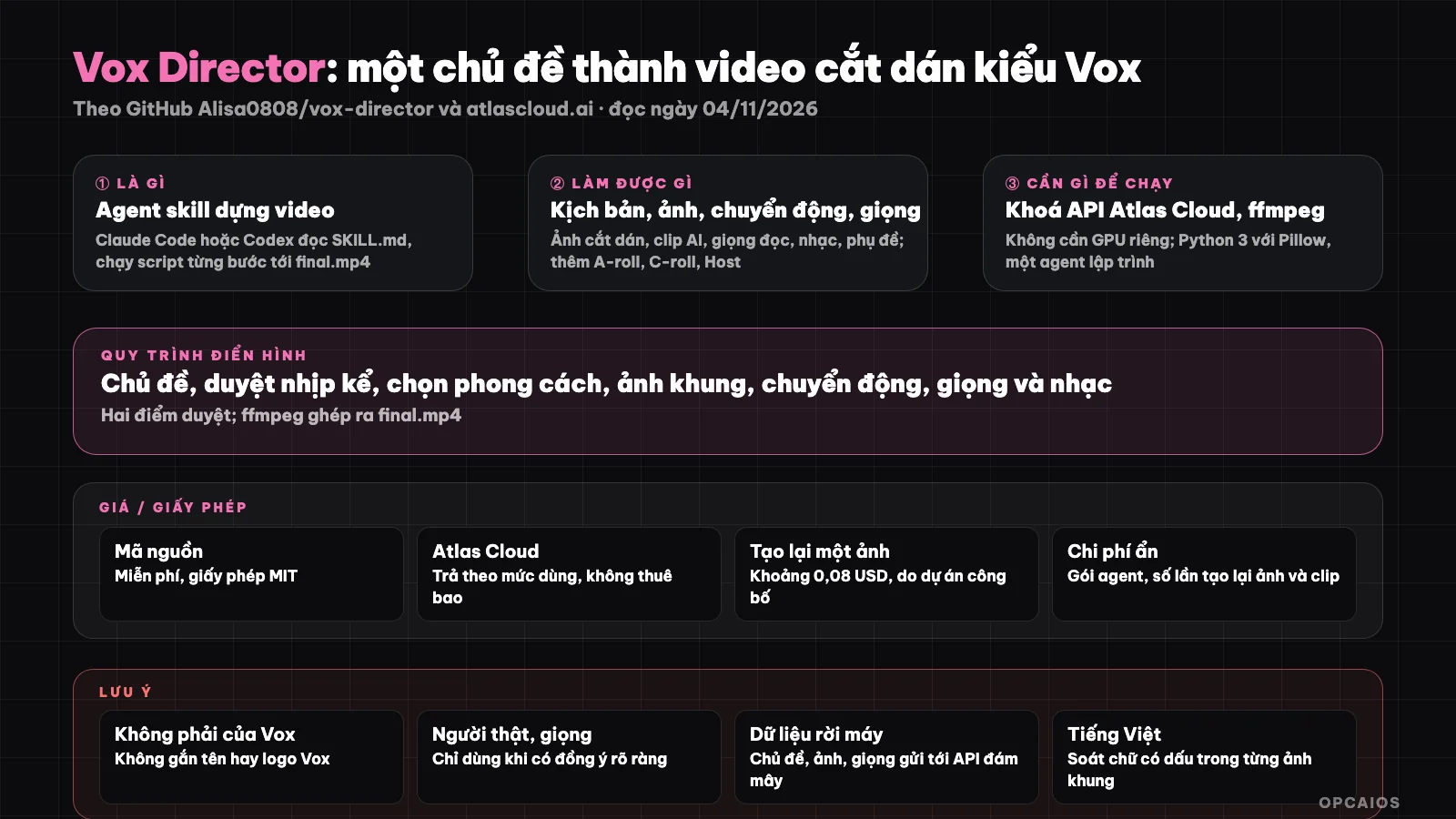
Vox Director runs six steps from topic to video, with two checkpoints for you to review. Diagram: OPCAIOS.
What is Vox Director and who created it?
Vox Director is a skill, that is a package of instructions and scripts that an agent reads and follows, not an application with a user interface. The author is Alisa Qian (X account @alisaqqt), according to the Credits section and LICENSE file in the README on GitHub (read 04/11/2026). The project draws inspiration from the visual language of Vox's explanatory videos and the paper collage advertising process of some other creators.
The paper collage style here is a modern editing style: hand-cut paper pieces, torn edges, tape, halftone dots, old newspaper scraps, each beat a solid flat color and large cut-out type title. This skill is released by an individual, clearly marked "powered by Atlas Cloud" with a campaign tracking code link to Atlas Cloud, so you should understand it's tightly bound to one API provider. If you're not familiar with the skill concept, see What is a Skill?.
What can Vox Director do?
Vox Director automates nearly the entire process of building a short explanatory video, from a one-line topic to an mp4 file, and only stops at two places for the user to decide. According to the README and SKILL.md on GitHub (read 04/11/2026), every step uses a shared beats.json file for each project.
| Feature | Description from README |
|---|---|
| Beat map | Choose a narrative arc, write each beat with narration; you review before creating images |
| Style trials | Build the same beat across 3–4 visual themes for you to choose by eye |
| Paper collage keyframes | Each beat a "poster" with title text, created by image model through Atlas Cloud |
| Motion | Video model turns images into clips; real people and brand logos use a different model |
| Voiceover and music | One narration voice via TTS, background music created by AI, with voice cloning option |
| Combine with ffmpeg | Splice clips, lower music under voiceover, insert subtitles and watermark |
| A-roll, C-roll, Host modes | Overlay style on existing talking-head video, composite still images, or add virtual host |
The most important part of the skill is the idea that "style is created at the image step." The README makes clear: if the keyframe images lack enough collage quality, later steps can't fix it. So SKILL.md recommends carefully checking each image and recreating poor images at the cheap step, rather than paying for motion on a weak image. Motion is added later, by default using an AI video model that animates the whole poster. For scenes wanting piece-by-piece assembly, the skill has a local frame engine that cuts the poster into parts then controls each part. SKILL.md lists 9 pre-built visual themes like swiss-modern, punk-zine, chinese-ink or newsprint-editorial, and 14 narrative arcs in the beat documentation. The models used include image models from Google, video models from Google, Kling and ByteDance, voiceover from xAI and music from MiniMax, all called through Atlas Cloud. The README notes that model names change often, so the skill fetches the model list directly before running.
Is Vox Director Free, and Where Are the Real Costs?
The Vox Director code is free under the MIT license, but every video costs money in API calls. Every content generation step runs on Atlas Cloud, a platform that charges based on usage. You don't need your own GPU, but you do need an Atlas Cloud API key with a balance.
| Item | Details | Source, date read |
|---|---|---|
| Source code | Free, MIT | GitHub API, 04/11/2026 |
| Atlas Cloud billing | Pay-as-you-go, no subscription; video charged by output second | atlascloud.ai/pricing, 04/11/2026 |
| Generate one frame image | Around 0.08 USD (per project disclosure, unverified) | SKILL.md, 04/11/2026 |
| Host clip | Around twice the cost per second of a regular clip (per project disclosure) | SKILL.md, 04/11/2026 |
| Your machine | ffmpeg, ffprobe, Python 3 with Pillow | README, 04/11/2026 |
| Hidden costs | Agent packages (Claude Code, Codex), number of frame and clip regenerations | General estimate |
Prices exclude tax and may change. The Atlas Cloud pricing page we read does not show individual prices for each model the skill uses, so we cannot quote a total cost per video. SKILL.md states that Host mode outputs a cost estimate and pauses for your confirmation; this is a good practice to apply to every run.
How Do I Install and Run Vox Director?
Installing Vox Director means placing the skill folder where the agent finds skills, setting your API key, and giving commands in natural language. According to the README on GitHub (read 04/11/2026), the steps are:
- First, set up a coding agent like Claude Code or Codex, and install ffmpeg and Pillow.
- Next, download the skill into Claude Code's skill folder:
git clone https://github.com/Alisa0808/vox-director.git ~/.claude/skills/vox-director
- Set your Atlas Cloud API key from their console page:
export ATLASCLOUD_API_KEY="sk-..."
- Give the agent a command in natural language, stating the topic, language, frame ratio, and length.
- Review the narrative beat map, then choose a style from the style section.
- Finally, wait for the agent to generate images, motion, voice, music, and compose them into
out/<project>/final.mp4.
For agents other than Claude, the README directs the agent to read AGENTS.md and then SKILL.md. There is also a vox-director.skill package to install through Claude's skill interface. For example (hypothetical): a course seller asks for "a 30-second Vox-style video explaining email marketing, in Vietnamese, 9:16"; the agent will propose 6–8 narrative beats following SKILL.md's guidelines, wait for approval, then start spending API money.
Limits, Risks, and Legal Notes for Vox Director
The biggest risk with Vox Director lies in copyright, real faces and voices, and vendor dependence—not the code itself. The code runs locally, but your topic, uploaded images, and voice are all sent to Atlas Cloud and the models behind it.
- Style and branding: "Vox-style" is a style description. Don't attach the Vox name, logo, or make viewers think the video is produced by Vox.
- Real people and voice cloning: A-roll, C-roll, and voice cloning modes use real faces and voices. Use only with explicit consent. SKILL.md notes that some models refuse celebrity faces and logos; don't try to bypass those filters.
- Images and input materials: any photos, news clips, or logos you provide must be something you have the right to use.
- Platform terms: when posting to TikTok, YouTube, or Facebook, follow their policies on AI-generated content, including labeling if required.
- Personal data: voice cloning is biometric data; consider personal data protection rules before processing someone else's voice.
The above points are general reference only, not legal advice; we have not checked Atlas Cloud's terms of service nor reviewed source law text. On the technical side, quality depends on the AI model, so you may need to regenerate many times, and SKILL.md lists known issues, such as Host mode backgrounds occasionally drifting.
Comparing Vox Director with Other Options
Vox Director differs from other video editing tools in that it delegates nearly all creative work to an AI model via API, and you just review. The table below is a general description, not a measurement.
| Option | Strengths | Weaknesses |
|---|---|---|
| Vox Director | One command produces a complete cut-and-paste video with review checkpoints | Depends on Atlas Cloud, costs money each time you create |
| Remotion | Video as React code, frame-by-frame control, runs locally | Must write or ask an agent to write code, doesn't generate images itself |
| Manim | Math animation, precise diagrams, free | Doesn't suit cut-and-paste style, requires writing Python |
| Hire a designer or build it yourself | High creative control, less model risk | Takes time and labor costs |
When Should You Use Vox Director?
Vox Director works for people who need many short explainer videos, accept API costs, and have time to review each step. It's not a fit if you need frame-by-frame control or don't want to send content to an outside service.
| Scenario | Recommendation |
|---|---|
| Need a 30–60 second explainer video for social media | Worth trying, set a small trial budget first |
| Want to turn existing talking-head video into cut-and-paste style | Try A-roll mode, just with your own video |
| Need data animation, precise diagrams | Consider Remotion or Manim |
| Don't code, never used an agent before | Get familiar with Claude Code first, then add this skill |
| Sensitive content, can't leave the machine | Not a fit, since every step goes through cloud API |
OPCAIOS's Experience
We added Vox Director to the Repo list in the Utilities section on opcaios.org after reading the README and checking that the repository is still maintained; we haven't run a trial yet, so this section lays out the criteria we use to weigh it, not an assessment after use. Our criteria have four points. First, the repository is still maintained: the most recent code push was 5/10/2026 according to GitHub API. Next, the MIT license lets you use and modify freely. Third, hidden costs sit with Atlas Cloud, not your machine, so you have to budget for each creation run. Last, the risk of terms with real people, voices, and brands. We run opcaios.org using AI agents like Claude Code and Antigravity, so a skill running inside an agent is easier to fit into our existing workflow than a standalone app.
Read more: What is a Skill?, What is Claude Code?, What is Remotion?, What is Video Use?.
Frequently Asked Questions
Is Vox Director a product of Vox?
No. According to the README and LICENSE on GitHub (read on 04/11/2026), Vox Director is released by Alisa Qian under the MIT license, only drawing inspiration from the visual language in Vox's explainer videos. The README does not say the project is affiliated with Vox Media. So when you use it, you should describe the video as "collage style," without attaching Vox's name or logo, so viewers don't mistake the source. The project also clearly states it runs on Atlas Cloud, so this is a skill tied to a specific API provider.
How much does it cost to make one video with Vox Director?
We don't have a total figure for one video because we haven't run a trial and the Atlas Cloud pricing page (read on 04/11/2026) doesn't show separate prices for individual skills. Atlas Cloud charges by usage; videos are charged by output seconds. SKILL.md says recreating a frame image costs around 0.08 USD and presenter clips cost about twice as much per second as regular clips, both as stated by the project, unverified. The safe way is to deposit a small amount, make a 15-second video first, then check your spending history on Atlas Cloud.
Does Vox Director need a GPU?
No dedicated GPU needed. Every heavy step like image generation, motion creation, voice-over and music all run on Atlas Cloud's servers. Your machine only needs a code agent like Claude Code or Codex, ffmpeg and ffprobe for video assembly, and Python 3 with the Pillow library for subtitle and watermark insertion, according to the README on GitHub (read on 04/11/2026). In return, you depend on network, API balance and the provider's policies; if Atlas Cloud renames a model or changes prices, results and costs change too.
Can Vox Director make Vietnamese videos?
The README has no Vietnamese examples; sample videos are in English, and the skill has a Chinese instruction manual. SKILL.md has a voice list file to choose voices by language and tone, but we haven't checked which Vietnamese voices are in it. Title text lives in images created by the model, so Vietnamese text with diacritics may be wrong and needs careful review. Try a short video first before making a large series, and proofread every frame image.
Can someone with no coding knowledge use Vox Director?
Possibly, but you need to get familiar with a code agent first. You don't write code: the agent reads SKILL.md, runs the script and asks you at two review points. Still, you must install ffmpeg, set environment variables for your API key, read error messages and decide when to stop to avoid spending money. Newcomers should start with a short video, track spending and review each command the agent suggests. If you want to learn how to work with an agent safely, check out OPCAIOS's AI application training course.
Source: GitHub Alisa0808/vox-director (README, SKILL.md, file list, API, read on 04/11/2026), atlascloud.ai/pricing page (read on 04/11/2026); not read/not verified: per-model pricing on Atlas Cloud, Atlas Cloud terms of use, Vietnamese voice list, actual video quality; ratings and prices may change. Experience is OPCAIOS's.
Translated from Vietnamese with AI. Read the original.
Want to apply this in your business?
Book a free 30-minute call (Vietnam time, in English or Vietnamese).