


What is Remotion? Remotion is an open-source framework for creating videos using React: each frame is a React component rendered by frame number, so you write video like writing a webpage, using data, APIs, and code to generate batch videos with the same template. According to the GitHub repository (read on October 25, 2026), the project has around 67.1 thousand stars, installed with npx create-video@latest, rendered via Node.js, AWS Lambda, Vercel or directly on the client, and includes a Player for embedding in applications. Important points: Remotion uses its own license, free for individuals and companies with a maximum of 3 employees, larger organizations need a company license. For example, a business could use Remotion to generate product introduction videos from a data file. This post has four parts:
- First, what is Remotion and its license.
- Next, when to use it and how to get started.
- Then, limitations you need to know.
- Finally, real experience from OPCAIOS (we use Remotion in our website's video building module).
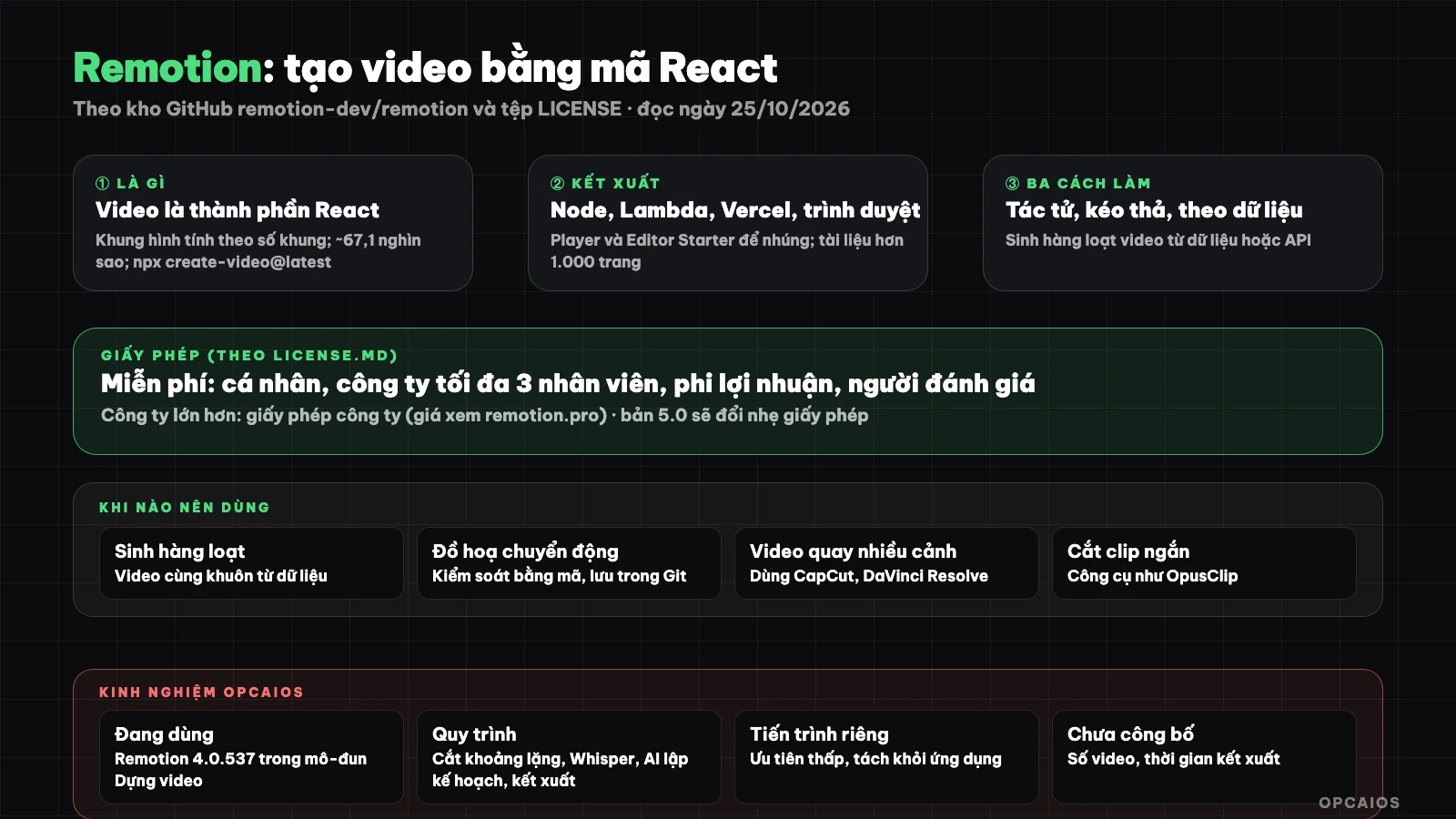
Video is code: same template, many data, many videos. Diagram: OPCAIOS.
What is Remotion and how does it work?
Remotion is a framework for building video using React components, where each frame is calculated by frame number. According to the code repository page on GitHub (read on October 25, 2026), there are three ways to make video with Remotion:
- First, by having a programmer create the video.
- Next, make it interactive using drag and drop.
- Finally, make it programmatically by connecting with data.
The project mentions rendering via Node.js API, AWS Lambda, Vercel or client-side, batch rendering on private infrastructure, Player component and Editor Starter for building video tools, and documentation of over 1,000 pages. The page does not specifically mention MP4 format. Because video is code, you can use a programmer agent to generate dynamic scenes, version control in Git (see What is GitHub?) and generate many variations from data. For example, when video connects with a JSON file, changing data means changing video content. For scenes generated dynamically by AI, see our two posts on motion graphics with Claude Opus 5.5 and motion engineering.
What is Remotion's license and is it free?
Remotion's license is a proprietary license, free for individuals and for-profit organizations with a maximum of 3 employees, while larger units need a company license. According to the LICENSE file on GitHub (read on October 25, 2026), the regulations include:
- First is the free license: individuals, for-profit organizations with a maximum of 3 employees, non-profit organizations and those evaluating; usable for commercial and non-commercial purposes, may be modified.
- Next is the company license: required for units outside the above group, with priority support; price available at remotion.pro/license (we did not read the pricing).
- Finally are the restrictions: no copying or modifying Remotion to sell, rent or relicense your own derivative versions.
For example, a one-person company falls under the free group, but when hiring enough employees to exceed 3, you need to review the license. This license is not an open-source license by standard definition; read the LICENSE file before commercial use.
Free support at the best level possible, via GitHub Issues and Discord. The page indicates the license will change slightly in Remotion 5.0 (PR #3750), we have not read the change details. Consult a legal expert if needed.
When should you use Remotion?
| Need | Recommendation |
|---|---|
| Generate batch videos with the same template from data (reports, personalized ads, product introduction videos) | Remotion is suitable |
| Dynamic scenes, motion graphics controlled by code | Suitable |
| Build one video one time, many live-action shots | Use editing software like CapCut, DaVinci Resolve |
| Cut long video into short clips quickly | Tools like OpusClip |
| Don't know programming | Can ask a programmer, but need to review code and results |
How to Get Started with Remotion?
Getting started with Remotion means installing Node.js, creating a project from a template, and describing scenes using React components. According to Remotion's GitHub repository (read on October 25, 2026), projects are installed using npx create-video@latest. The basic steps according to Remotion include:
- First, install Node.js, run
npx create-video@latestand choose a template. - Describe a scene using React components; preview it using Remotion's viewer.
- Connect data (JSON files, APIs) to swap text, numbers, and images.
- Render to a video file on your machine; when you need parallelization, use Lambda (Amazon) or a private server.
- Finally, push the code to Git and review the video before publishing.
Example scenario: a weekly report could swap data from a JSON file and re-render using the same template. With large-scale rendering on a server, pay attention to resources (CPU, memory) and run at low priority so it doesn't affect other services (see What is VPS?).
What are Remotion's Limitations?
Remotion's biggest limitation is the learning curve: projects require knowledge of React and JavaScript. Five points to keep in mind, according to Remotion on GitHub (read on October 25, 2026), include:
- First, the learning curve: AI coding assistants help but don't replace understanding.
- Rendering consumes resources: long videos and high resolution consume CPU and time.
- Company license: organizations with more than 3 employees need to purchase a license.
- Version changes: Remotion 5.0 will change the license terms; pin the version in your project.
- Copyrights: fonts, music, and images used in videos must be licensed.
Example scenario: a high-resolution, long video could consume much of a small server's CPU, so it should run at low priority or use AWS Lambda (Amazon).
OPCAIOS's Experience
We use Remotion for real: the "Video Building" module on our website has its own background process, using Remotion version 4.0.537 for the rendering step, according to project configuration (read on October 25, 2026). The workflow includes three steps:
- First is the analysis step: trim silence and transcribe speech using Whisper (OpenAI).
- Next is the AI planning step for video building.
- Finally is the rendering step using Remotion.
The rendering process runs separately from the main application at low priority, so a single deployment or restart doesn't kill ongoing renders. We're a solo business so we fall under the free tier according to the terms we've read; if our scale changes, we'd need to review the license. We haven't published the number of videos built, rendering times, or comparisons with other tools.
Read more: 5 Best Code-Based Video Tools in 2026.
Frequently Asked Questions
What is Remotion?
It's a framework for creating videos using React code, rendering frame by frame, and using data and APIs to generate multiple videos.
Is Remotion free?
It's free for individuals and companies that are for-profit with a maximum of 3 employees; larger organizations need a company license.
Do I need to know how to code?
You need to understand React/JavaScript or use an AI coding assistant, and you must review the results.
How is Remotion different from CapCut?
CapCut is video editing software with a graphical interface, while Remotion creates videos using React code, according to Remotion's code repository (read on October 25, 2026). The two tools differ in three ways:
- First is the approach: CapCut uses drag-and-drop on a timeline; Remotion describes scenes using React components.
- Next are the strengths: CapCut works well for one-off videos with multiple live-action shots. Remotion excels at batch generation. Multiple videos with the same template are created from data.
- Finally are the requirements: Remotion requires knowledge of React/JavaScript or the use of an AI coding assistant and you must review the results.
For example, a one-time intro video would be created with CapCut or DaVinci Resolve (Blackmagic), while hundreds of product intro videos with the same template would suit Remotion (hypothetical example).
Where does video rendering happen?
According to Remotion's code repository (read on October 25, 2026), rendering runs on your machine, a private server, AWS Lambda or Vercel, or the client side. To learn how to build an AI-powered video workflow, check out OPCAIOS's AI Applications Training.
Source: remotion-dev/remotion GitHub repository and LICENSE file, read on October 25, 2026; company license pricing and version 5.0 changes not yet reviewed. Experience is from OPCAIOS based on source code and project configuration.
Translated from Vietnamese with AI. Read the original.
Want to apply this in your business?
Book a free 30-minute call (Vietnam time, in English or Vietnamese).