



What is Paperclip?
Paperclip is an open-source Node.js server with a React interface to orchestrate an entire team of AI agents as if they were a company: with an organizational chart, objectives, budget, approval processes and work tracking in ticket form. According to the GitHub repository (accessed 24/10/2026), the project is under MIT license, maintained by Paperclip Labs, Inc., has around 106.6 thousand stars, and works with agents like Claude Code from Anthropic, OpenAI's Codex, Cursor, Gemini CLI, OpenClaw and Hermes. The project's tagline: if OpenClaw is an employee then Paperclip is the entire company. A note on spelling: the correct name is Paperclip (one p in the middle). This article has six parts: (1) what Paperclip does; (2) main concepts; (3) how to install; (4) risks; (5) when to use it; (6) OPCAIOS's experience on a private server.
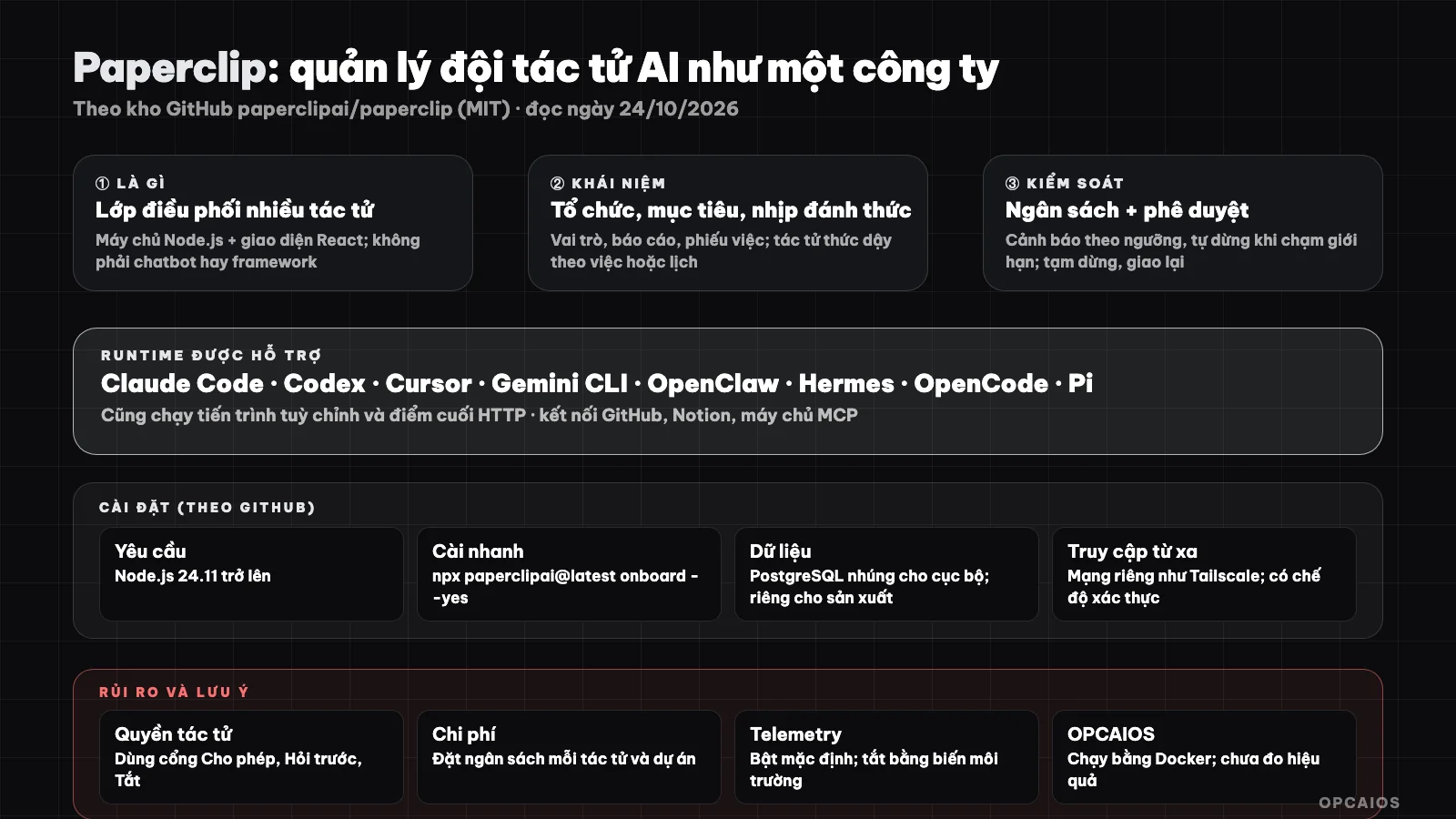
Paperclip is not a single agent, but a management layer for multiple agents: roles, budget, approvals. Diagram: OPCAIOS.
What is Paperclip and what is it not?
Paperclip is an orchestration layer for a team of agents, according to the GitHub repository page (accessed 24/10/2026). Paperclip is not a chatbot, an agent framework, a workflow builder or a prompt manager, and is not limited to a single agent or code review. Each agent in Paperclip is given a role, title, manager and permissions. Work is assigned as tickets tied to the organization's objectives so the agent understands why the work must be done. If you're new to the concept of agents, see What is LLM? and How to build an AI Agent system working 24/7.
Main concepts
| Concept | Meaning from documentation |
|---|---|
| Organizational chart | Agents have roles, titles, reporting relationships and permissions |
| Objectives | Tasks and projects tied to organizational objectives so agents have context |
| Heartbeats | Agents wake up to do assigned work, reply to messages or run on schedule |
| Budget | Budget by company, agent, project; alerts by threshold and auto-stop at limit |
| Governance | Review and approval stages, approve new agent hiring, pause, reassign or stop work |
| Ticket conversation flow | Conversations, plans, files and run history attached to each task |
| Recurring work | Triggered by cron, webhook or API, each run has a ticket and history |
| Skills | Shared skills with saved test inputs and version recovery |
| Integrations | GitHub, Notion, Railway and custom MCP servers, with Allow, Ask First, Off modes |
| Multiple organizations | One deployment can contain multiple separate organizations |
Agent runtimes listed: OpenClaw, Claude Code, Codex, Cursor (and Cursor Cloud), Gemini CLI, OpenCode, Pi, Hermes, Grok Build, Kimi Code, plus custom processes and HTTP endpoints.
Installation and requirements
Installing Paperclip means running one command after you have Node.js. Step 1, according to Paperclip's GitHub repository (accessed 24/10/2026), prepare Node.js 24.11 or later. Step 2, run the command npx paperclipai@latest onboard --yes. Step 3, open the interface at the local port. Development mode needs pnpm 9.15 or later then run pnpm install and pnpm dev (interface and API at local ports). Log in with a Claude or local Codex subscription; local command-line tools need Python 3 and the corresponding tool. An embedded PostgreSQL database is created automatically for local environments; production uses a separate Postgres. There are two deployment modes: local loopback trust or with authentication and privacy. The project suggests remote access over a private network like Tailscale. For example, assume someone testing on a personal machine uses local mode. For server infrastructure, see What is VPS? and What is Docker?.
Risks and Considerations
Paperclip has six risks to control, according to the project's GitHub repository (checked on 24/10/2026):
- 1. Agent permissions: each agent can run commands and use tools; use the Allow, Ask First, Off gates and grant minimal permissions (see What is MCP?).
- 2. Cost: multiple agents running in the background consume tokens; set budgets per agent and project to auto-stop when limits are hit.
- 3. Secrets: according to the project, company secrets are stored encrypted and agent configuration only references secrets; but exported packages may still contain plain environment variable values and local paths, so review before sharing.
- 4. Telemetry: enabled by default; disable with
PAPERCLIP_TELEMETRY_DISABLED=1,DO_NOT_TRACK=1or configuration. - 5. Very new project: roadmap has many work-in-progress items (memory and knowledge, agent conversation, cloud deployment); features change quickly.
- 6. Does not replace humans: approval, goals and budgets are still set by you; agents only work within that frame.
When to use Paperclip?
| Situation | Recommendation |
|---|---|
| Two or more agents working in parallel, need task delegation and cost control | Paperclip is a good fit |
| Only one agent, one task | Not needed yet; use that agent directly |
| Want to add an approval layer and logs for background-running agents | Paperclip has approval and run history built in |
| Want multiple agents coordinating in the same terminal window | See What is Herdr? (alternative direction: multiplexer) |
OPCAIOS Experience
We deployed Paperclip with Docker on a private server, behind a reverse proxy, with a dedicated PostgreSQL database. At the time of check on 24/10/2026, both containers were running stably (several days straight) and the page returned 200. According to internal deployment documentation, we created one organization and one default agent with the "chief of staff" role, using Claude runtime locally through an internal model routing port. We have not yet measured time savings or output quality from the agent team, have not used all features like scheduling or connection ports, and do not include efficiency numbers in this post.
Read more: 6 best tools for running multiple AI code agents at once in 2026.
Frequently Asked Questions
What is Paperclip?
Paperclip is an open-source platform that orchestrates a team of AI agents like a company, complete with organizational structure, goals, budgets, approval processes, and work tickets. Here's a hypothetical example: a small business owner could create an organization with a few agents, assign work as tickets tied to goals, and review each important step. Paperclip is not an agent itself but rather a management layer for multiple agents.
Is Paperclip free?
Paperclip software is open-source under the MIT license and self-hosted, so you pay no licensing fees. According to the project's GitHub repository (read on 24/10/2026), the project is maintained by Paperclip Labs, Inc. and has around 106.6 thousand stars. However, you still pay for the models or subscription plans of the underlying agents, such as Anthropic's Claude Code or OpenAI's Codex, and server costs if self-hosting. Here's a hypothetical example: a team of 3 agents running all day could consume significant tokens, so set budgets per agent and project so Paperclip automatically stops when hitting the limit. First calculate server costs, then model fees, finally set the budget.
How is Paperclip different from Claude Code or OpenClaw?
Anthropic's Claude Code and OpenClaw are agents (like employees); Paperclip manages multiple such agents (like a company). According to Paperclip's GitHub repository (read on 24/10/2026), Paperclip does not replace those agents but sits above them. For example, you could assign one ticket to an agent using Claude Code and another to an agent using Codex, then review results in one place. See 5 autonomous AI agent tools.
What do I need to install Paperclip?
Installing Paperclip requires Node.js 24.11 or higher and the command npx paperclipai@latest onboard --yes, according to the project's GitHub repository (read on 24/10/2026). The local environment pre-creates an embedded PostgreSQL database, while production needs a separate PostgreSQL and access via a private network like Tailscale. Here's a hypothetical example: a team deploying for multiple people should use Docker, a separate PostgreSQL, and a private network.
Is it safe?
There are permissions gates, self-stopping budgets, and logging, but agents still run real commands so they need minimal permissions and a reviewer. According to Paperclip's GitHub repository (read on 24/10/2026), each agent can run commands and use tools, and connections have three gates: Allow, Ask first, and Off. Step 1, grant minimal permissions to each agent. Step 2, set budgets per agent and project to auto-stop when hitting the limit. Step 3, keep a reviewer for irreversible actions. Remote telemetry is on by default and can be disabled with PAPERCLIP_TELEMETRY_DISABLED=1. To learn how to build a safe agent team, see OPCAIOS's AI application training course.
Source: paperclipai/paperclip GitHub repository, read directly on 24/10/2026; star count and features change rapidly. We have not read detailed documentation for every feature. Experience comes from OPCAIOS based on internal deployment documentation and direct verification.
Translated from Vietnamese with AI. Read the original.
Want to apply this in your business?
Book a free 30-minute call (Vietnam time, in English or Vietnamese).