


What is Apple Health MCP Server? Apple Health MCP Server is an open-source MCP server released by Momentum (themomentum.ai) that helps AI like Claude read Apple Health data exports (XML files from iPhone) and answer questions about steps, heart rate, sleep, or runs in natural language, without needing to write SQL. According to GitHub API (accessed 04/11/2026), the the-momentum/apple-health-mcp-server repository has 284 stars, MIT license, written in Python, created on 02/07/2025, with the most recent code push on 09/07/2026. The software is free; the hidden cost is your computer and the AI model you connect. This post follows four parts: first is how it works, next is how to install it according to official documentation, then limitations and privacy, and finally when you should use it.
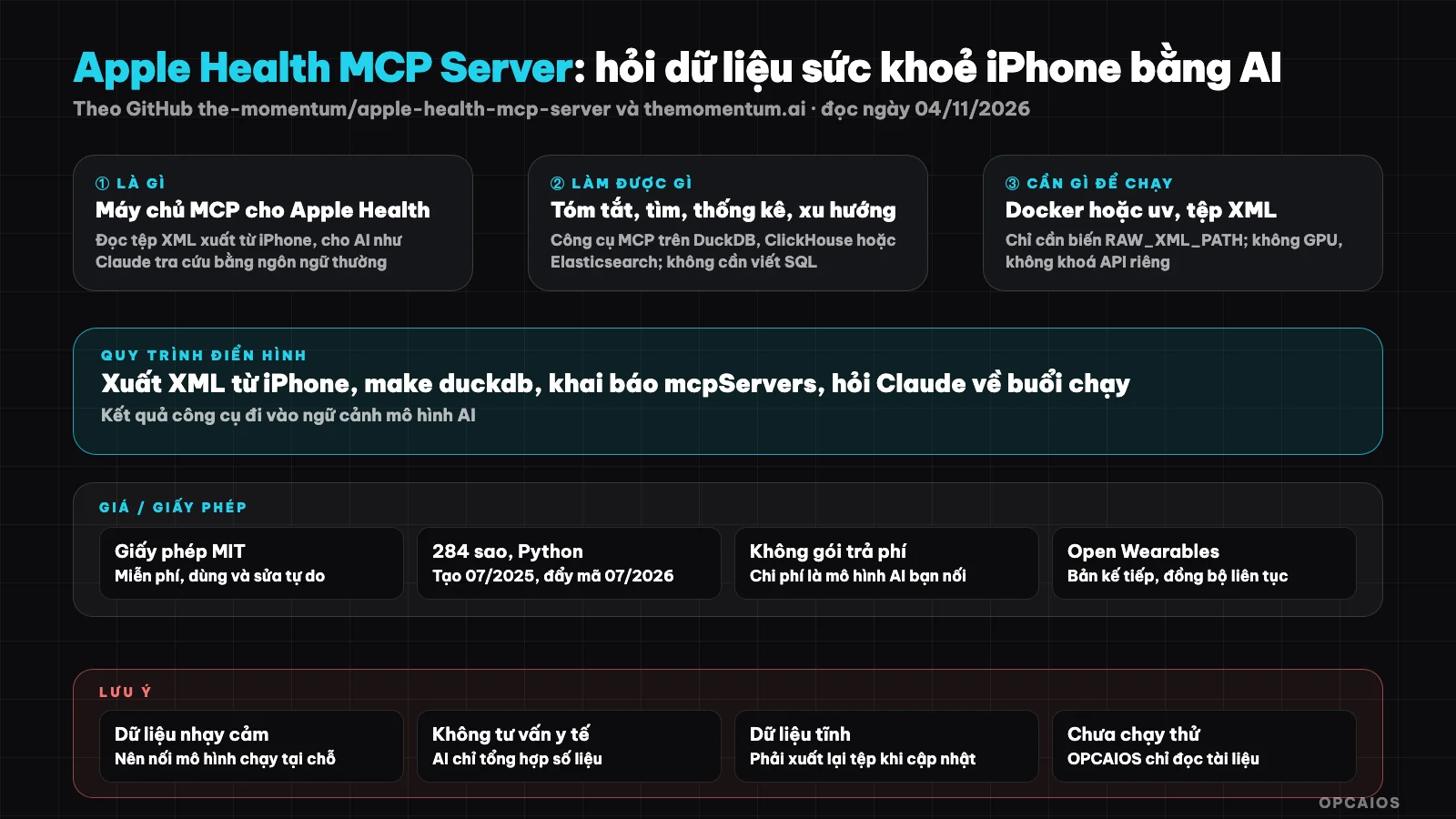
Apple Health MCP Server stands between the exported Apple Health file and the AI model, returning filtered data instead of the entire file. Diagram: OPCAIOS.
What is Apple Health MCP Server and who created it?
Apple Health MCP Server is a bridge between personal health data on iPhone and a large language model. MCP (Model Context Protocol) is an open standard for AI to call external tools; this server provides tools to read, filter, and calculate statistics on Apple Health data for any AI application that supports MCP.
The project was released by Momentum, a company developing AI for healthcare, within their open-source ecosystem. The README on GitHub (accessed 04/11/2026) describes how it works: you export Apple Health data from iPhone as an XML file, the server reads the file in a streaming fashion to handle large files, loads it into one of three storage platforms—Elasticsearch, ClickHouse, or DuckDB—then opens MCP tools for AI to query. The demo in the README shows Claude (Anthropic) listing available data types, summarizing recent activity, and aggregating runs by month. The README also notes the project has "evolved" into Open Wearables, a self-hosted platform with continuous Apple Health syncing app, so this MCP version keeps its role as a lightweight tool for those who only need manual file exports. If you're not yet familiar with this standard, see What is MCP?.
What can Apple Health MCP Server do?
The server provides three groups of tools: reading the XML file directly, and querying each storage platform. Each platform has the same five tools: overall summary, search with filtering, statistics by type, trends over time, and exact value matching.
According to the docs/mcp-tools.md documentation (GitHub, accessed 04/11/2026):
| Tool group | What it does |
|---|---|
Read XML (get_xml_structure, search_xml_content, get_xml_by_type) |
View export file structure and size, count record types, search by device or type |
Summarize (get_health_summary_*) |
Total records and distribution by data type |
Search (search_health_records_*) |
Filter records by type, time, source |
Statistics (get_statistics_by_type_*) |
Count, minimum, maximum, average, sum for a type |
Trends (get_trend_data_*) |
Changes by day, week, month, or year |
Find values (search_values_*) |
Find records with exact value match, including text |
| Infrastructure | FastMCP, stream XML import, Docker, configure with .env file |
The suffixes _es, _ch, _duckdb correspond to Elasticsearch, ClickHouse, and DuckDB. The docs/about.md documentation says Elasticsearch is strong for searching large datasets but needs its own server, ClickHouse is easier to deploy, and DuckDB "may" be faster; the project lists these as capabilities, not measured results. We have not yet measured them.
Is Apple Health MCP Server Free? License and Hidden Costs
Apple Health MCP Server is free under the MIT license, which means you can use, modify, and distribute it, including for commercial purposes, as long as you keep the copyright notice. The project has no pricing page; the real costs lie in the AI model and where you run the server.
| Item | Status (checked 04/11/2026) |
|---|---|
| Source code | Free, MIT license (GitHub API) |
| Paid plans | None; no pricing page |
| AI model | Not included; depends on your provider's plan or API |
| Hardware | Personal computer running Docker or Python via uv; no GPU needed |
| Storage platform | DuckDB and ClickHouse run locally; Elasticsearch needs a separate server |
| API keys | No API keys required; only need Elasticsearch account if using that platform |
AI service pricing does not include taxes and may change. The MIT license says nothing about your health data; that depends on the AI model you connect.
How Do I Install Apple Health MCP Server?
Installation has four steps: export data from iPhone, clone the repository, load data into a storage platform, then declare the server in your AI app. The docs/getting-started.md file (GitHub, checked 04/11/2026) requires Docker (recommended) or uv along with Docker, Git, and one of three storage platforms.
- First, export Apple Health data: on iPhone, use the Health app's export feature to get an XML file, copy it to the project root directory (default name
raw.xml). The project has sample data to try first. - Next, clone the repository and create a config file:
git clone https://github.com/the-momentum/apple-health-mcp-server
cd apple-health-mcp-server
cp config/.env.example config/.env
- Load data into your storage platform. With DuckDB, the lightest option:
make duckdb
For Elasticsearch use make es, for ClickHouse use make ch.
4. Build the Docker image with make build, or run locally with uv.
5. Finally, declare the server in your AI app: the documentation provides a JSON sample in mcpServers form, with the command uv run --frozen --directory <project path> start; for Docker, mount the XML file and config/.env into the container. Restart your AI app after making changes.
According to docs/configuration.md, only the RAW_XML_PATH variable is required; the rest have defaults. We haven't tested this ourselves; the steps above follow the official documentation.
Limits, Risks, and Privacy When Using Apple Health MCP Server
The biggest risk is not the software itself but where your health data goes after the server returns results. The server runs locally, but the AI model receives the tool results, and the model provider has its own data policy.
- Sensitive personal data. The exported Apple Health file contains heart rate, sleep, weight, and possibly menstrual cycle or medications. When AI calls the tool, results enter the model's context. If using a cloud service, read the provider's storage and training terms; to keep everything local, connect it to a model running via Ollama. The project documentation has no separate privacy section; this is our assessment.
- Not medical advice. The tool only aggregates numbers; AI can misinterpret medical meaning. Any health conclusions need a doctor.
- Static data. This MCP version reads manual exports; for continuous sync, the README points to Open Wearables.
- Update frequency. The most recent code push is 09/07/2026 and the latest release is 0.1.0 (22/10/2025) per GitHub (checked 04/11/2026); the repository is not archived but no longer as active as at the start, possibly because focus has shifted to Open Wearables.
Health data falls under sensitive personal data in many legal frameworks (GDPR, Vietnam's personal data protection rules); we have not compared the original text and do not offer legal advice. See also 5 data security rules when using AI.
Apple Health MCP Server versus other options
Apple Health MCP Server stands out because it's not a chart-viewing app but rather a tool layer for AI, so its value lies in free-form questions. The table below is a general description, not a measurement:
| Option | How it works | Best for |
|---|---|---|
| Apple Health MCP Server | Export XML manually, load into storage layer, AI calls tools | Free-form Q&A, keep data on device |
| Open Wearables (same author) | Self-hosted platform, continuous sync, has MCP server | Need fresh data always, accept heavier install |
| Apple's Health app | Pre-built charts on iPhone | Quick viewing |
| Give XML file to AI yourself | Paste or upload to chat | Small files; large files exceed context and send all data to cloud |
| Write Python script yourself | Analyze as you wish | People who know code |
When to use Apple Health MCP Server?
Use it if you have an iPhone or Apple Watch, want to ask your own data in a natural way, and are ready to install Docker or Python. Don't use it if you only need pre-built charts or don't want health data touching a cloud model.
| Situation | Suggestion |
|---|---|
| Want to ask "which month did I run the most this year?" | Use it, with DuckDB platform for lightness |
| Want continuous tracking, many devices | Check out Open Wearables |
| Worried about data going to cloud | Use it with a local model, or don't use it |
| Don't know the command line | Ask someone who knows to help set it up |
| Building a health product for clients | Consider Open Wearables and get legal advice on health data |
Example (hypothetical): someone who runs exports their Apple Health file from 2 years, loads it into DuckDB, then asks Claude "compare average heart rate for 5km runs between summer and winter". AI calls get_trend_data_duckdb and get_statistics_by_type_duckdb, returns a table, and they take the table to ask their coach.
OPCAIOS experience
We added Apple Health MCP Server to our Repo list in the Utilities section on opcaios.org after reading the README and checking the repository is still maintained; we haven't tested it yet, so this part lists the criteria we use to decide, not an evaluation after use. Four criteria:
- Repository still maintained: last code push July 2026, not archived, but the author has shifted focus to Open Wearables.
- License: MIT, no complications for personal or internal use.
- Hidden costs: no GPU or private API keys needed; cost is the AI model you connect to it, same as other MCP servers we use with Claude Code.
- Data risk: health data is the most sensitive kind in the MCP servers we curate; we will only test it with a local model.
Read more: What is MCP?, What is Ollama?, What is Docker?, What is Google Workspace MCP?.
Frequently Asked Questions
What is Apple Health MCP Server?
Apple Health MCP Server is an open-source MCP server by Momentum that reads XML files exported from the Health app on iPhone, loads them into DuckDB, ClickHouse, or Elasticsearch, and then lets AI like Claude call tools to summarize, search, analyze statistics and trends. Users ask in natural language instead of writing SQL. According to GitHub (read on 04/11/2026), the repository has 284 stars, MIT license, written in Python.
Is Apple Health MCP Server free?
Yes. The source code is under the MIT license, with no paid plans or pricing page. The real costs are the AI model you connect (Claude plan, API, or a local model) and the computer running Docker or Python. No GPU needed, no separate API key; only the Elasticsearch platform needs an account.
What do I need to install Apple Health MCP Server?
You need Git, Docker (recommended) or uv, an XML file exported from iPhone, and an AI application that supports MCP. According to the official documentation, you clone the repository, copy config/.env.example to config/.env, run make duckdb (or make es, make ch), build the image with make build, then add an mcpServers block to your AI application's configuration. We have not tried running it yet.
Is health data sent over the network?
The server runs on your machine and DuckDB or ClickHouse also stores data locally. But the results from tools go into the context of the AI model; if the model is a cloud service then that data leaves your machine according to the provider's policy. To keep everything local, connect to a model running on Ollama. The project documentation has no privacy section; this is our assessment.
Is Apple Health MCP Server suitable for people who cannot code?
Partly. The question-and-answer part is entirely in natural language, anyone can use it. But the setup requires command line, Docker or uv, and editing the JSON configuration file of your AI application, so people unfamiliar with it will need support the first time. After that, the only remaining task is exporting a new XML file when you want to update. If you want to learn how to install an MCP server yourself and connect AI to your data safely, see the AI application training course by OPCAIOS.
Source: GitHub the-momentum/apple-health-mcp-server (README, docs/getting-started.md, docs/mcp-tools.md, docs/configuration.md, docs/about.md, API, read on 04/11/2026), themomentum.ai (reference only from README); not read/not verified: Open Wearables documentation, DuckDB speed gains mentioned by the project; star count and pricing may change. Not medical or legal advice. Experience is from OPCAIOS.
Translated from Vietnamese with AI. Read the original.
Want to apply this in your business?
Book a free 30-minute call (Vietnam time, in English or Vietnamese).