


What is Google Workspace MCP?
Google Workspace MCP (package workspace-mcp) is an open-source MCP server developed by programmer Taylor Wilsdon, allowing AI assistants like Claude, ChatGPT, Claude Code or Codex to read and interact with Gmail, Drive, Google Calendar, Docs, Sheets, Slides, Forms, Tasks, Contacts, Chat and Apps Script. According to GitHub API (read 04/11/2026), the taylorwilsdon/google_workspace_mcp repository was created on 27/04/2025, has around 3,470 stars, MIT license, written in Python, with the most recent code push on 30/10/2026; the package on PyPI is at version 2.3.0. The project is self-hosted for free, though there is also a paid cloud version starting from 5 USD per month. Note: this is an independent project, not a Google product. This post explains what the tool does, its costs, how to install it, risks when connecting AI to your inbox, and when you should use it.
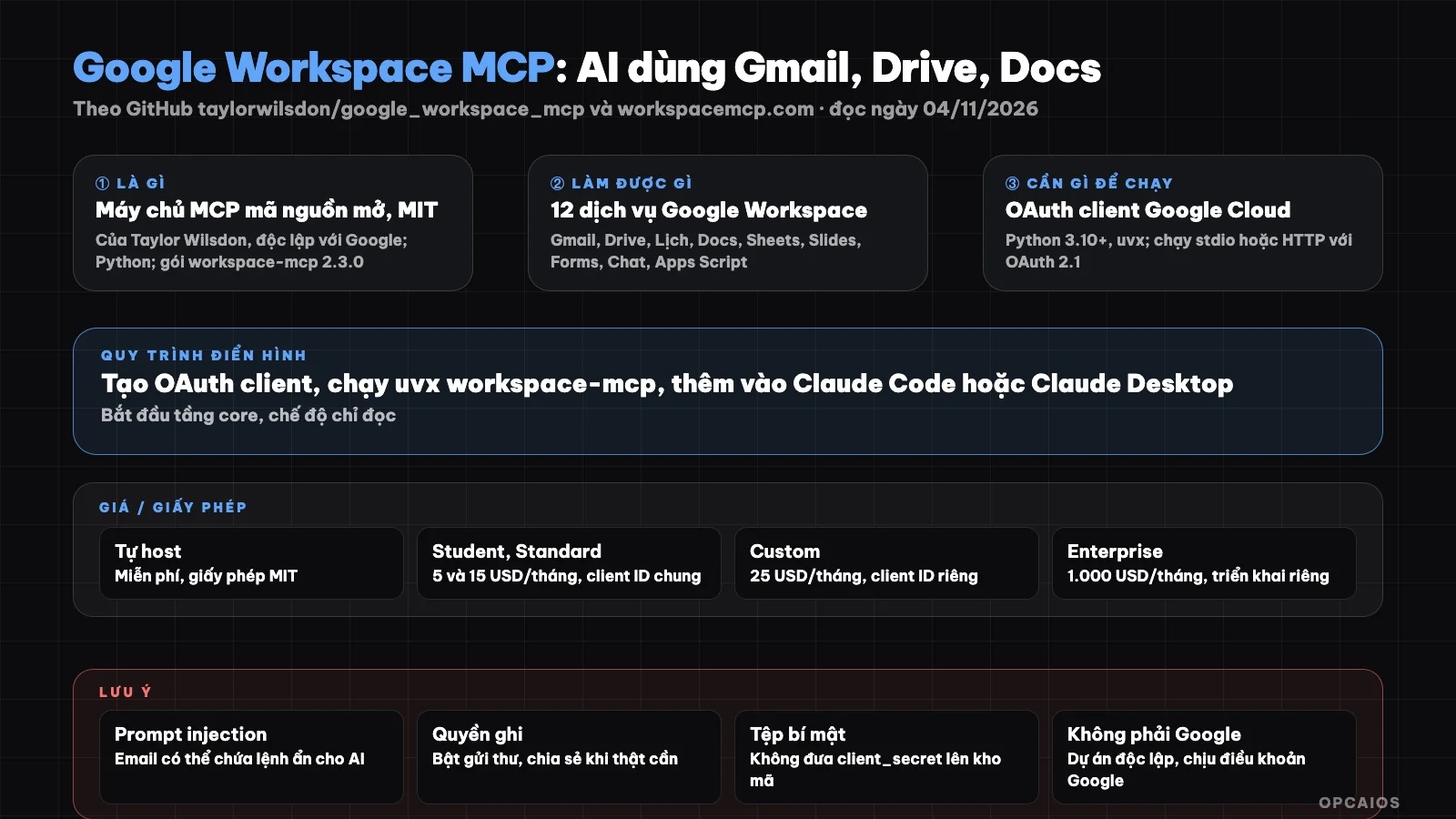
AI assistants call tools via MCP, the server uses your OAuth information to call Google APIs. Diagram: OPCAIOS.
What is Google Workspace MCP and who created it?
Google Workspace MCP is a bridge between AI assistants and Google's office applications, packaged as a single MCP server. The author is Taylor Wilsdon (GitHub account taylorwilsdon), with the official website workspacemcp.com clearly stating the project is independent and unaffiliated with Google LLC.
MCP (Model Context Protocol) is an open standard for AI assistants to call external tools in the same way; see What is MCP? if you're not familiar. According to the README (read 04/11/2026), this server consolidates over 120 tools for twelve Google Workspace services through a single connection point, a figure claimed by the project and not yet verified. The server runs two ways: locally via stdio for legacy applications, or via HTTP in streamable form for remote use and multiple users. A point the project emphasizes is that it uses your own OAuth client from your Google Cloud project, so access permissions and scopes are under your control. The README also commits that the server does not send data anywhere outside Google APIs, has no usage statistics or license server, unless you enable OpenTelemetry yourself.
What can Google Workspace MCP do?
Google Workspace MCP lets AI assistants find, read, create and edit content across Google applications using natural language commands. You choose which services to enable, which tools to grant, and can lock it to read-only mode.
| Service | What it can do per README (read 04/11/2026) |
|---|---|
| Gmail | 15 tools: search, send, draft, labels, filters, attachments |
| Drive | 16 tools: search, create, share, import Office files |
| Calendar | 7 tools: events, availability, absence, focus time |
| Docs | 19 tools: edit, format, tables, tabs, comments, export files |
| Sheets | 14 tools: data ranges, tables, formatting, conditional rules |
| Slides, Forms, Tasks | Create slides, build forms and read responses, manage task lists |
| Contacts, Chat | Contacts and groups; spaces, messages, reactions (Chat needs Workspace account) |
| Apps Script, Custom Search | Write, deploy, run and debug scripts; programmatic web search |
Three layers of tools help keep the context window compact: core is the essential set, extended adds management actions, complete enables everything. You also have a --tools flag to select services, --read-only for read-only access, --permissions per service, and --disabled-tools to exclude individual tools.
Price, License, and Limits
Google Workspace MCP is free when self-hosted under the MIT license, and there's a Workspace MCP Cloud package operated by the maintainer. Self-hosting has no software cost, but you handle the server, configure Google Cloud, and apply patches yourself.
| Package (workspacemcp.com, read on 04/11/2026) | Price | Key Points |
|---|---|---|
| Self-host | Free, MIT | You create the OAuth client and operate it yourself |
| Student | 5 USD/month | One Google account allowed, shared connection quota |
| Standard | 15 USD/month | Unlimited users, shared project client ID |
| Custom | 25 USD/month | Your own client ID, private connection quota, Google Chat included |
| Enterprise | 1,000 USD/month | Private deployment, direct setup support |
Prices exclude tax and may change. With self-hosting, hidden costs are the server machine (personal computer or small server), time to configure Google Cloud, and fees for the AI model your assistant uses; the MCP server doesn't need a GPU.
How do I install Google Workspace MCP?
Installing Google Workspace MCP takes three steps: create an OAuth client in Google Cloud Console, run the server with uvx, then connect your AI assistant. According to the README, the quick setup on workspacemcp.com takes about five minutes, a figure stated by the project.
- First, go to Google Cloud Console, create a project, enable APIs for the services you'll use, and create an OAuth client; get the client ID and client secret.
- Next, set two environment variables
GOOGLE_OAUTH_CLIENT_ID,GOOGLE_OAUTH_CLIENT_SECRET, then run the server with your desired tool tier (requires Python 3.10 or later and theuvtool):
uvx workspace-mcp --tool-tier core
uvx workspace-mcp --tools gmail drive calendar
- For multiple users or remote connections, enable OAuth 2.1 and run over HTTP:
uvx workspace-mcp --transport streamable-http --tool-tier core. - Finally, connect your assistant. With Claude Code, run the server in HTTP mode then add:
claude mcp add --transport http workspace-mcp http://localhost:8000/mcp
For Claude Desktop, web, and mobile versions, the README recommends adding it as a custom Connector; for ChatGPT, use Developer Mode. The README warns against running uvx workspace-cli because that name on PyPI is held by an abandoned package. We haven't run these steps ourselves; this is a summary from the official documentation. See also What is Claude Code?.
Limits, Risks, Security, and Personal Data
The main risk of using Google Workspace MCP is giving your AI assistant permission to read and send emails, edit documents, and share files on your behalf. An email or document containing hidden commands could make the agent do work you didn't intend, so you must enable permissions deliberately.
Prompt injection is an attack type that embeds commands in data to control AI, and your inbox is the easiest place to encounter it. The project's README reminds us of this: emails, documents, calendar events can all contain hidden instructions, so only connect trusted data and carefully consider which write tools to enable. There are four habits to keep. First, start with --read-only and the core tier, only adding email send or file share permissions when truly needed. Second, never upload .env files, client_secret.json, or the .credentials/ folder to your code repository. Third, when running on a server for multiple people, use HTTPS and OAuth 2.1 as the README recommends. Finally, with the Standard cloud package using a shared client ID, OAuth permissions live in the maintainer's Google Cloud project, not yours; only the Custom package keeps them in your own project. The README also notes one milestone: Google's "use client for AI agent" setting cannot be changed on existing clients after 12/11/2026, so anyone who needs this flag must create their own client.
On personal data: emails and documents usually contain information about customers, partners. Putting them in model context means the model provider also receives them, according to their own privacy policy. Please check Google Workspace's terms and the data protection rules where you operate; this section is for reference only, not legal advice.
Compared to Other Options
Google Workspace MCP is strong in service coverage and control, but requires more setup than ready-made integrations. The table below is a general overview, not a benchmark.
| Option | Strengths | Weaknesses |
|---|---|---|
| Google Workspace MCP self-hosted | 12 services, granular permissions, your own OAuth, free | Must create OAuth client, self-operate |
| Workspace MCP Cloud | No self-operation needed, set up in a day | Monthly fee, cheaper tier uses shared client ID |
| Gmail, Drive integrations built into Claude, ChatGPT | Quick to enable, no server needed | Fewer services and actions than the project README |
| n8n workflow with Google node | Runs on schedule, step-by-step control | No natural conversation, must build workflow |
| Custom Apps Script | Runs inside Google, free | Requires coding knowledge, no AI included |
When Should You Use It?
Google Workspace MCP makes sense when you work daily in Gmail, Drive, Docs and want an AI assistant to actually take action instead of just answering. If you only need AI to read a few files, the built-in integrations are usually enough.
| Situation | Recommendation |
|---|---|
| Want AI to summarize unread emails each morning | Enable Gmail in read-only mode |
| Draft reports in Docs, Sheets using Claude Code | Use core layer with Docs, Sheets, Drive |
| Small team sharing, don't want to self-operate | Consider cloud tier, read OAuth permissions carefully |
| Need scheduled runs without conversation | Use n8n or Apps Script |
| Inbox contains sensitive customer data | Test on a secondary account first |
Example (hypothetical): a course seller runs a read-only server with Gmail and Sheets, asking Claude to collect price inquiry emails from the week into a spreadsheet for follow-up.
OPCAIOS Experience
We recently added Google Workspace MCP to the Repo list in the Utilities section on opcaios.org after reading the README and checking that the repo is still maintained; we have not run it yet, so this section outlines the criteria we use to consider it, not an evaluation after use. First, the repo is still maintained: code pushed and version 2.3.0 released on the same day, 30/10/2026. Next, MIT license, no special contribution terms. Then, hidden costs: the self-hosted version costs mainly Google Cloud setup work, while the cloud version charges monthly. Finally, risk: send email and file share permissions are powerful, so our deciding criterion is whether it can run in read-only mode and disable individual write tools, and the README shows it can.
Read more: What is n8n?, What is an AI agent?, What is Google Analytics MCP?, Slash command, skill, plugin or MCP.
Frequently Asked Questions
Is Google Workspace MCP a Google product?
No. According to workspacemcp.com (read on 04/11/2026), Workspace MCP is an independent open-source project, unaffiliated and not sponsored by Google LLC; Google and Google Workspace are trademarks of Google. The author is Taylor Wilsdon, with code in the GitHub repository taylorwilsdon/google_workspace_mcp. The server calls Google's public APIs using an OAuth client you create, so access permissions still fall under Google's terms and policies.
Is Google Workspace MCP free?
The self-hosted version is free under the MIT license, including commercial use. You only pay for creating an OAuth client and running the server machine, plus the AI model fees of your assistant. If you don't want to run it yourself, the Workspace MCP Cloud packages cost 5, 15, 25, or 1,000 USD per month depending on the plan (workspacemcp.com, read on 04/11/2026), not including taxes and subject to change. The Student plan is for one Google account; the Custom plan uses your own client ID.
How do I use Google Workspace MCP with Claude Code?
According to the README, you run the server in HTTP mode (default port 8000), then in the terminal run the command claude mcp add --transport http workspace-mcp with your server's /mcp address. After that, Claude Code sees Gmail, Drive, and Docs tools as normal tools. The project also includes a skill named managing-google-workspace so Claude Code picks the right tools better; you create a symlink from that skill directory into Claude Code's skill directory. It's best to start with the core layer and the --read-only flag.
Is Google Workspace MCP safe with your mailbox?
Safety depends on what permissions you enable. The README states the server doesn't send data anywhere outside Google APIs and has no usage statistics, but email content still goes into the context of your AI model. The bigger risk is prompt injection: a hidden command in an email could trick the agent into sending mail or sharing files. So run read-only mode first, disable write tools you don't need, keep your OAuth file secret, and review every send action.
Can someone without coding knowledge use Google Workspace MCP?
Yes, if they're willing to follow each step. The hardest part is creating a project and OAuth client in Google Cloud Console; workspacemcp.com has a guide with screenshots. Running uvx requires opening the terminal once. Someone who doesn't want to touch the command line at all can choose the cloud package and then add a Connector in Claude Desktop, but should understand what OAuth permissions they're granting. If you want to learn how to safely connect AI to office work, check out OPCAIOS's AI application training course.
Source: GitHub taylorwilsdon/google_workspace_mcp (README, API, read on 04/11/2026: around 3,470 stars, MIT), PyPI workspace-mcp (version 2.3.0), workspacemcp.com/workspace-mcp-cloud (pricing table, read on 04/11/2026); not read/not verified: full documentation and quick start on workspacemcp.com, Google API limits, the 120+ tools number announced by the project; star count and pricing may change. Experience is from OPCAIOS. This article is not legal advice.
Translated from Vietnamese with AI. Read the original.
Want to apply this in your business?
Book a free 30-minute call (Vietnam time, in English or Vietnamese).