


What is Automate Faceless Content?
Automate Faceless Content is a GitHub repository containing tutorial documentation and self-paced courses on creating faceless videos for YouTube, TikTok, Facebook and Instagram, created by Chris Porter, centered around the paid tool ViralWave Studio. The repository contains no executable code. According to GitHub (API, read on 04/11/2026), the repository cporter202/automate-faceless-content was created on 08/12/2025, has around 3,225 stars and 637 forks, declares no license, with the most recent push on 17/10/2026. This post clarifies the marketing nature of the repository, what's worth learning, the actual price of ViralWave Studio on the official page, and the main platform policy risks when producing videos in bulk.
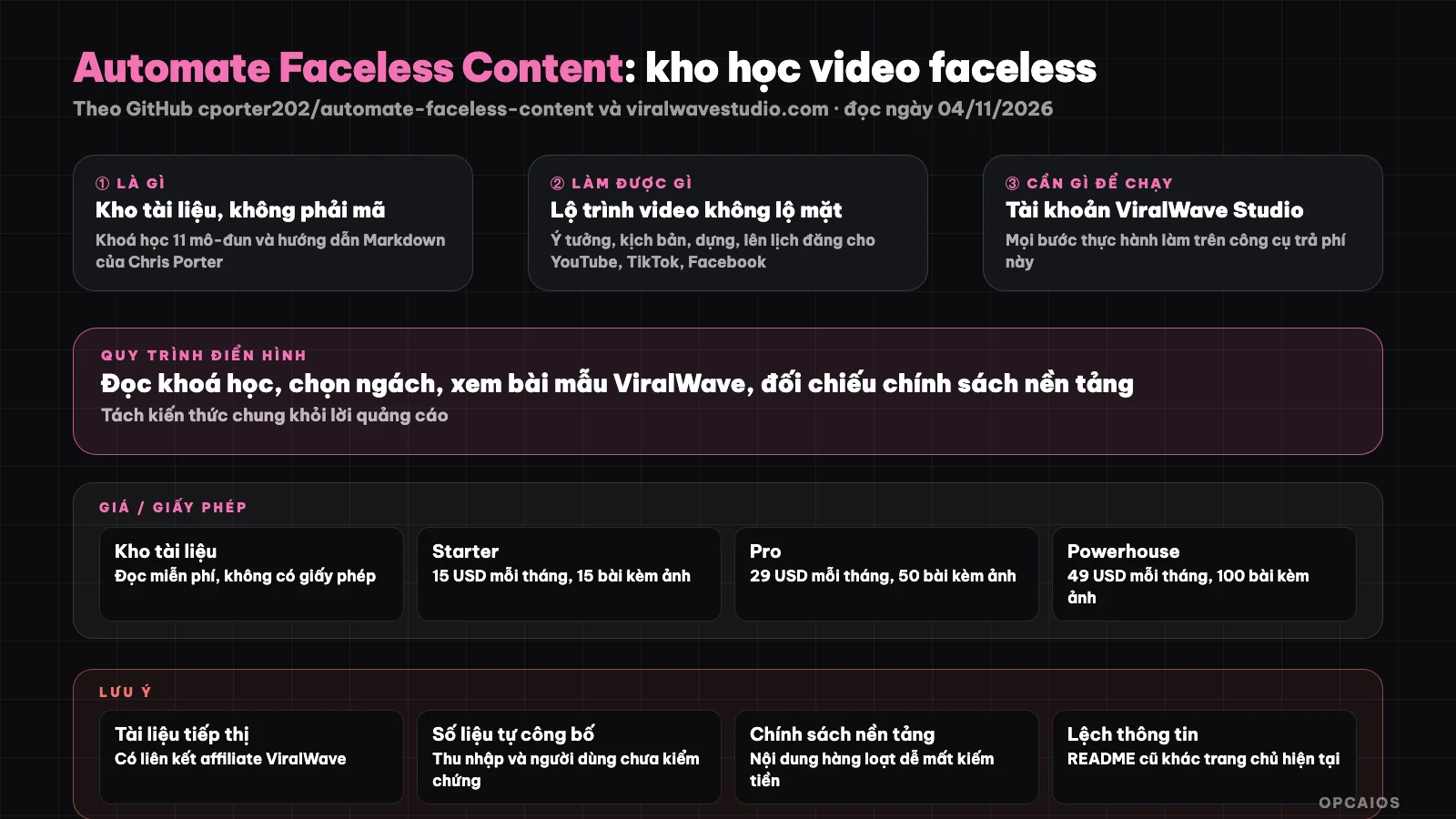
The repository is free learning material, but every process leads to a paid tool. Diagram: OPCAIOS.
What is Automate Faceless Content and who created it?
Automate Faceless Content is a collection of Markdown documentation, not software. The author is Chris Porter, who introduces himself as someone who posts about GitHub repositories on Facebook. The README clearly states the repository contains affiliate links and encourages readers to sign up for ViralWave Studio to get the most out of the course.
According to the README and file list on GitHub (read on 04/11/2026), the repository has four parts. First is the "Faceless Video Mastery" course with 11 modules numbered 0 to 10, from fundamentals to expanding across multiple channels. Next is the guides/ directory organized by groups: getting started, features, monetization, strategy, content niches, platforms, workflows and resources. Third is the video-ideas.md file about 57 KB containing video ideas. Finally is the best-automating-tools.md file introducing only a single tool: ViralWave Studio. The end of the README also has a banner advertising the author's "AI Playbook" package at 10 USD per month, added on 17/10/2026. GitHub does not recognize a programming language for the repository, which is consistent with it containing only text.
In short: this is promotional documentation with reference value, not a neutral tool.
What does the Automate Faceless Content repository teach?
The repository teaches the process of creating faceless videos from ideation, scripting, video editing to scheduling posts, but most practical steps involve operating the ViralWave Studio interface. The general knowledge sections on niches, platforms and content repurposing can still be read independently.
| Documentation Group | Main Content |
|---|---|
| 11-module course | From faceless concepts to running multiple channels, includes progress tracking file |
| Features | Video creation, video editing, consistent characters, batch scheduling, cover images, URL to video |
| Monetization | Monetization conditions per platform, revenue sources, affiliate marketing |
| Content Niches | Finance, health, technology, business, multi-niche strategy |
| Platforms | Specific guides for YouTube, TikTok, Instagram, Facebook |
| Workflows | Daily production, batch production by month, repurposing one video into multiple clips |
| Idea Repository | Long list of video ideas in a single file |
The README also lists many attractive numbers: over 150,000 ViralWave Studio subscribers, over 250,000 videos created, and people earning over 19,000 USD in 7 days. These are numbers self-reported by the author and provider, unverified, and without original sources. The promise of "making money on every platform in 2 to 3 weeks" should also be read as advertising.
How much does Automate Faceless Content cost, and what's the license?
The documentation repository is free to read on GitHub, but it has no license file, so the author retains all copyright: you can read it, but shouldn't copy it to resell or republish. The real cost is ViralWave Studio, which has monthly paid plans.
| Item | Status |
|---|---|
| Documentation repository | Free to read; no license declared (GitHub API, read 04/11/2026) |
| ViralWave Studio Starter | 15 USD per month, 15 posts with images (viralwavestudio.com homepage, read 04/11/2026) |
| ViralWave Studio Pro | 29 USD per month, 50 posts with images |
| ViralWave Studio Powerhouse | 49 USD per month, 100 posts with images |
| Trial | Homepage states start with four free posts |
| Author's AI Playbook package | 10 USD per month according to banner in README, sales page not yet read |
Prices exclude tax and may change. There's one discrepancy to know: the README (last updated December 2025) describes a free plan of 10 posts per month and 15% discount code, but the homepage read on 04/11/2026 positions ViralWave as an AI marketing employee that creates social media posts with images from a business website, with channels listed as Facebook, LinkedIn, Threads, and Pinterest. This means the product may have shifted direction from the course; check again before paying.
How do I get started with Automate Faceless Content?
Getting started with Automate Faceless Content requires no installation: you read directly on GitHub or download the repository to read offline. The effective way to read is to separate general knowledge from tool-specific operations.
- First, open the repository on GitHub and read the
course/README.mdfile to see the structure of 11 modules. - Next, read the files in
guides/platforms/andguides/niches/because this part is least dependent on specific tools. - Cross-check every monetization condition in
guides/monetization/with the official policy pages of YouTube, TikTok, Meta, because the documentation may be outdated. - Finally, if you want to try ViralWave Studio, watch the four free sample posts first before signing up for a plan.
To get a copy for reading offline, use standard git commands (standard Git commands, not specific README commands):
git clone https://github.com/cporter202/automate-faceless-content.git
For example (hypothetical): a bakery owner wants to make a TikTok channel telling the story of baking bread without appearing on camera. They read the content repurposing section to learn that one long video can be cut into many short clips, then create it using available tools without necessarily buying additional software.
What are the policy and legal risks of Automate Faceless Content?
The biggest risk of the faceless video mass production model is violating platform monetization and copyright policies, not the documentation repository itself. This section is for reference only, not legal advice; we have not cross-checked the original policy text as of the writing date.
First, YouTube has monetization policies against repetitive content, mass production, or reusing others' content without adding value; channels posting similar AI videos may be rejected or lose monetization rights. TikTok and Meta also require labeling AI-generated content in some cases. Second, images, music, and video clips inserted into videos must have usage rights; AI tools don't automatically grant those. Third, the "Real Clone" feature in the documentation requires the consent of the person being cloned. Finally, the repository contains affiliate marketing links, so the advice is not neutral; if you recommend tools to others, disclose your affiliate relationship.
How does Automate Faceless Content compare to other options?
Automate Faceless Content is documentation bundled with one tool, while other options are tools or open-source code you control yourself. The table below is general description, not measurement.
| Option | Strengths | Points to consider |
|---|---|---|
| Automate Faceless Content | Clear learning path, many ideas | Marketing for ViralWave, no license |
| Hypit | Skills for AI agents to build videos by workflow | Need to know how to use agents |
| Remotion | Build videos with code, full control | Need programming knowledge |
| OpenCut | Open-source video editor | More manual work |
| Self-combine HeyGen, Suno, CapCut | Flexible, many popular tools | Pay at multiple places |
When Should You Use Automate Faceless Content?
Automate Faceless Content is suitable for beginners who want a learning roadmap about faceless videos and accept that the material is selling a tool. If you need a self-controlled workflow, open source, or low cost, choose another direction.
| Situation | Recommendation |
|---|---|
| Just starting, need a knowledge framework | Read the foundation and niche sections, skip income promises |
| Need a posting tool for a small business | Check out four sample posts from ViralWave first, then decide |
| Want to automate with agents | Check Hypit or Remotion |
| Want a sustainable income channel | Prioritize content with inherent value, avoid mass-produced similar content |
| Want to reuse the material to sell | Don't, the repository has no license |
OPCAIOS's Experience
We just added Automate Faceless Content to the Repo listing in the Utilities section on opcaios.org after reading the README and checking that the repository is still being updated; we haven't tested it yet, so this section outlines the criteria we used to consider, not an assessment after use. We also haven't used ViralWave Studio. Four criteria:
- Is the repository still being updated: there are changes on 17/10/2026, but that's just adding advertising banners; the README still says the last content update was in December 2025.
- License: none, so it's read-only for reference.
- Hidden costs: the material is free but the workflow requires a ViralWave plan starting from 15 USD per month.
- Terms risk: mass-produced videos easily violate platform monetization policies.
Read more: Create TikTok Shorts Channels Using HeyGen, Suno, CapCut, What is Hypit?, What is Remotion?, What is TryPost?.
Frequently Asked Questions
Is Automate Faceless Content software?
Automate Faceless Content is not software. It's a GitHub repository containing Markdown material: an 11-module course, topic-specific guides, and a video idea file. All video editing operations in the material are done on ViralWave Studio, an external paid service. You don't install or run anything from this repository. If you need self-controlled tools, check open source repositories like Remotion or OpenCut.
How much does ViralWave Studio cost?
According to viralwavestudio.com as of 04/11/2026, ViralWave Studio has three monthly subscription plans: Starter 15 USD with 15 posts including images, Pro 29 USD with 50 posts, Powerhouse 49 USD with 100 posts; you can preview four posts for free. Prices don't include tax and may change. The repository's README describes a free plan of 10 posts per month, which differs from the current homepage, so trust the official pricing page at the time you purchase.
Can you make money quickly making videos from this repository?
Nothing is guaranteed. Numbers like over 19,000 USD in 7 days are self-reported by the author and provider, unverified, and the repository contains affiliate marketing links. Income depends on the niche, quality, timing, and each platform's monetization policy. YouTube has rules for repetitive or mass-produced content, so a channel with only similar AI videos risks having monetization denied.
Can I copy the material in the repository to reuse it?
The repository declares no license, according to GitHub API as of 04/11/2026. When there's no license, by default the author retains all rights: you can read on GitHub, but you shouldn't copy, retranslate to sell, or post as your own course. You can learn the ideas and write your own version. This is reference information, not legal advice.
Can someone who doesn't know code use this repository?
Yes. Automate Faceless Content is written for beginners, no programming needed: you just read the material on GitHub. What's required is the ability to read English and awareness against advertising claims. If you want to build your own AI content workflow without depending on one paid tool, you can learn to use AI agents and automation tools like n8n. See OPCAIOS's AI application training.
Source: GitHub cporter202/automate-faceless-content (README, best-automating-tools.md, file list, API, read 04/11/2026), viralwavestudio.com homepage (read 04/11/2026); not read/not verified: ViralWave's /pricing page (only shows login screen), content of each course module, aiwithchris.com, user and income numbers self-reported by author, original policy text from YouTube, TikTok, Meta; star count and prices may change. Experience is OPCAIOS's.
Translated from Vietnamese with AI. Read the original.
Want to apply this in your business?
Book a free 30-minute call (Vietnam time, in English or Vietnamese).