


What is Hypit?
Hypit is an open-source project written in TypeScript that provides skills and command-line tools for AI agents like Claude Code (Anthropic) or Codex (OpenAI) to build videos through an editable and re-runnable process: from a sample video, the agent extracts shots, subtitles, B-roll, and effects, then creates new variations. According to the GitHub API (as of November 4, 2026), the hypit-ai/hypit repository has approximately 27,700 stars, 3,200 forks, was created on July 29, 2026, with the most recent push on November 3, 2026, and is licensed under the Hypit Open Source License (Apache 2.0 with additional conditions). Hypit does not charge per user or per export, but you pay for image generation models, video, and custom voices. This post explains what Hypit does, real costs, how to install it, and copyright, face, and platform terms risks when "cloning" someone else's video.
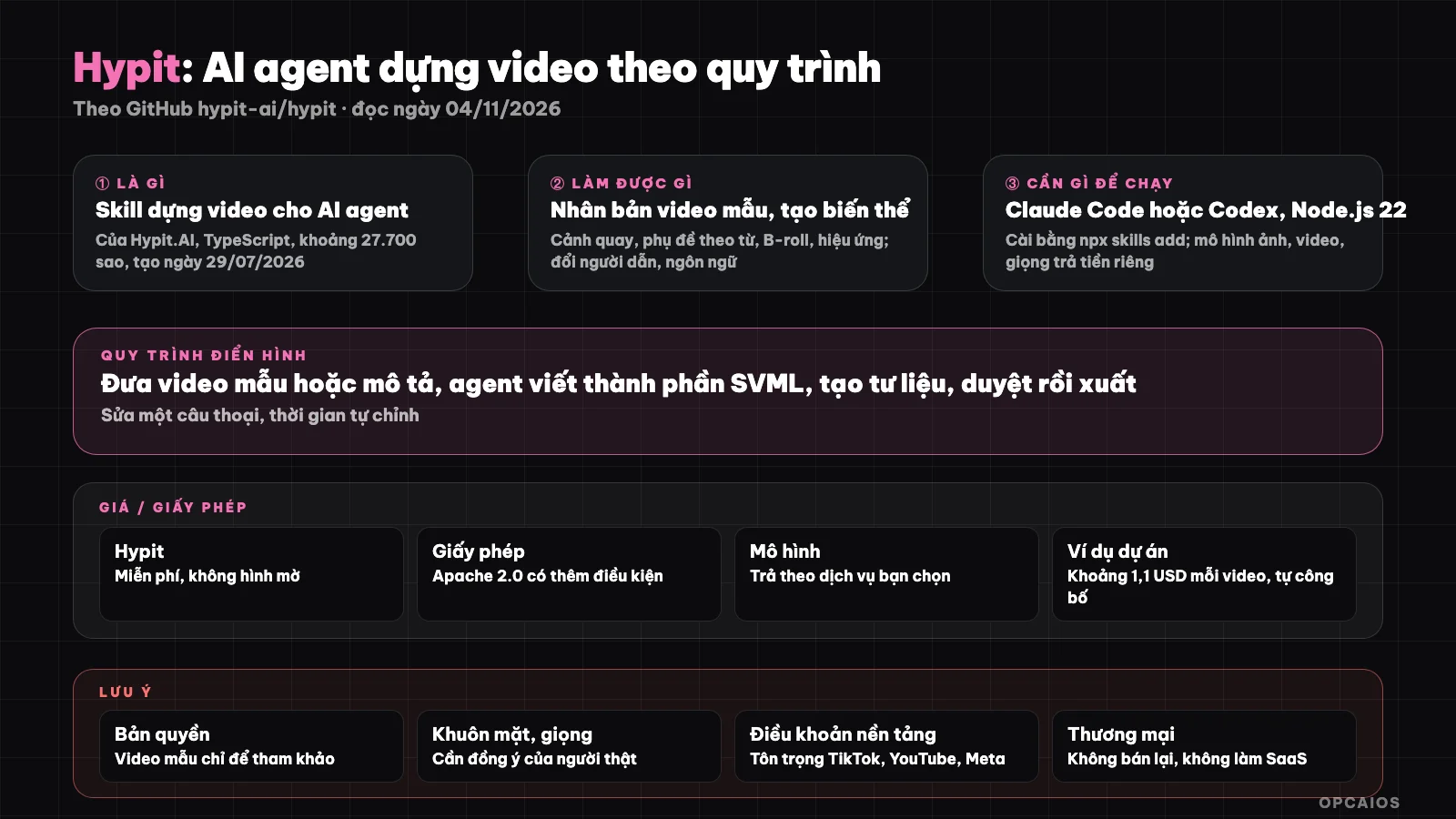
An agent turns a sample video into an editable process, then only recreates the parts that change. Diagram: OPCAIOS.
What is Hypit and who created it?
Hypit is a skills and command-line package @hypit/hypit released by the Hypit.AI team, with copyright held by Hypit.AI. Hypit gives agents a "language" for describing video called SVML, where everything follows each word in the speech rather than by seconds.
The core idea of Hypit, according to the README on GitHub (as of November 4, 2026), is that you don't work directly with video editing software. You work with an agent programmer. You give the agent a sample video, or just describe the video you want to make, and the agent writes out a composition file in SVML: main shots (A-roll), illustrative shots (B-roll), karaoke-style subtitles tied to each word, motion graphics, background music. Because subtitles and effects are anchored to words rather than seconds, when you edit a line of dialogue the timing automatically adjusts. The README makes clear that cloning video is just one entry point: you can start from an existing template or describe from scratch. Image, video generation models are also not required, since a process can use only subtitles, motion graphics, and images built with code, rendered through multiple headless Chromium processes. This approach is close to Remotion, but the person writing code is an agent. If you're new to skills, see What is a skill?.
What can Hypit do?
Hypit can make social media ads, AI-generated UGC videos, podcast clips and interviews, code-built videos, and localize a video into multiple languages. The strength is that one process can be reused for many variations, only recreating the parts that change.
| Feature | Brief description (from README, as of November 4, 2026) |
|---|---|
| Clone sample video | From one video, the agent rebuilds the entire process, not just the script |
| Multiple variations | Keep the structure, change the host, opening, product, language, aspect ratio |
| Plug-and-play components | Swap hosts without touching subtitles; write your own or use ready-made packages |
| Subtitles by word | Use WhisperX to get each word and its timing |
| Code-built video | Images created by interface code, rendered locally, no model calls |
| Studio and comments | Edit on timeline, comment at any moment |
| Localization | Same video in multiple languages, rewrite sentences and timing adjusts itself |
The README gives three examples (soccer rankings, podcast clip, street interview), each with total model costs around 1.07 to 1.15 USD (as announced by the project, unverified).
Does Hypit have a free version, and where are the hidden costs?
Hypit is free to use: no per-user fees, no per-output fees, no watermarks. The real costs are your programming agent package and any AI services for image, video, voice, or transcription generation if your workflow needs them.
| Item | Details (read 04/11/2026; before tax, subject to change) |
|---|---|
| Hypit | Free under Hypit Open Source License |
| Programming agent | Claude Code, Codex, or another agent package, billed by provider |
| Image, video, voice generation | Pay by service of your choice; HypiHub is the recommended service |
| WhisperX transcription | Run locally (requires installation, heavier with GPU) or use archived version |
| Runtime machine | Node.js 22.15 or later per package.json; rendering uses multiple Chromium processes |
| Commercial use | You can use it for your organization and your clients; multi-tenant services or reselling require separate licensing |
We could not access HypiHub's pricing page: hypit.ai returned a 502 error when we checked on 04/11/2026, so this post does not list that service's price.
How to install Hypit and get started?
Installing Hypit takes just one command to add a skill to your agent; the agent checks the environment and helps install runtime packages when you first use it. You don't need to clone the entire repository. Then you call /hypit in your agent with a sample video or description.
- First, install the skill per the README:
npx skills add hypit-ai/hypit -g
- Next, open your video project folder in Claude Code or Codex.
- Call the skill, for example:
/hypit Make a video ranking AI toolsor provide a path to a sample video file. - The agent checks your environment, asks for API keys to model services if needed, then creates assets and builds components.
- Finally, review in Studio and then export your video; the README separates review and export into two steps.
To check your installed version, the quickstart documentation suggests the command hypit version --check. We have not run through these steps ourselves.
Copyright, face, and platform terms risks when using Hypit
"Going viral video cloning" is Hypit's easiest feature to misuse. You can learn a video's structure, but the footage, music, voiceover, faces, and brand inside belong to someone else. Treat a sample video as reference material, not raw content to copy.
The first risk is copyright. Hypit's license says videos you create are yours, but that does not give you rights to content in the sample video. Reusing someone else's footage, background music, or script almost verbatim can infringe copyright. Next is face and voice. The README advertises changing narrators and swapping faces; using an actual person's image or voice without permission can violate personality rights, and in Vietnam biometric data falls under sensitive personal data per personal data protection rules. The README examples also use famous athletes' names, so be careful when placing real people in promotional content. Third is platform terms: the quickstart lets you provide links from supported platforms; downloading videos from TikTok, YouTube, or Meta must follow each platform's terms, and we do not advise ways around those blocks. Fourth is advertising: bulk promotional videos still must follow advertising law and platform ad policies, especially for supplements, cosmetics, or finance. Last, the "100 free AI avatars" package the README advertises lives in a Google Drive folder; check usage rights before putting them in commercial videos. We have not cross-checked the original texts of those laws and terms; this is not legal advice.
On software licensing: GitHub API lists this as "Other" because it is not a standard license. You can use it for your own organization and your clients, but you cannot run Hypit as a multi-tenant service, cannot resell it, and cannot remove Hypit's name and logo from the command-line interface and run reports.
Hypit vs other video making tools
Hypit differs from other AI video apps in that it doesn't have its own drag-and-drop interface; the programming agent is the one building it. Compared to code-based video libraries, Hypit comes with built-in production knowledge and a way to replicate video templates.
| Tool | How it works | Good for |
|---|---|---|
| Hypit | Agent writes SVML components, calls models as needed | Claude Code or Codex users who need many variations |
| Remotion | Programmer writes video in React | Teams with developers who need frame-by-frame control |
| AI avatar apps (like HeyGen) | Web interface, pick avatar, paste script | Non-coders, few variations |
| Manual video editing software | Drag and drop on timeline | Videos needing emotion, manual tweaks |
General description, not a measurement. If you're planning to run a faceless channel, check out faceless TikTok and Reels channels for OPC.
When should you use Hypit?
Hypit makes sense when you're already comfortable with a programming agent, have a repeating video format, and need many variations fast—like testing different hooks for your own ads or daily product videos. It's not a fit if you've never used the command line or if you're planning to copy someone else's video wholesale.
| Situation | Recommendation |
|---|---|
| Testing 20 different hooks for the same ad of your own | Very good fit |
| Daily product videos following a fixed template | Good fit, keep structure, swap products |
| Localizing your video into many languages | Good fit |
| Copying a viral video from someone else to post | Not recommended, copyright risk |
| Swapping in a celebrity's or another real person's face without consent | Don't do it |
| Haven't used Claude Code or Codex yet | Learn agents first, see What is Claude Code? |
Example (hypothetical): an online course seller has an intro video they filmed themselves. They ask an agent to use Hypit to create five versions with five different hooks and Vietnamese captions, run test ads, then keep the version with the highest click rate.
OPCAIOS experience
We added Hypit to the Repository list in the Tools section on opcaios.org after reading the README and checking that the repo is still maintained; we haven't tested it yet, so this section lays out the criteria we use to consider it, not an evaluation after use.
- Is the repo still being updated: yes, push on 03/11/2026, latest release on GitHub is v0.3.1 on 09/10/2026; the project is still young, created 29/07/2026, so there could be many changes between versions.
- License: not a standard license; you can use internally and for clients, but you can't resell or run it as a service for many users.
- Hidden costs: fees for image, video, and voice models, plus the programming agent package; set a spending limit at the model service before running batches.
- Terms risk: only use video and faces you have rights to; this was a deciding factor for us.
Read more: What is Codex?, What is a video outlier?, What is Remotion?.
Frequently Asked Questions
Is Hypit really free?
Hypit software is free: the README says there's no per-user charge, no per-export fee, and no watermark. But you still pay for programming agents like Claude Code or Codex, and for model services for image, video, and voice generation if your workflow uses them. The three examples in the README cost around 1.07 to 1.15 USD per video in model fees (according to the project, unverified). Videos using only subtitles and code-generated graphics may not cost model fees.
Can I use Hypit to make videos for clients?
According to the Hypit Open Source License read on 04/11/2026, you can use Hypit for your organization's work, including commercial work and making videos for clients, and the generated videos belong to you. What's forbidden without a commercial license is running Hypit as a service for multiple parties with separate workspaces, or reselling Hypit or derivatives. Content generated by third-party models remains subject to that provider's terms. This is not legal advice.
Does cloning someone else's viral video infringe copyright?
Possibly. Learning a video's structure, like cutting rhythm, opening phrasing, subtitle style, is usually common professional practice. But reusing footage, music, scripts that are nearly identical, or faces from the sample video may infringe copyright and image rights. Downloading video from TikTok or YouTube must also follow platform terms. We recommend using sample videos only as reference and shooting or creating your own content. This is not legal advice.
Does Hypit need a GPU?
No, it's not required. Hypit's editing and rendering runs on Node.js and many headless Chromium processes, so a regular computer can run it, just slower with long videos. The heavy parts are WhisperX transcription and image, video, and voice generation models: you can run them locally if you have a GPU, or use hosting services like HypiHub or third-party API keys. Quickstart says the agent will explain the effort to run locally and service options before you decide.
Can someone who doesn't know code use Hypit?
Yes, at a basic level if you're already familiar with a programming agent like Claude Code or Codex, since Hypit lets the agent write code and run commands for you. You still need to know how to install skills, read the agent's proposed commands, manage API keys, and review video before posting. If you've never used a command line, a web-based AI avatar app would be easier to start with. To learn how to use agents and AI tools for content systematically, see OPCAIOS's AI application training course.
Source: GitHub hypit-ai/hypit (README, LICENSE, docs/quickstart.md, docs/guide/agents.md, package.json, API, read 04/11/2026: about 27,700 stars, 3,200 forks, Hypit Open Source License); couldn't read hypit.ai website (502 error on 04/11/2026) and HypiHub pricing page; unverified: cost of example videos, claims about view counts, usage rights of avatar packages on Google Drive, original Vietnamese data protection law text; star count and pricing may change. Experience is OPCAIOS's.
Translated from Vietnamese with AI. Read the original.
Want to apply this in your business?
Book a free 30-minute call (Vietnam time, in English or Vietnamese).