


What is TryPost?
TryPost is open-source social media scheduling and posting software designed for AI agents to compose, schedule, and post content via MCP or REST API, while also providing an editor, calendar, and review workflow for teams. According to the GitHub API (read on 04/11/2026), the trypostit/trypost repository has around 800 stars, over 200 forks, AGPL-3.0 license, written in PHP, created on 17/01/2026, with the most recent push on 03/11/2026; the latest release is v2.0.1 from 01/11/2026. The self-hosted version is free and feature-complete; TryPost Cloud pricing starts at 19 USD per month according to the price page at trypost.it (read on 04/11/2026). This post answers what TryPost can do, the cost, how to self-host, platform terms risks, and when to use it.
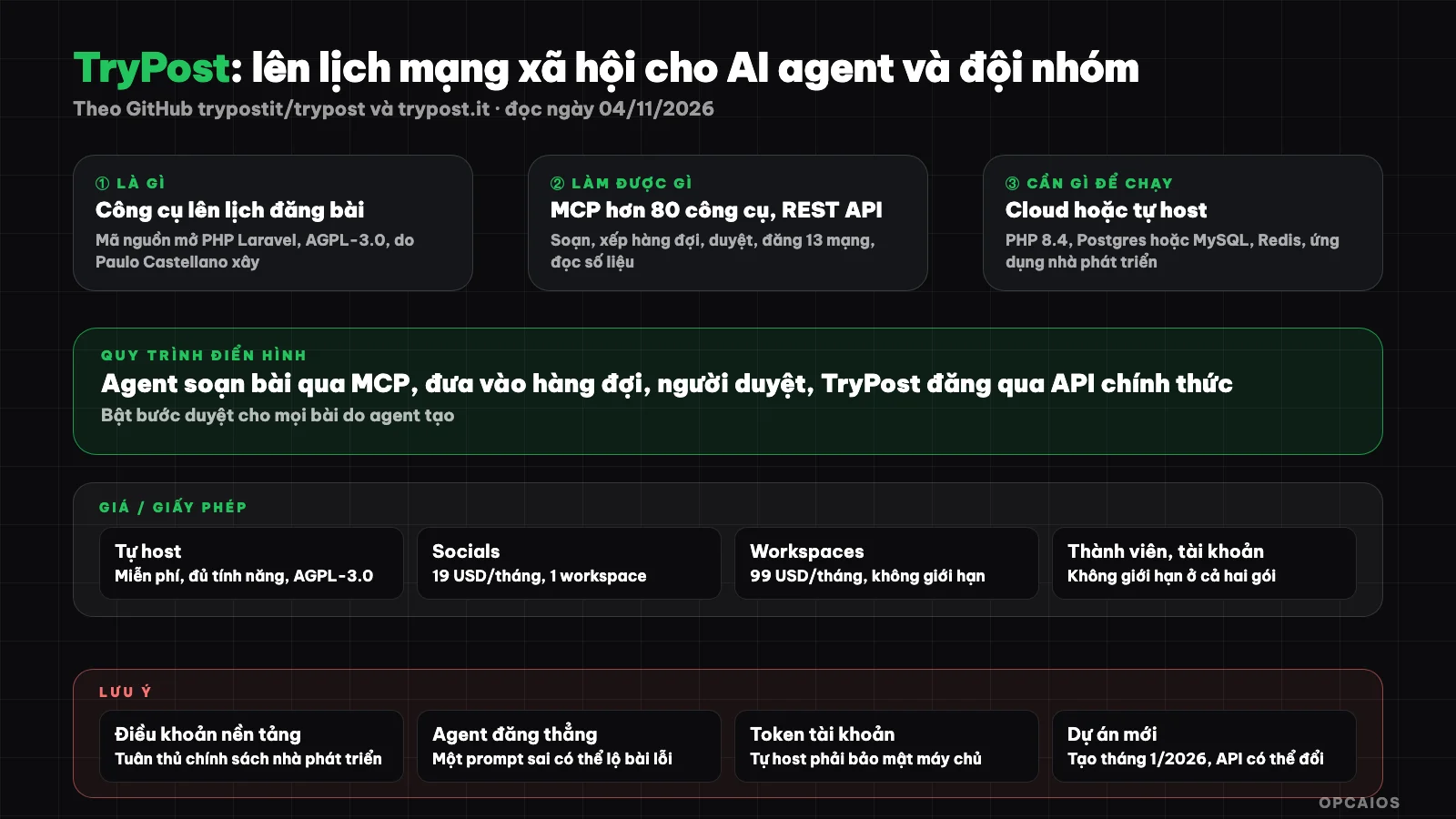
Both agents and humans feed posts into one queue; TryPost posts via each network's official API. Diagram: OPCAIOS.
What is TryPost and who created it?
TryPost is a web application written in PHP (Laravel) built publicly by Paulo Castellano on GitHub. The main idea is stated plainly in the README: most posts today come from AI agents and scripts, the rest come from teams who need a good editor and a reviewer.
According to the README (read on 04/11/2026), TryPost has two entry points. The first is for AI agents: an MCP server with over 80 tools to manage posts, media files, queues, ideas, labels, signatures, and metrics, plus a REST API for custom scripts. The second is a web app for humans, consisting of an editor that works for many networks at once, a drag-and-drop calendar, a time-slot queue, and a post review step. The README emphasizes that agents can do everything the app can do, with the same rules, the same limits, and the same review steps. If you're new to MCP, see What is MCP?.
What can TryPost do?
TryPost brings together composing, scheduling, reviewing, posting, and measuring social media in one place, for both agents and humans. The README lists 13 supported networks, posting via each network's official API, not the kind that reminds you to finish posting on your phone.
| Feature | Short description from README (read on 04/11/2026) |
|---|---|
| MCP server | Over 80 tools for posts, media, queues, ideas, labels, metrics |
| REST API, webhooks | Create posts in bulk, upload media, read metrics, receive posting or error events |
| Editor | Write once, tweak per network, preview, AI assistant rewrites |
| Calendar and queue | Set time slots for each channel, new posts fill the next empty slot |
| Post review | Members submit for review, admins approve or reject with one click |
| Workspace | Separate each customer or brand |
| Supported networks | Instagram, TikTok, LinkedIn, X, YouTube, Facebook, Threads, Bluesky, Pinterest, Mastodon, Google Business, Telegram, Discord |
| Other | Auto-repost video to other networks, fetch images from Unsplash, Google Drive, Canva; 16 interface languages |
A real-world use example (hypothetical): a course seller asks Claude to write seven posts for next week about a new program; Claude calls TryPost's MCP to add posts to the Facebook, LinkedIn, and Threads queue; the owner opens the calendar, edits two posts, approves, and TryPost auto-posts at the right times.
How much does TryPost cost, what license does it have, and where are the hidden costs?
TryPost has two options: self-host for free with all features under the AGPL-3.0 license, or use the paid TryPost Cloud to avoid running a server. The README states that the self-hosted version has no paid tier or locked features.
| Plan | Price (from trypost.it/pricing, read 04/11/2026) | Limits |
|---|---|---|
| Self-host | 0 USD for software | All features, self-managed |
| Socials | 19 USD/month or 190 USD/year | 1 workspace, unlimited social accounts and members |
| Workspaces | 99 USD/month or 990 USD/year | Unlimited workspaces, same feature set |
| Trial | Not listed on pricing page; offers (if any) appear at signup | Not yet verified |
Prices exclude tax and may change. There are three hidden costs when self-hosting. First is the server: the docs.trypost.it documentation lists a minimum of 1 CPU core, 1 GB RAM, 10 GB disk, and recommends 2 cores, 2 GB RAM, 20 GB or more if storing lots of media. Second is the work of registering a developer application with each social network to get posting permissions via API; this process takes time and may require platform approval. Third, if your agent composes posts using a cloud model, you pay for that model's API separately.
On AGPL-3.0: the README summarizes that you may use, modify, fork, self-host, and redistribute, including commercially; if you run a modified version as a network service, you must disclose your changes to that service's users. This is a summary only, not legal advice.
How do I install TryPost and get started?
TryPost's README does not list install commands; the guide is in the self-host section on docs.trypost.it. According to the overview and requirements pages (read 04/11/2026), there are three paths: Docker for production, direct install on a VPS, and Docker for developers.
- First, choose your install path. The production Docker build uses a prebuilt image already configured with Horizon (queue), Reverb (WebSocket), and scheduler. Direct install requires PHP 8.4.1 or higher, Composer 2, and Node.js 22.12 or higher.
- Next, prepare a PostgreSQL or MySQL database and Redis (required for queue, cache, locks).
- Generate an app key, run database migrations, create Passport keys for REST API and MCP OAuth, then create an admin account using a seeder as documented.
- Register a developer application with each network you want to post to and fill in the credentials in your config. The overview page lacks detail; each network has its own page in the docs that we have not yet read.
- Finally, connect your agent: add TryPost's MCP server to Claude, ChatGPT or Cursor per the AI section in the docs, then test with a secondary channel first.
We do not provide specific commands because we have not read the detailed install page; follow docs.trypost.it. See What is Docker? and What is a VPS? if you are new to self-hosting.
Limits, risks, security, and legal
The main risk of TryPost lies not in the code but in automating posts on others' platforms. Each social network has its own rules on automation, posting frequency, and content; accounts can be restricted if your agent posts too often or violates policy.
There are five points to keep in mind. First, TryPost posts via official APIs, which is the right way, but you must still follow the developer policies of Meta, TikTok, X, LinkedIn, Google, and others; we have not yet cross-checked each document. Second, giving your agent direct posting power is a risk: one bad prompt could push a flawed post to the public. Enable a review step for agent-generated posts. Third, TryPost stores access tokens to your social network accounts or your customers'; if you self-host, you are responsible for server security, HTTPS, and backups. Fourth, AI-generated content and images must still respect copyright, advertising rules, and personality rights. Fifth, the project is young (created January 2026), so the interface and API may change quickly. This section is for reference only, not legal advice.
TryPost vs Other Options
TryPost competes with self-hosted scheduling tools like Postiz, Mixpost and paid services like Buffer, Hootsuite. The table below is a general description, not a measurement.
| Option | Strengths | Weaknesses |
|---|---|---|
| TryPost | MCP with over 80 tools, feature-complete self-hosted version | New project, fewer stars than long-established competitors |
| Postiz | Self-hosted, large community | Requires operations, must register apps individually for each network |
| Mixpost | Laravel, self-hosted, more established | Some features are in the paid version |
| Buffer, Hootsuite | No server needed, stable | Pay per channel or user, data with third party |
| Self-built with n8n | Flexible, integrates into existing workflows | Must handle API and errors for each network yourself |
When to Use TryPost?
TryPost is a good fit when you want an agent to do most of the writing and scheduling work, while people just review. If you only post a few times a week on one network, the scheduling tool built into the platform itself is usually enough and carries less risk.
| Situation | Recommendation |
|---|---|
| Solo person wants agent to write and schedule across many networks | Try TryPost Cloud Socials plan first |
| Agency managing multiple brands | Workspaces plan or self-hosted |
| Need data on your own server | Self-host, enable HTTPS and backup |
| Only post one network, few posts | Use the platform's native scheduling tool |
| Person with no coding knowledge | Use Cloud version, don't self-host |
OPCAIOS Experience
We recently added TryPost to the Repo list in the Tools section on opcaios.org after reading the README and checking that the repository is still active; we have not run it yet, so this section describes the criteria we use to consider it, not an evaluation after use.
Our real situation: we once self-hosted Postiz for scheduling social media posts and then removed it; we have not tried Mixpost or TryPost. So we read TryPost against four criteria. First, is the repository alive: GitHub API shows a push on 03/11/2026 and version v2.0.1 on 01/11/2026. Next, AGPL-3.0 license works for internal use. Third, the biggest hidden cost is registering and maintaining developer apps with each network, plus a server and Redis always running; this was also the overhead when we ran Postiz. Finally, terms of service risk: we only consider it if we keep a review step before any post the agent writes.
Read more: What is an AI agent?, What is Claude Code?, What is Mixpost?, Tools section, 5 best social media scheduling tools 2026.
Frequently Asked Questions
Is TryPost free?
The self-hosted version of TryPost is free and has all features, according to the README on GitHub (read 04/11/2026), under AGPL-3.0 license. You only pay for the server, domain, and the work of registering developer applications with each social network. If you don't want to operate it yourself, TryPost Cloud has two plans according to trypost.it/pricing on the same date: Socials at 19 USD per month (190 USD per year) with one workspace, and Workspaces at 99 USD per month (990 USD per year) with unlimited workspaces. Both have unlimited social media accounts and members. Prices do not include tax and may change.
Which networks can TryPost post to?
According to the README on GitHub (read 04/11/2026), TryPost supports 13 networks: Instagram, TikTok, LinkedIn, X, YouTube, Facebook, Threads, Bluesky, Pinterest, Mastodon, Google Business, Telegram and Discord. The documentation notes that LinkedIn and Instagram have two types of connections, so the API uses 15 platform codes. Posts are made through the official API of each network, not by sending notifications. Each network has its own limits on format, length, and account type allowed to post via API; read the page for each platform in the TryPost documentation and that platform's developer policy before deploying it for customers.
How do I use TryPost with Claude or ChatGPT?
TryPost has an MCP server with over 80 tools, according to the README (read 04/11/2026). You add this server to Claude, ChatGPT, Cursor or other MCP-supporting applications according to the AI section in docs.trypost.it, then give commands in natural language, for example write a week of posts for three networks and put them in the queue. The agent can do everything the application can do, with the same rules and approval steps. We recommend turning on the review process for posts created by agents, testing on a secondary account first, and limiting posting frequency to avoid violating platform terms. OPCAIOS has not tried connecting it yet.
How is TryPost different from Postiz and Mixpost?
All three are social media scheduling tools that can be self-hosted. According to the README, TryPost positions itself as a tool made for AI agents first, with a large MCP server and REST API, and claims the self-hosted version does not lock any features. TryPost and Mixpost are both written in PHP Laravel; Postiz is written in TypeScript. TryPost is much newer, created in January 2026, so the community and stability still need time to prove themselves. The comparison table in the post is a general description, not a measurement. We once self-hosted Postiz and then removed it; we have not tried TryPost or Mixpost yet.
Can someone with no coding knowledge use TryPost?
Yes, if you use TryPost Cloud: you sign up, connect your social media accounts, write posts in the editor and schedule them like familiar tools. Self-hosting is different: you need to know Docker or install PHP, PostgreSQL or MySQL, Redis, configure HTTPS and register developer applications with each network yourself. Connecting agents via MCP also requires getting familiar with AI tool configuration. If you want to learn how to have agents write content while keeping approval rights, see OPCAIOS's AI Application Training course.
Source: GitHub trypostit/trypost (README, API, release v2.0.1, read 04/11/2026: about 800 stars, AGPL-3.0), pricing page trypost.it/pricing and documentation docs.trypost.it (self-hosted overview page and requirements page, read 04/11/2026); not read/not verified: detailed setup page, Docker page, individual platform pages, developer policy of each social network; star count and pricing may change. Experience is that of OPCAIOS. This post is not legal advice.
Translated from Vietnamese with AI. Read the original.
Want to apply this in your business?
Book a free 30-minute call (Vietnam time, in English or Vietnamese).