


What is the AI toolkit for the OPC model (one-person company)?
It's a small set of tools just enough for one person to do four core things: think and draft with AI, automate repetitive processes, manage customers, and distribute content. One honest note right from the start: no toolkit is "foolproof," and the claim "automate 80%" has no universal proof; the real percentage depends on what you do, whether your processes repeat, and how much risk you accept. This post gives you a framework for choosing tools across four layers, reference prices read from official pricing pages on 24/10/2026, a way to measure "what percentage of the process is automated" that you can verify, and experience from OPCAIOS.
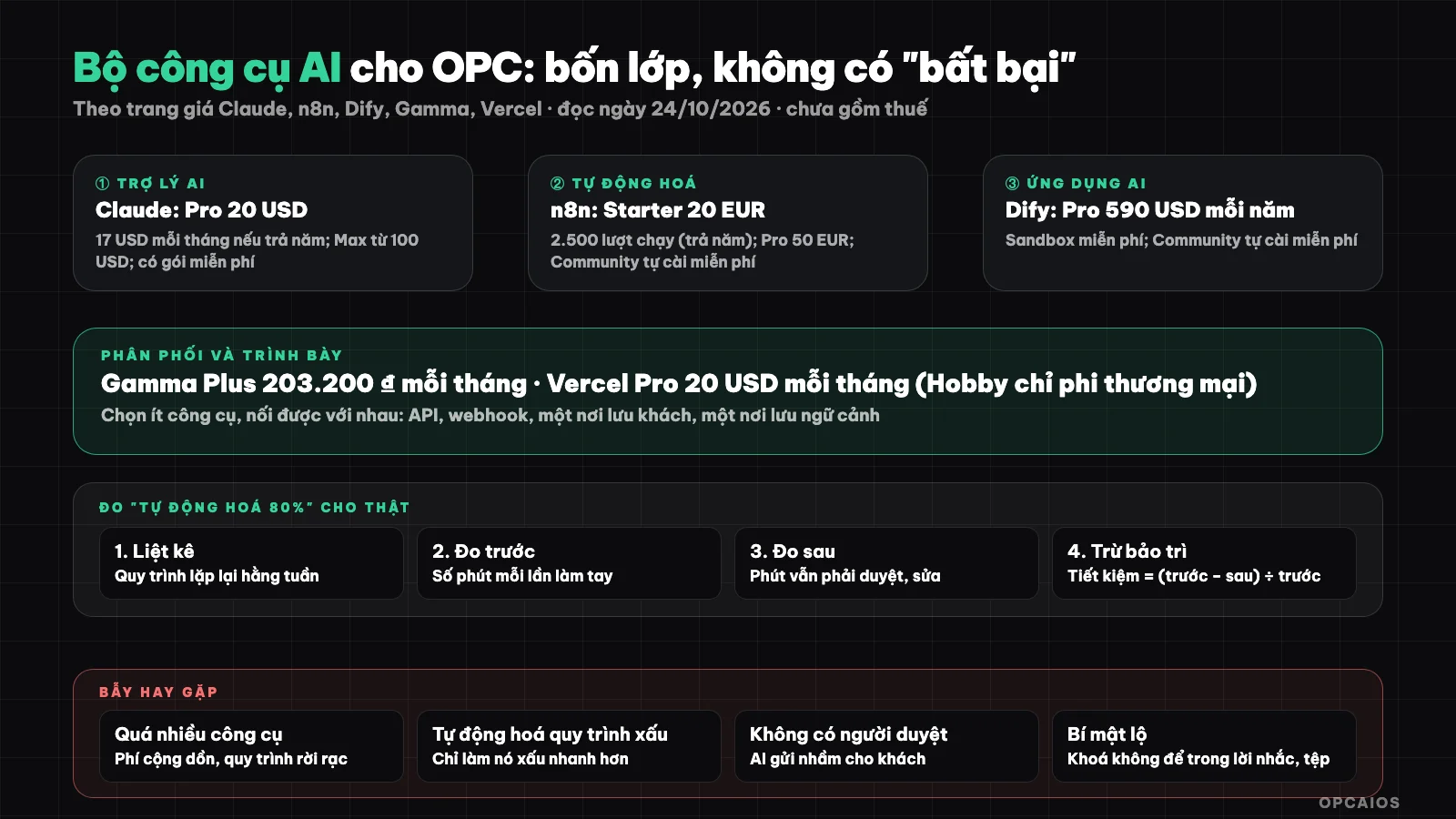
Choose few tools but connect them together, and measure automation ratio with real numbers. Diagram: OPCAIOS.
What four layers does the AI toolkit for OPC have?
The AI toolkit for OPC has four layers: AI assistant, automation, AI application, and distribution or presentation. According to official pricing pages read on 24/10/2026, a minimum set could include Claude Pro ($20 per month), n8n Starter (20 EUR per month when billed yearly) and Vercel Pro ($20 per month); this is an example assumption for budgeting, not a binding recommendation. The table below breaks down each layer:
| Layer | What to do | Example tools | Reference price (official pricing page) |
|---|---|---|---|
| 1. AI assistant | Draft, research, write code | Claude | Pro $20 per month ($17 per month if billed yearly); Max from $100 per month; free plan available |
| 2. Automation | Connect apps, run processes by event or schedule | n8n | Starter 20 EUR per month (billed yearly, 2,500 runs); Pro 50 EUR (10,000 runs); Community edition self-hosted free |
| 3. AI application | Chatbot, AI workflow, knowledge base | Dify | Sandbox free; Professional $590 per year; Community edition self-hosted free |
| 4. Distribution, presentation | Slides, documents, landing pages | Gamma, Vercel | Gamma Plus 203,200 ₫ per month (price shown in Vietnam); Vercel Pro $20 per month, Hobby plan for individuals only non-commercial |
Prices exclude tax and change over time; see details in What is Gamma?, What is Dify?, What is Vercel?, What is n8n?. We cannot read ChatGPT's pricing page (blocked from automated access) so it's not in the table; that doesn't mean you shouldn't consider it.
How to choose: few tools, connected to each other
- One main AI assistant enough for most work; add a second tool when you have a specific reason (for example needing a different model for one task).
- One automation tool as the glue layer; prioritize tools with APIs and webhooks (see What is API? and What is Webhook?).
- One place to store customer data (spreadsheet, CRM or database) as your source of truth.
- One place to store context for AI to read (see What is Second Brain?).
- Distribution channels that fit your customers, not every channel.
Each added tool is a fee, a password to protect, and a point that can break; add when you really need it.
How do you measure "automate 80%" honestly?
Instead of trusting a number, measure it yourself:
- List your repetitive processes each week (receive requests, quote, deliver, report).
- For each process, record how many minutes you spend each time doing it by hand.
- After automating, measure again how many minutes you still have to spend (review, fix, handle exceptions).
- Savings ratio = (time before − time after) ÷ time before, calculate each process separately then add them up.
- Subtract time spent maintaining the automated process (fixing when it breaks, updating when tools change).
Many processes save most of the time, some save almost none; your company's average is what you measure, not an ad claim.
Common traps
- Buy too many tools: fees add up and processes stay separate.
- Automate an unstable process: automating a bad process just makes it bad faster.
- No checkpoint for human review: AI sends wrong things to customers.
- Secrets in files, browser or prompts: use a secret manager instead.
- Locked to one vendor: have a backup plan if prices or terms change.
OPCAIOS's Experience
OPCAIOS's experience is to use a small group of tools rather than one tool for everything. We use a small group of tools: AI assistants for drafting and coding, n8n for some automated workflows, Dify for a website assistant, and CRM, email, scheduling, and payments built into the website itself; heavy workflows like translating articles or drafting have queues and reviewers. We don't use one tool for everything, and haven't measured our overall "automation" rate so we don't claim any specific number. What we're certain of is that documenting processes before automating them and having a reviewer at the public touchpoint has prevented many errors.
Read more: Weekly automation report for OPC owners; How to earn your first 1,000 USD from Affiliate Marketing in the B2B/SaaS software niche with AI.
Frequently Asked Questions
What does the minimum AI toolkit for OPC consist of?
The minimum AI toolkit for OPC (one-person company) consists of five components: one main AI assistant, one automation tool, one place to store customer data, one place to store context for AI to read, and a distribution channel suited to your customers. For example, the AI assistant could be Claude (Pro plan $20 per month at the price page read on 24/10/2026), the automation tool could be n8n (free Community self-hosted or Starter 20 EUR per month when paid yearly), and customer data sits in a spreadsheet or CRM. First, choose an assistant; next, choose the glue layer; only then add more tools when you have a specific reason. Each added tool is a cost and a potential point of failure.
Can you really automate 80% of your processes?
It's possible for some processes, but there's no general evidence for the 80% figure, and OPCAIOS hasn't measured its own overall automation rate either. The way to verify is to measure each process yourself. First, record how many minutes it takes to do by hand each time. Second, measure again how many minutes you still have to spend after automating (reviewing, editing, handling exceptions). Third, subtract the time spent maintaining the automated process. The formula is the savings rate equals time before minus time after, divided by time before. For example, suppose a quotation process takes 30 minutes by hand and 6 minutes after automation, then you save 80% for that one process alone, but that says nothing about the whole business.
How much should I pay per month?
It depends on your needs; see the calculation in the post about AI tool costs for OPC.
Which tool should I start with?
Start with one main AI assistant and one simple repeating process, rather than buying many tools at once. First, pick one task that repeats weekly, like receiving requests or drafting quotes. Next, use an AI assistant like Claude (has a free plan and Pro plan $20 per month at the price page read on 24/10/2026) to do that task, and track how many minutes you spend. Then, once the process is stable, add an automation tool like n8n. Finally, set a stopping point for a reviewer before any content goes out. See the 30-day roadmap. To learn how to choose and connect tools, see OPCAIOS's AI application training course.
Source: official price pages of Claude (claude.com/pricing), n8n (n8n.io/pricing), Dify (dify.ai/pricing), Gamma (gamma.app/pricing, displays by location) and earlier posts of OPCAIOS, read on 24/10/2026; prices exclude tax and may change; ChatGPT price page not yet read. The measurement method is OPCAIOS's. The experience is OPCAIOS's.
Translated from Vietnamese with AI. Read the original.
Want to apply this in your business?
Book a free 30-minute call (Vietnam time, in English or Vietnamese).