


What is Codex ChatGPT Web?
Codex ChatGPT Web is an open-source tool licensed under MIT that lets you select models from your ChatGPT Web account (including Pro) right in Codex's model selector, instead of using Codex quota. Messages run through an authenticated ChatGPT Web session in an embedded browser, so this is unofficial browser automation, not OpenAI's API. According to GitHub (API, read 04/11/2026), the miuuyy/codex-chatgpt-web repository was created on 26/07/2026, has around 15,500 stars and 1,200 forks, with the most recent code push on 30/10/2026; the README points to release v6.1.17. This post explains how the tool works, its three modes, how to install it, and why OpenAI's terms of service risk is something to weigh first.
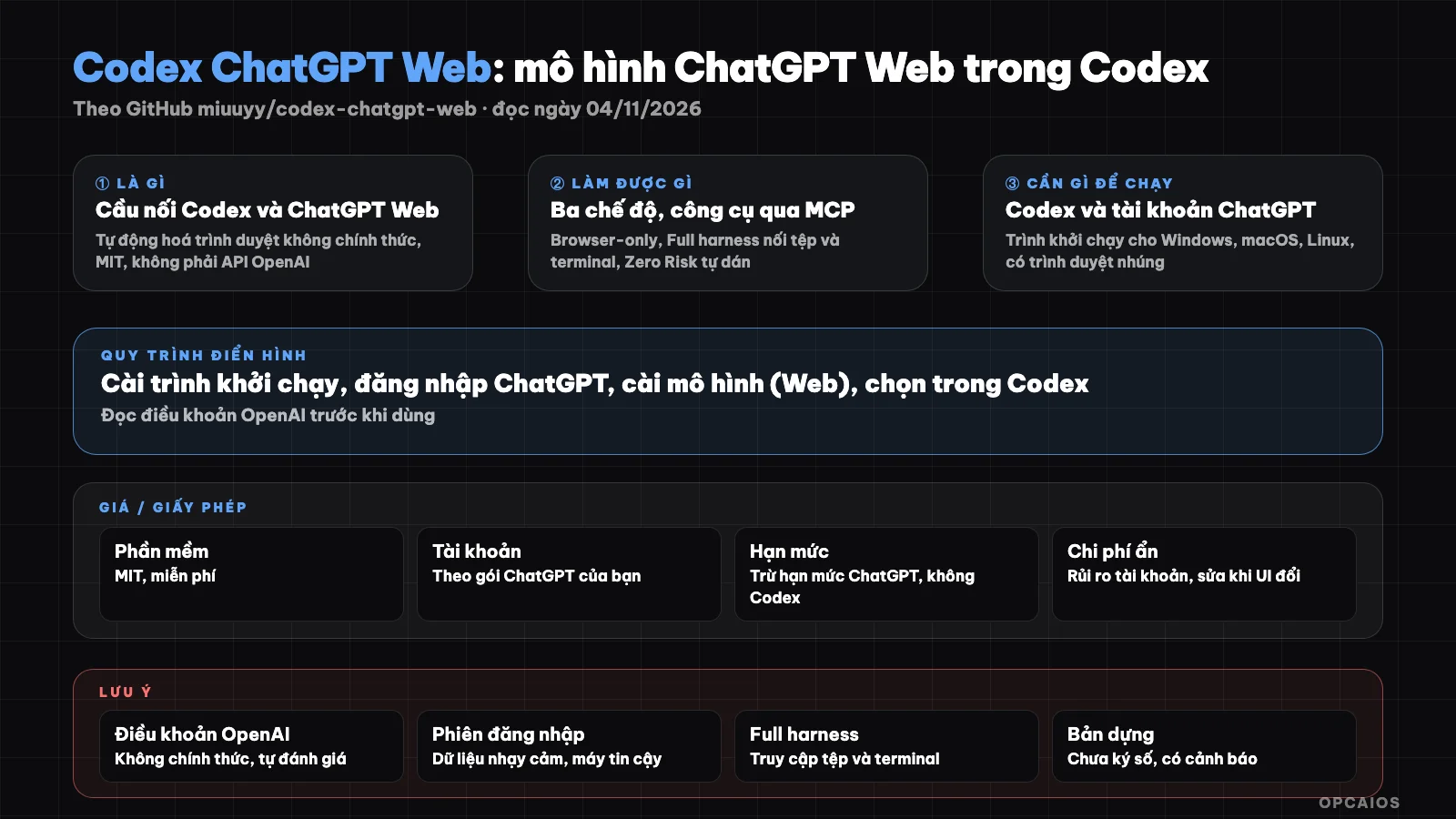
Codex ChatGPT Web places a ChatGPT Web session between Codex and the model, with tool calls via MCP. Diagram: OPCAIOS.
What is Codex ChatGPT Web and who made it?
Codex ChatGPT Web is a personal project by GitHub account miuuyy, written mostly in TypeScript. The README makes clear this is independent software, unaffiliated and not endorsed by OpenAI. The goal is to use the model from the ChatGPT plan you're already paying for as the "base model" in Codex.
To understand the tool, you need to separate two OpenAI products. Codex is a programming agent that runs in a terminal, application, or code editor, calling a model to read and edit code; see What is Codex. ChatGPT Web is a chat interface in the browser, each plan (Free, Go, Plus, Pro) has its own set of models and limits. Codex ChatGPT Web sits between the two. According to the README (read 04/11/2026), you install a launcher, log into ChatGPT in its embedded browser, then the launcher adds model entries with a "(Web)" suffix to Codex. When you pick that entry, each Codex turn becomes a conversation turn in the ChatGPT Web session, and the result sends back to Codex, with streaming and images. Messages count against your ChatGPT account limit, not deducted from Codex quota. The README lists model names like GPT-6 Sol and GPT-5.6 Sol for paid accounts; these names are announced by the project, they vary by account, and we have not verified them.
What are the main features of Codex ChatGPT Web?
Codex ChatGPT Web has three send modes, a Full harness mode that connects Codex tools via MCP, long context management, and diagnostic tools. The table below summarizes according to the README (read 04/11/2026).
| Feature | Short description |
|---|---|
| "(Web)" models in Codex | Select your ChatGPT account models right in Codex's selector |
| Browser-only | Send auto, don't let ChatGPT use Codex's local tools |
| Full harness | Send auto, ChatGPT calls files, terminal, Codex task tools via MCP |
| Zero Risk | Don't read or control the ChatGPT page; you paste and send prompts yourself |
| OpenAI tunnel | Full harness uses OpenAI's official tunnel-client, outbound connection, no inbound port |
| Long context | Support for Codex context compression; limits depend on plan and reasoning level |
| Temporary Chat | On by default so task conversations don't go into ChatGPT history |
| Diagnostic | Activity page and "Run doctor" check end-to-end health |
| Subagent | Compatibility mode for child agents to run across multiple backends |
Full harness mode needs Developer Mode on in ChatGPT and creating a connector with the exact name the README requires. The README notes that write and edit actions still depend on your ChatGPT workspace policy. If you're not sure about MCP, see What is MCP.
How much does Codex ChatGPT Web cost and are there hidden fees?
Codex ChatGPT Web itself is free under the MIT license. You don't pay for the tool, but you still need a ChatGPT account, and the powerful models are only available in paid plans. We haven't checked the ChatGPT pricing page today so I can't list the plan prices.
| Item | Cost | Notes |
|---|---|---|
| Software | 0 USD, MIT | Download from GitHub Releases |
| ChatGPT account | According to OpenAI's plans | Free/Go only has basic models per README |
| Rate limits | According to ChatGPT account | Codex doesn't use rate limits |
| Hidden costs | Account risk | Could be restricted if terms are violated |
The biggest hidden cost is not money. A paid ChatGPT account is your asset; if OpenAI considers automating the web interface a violation, the risk of losing access is greater than the rate limit savings.
How to install Codex ChatGPT Web and get started?
The README provides pre-built installers for Windows x64, macOS (Apple Silicon and Intel), and Linux x64, with a bundled browser and runtime, so you don't need to install Chrome, Node, or Bun separately. The process has four steps, starting with installation and ending with launching the tool:
- First, download the launcher from GitHub Releases for your operating system.
- Next, log into ChatGPT in the embedded browser and run a browser test.
- Install model items then restart Codex once; select a model with the "(Web)" suffix.
- Finally, if you want ChatGPT to use programming tools, open the MCP page in the launcher and follow the Full harness section.
Those who want to run from source code need Bun 1.4.0, according to the README:
git clone https://github.com/miuuyy/codex-chatgpt-web.git && \
cd codex-chatgpt-web && \
bun run app
The README also has a terminal-based installer that downloads a script and runs it directly. This installation method is convenient but you should read the script contents first. The README notes that builds are not signed per platform, so Gatekeeper on Mac or SmartScreen on Windows may warn; the installer verifies the published SHA-256 hash. We haven't tried installing it. If you're new to Codex, see installing Codex CLI first.
Risks around terms, security, and data
The number one risk of Codex ChatGPT Web is OpenAI's terms. The tool controls the ChatGPT Web interface through browser automation, not via the official API, and the README itself acknowledges this is unofficial automation. This section is for reference only, not legal advice.
First is the terms. The README requires you to use it only with your own account, comply with OpenAI's Terms of Use and workspace policies, and says the tool does not bypass authentication or access controls. However, "not bypassing authentication" is different from "being permitted by OpenAI". The terms of major AI services typically restrict access or data extraction by automated methods outside official channels. I tried to read OpenAI's Terms of Use from 04/11/2026 but the page returned an access error, so I couldn't cross-reference the original text. Please read the current terms yourself before using, especially with a company account or workspace with an administrator.
Second is security. The README warns that browser state is sensitive login data, and the local listening port can be called by other processes run by the same user on the machine. Don't share launcher profiles, only use on trusted machines. In Full harness mode, ChatGPT is given access to your files and terminal, so approval rights are critical; the README says unexpected approval prompts will be denied by default. See also Codex approval modes and sandbox.
Third is data. The README notes that task prompts are processed by OpenAI and conversations may be in your ChatGPT history; ChatGPT's memory and custom instructions may apply. Don't put customer code or secrets in if your contract doesn't allow it.
Codex ChatGPT Web versus other options
Codex ChatGPT Web solves the problem of "wanting to use the ChatGPT subscription model within Codex". There are more official ways to achieve similar goals. The table below is a general description, not a benchmark.
| Approach | Type | Strengths | Considerations |
|---|---|---|---|
| Codex ChatGPT Web | Browser automation, MIT | Use ChatGPT Web model within Codex | Not official, terms of service risk, breaks when interface changes |
| Codex login with ChatGPT | Official OpenAI | Stable, supported | Uses Codex quota from your plan |
| Codex with API key | Official, pay per token | Cost control, independent of interface | Costs based on usage |
| Router gateway like 9Router | Self-hosted | Switch between multiple model providers | Still subject to each provider's terms |
When should you use Codex ChatGPT Web?
You should only consider Codex ChatGPT Web if you're using a personal account, have read OpenAI's terms of service and accept the risks, and understand how browser automation works. For client work or business accounts, official channels are safer.
| Scenario | Recommendation |
|---|---|
| Programming for clients, need stability | Use official Codex or API key |
| ChatGPT account managed by company | Ask administrator first; don't use by default |
| Want to try without tool controlling the page | Zero Risk mode, copy and paste manually |
| Ran out of Codex quota mid-project | Wait or use API key; consider risks before using the tool |
| Researching agent connection with MCP | Read the project's architecture and security model documentation |
Example (hypothetical): a freelance developer uses a personal Plus account, turns on Zero Risk mode to have the Web model review a code snippet with no secrets, manually pastes the prompt and confirms sending. They don't run full automation on a client's codebase.
OPCAIOS experience
We added Codex ChatGPT Web to the Repo list in the Utilities section on opcaios.org after reading the README and checking that the repository is still maintained; we haven't run it yet, so this section describes the criteria we use to evaluate, not an assessment after use. We use Codex through official channels and use 9Router as our model router gateway. Four criteria:
- First, the repository is maintained: latest code push on 30/10/2026 per GitHub API.
- Next, license: MIT for the software, but OpenAI's terms of service are the main constraint.
- Hidden costs: no tool fees, but risk of account issues and fixes needed when ChatGPT interface changes.
- Finally, whether we can replace our current tool: for us, no, because terms of service risk outweighs the quota benefit.
Read more: What is Codex, install Codex CLI, What is MCP, protect business data when using AI.
Frequently Asked Questions
Is Codex ChatGPT Web free?
Codex ChatGPT Web is free, open-source software under the MIT license on GitHub. However, you need a ChatGPT account, and according to the README (read on 04/11/2026) Free and Go accounts only have basic models, while stronger models are for paid plans. Messages count against your ChatGPT account quota, not the Codex quota. We haven't read today's ChatGPT pricing page so we won't list plan prices. An additional cost to consider is account risk if automation is seen as violating the terms of service.
Does using Codex ChatGPT Web violate OpenAI's terms of service?
We cannot confirm this, and this is not legal advice. The README states the tool is independent, not endorsed by OpenAI, is unofficial browser automation, and requires you to comply with OpenAI's Terms of Use. The terms of major AI services typically restrict access via unofficial automated methods outside official channels. We could not compare the original text because the terms page returned an error when read on 04/11/2026. The safe approach is to read the current terms yourself, or use Zero Risk mode, or use the official channel.
Is Codex ChatGPT Web safe for my source code?
There are three points to know. First, prompts are processed by OpenAI and conversations may be saved in ChatGPT history, even with Temporary Chat mode enabled. Second, in Full harness mode, ChatGPT can call files and terminal of the Codex task, so you need to review permissions carefully. Third, the README warns that browser state contains sensitive login sessions and local ports can be accessed by other processes on the same machine. Only use on trusted machines and do not include client secrets.
How do Browser-only, Full harness, and Zero Risk modes differ?
Browser-only sends messages automatically through ChatGPT Web but does not let the model use local tools of the Codex task. Full harness also sends automatically, while connecting files, terminal, and tools of the Codex task to ChatGPT via MCP, using OpenAI's official tunnel-client. Zero Risk does not read or control the ChatGPT page: you choose the model yourself, paste your prepared prompt yourself, send it yourself, then click confirm in the launcher. Zero Risk is slower but depends the least on interface automation.
Should someone who doesn't know how to code use Codex ChatGPT Web?
No. The tool is for people who already know Codex well and understand the risks: you must configure Developer Mode, MCP connector, tunneling, and monitor when ChatGPT's interface changes and the tool stops working. Beginners should start with Codex through OpenAI's official channel, learn how to delegate tasks, review changes, and maintain security first. Once familiar, you have enough information to weigh unofficial tools yourself. If you want to learn systematically how to work with coding agents, see OPCAIOS's AI application training course.
Source: GitHub miuuyy/codex-chatgpt-web (README, API, read on 04/11/2026); project has no website outside GitHub; not read/not verified: OpenAI's Terms of Use (access error page when read on 04/11/2026), ChatGPT pricing page, architecture documentation and security model in the repo, model names and context limits announced by the project; star count and pricing may change. Experience is from OPCAIOS.
Translated from Vietnamese with AI. Read the original.
Want to apply this in your business?
Book a free 30-minute call (Vietnam time, in English or Vietnamese).