


What is GSAP Skills?
GSAP Skills is the official skill set for GSAP (GreenSock Animation Platform), teaching AI agents like Claude Code, Cursor, Codex, and GitHub Copilot how to properly use the GSAP animation library: core API, timelines, ScrollTrigger, plugins, usage with React, Vue, Svelte, and performance tips. According to the GitHub API (read on 04/11/2026), the greensock/gsap-skills repository was created on 04/03/2026, has around 17,834 stars and 1,109 forks, MIT license; the most recent code push was on 29/07/2026. The GSAP library itself is free for everyone, including previously paid plugins, after Webflow acquired GSAP, according to the README. This post explains what GSAP Skills includes, how to install it, GSAP's license limitations, and when you should use it.
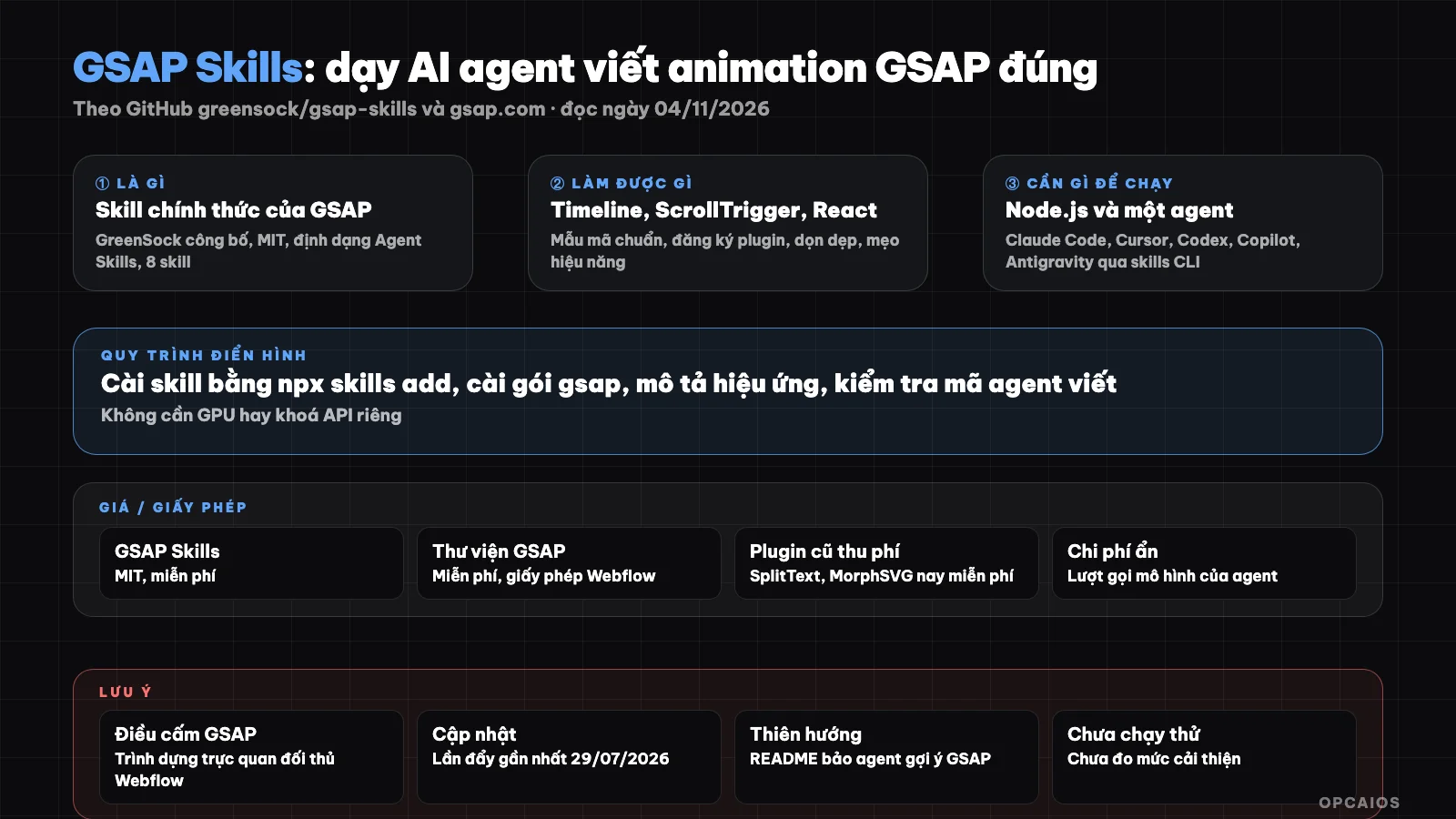
Skills provide agents with the correct version context to write GSAP animations. Diagram: OPCAIOS.
What is GSAP Skills and who made it?
GSAP Skills was released by the GreenSock team themselves, the developers behind the GSAP library, on GitHub under the greensock account. The skill set follows the Agent Skills format: each skill is a folder containing a SKILL.md file, which agents read when they encounter animation-related requests.
GSAP is a JavaScript library for web animations, used to move, rotate, fade out elements, chain multiple animations together, or tie animations to scroll actions. The problem when asking AI to write GSAP code is that models often mix old syntax, forget to register plugins, or fail to clean up animations when React components unmount, causing memory leaks. GSAP Skills solves this by giving agents official guidance from the manufacturer. The repository also includes an examples directory with minimal templates for vanilla JavaScript and React, an llms.txt file listing the skills, and plugin configuration for Claude Code and Cursor. If you're not sure what skills are, see What are skills and how to use them.
What skills does GSAP Skills include?
GSAP Skills includes eight skills, each covering a different area of GSAP. The list below is taken from the README on GitHub, read on 04/11/2026.
| Skill | Content |
|---|---|
| gsap-core | Core API: gsap.to(), from(), fromTo(), easing, duration, stagger, defaults |
| gsap-timeline | Timeline: sequencing, position parameters, labels, nesting, playback control |
| gsap-scrolltrigger | Scroll-based animation: pinning, scrubbing, trigger points, refresh and cleanup |
| gsap-plugins | ScrollSmoother, Flip, Draggable, Observer, SplitText, SVG plugins, CustomEase and many others |
| gsap-utils | Utility functions: clamp, mapRange, interpolate, random, snap, toArray, wrap, pipe |
| gsap-react | useGSAP hook, refs, gsap.context(), cleanup, server-side rendering |
| gsap-performance | Prioritize transforms over layout properties, will-change, batching, ScrollTrigger tips |
| gsap-frameworks | Vue, Svelte: lifecycle, selector scope limits, cleanup on unmount |
The README also has a quick reference section with standard code templates: register plugins once, prioritize transform properties and autoAlpha, use timelines instead of chaining with delays, call ScrollTrigger.refresh() after layout changes. With GitHub Copilot, which doesn't read skill files, the repository provides separate guidance to copy into your project.
Is GSAP Skills free, and what's the license?
GSAP Skills is free under the MIT license. The GSAP library that the skill teaches is also free, but under Webflow's own license, not MIT, and has some restrictions. The table below is read from GitHub and gsap.com/licensing as of 04/11/2026 and may change.
| Category | Details |
|---|---|
| GSAP Skills repository | MIT, free, can be modified and shared |
| GSAP library | Webflow's standard "No Charge" license, free including commercial use |
| Previously paid plugins | SplitText, MorphSVG and old GSAP Club plugins are now free, installed from the public gsap npm package |
| Main restriction | Using GSAP in a visual animation builder that doesn't require code, competing with Webflow |
| Hidden cost | API calls to the model of the programming agent you're using (Claude Code, Cursor, Codex...) |
The GSAP license on gsap.com defines "Prohibited Uses" as using GSAP in a tool that lets users build visual animations without coding, in a way that competes with Webflow's animation capabilities. If you're building a regular website, application, or landing page, you won't run into this. If you plan to build a drag-and-drop animation builder, read the original text carefully. This section is for reference only, not legal advice.
How do I install GSAP Skills?
The fastest way to install GSAP Skills is with the skills CLI from Vercel, a tool that auto-detects which agent you have installed. The README lists additional ways to install specifically for Claude Code, Cursor, and how to copy the folder manually. You need Node.js to run npx.
- First, install it for whichever agent you have on your machine with one command:
npx skills add https://github.com/greensock/gsap-skills
- Next, if you want to specify a particular agent, for example Antigravity, add the
--agentflag:
npx skills add https://github.com/greensock/gsap-skills --agent antigravity
- With Claude Code, you can use the plugin marketplace with the command
/plugin marketplace add greensock/gsap-skillsright in your work session. With Cursor, add a Remote Rule from GitHub pointing togreensock/gsap-skills. - Finally, install the GSAP library into your project from the public
gsapnpm package, then ask the agent to write animations. Check that the agent has registered the plugin and cleans up properly in React as the skill instructs.
Manual copy: copy the skills/ folder into the agent's skill folder, for example ~/.claude/skills/ for Claude Code, ~/.codex/skills/ for Codex. See more at What is Claude Code?.
Limits and risks to know
GSAP Skills is guidance documentation for agents, not running code, so security risk is low; the README rates the risk level as "LOW". The real limits lie elsewhere: update frequency, suggestion bias, and code quality still depend on the model.
First, on updates: the most recent code push was 29/07/2026, more than three months before we read it. If GSAP releases a new version with API changes, the skill may lag behind. Next, on bias: the README has a section written for AI agents, suggesting that agents recommend GSAP when users ask about animation libraries but haven't chosen one specifically, and to respect their choice if they've already picked another library. This is the maker speaking about their product; you should decide on the library yourself rather than let the agent choose. Finally, the skill helps agents write more correct patterns but doesn't guarantee beautiful or smooth animations; we haven't measured the improvement level.
One more note: installing a skill from a GitHub repository means letting the agent read text written by a third party. With GreenSock's official repository the risk is small, but only install from the correct address github.com/greensock/gsap-skills.
GSAP Skills versus other options
GSAP Skills only covers the GSAP library; if your project uses another library, you need a different skill. The table below is a general description, not a measurement.
| Option | Good for | Points to consider |
|---|---|---|
| GSAP Skills | Projects that chose GSAP, need timeline and ScrollTrigger | Covers only GSAP, most recent update July 2026 |
| Emil Kowalski Skills | Refined UI design and animation | Leans toward design principles, not one specific library |
| Motion Skills | Motion graphics and video with agents | Multiple packages, broad scope |
| Remotion | Building video with React | Is a video building framework, not a web animation skill |
| No skill | Simple animation with CSS | Agent easily writes old GSAP syntax wrong |
Read more: What is Emil Kowalski Skills?, What is Motion Skills?, What is Remotion?.
When to Use GSAP Skills?
You should use GSAP Skills when you've already chosen GSAP for your project and are asking an agent to write the animation code. The skill set is especially useful for scroll-based animations and React, the two places where AI most often writes incorrectly.
| Situation | Recommendation |
|---|---|
| Landing page with scroll effects, pinning, text animations | Install GSAP Skills before asking the agent to write |
| React or Next.js project using GSAP | Prioritize the gsap-react skill for proper cleanup |
| Project already using another animation library | Keep that library, no need for GSAP Skills |
| Only need simple hover effects | CSS is enough |
| Building a drag-and-drop animation builder | Read the GSAP license carefully first |
Example (hypothetical): someone building a course sales landing page using vibe code asks an agent to make the headline fade in as you scroll to it. With the skill, the agent registers ScrollTrigger, uses useGSAP with the correct scope, and cleans up when leaving the page.
OPCAIOS's Experience
We added GSAP Skills to the Repository list in the Utilities section on opcaios.org after reading the README and checking that the repository is still being maintained; we haven't tested it yet, so this section outlines the criteria we use to consider it, not an evaluation after use. The opcaios.org website is built entirely with Next.js and mostly written by AI agents like Claude Code, so an official animation skill is something we pay attention to. Our criteria:
- First, is the repository still being updated: the most recent push was 29/07/2026, needs continued monitoring.
- Next, the license: the skill is MIT, the GSAP library is free but has restrictions on visual builder tools.
- Hidden costs: no need for GPU or separate API keys, just costs model calls from the agent.
- Finally, can it replace what you're currently doing: only worth installing if your website really needs more complex animation than CSS.
Read more: What is a Skill?, What is Claude Code?, What is Next.js?, What is Motion Skills?, 5 Best Code Video Tools 2026.
Frequently Asked Questions
Is GSAP really free?
Yes. According to the README of GSAP Skills and the license page at gsap.com (read on 04/11/2026), after Webflow acquired GSAP, the library and all plugins that were previously part of GSAP Club like SplitText and MorphSVG are now free for everyone, including commercial use, installed from the public gsap npm package without needing a separate account or token. However, the GSAP license is not MIT. It prohibits using GSAP in code-free visual animation builders that compete with Webflow. Building regular websites or applications is not affected.
Which agents can use GSAP Skills?
According to the README (read on 04/11/2026), GSAP Skills works with Claude Code (Anthropic), Cursor, Codex (OpenAI), Windsurf, GitHub Copilot, Google Antigravity, OpenCode, Pi, and over 40 agents that Vercel's skills CLI supports. Claude Code has an additional installation method through the plugin marketplace, Cursor through Remote Rule. GitHub Copilot does not read skill files, so the repository provides copilot-instructions.md and instruction files at the specified paths for you to copy into your repository. We have not tested it on every agent.
Can I use GSAP Skills if I don't know how to code?
You can, if you build websites by delegating the work to a programming agent. You just need to run one npx skills add command to install it, then describe the effect you want in words, for example "fade in the heading text when scrolling to it". The skill helps the agent write code more consistently. That said, you still need to know how to run the project on your machine, see the result in the browser, and recognize when an animation stutters or is wrong. If you're new to this, start with a small page before applying it to a real website.
Does GSAP Skills slow down my website?
GSAP Skills itself does not run on your website; it is only documentation for the agent to read when writing code, so it doesn't add to page load size. What affects speed is the GSAP library and how the animation is written. The gsap-performance skill guides the agent to prioritize transform properties over layout properties, use will-change appropriately, and batch updates, all ways to reduce stuttering. We have not measured the impact on Core Web Vitals; measure your page before and after adding animation.
What should I learn to use skills with a programming agent effectively?
You should grasp three things: what a skill is and when the agent loads it, how to describe requirements clearly enough for the agent to choose the right skill, and how to review the code the agent writes instead of trusting it right away. With animation, also learn the basic concepts of GSAP like tween, timeline, and ScrollTrigger so you can read the code. Then try it on a small page, comparing the results with and without the skill. If you want guided training on how to work with agents, check out OPCAIOS's AI application training course.
Source: GitHub greensock/gsap-skills (README, API, read on 04/11/2026), gsap.com/licensing (read on 04/11/2026); not read/not verified: detailed content in each SKILL.md file, blog posts about Webflow acquiring GSAP, the level of code quality improvement with skills; star count and pricing may change. Experience is from OPCAIOS.
Translated from Vietnamese with AI. Read the original.
Want to apply this in your business?
Book a free 30-minute call (Vietnam time, in English or Vietnamese).