



Emil Kowalski Skills là gì?
Emil Kowalski Skills là bộ skill (tệp hướng dẫn SKILL.md) mã nguồn mở giúp AI agent lập trình như Claude Code, Codex hay Cursor thiết kế giao diện và hoạt ảnh tốt hơn, đúc kết từ kinh nghiệm của Emil Kowalski, kỹ sư thiết kế (design engineer) và tác giả thư viện thông báo Sonner. Theo GitHub (API, đọc ngày 04/11/2026), kho emilkowalski/skills được tạo ngày 16/03/2026, có khoảng 53.313 sao và 3.108 bản fork, giấy phép MIT, lần cập nhật gần nhất ngày 02/11/2026. Kho có 16 skill, từ chọn đường cong easing, soát hoạt ảnh, đến làm web giống ứng dụng trên điện thoại. Bài này giải thích từng nhóm skill, cách cài, chi phí ẩn, rủi ro khi cài skill của người khác, và so sánh với các bộ skill cùng loại.
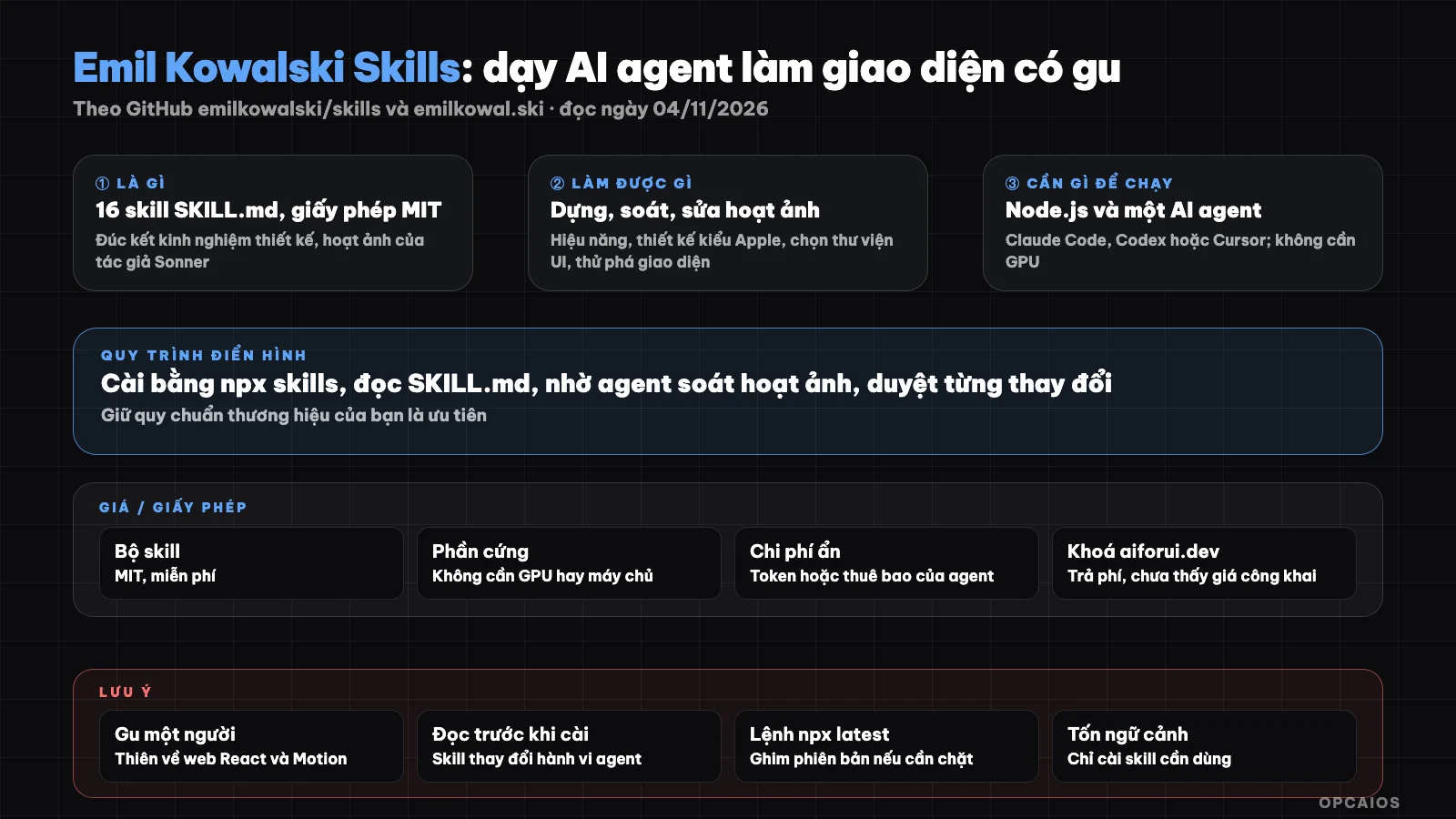
Bộ skill đưa nguyên tắc thiết kế và hoạt ảnh của Emil Kowalski vào AI agent. Sơ đồ: OPCAIOS.
Emil Kowalski Skills là gì và ai tạo ra?
Emil Kowalski Skills là kho GitHub của Emil Kowalski, chứa các skill Markdown để AI agent đọc khi làm giao diện người dùng. Mỗi skill là một thư mục có tệp SKILL.md mô tả quy tắc, lỗi hay gặp và cách sửa. Kho không chứa thư viện chạy được, GitHub nhận diện ngôn ngữ là Markdown.
Theo README (đọc ngày 04/11/2026), Emil Kowalski tự giới thiệu từng làm ở Vercel và Linear, đây là thông tin tác giả tự công bố. Ông cũng là tác giả Sonner, thư viện hiển thị thông báo dạng toast cho React, và có skill riêng hướng dẫn dùng Sonner. Lý do ra đời bộ skill được README nói gọn: agent "don't have great taste", tức AI agent hay chọn sai những chi tiết nhỏ. Ví dụ README nêu là dùng easing ease-in cho hoạt ảnh xuất hiện, trong khi nên dùng ease-out, hoặc dùng viền đặc thay cho bóng đổ bán trong suốt.
Tác giả cũng nhấn mạnh skill chỉ là phần phụ của chuyên môn: AI khuếch đại người có hiểu biết, không thay thế hiểu biết. Bộ skill gắn với khoá học trả phí aiforui.dev của cùng tác giả; trang emilkowal.ski/skill gọi bộ skill miễn phí là phần nổi của tảng băng.
Emil Kowalski Skills gồm những skill nào?
Emil Kowalski Skills có 16 skill (danh sách thư mục trên GitHub, đọc ngày 04/11/2026), phần lớn xoay quanh hoạt ảnh, phần còn lại về thiết kế, Swift, chọn thư viện và kiểm thử giao diện. Skill chính là emil-design-eng, gom triết lý thiết kế và phần lớn quy tắc hoạt ảnh.
| Skill | Việc chính |
|---|---|
| emil-design-eng | Skill chính: triết lý thiết kế, quy tắc hoạt ảnh, cách soát |
| animate, animate-expo | Dựng hoạt ảnh mới với đường cong, thời lượng đúng; bản cho React Native và Expo |
| review-animations, improve-animations | Soát nghiêm hoạt ảnh; rà cả mã nguồn và lập kế hoạch sửa theo thứ tự ưu tiên |
| find-animation-opportunities, remove-animations | Tìm chỗ đáng thêm chuyển động; gỡ chuyển động thừa |
| animation-performance, animation-vocabulary | Sửa hoạt ảnh tụt khung hình; từ vựng để mô tả hoạt ảnh cho AI |
| apple-design, mobile-native | Nguyên tắc thiết kế của Apple cho web; làm web có cảm giác ứng dụng trên điện thoại |
| pick-ui-library, prototype, break-ui | Chọn thư viện đáng tin; làm nhiều phương án để so; thử phá giao diện bằng dữ liệu xấu |
| write-swift, ask-sonner | Viết Swift hiện đại; hướng dẫn dùng thư viện Sonner |
Kho vẫn đang thêm skill: remove-animations được thêm ngày 28/10/2026, và ngày 02/11/2026 có cập nhật hướng dẫn tăng tốc phần cứng cho thư viện Motion bản 14.2 (lịch sử commit, đọc ngày 04/11/2026). Một chi tiết nên biết: skill chính có quy định câu trả lời mở đầu cố định khi được gọi mà chưa có câu hỏi, nên đừng ngạc nhiên nếu agent chỉ chào một câu rồi chờ.
How Much Does Emil Kowalski Skills Cost and What Are Its Limitations?
Emil Kowalski Skills is free under the MIT license, requiring no GPU or server. The hidden cost is the subscription or tokens of the AI agent you use, since skills are loaded into context. The aiforui.dev course is a separate paid product, and I haven't been able to find its price.
| Item | Status (checked 04/11/2026) |
|---|---|
| License | MIT, can be modified and used commercially if license notice is retained |
| Skill set on GitHub | Free, 16 skills |
| Hardware | No GPU needed, only Node.js to run the install command |
| Hidden cost | Subscription or tokens from Claude Code, Codex, Cursor |
| aiforui.dev course | Paid, registration page reopens 19/01, no public price listed |
| Skill set in course | Page lists 28 skills and Lapse tool for animation review |
Any prices listed don't include tax and may change. The aiforui.dev page states over 4,500 people have taken the course, a figure the project reports that hasn't been verified. The biggest limitation of the skill set is subjectivity: it's one person's taste. Most rules lean toward React web and Motion, so they'll be less valuable if you build interfaces with other technologies.
How to Install and Get Started with Emil Kowalski Skills
Installing Emil Kowalski Skills according to the README is a single npx command that calls the skills tool on npm. This tool copies skills into a folder your agent can read. After that, you just ask your agent to do things or review the interface as usual.
- First, install Node.js on your machine if you don't have it, since the install command runs through
npx. - Next, open your interface project and run the command in the README:
npx skills@latest add emilkowalski/skills
- Open the skill folder you just installed and quickly read a few SKILL.md files to see what your agent will follow.
- Finally, call the skill when you need it. For example, ask your agent to use
review-animationsto review animations you just wrote, orbreak-uito test the interface with very long names and empty lists.
Note: the page emilkowal.ski/skill (checked 04/11/2026) lists the command with the singular repo name emilkowalski/skill, which differs from the README. I'm following the actual repo name on GitHub, which is emilkowalski/skills. Example (hypothetical): someone building a course sales page with Next.js notices buttons and dialogs animating jerkily. They ask Claude Code to run improve-animations to scan all the code, get a list of fixes in priority order, then have the agent fix each item.
Risks and Things to Watch When Installing Emil Kowalski Skills
Risks when installing Emil Kowalski Skills lie in the nature of all skills: they're instructions the agent will follow, and the install command downloads code from npm to your machine. Additionally, the design rules are subjective, so the agent might modify your interface according to the author's taste rather than your brand's taste.
First, about supply chain. The npx skills@latest command always grabs the latest version of the install tool on npm; if your environment needs to be strict, read the code first or pin the version. Second, about skill content: SKILL.md can change how the agent behaves—for example, a skill might set a fixed opening response. Reading files before installing is a habit worth having with all third-party skills. Third, about context: each skill loaded costs tokens; installing all 16 skills for a small project might be overkill. Fourth, about legal: the MIT license allows use, modification, and redistribution, provided the copyright notice is kept. The 28 skills in the course are paid content and shouldn't be shared again. This is reference information, not legal advice. The skill set doesn't touch personal data, but the agent reads your project source code according to the permissions you grant it.
Emil Kowalski Skills Compared to Other Skill Sets
Emil Kowalski Skills stands out for depth in animation and interface feel. Other skill sets excel in specific libraries, programming workflows, or design systems. The table below is general description, not measurement.
| Choice | Strengths | Things to Consider |
|---|---|---|
| Emil Kowalski Skills | Animation rules, interface review, interface stress testing | One person's taste, leans toward React web |
| GSAP Skills | Official GSAP skills: timeline, ScrollTrigger | Only useful if you use GSAP |
| Motion Skills | 17 packages on motion graphics, animation, video | Broad scope, need to pick packages |
| Awesome DESIGN.md | Describes design systems of many websites | Doesn't teach animation |
| Matt Pocock Skills | Programming workflow: clarify requirements, TDD, debugging | Doesn't focus on interface |
When Should I Use Emil Kowalski Skills?
I should use Emil Kowalski Skills when I'm building a web interface with an AI agent and the result works but lacks refinement: animations stutter, movements are excessive, small details are wrong. If I don't yet have an interface to review, or I'm working with other technologies besides React, the benefits will be lower.
| Situation | Recommendation |
|---|---|
| Animations on the page stutter or drop frames | Use animation-performance and improve-animations |
| Page has too many effects | Use remove-animations |
| Agent writes its own toast components, dialogs | Use pick-ui-library or ask-sonner |
| Web needs to feel like a mobile app | Use mobile-native |
| I have my own brand design system | Prioritize brand guidelines, use skill to review details |
OPCAIOS Experience
I recently added Emil Kowalski Skills to the Repo list in the Utilities section of opcaios.org after reading the README and checking that the repository is still maintained; I haven't tested it yet, so this section states the criteria I use to consider it, not an evaluation after using it. Four criteria:
- Is the repository still being updated: yes, the most recent commit is on 02/11/2026.
- License: MIT, permissive.
- Hidden costs: no GPU needed; only costs agent tokens when a skill is loaded.
- Can it replace the tools I'm already using: no, it supplements programming agents like Claude Code; with an interface that already has its own standards, I would use it as a checklist, not let the agent modify it according to different preferences.
Read more: What is a Skill? How to use skills, Anatomy of a skill in Claude Code, What is Claude Code?, Motion engineering with Opus 5.5, 7 best Claude Code skill sets in 2026.
Frequently Asked Questions
Is Emil Kowalski Skills free?
Yes. The set of 16 skills on GitHub uses the MIT license, free for both personal and commercial projects, per the GitHub API read on 04/11/2026. I don't need a GPU or server. The real cost is the subscription or tokens of the AI agent reading the skill. The paid part is the aiforui.dev course from the same author, which comes with 28 additional skills and the Lapse tool; I haven't seen a public price on that site yet.
Which agents can use Emil Kowalski Skills?
The README doesn't limit to specific agents. A skill is a directory containing SKILL.md in a format that many programming agents can read, like Anthropic's Claude Code, OpenAI's Codex, or Cursor. The installation command npx skills@latest add emilkowalski/skills copies skills into the directory the agent uses. Each agent loads skills slightly differently, so after installing, try calling a small skill like break-ui to make sure the agent has recognized it.
Who is Emil Kowalski?
Emil Kowalski is a design engineer and author of Sonner, a popular toast notification library for React. According to the README read on 04/11/2026, he previously worked at Vercel and Linear; this is information the author disclosed themselves, and I haven't independently verified it. He writes many posts about animations on emilkowal.ski and teaches the aiforui.dev course about using AI to build high-quality interfaces.
Is it safe to install skills from other people?
A skill is instructional text, not a program running in the background, but the agent will follow that instruction in my project. The installation command also downloads tools from npm. So I should open and read SKILL.md before using it, only install the skills I need, and review the changes the agent proposes before accepting them. With a public MIT repository like Emil Kowalski Skills, I can read the entire content on GitHub before installing.
Can someone without coding knowledge use Emil Kowalski Skills?
It's hard to get the full benefit. The skill set is written for people building interfaces with code, mainly React web, and pays off when I have a project for the agent to review. Someone without coding knowledge can still install with one command and ask the agent to use the skill when building a page, but it will be hard to judge whether the agent fixed things correctly. To learn how to work with AI agents and skills from scratch, see OPCAIOS's AI application training course.
Source: GitHub emilkowalski/skills (README, skills directory list, skills/emil-design-eng/SKILL.md file, commit history, API, read 04/11/2026), emilkowal.ski/skill and aiforui.dev (read 04/11/2026); not read/not verified: detailed content of the 15 remaining skills, aiforui.dev course price, source code of the skills installation tool on npm, author's work experience, the figure of over 4,500 students; star count and prices may change. Experience is from OPCAIOS.
Translated from Vietnamese with AI. Read the original.
Want to apply this in your business?
Book a free 30-minute call (Vietnam time, in English or Vietnamese).