


What is Motion Skills?
Motion Skills is an open-source skill set released by iart.ai, teaching AI agents like Claude Code, Cursor, or Codex how to make motion graphics: animated text, dynamic data charts, explainer videos, vertical videos for TikTok and Reels, WebGL animations, and mathematics with Manim. According to the GitHub API (read on 04/11/2026), the iart-ai/motion-skills repository was created on 22/06/2026, has around 1,190 stars, MIT license, and the most recent code push was on 25/10/2026. The README currently lists 56 skills divided into 19 separate install packages, while the repository description still shows 50 skills and 14 packages, showing the project is expanding rapidly. The skill set is free; the real cost lies in the agent and model you use. This post explains what skills are, which packages they come in, how to install them, copyright risks, and when to use them.
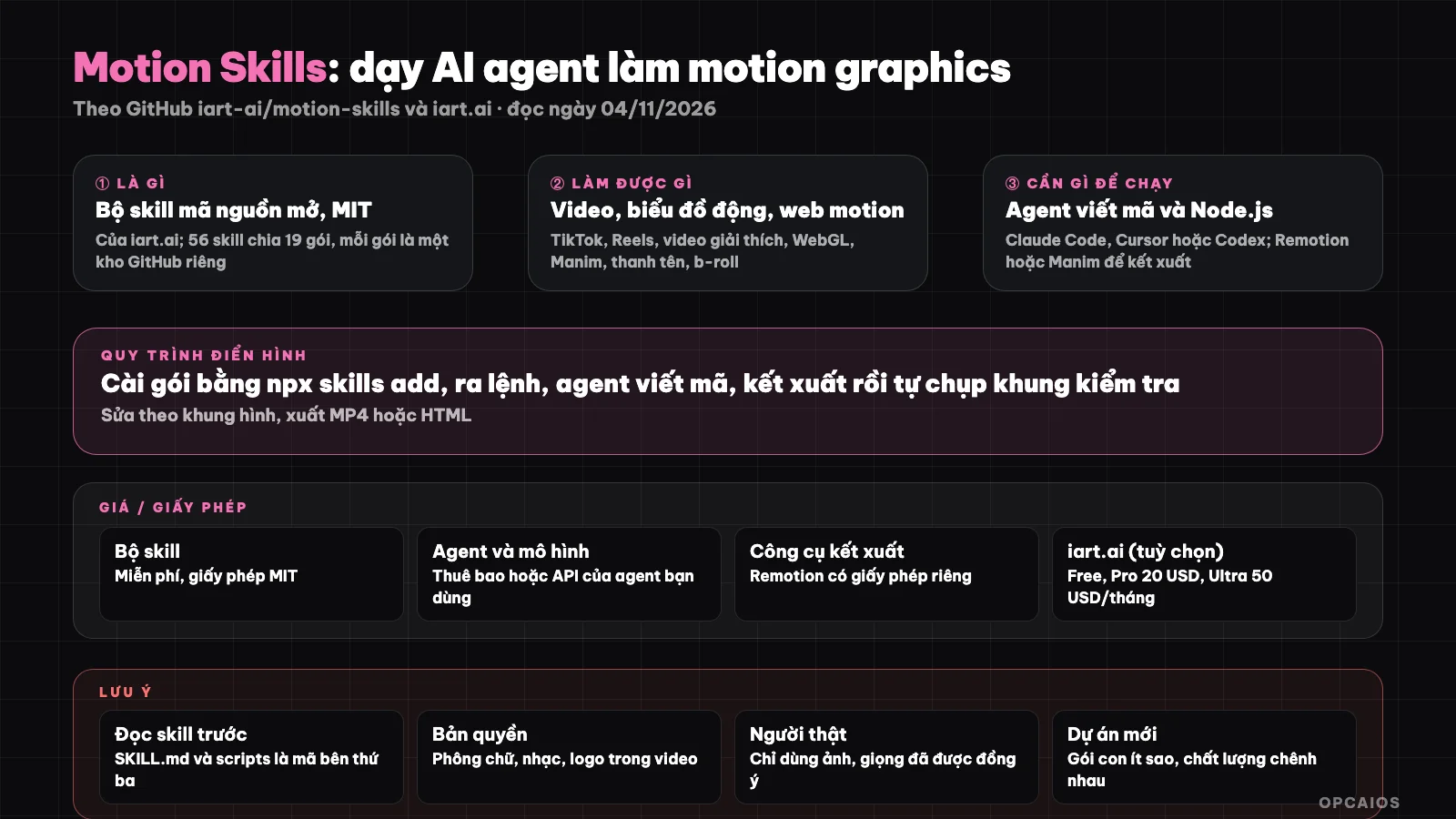
The agent reads skills, writes animation code, renders it, then self-checks frames. Diagram: OPCAIOS.
What is Motion Skills and who created it?
Motion Skills is an index repository by iart.ai, a company that makes AI agents for creating motion graphics, combining 19 skill packages about animation and video into one list. Each package is a separate GitHub repository, aimed at a specific user group, and you only install the packages you need.
A skill, according to the README (read on 04/11/2026), is a self-contained directory consisting of a SKILL.md file and a references/ folder, teaching an agent a specific workflow. There is no model fine-tuning, no runtime plugin: just craft knowledge written in a format that large agents already know how to read. See What is a Skill? if you're new to this. The reason the project exists, according to the README, is that motion is hardest to get right using only prompts: timing and motion curves, safe zones on the frame, precise frame-by-frame rendering, colors and fonts matching brand guidelines, loops that actually fit together. Each skill encodes how a motion professional would build something, with a "deliver then check" loop: render a frame, capture it, review for errors. The main repository essentially contains only a README, license, illustrations, and a small tools folder; the skill content lives in each package repository. iart.ai states clearly this is the open-source craft knowledge behind their commercial product.
What can Motion Skills do?
Motion Skills lets agents write code that knows how to build many kinds of motion, from short videos to web animations. Each package targets a different audience, with varying numbers of skills per package.
| Package (per README, read 04/11/2026) | For, number of skills |
|---|---|
| tiktok-video-skills | TikTok, Reels, Shorts creators; 4 skills |
| explainer-video-skills | Teachers, educational content makers; 5 skills |
| data-animation-skills | Analysts, product managers; 3 skills for animated charts |
| ad-video-skills, ecommerce-video-skills | Brand advertising, online sellers; 3 skills each |
| web-animation-skills, motion-design-skills | UI programmers, motion designers; 9 skills each |
| webgl-animation-skills, manim-skills | 3D, WebGL, shaders; math animation |
| lower-thirds-skills, b-roll-skills | Name bars throughout for OBS, Premiere; b-roll synced to speech |
| talking-head-skills | Create speaking scenes from image and voice, blend with graphics |
Skills that produce images come with a scripts/ folder to freeze a frame, generate contact sheets of multiple frames, and verify the encoded MP4 file. Web skills render to a standalone HTML file; video skills render via Remotion or Manim.
Price, License, and Hidden Costs
Motion Skills is free under the MIT license and can be used for commercial purposes. But skills are just instructions: to produce video, you need an agent with an AI model, rendering tools like Remotion or Manim, and a machine powerful enough to render.
| Item | Details (as of 04/11/2026) |
|---|---|
| Skill pack | Free, MIT (main repo and tiktok-video-skills package verified) |
| Agent and model | Subscription or API fees for Claude Code, Codex, Cursor you're using |
| Rendering tools | Remotion, Manim, Node.js, FFmpeg depending on skill; Remotion has its own license, not yet cross-checked |
| Machine | Video rendering uses CPU and time; README does not state GPU requirements |
| iart.ai (proprietary product) | Free 0 USD with 2 USD credit, Pro 20 USD/month, Ultra 50 USD/month |
iart.ai pricing taken from iart.ai/pricing as of 04/11/2026, before tax, subject to change; this is a separate service and not required to use skills. The easiest hidden cost to forget is tokens: each "render, capture, fix" loop is another model call, so a 15-second animation segment can cost more iterations than you think. We have not measured this number.
How to Install Motion Skills?
Installing Motion Skills means installing each package with the npx skills add command or adding packages as Claude Code plugins. After installation, according to the README, skills are auto-detected and auto-activated by the agent when your command matches the task.
- First, choose a package based on your needs from the table above; you don't need to install everything.
- Next, install the package using Node.js:
npx skills add iart-ai/tiktok-video-skills
npx skills add iart-ai/data-animation-skills
- If using Claude Code, you can add packages like a plugin marketplace right in your session:
/plugin marketplace add iart-ai/web-animation-skills
- Finally, install the rendering tools that the skill needs (Remotion or Manim) according to each package's documentation, then give commands in natural language—for example, ask the agent to build a dynamic bar chart from a CSV file.
The README states skills run on Claude Code, Cursor, Codex, and over 40 other agents; this number is claimed by the project and not yet verified. We have not run these steps; this is a summary from official documentation. See also What is Remotion?.
Limitations, Risks, and Copyright
The main risk when using Motion Skills is not in the code but in the content you feed into the video: fonts, music, logos, real people's images. Skills help the agent build quickly, but the right to use assets remains your responsibility.
There are five points worth knowing before using it for clients. First, skills are instruction text that the agent reads and follows, so before installing, open SKILL.md and the scripts/ folder and read through them as you would any third-party code; unfamiliar skill files may contain instructions you don't want the agent to execute. Second, the MIT license applies only to skills, not to Remotion, fonts, or music that the agent pulls in; Remotion has its own commercial terms, and we have not cross-checked the original text. Third, the talking-head package creates scenes of a speaker from an image and voice: only use images and voices from yourself or someone who has agreed in writing, and clearly note if content is AI-generated if the platform requires it. Fourth, videos posted to TikTok, YouTube, Facebook must follow the terms of service and AI content policies of each platform. Finally, the project is about four months old, some packages have few stars (the tiktok-video-skills package has around 20 stars per GitHub API as of 04/11/2026), so the quality of each skill may vary. The legal section is for reference only, not legal advice.
Compared to Other Options
Motion Skills is a knowledge layer on top of video-building tools, not a replacement for them. The table below compares by use case and is general description, not measurement.
| Option | Strengths | Weaknesses |
|---|---|---|
| Motion Skills with code-writing agent | Free, generated code is editable, many styles | Needs agent, needs Remotion or Manim installed |
| Writing Remotion code yourself | Full control over every frame | Must know React and animation principles |
| GSAP Skills or standalone Manim | Deep for one library | Narrower, doesn't cover short video, ads |
| iart.ai (commercial service) | No installation needed, has voiceover, exports MP4 | Pay by credits, less control over source code |
| After Effects, CapCut | Familiar, intuitive interface | Manual work, hard to automate by data |
When to use?
Motion Skills is suited for people who've already used Claude Code for writing agents and want to produce repeatable animations, like weekly charts or explanatory videos following the same template. If you only need a single video, a tool with a regular interface is usually faster.
| Situation | Recommendation |
|---|---|
| Already used Claude Code, want short explainer videos | Install explainer-video-skills |
| Data reports need animated charts every week | Install data-animation-skills, build a template to reuse |
| Website needs motion effects | Install web-animation-skills |
| Don't know command line, need video right away | Use a tool with an interface first |
| Video has real people or client branding | Only use assets you have rights to |
Example (hypothetical): a course seller uses Claude Code with the data-animation-skills package to turn a monthly student enrollment table into a 10-second animated bar chart clip for posting on Reels.
OPCAIOS's experience
We added Motion Skills to the Repo list in the Utilities section on opcaios.org after reading the README and checking that the repository is still maintained; we haven't run it yet, so this section outlines the criteria we use to consider it, not an evaluation after using it. First, the repository is still maintained: code was pushed on 25/10/2026 and the package list grew from 14 to 19. Next, MIT license for the skills, but must be separated from Remotion's license and assets in the video. Then, hidden costs: agent tokens for each render and check cycle, plus render time on your machine. Finally, risks: this is the open source part of a commercial product, so we see it as good craft documentation, but read each skill carefully before letting an agent run it.
Read more: Motion graphics with Claude Opus 5.5, What is Manim?, What is GSAP Skills?, What is Claude Code?, 5 best video-from-code tools in 2026.
Frequently Asked Questions
Is Motion Skills free?
Yes, all skills are released under the MIT license (GitHub, read 04/11/2026), usable for commercial purposes, you just need to keep the license notice. What you pay for is the agent and the AI model behind it, for example a Claude Code subscription or API fees, plus machine time to render video. iart.ai, the company that releases the skill set, sells a separate service with a free tier that includes 2 USD credit and paid plans from 20 USD per month, but you're not required to use that service.
Which agents can Motion Skills run on?
The README states the skills are auto-discovered by Claude Code, Cursor, Codex and over 40 other agents, a figure claimed by the project and not yet verified. The reason is that the skill format (a folder with SKILL.md and references/) has become a common convention among many agents. With Claude Code there is also a second way: add the package as a plugin marketplace using the command /plugin marketplace add. With other agents, you should check that agent's documentation to see where it reads the skill folder.
Do I need to know After Effects to use Motion Skills?
No. Motion Skills does not use After Effects; the agent writes animation code using Remotion, Manim, HTML, GSAP, SVG or Three.js then renders it to video or a web page. You need to understand the basics of frame rate, duration, aspect ratio so you can give clear instructions and review the results. Knowledge of motion design is helpful: if you know what a smooth curve looks like and what a good cutting rhythm is, you'll spot errors faster than the agent will.
How is Motion Skills different from Remotion?
Remotion is a React library for programming video, while Motion Skills is a set of guides teaching agents how to use Remotion and other libraries correctly for the job. In other words, Remotion is the tool, Motion Skills is experience using the tool written in advance for AI to read. Many video skills in this set render through Remotion, so you still have to install Remotion and follow its license. Web skills output a standalone HTML file, no Remotion needed.
Can someone who doesn't know how to code use Motion Skills?
Yes at the trial level, harder at the routine level. Installing the package takes one command, you can give instructions in Vietnamese, but when rendering fails, fonts are missing or Node version is wrong, you have to read the error message and ask the agent to fix it. Newcomers should start with one package, one video template, then reuse that pattern. If you want to learn how to work with code-writing agents and skills from scratch, see the AI application training course by OPCAIOS.
Source: GitHub iart-ai/motion-skills (README, API, file list, read 04/11/2026: around 1,190 stars, MIT), GitHub iart-ai/tiktok-video-skills (API, read 04/11/2026), iart.ai and iart.ai/pricing (read 04/11/2026); not read/not verified: content from each skill in 19 packages, Remotion license, the over 40 compatible agents figure claimed by the project; star count and pricing may change. Experience is from OPCAIOS. This post is not legal advice.
Translated from Vietnamese with AI. Read the original.
Want to apply this in your business?
Book a free 30-minute call (Vietnam time, in English or Vietnamese).