


What is Next.js?
Next.js is a React framework for building full-stack web applications: you use React to build the interface, and Next.js adds features and optimizations while automatically configuring the underlying tools like bundler and compiler. According to the official documentation at nextjs.org (updated 5/13/2026, read on 10/25/2026), Next.js has two routers: App Router and Pages Router. This post explains what Next.js is, how App Router differs from Pages Router, display types, deployment, when to use it, and OPCAIOS's experience.
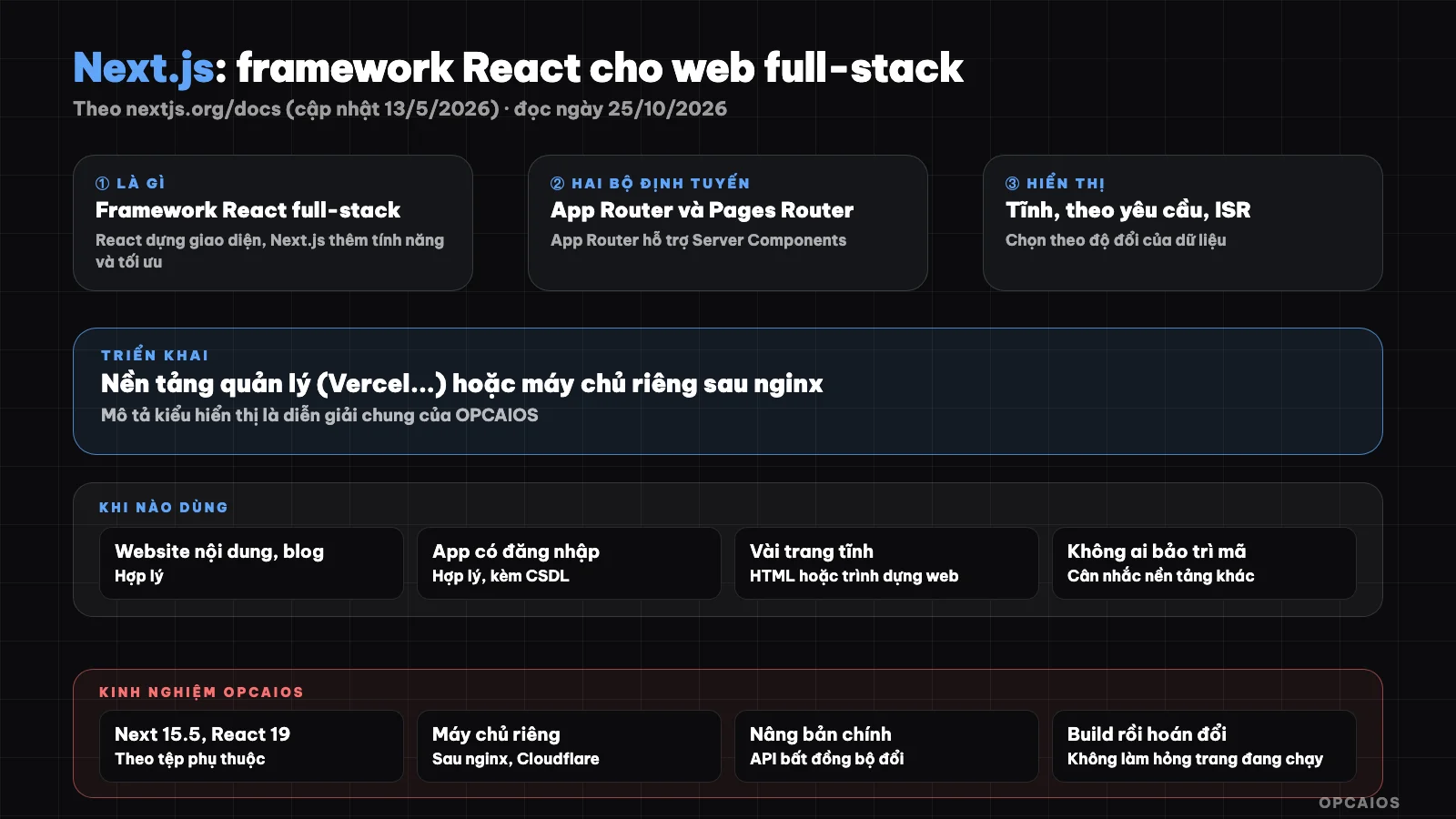
React handles the interface, Next.js handles routing, display, and optimization. Diagram: OPCAIOS.
What is Next.js and who created it?
Next.js is an open-source framework built on React, maintained by Vercel. It lets you write both interface and server code in the same project, with routing based on folder structure, so one person can build both a website and an API.
For the company behind it, see What is Vercel. This post assumes you're familiar with HTML, CSS, JavaScript, and React; if you're new to React, you should learn that foundation first. If you're just getting into building web with AI, see vibe coding.
How do App Router and Pages Router differ?
App Router is the newer router, supporting new React features like Server Components; Pages Router is the original, still supported and improved. According to the documentation, the two handle React versions differently.
| Criterion | App Router | Pages Router |
|---|---|---|
| Position | Newer router | Original router, still supported |
| React features | Supports new features like Server Components | Uses the React version in your project's package.json |
| React version | Uses integrated React canary (includes stable changes from React 19) | The version you install |
| New projects | Recommended in official docs | Old projects or those needing compatibility |
Main display types
A page can be built as static HTML when you build, built on each request on the server, or static but refreshed on a schedule. Which type you choose depends on whether data changes constantly and whether you need speed or freshness.
- Static: fastest, suits content that rarely changes like blog posts, intro pages.
- On request (server): suits personal data for each user or constantly changing data.
- Refresh on schedule (ISR): static but updates after a time interval, balancing speed and freshness.
I only read the introduction page of the documentation, not each page in detail about display types, so this description of the three types is a general OPCAIOS description, not taken from the documentation. Display affects SEO and speed, see Core Web Vitals.
Where to deploy Next.js?
You can deploy to managed platforms like Vercel (see Vercel and Cloudflare Pages) or run it yourself on a private server with next start behind a reverse proxy like nginx, usually via Docker or a process manager.
| Method | Advantages | Notes |
|---|---|---|
| Managed platform | Deploy from Git, little operations | Price and limits by plan |
| Private server (VPS) | Full control, predictable costs | Patch yourself, backup, monitor |
When to and not to use Next.js?
Use it when you need a website with good SEO, many pages, combining interactive interface and server code in one project. Don't use it when you have just a few simple static pages or you don't have someone to maintain JavaScript code.
| Situation | Recommendation |
|---|---|
| Landing page with a few pages | Web builder or static HTML may be enough |
| Content website, blog, e-commerce | Next.js is reasonable |
| App with login, admin panel | Next.js is reasonable (with database) |
| No one to maintain code | Consider code-free platforms |
OPCAIOS Experience
The opcaios.org website runs on Next.js 15.5 and React 19 according to the project dependencies; we deploy to a private server, running behind a process manager with nginx and Cloudflare. When upgrading to a major version, functions like reading page parameters or cookies become asynchronous so the code has to be updated accordingly.
Operational lesson: upgrading the framework major version should be deployed via a separate directory that can be rolled back, and build scripts should target a new directory then swap it so the running site doesn't break during the build. Limitation: this post does not claim Next.js is "better" than other frameworks; we have not done comparative measurements with other options.
Frequently Asked Questions
How is Next.js different from React?
React is a library for building interfaces; Next.js is a framework built on React, adding routing, server-side rendering, optimization and build tools.
Is Next.js free?
The framework is open source. Costs lie in where you deploy (platform or server), see Vercel and VPS.
Should I learn App Router or Pages Router?
For new projects, the documentation points toward App Router; Pages Router is still supported for legacy projects.
Is Next.js good for SEO?
Server-side or static rendering helps search engines read content more easily. SEO also depends on content and other techniques, see SEO and GEO.
I don't know how to code, can I use it?
You can use it with AI tool support but need a safe process, see programming agent for people who don't know code. Training is needed, see AI application training service.
Source: nextjs.org/docs (updated 13/5/2026), read on 25/10/2026; only read the introduction page, have not read individual pages about rendering types, Node.js version requirements and the latest version. Information about the OPCAIOS website comes from our check of the project dependencies. Experience is from OPCAIOS.
Translated from Vietnamese with AI. Read the original.
Want to apply this in your business?
Book a free 30-minute call (Vietnam time, in English or Vietnamese).