



What is Jev Ultrafast?
Jev Ultrafast is an open-source browser control agent developed by Browser Use together with TypeSafe: at each step, TypeSafe's Jev model selects an action and an element from a numbered element table, only calling a small language model when text needs to be typed. According to the GitHub API (read on 04/11/2026), the browser-use/jev-ultrafast repository has around 24,138 stars, MIT license, written in Python, created on 16/09/2026 and still being pushed to on 03/11/2026. The README mentions one flight search from Zürich to London on Google Flights taking about 7.1 seconds (as stated by the project, unverified). This post explains how Jev Ultrafast works, API costs, how to try it, limitations, terms risks, and when to use it.
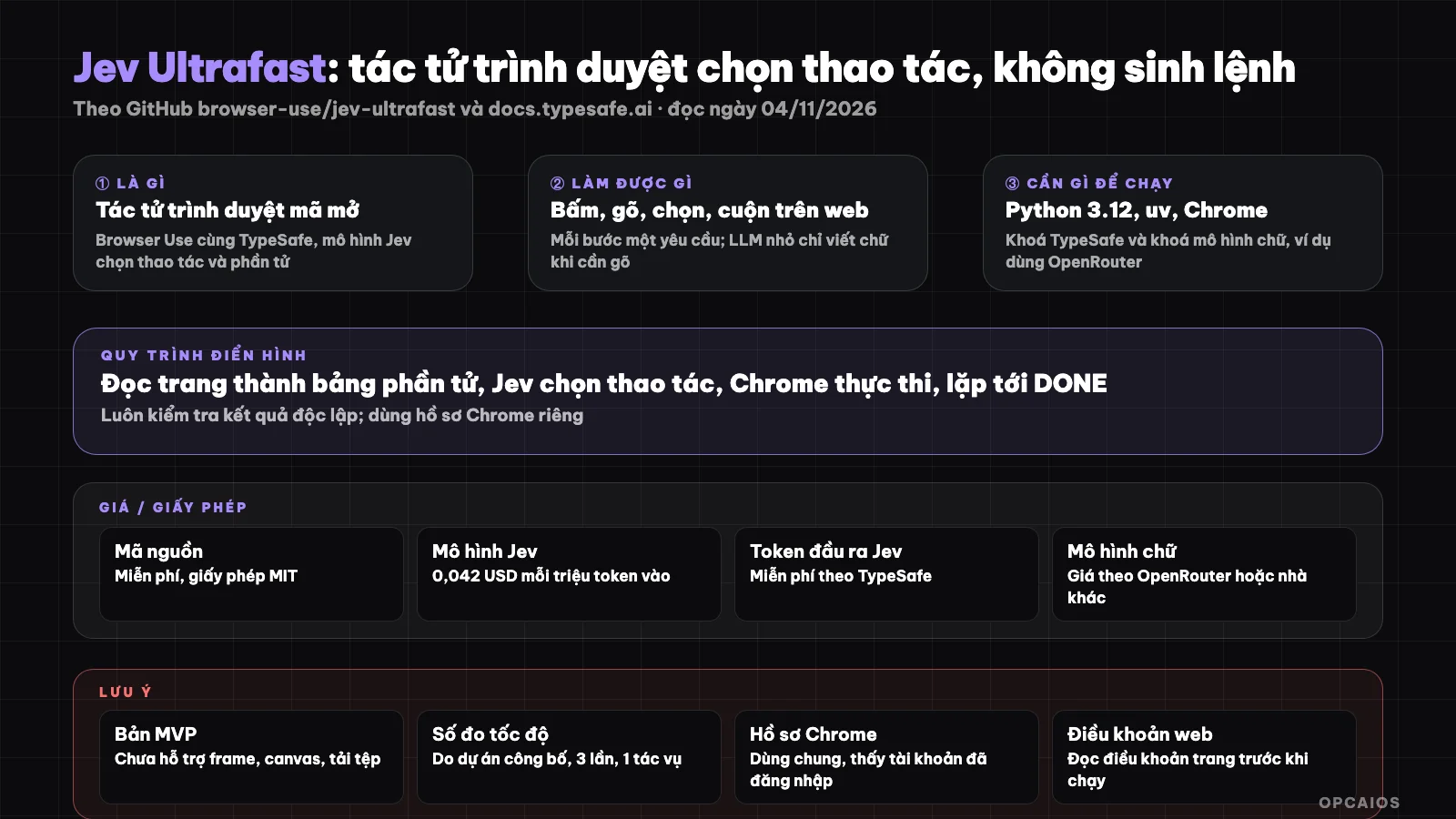
Each step makes only one model call to select the action and element, text is only generated when needed to type. Diagram: OPCAIOS.
What is Jev Ultrafast and who created it?
Jev Ultrafast is a lightweight browser agent, a result of collaboration between Browser Use (the team behind the famous browser agent library of the same name) and TypeSafe, the company behind the Jev model. The repository description on GitHub calls itself the fastest and cheapest web agent, a claim made by the project and unverified.
The core idea lies in the Jev model. According to the docs.typesafe.ai documentation (read on 04/11/2026), Jev is TypeSafe's flagship model and the first "System One" model: you send a state along with typed questions, Jev returns choices, probabilities, and confidence in structured form, not generating text. Traditional large language models (LLMs) are built to write text for readers, so when using an LLM to make decisions for software, you have to force it to output structured results and parse them back. Jev Ultrafast takes a different approach: treating browser control as a selection problem from a finite list. A website is read into a numbered element table, Jev selects an action and target, the rest is executed by Python code. At the top of the README, Browser Use also introduces BU Ultrafast, an agent pre-stored on Browser Use Cloud. If you're unfamiliar with the concepts, see What is Browser Use? and What is an AI agent?.
How does Jev Ultrafast work?
Jev Ultrafast runs a short loop: capture the page state into an element table, send a request to Jev to choose an action and element, execute it, then read the page again. By default it does not use screenshots in the loop. The table below summarizes from the README, we have rephrased it.
| Component | Role |
|---|---|
| Indexed action space | Each observation creates a new element table: buttons, input fields, checkboxes, with ordinal numbers |
| 8 actions | CLICK, TYPE_TEXT, SELECT, SCROLL_UP, SCROLL_DOWN, WAIT, DONE, BLOCKED |
| One request per step | Action and targets are asked in parallel in a single call |
| Small text model | Only called when the action is TYPE_TEXT, for example writing a city name |
| Target verification | Before clicking, verify the element is still correct, not hidden, page hasn't changed |
| Browser Harness | Connect to Chrome via remote debugging mode, installed when running uv sync |
| Local inspector | Web interface displays elements, action probability, target probability |
Worth noting is how output safety is maintained. According to the README (read on 04/11/2026), every target being executed comes from an observed DOM node, and the model's output never becomes CSS selectors, coordinates, shell commands or executable JavaScript. Content written by the text model must be parsed into a small JSON object before typing. Questions about targets are speculative: Jev answers targets for clicking, typing, and selecting in one call, but only the target matching the chosen action is used. This way two decisions cost only one network round trip. The source code is kept small, split into a few files like agent.py, snapshot.js, browser.py, model.py, so anyone familiar with Python can read through the whole loop in one sitting.
Is Jev Ultrafast free, and how much does the API cost?
The Jev Ultrafast code is free under the MIT license, but running it requires two paid API keys: a TypeSafe key for the Jev model and a key for the text model. The README clearly states that all working examples and recorded scenarios call paid APIs.
| Item | Cost and conditions (read 04/11/2026) |
|---|---|
| Jev Ultrafast source code | Free, MIT |
| Jev model (TypeSafe) | 42 USD per billion input tokens, that is 0.042 USD per million tokens; output tokens are free |
| Jev context | 64k tokens per request, 32k per question; optional long context mode available |
| Text model | Default example uses OpenRouter key with inception/mercury-2.5; pricing according to OpenRouter |
| Browser | Chrome pre-installed on machine, no GPU needed |
| Ultrafast BU on Browser Use Cloud | Available on all plans per README; haven't read Browser Use pricing page yet |
TypeSafe pricing taken from the Models page on docs.typesafe.ai, read 04/11/2026, before tax and subject to change. We haven't measured how many tokens a real task costs, so we can't estimate the cost per run.
How do I try Jev Ultrafast?
Trying Jev Ultrafast requires Python 3.12 or later (per pyproject.toml), the uv tool, Chrome, and two API keys. The process follows the README: first download the code, next fill in the keys, finally open the inspector:
- First, clone the repository and install dependencies with
uv sync, which also installs Browser Harness. - Next, copy the
.env.examplefile to.env, and fill inTYPESAFE_API_KEYandTEXT_MODEL_API_KEY. - Run
uv run jev, open the local address mentioned in the README, and click to run the demo. - If Chrome isn't connected, run
uv run browser-harness --doctorand allow remote debugging when Chrome asks. - Finally, try a different goal via
examples/run.pywith--urland--goalparameters.
Commands per README:
git clone https://github.com/browser-use/jev-ultrafast.git
cd jev-ultrafast
uv sync
cp .env.example .env
uv run jev
You can also call it from Python via the Agent class, passing a URL and goal in natural language, then loop through the returned states. The "Choose next" button in the inspector lets you pause before each execution to see what the agent plans to do.
What are the limitations and risks of Jev Ultrafast?
Jev Ultrafast is an MVP, and the README lists many limitations. The biggest risk when using it in practice is that the agent runs in your current Chrome profile, so it sees every account you're logged into.
The main limitations and risks, per README (read 04/11/2026) and our assessment:
- DOM scope: the reader handles common HTML and ARIA controls; shadow root, frames, canvas, file upload, popped-out tabs, nested scrolling, and custom keyboard widgets are outside the MVP.
- Results need verification: when the agent picks
DONE, there still needs to be an independent verification step. For example, the Google Flights example in the repo only finds and verifies results, it doesn't select or book tickets. - Shared Chrome profile: the agent's tabs share your current Chrome profile. You should use a separate profile and not log into important accounts.
- Speed measurement: the README itself says results are 3 out of 3 runs on one task, one browser profile, not a general reliability assessment.
- Website terms: automating actions on services like Google Flights may be restricted by terms of service. Read the terms for each site, respect rate limits and content copyright, and don't use it to bypass bot blocking systems. This section is for reference only, not legal advice.
- Data sent out: text displayed on the page is sent to TypeSafe and the text model provider, so avoid running on pages with personal data.
How does Jev Ultrafast compare to other browser agents?
Jev Ultrafast differs from popular browser agents in that it doesn't ask the LLM to generate commands but only to choose from a list. The table below is a general description based on public documentation, not measurements.
| Tool | Decision method | Good for |
|---|---|---|
| Jev Ultrafast | Jev model picks action and element, small LLM only writes text | Short web tasks, speed, low cost |
| Browser Use | LLM reads page state and decides action | Multi-step tasks, more flexibility |
| Playwright | Script written by human, no AI | Testing, fixed repetitive tasks |
| Camoufox CLI | Fingerprinted browser, command-line control | Cases needing separate browser, must respect terms |
For a detailed comparison, read What is Playwright? and What is Camoufox CLI?.
When should you use Jev Ultrafast?
Jev Ultrafast suits programmers who want to explore a new approach to browser agents, or need short web tasks that run fast on pages with clear HTML structure. People without coding knowledge will find it difficult, since it requires uv, a .env file, and API keys.
| Situation | Recommendation |
|---|---|
| Want to understand how browser agents work | Read Jev Ultrafast code, since the repo is small and clear |
| Short form-filling task on an internal page | Try Jev Ultrafast with a separate Chrome profile |
| Page uses canvas, frames, file uploads | Not suitable yet, use Browser Use or Playwright |
| Fixed regression testing | Use Playwright, no need for AI |
| Don't want to manage API keys yourself | Consider pre-hosted services, read pricing carefully first |
Example (hypothetical): someone running OPC needs to open their own internal admin page, filter a list of orders by date, and stop when the results table appears. Jev Ultrafast can do this in a few steps, and the user can verify the results before proceeding further.
OPCAIOS experience
We added Jev Ultrafast to the Repo list in the Utilities section on opcaios.org after reading the README and checking that the repo is still maintained; we have not run it yet, so this section describes the criteria we use to consider it, not an evaluation after use. We have a separate post about Browser Use. Four criteria we examined:
- Is the repo still maintained: yes, code pushed on 03/11/2026, though the repo was only created on 16/09/2026 so it's still young.
- License: MIT, can use commercially; but the Jev model is a paid service from TypeSafe, not open.
- Hidden costs: two paid API keys; cost per task not yet measured.
- Can it replace existing tools, terms risk: only worth considering for short tasks on our own pages; for third-party pages must read terms first, and always use a separate Chrome profile.
Read more: Browser Use là gì?, Playwright là gì?, Agent Reach là gì?, LLM là gì?.
Frequently Asked Questions
How much faster is Jev Ultrafast than regular Browser Use?
The README does not make a direct comparison with the Browser Use library. The published numbers compare two versions of Jev Ultrafast itself: across six interleaved runs with the same model and settings, the median time decreased from 9.45 seconds to 7.09 seconds, about 25%, and the median number of browser protocol commands dropped from 1,092 to 101. The README itself emphasizes that this is three iterations of one task on one browser profile, not a general reliability assessment. These numbers are published by the project and remain unverified; we have not measured them.
Do I need a GPU to run Jev Ultrafast?
No GPU needed. Jev Ultrafast runs on your machine as a small Python program that controls Chrome, while the reasoning work is handled by two cloud services: TypeSafe's Jev model chooses actions, and a text model via OpenRouter writes content when typing is needed. So a standard office computer is sufficient. What you do need is Python 3.12 or higher, the uv tool, Chrome with remote debugging enabled, a stable network connection, and two paid API keys. The README mentions you can swap the text model for Gemini, GLM, or DeepSeek via an OpenAI-compatible layer.
Can I use Jev Ultrafast with locally-run models?
Partially. The text model uses an OpenAI-compatible interface, so in principle you could point TEXT_MODEL_BASE_URL to a local server; the README only mentions Gemini, GLM, and DeepSeek, not local models, so this remains unverified. The critical part—choosing actions and elements—depends on the Jev model, a TypeSafe service called via API. We found no documentation saying Jev runs on private hardware. If running everything locally is a hard requirement, Jev Ultrafast is not yet the right choice.
Is it legal to automate websites with Jev Ultrafast?
It depends on the website and your purpose. Many large services restrict their terms against automated access, bulk data collection, or circumventing anti-bot measures. Before running on a third party's site, read their terms of service, keep the frequency low, respect content rights, and don't collect personal data. The safest approach is to use it on your own systems or sites that permit automation. This section is for reference only, not legal advice; we have not cross-checked specific terms for Google Flights or Vietnamese legal texts.
Where can I learn to build AI agents that control the browser?
Start with the fundamentals: understand language models, the concept of agents, and how browsers are controlled with code. The posts What is an AI agent?, What is Browser Use?, and What is Playwright? are good entry points. Then read the Jev Ultrafast codebase, since it's a small repository with a clear loop, state capture, and execution. Try it first on your own site, using a separate Chrome profile. If you want a structured pathway to bring AI agents into your solo business's daily workflow, you can look into OPCAIOS's AI application training course.
Source: GitHub browser-use/jev-ultrafast (README, .env.example, pyproject.toml, API, read 04/11/2026), docs.typesafe.ai (Introduction, Models, read 04/11/2026); not read: Browser Use Cloud pricing page, docs/performance.md, OpenRouter pricing; unverified: all speed measurements in the README, ability to run text models locally; star counts and prices may change. Experience is from OPCAIOS.
Translated from Vietnamese with AI. Read the original.
Want to apply this in your business?
Book a free 30-minute call (Vietnam time, in English or Vietnamese).