


Can You Burn Out Running AI Solo? Yes. And Here Are 6 Boundaries to Prevent It.
Can you burn out running AI solo? Yes, because AI can work 24/7 but you cannot, and the reviewing, fixing, and answering alerts still fall on one person. According to the World Health Organization (WHO, statement 28/5/2019, accessed 25/10/2026), burn-out in ICD-11 is an occupational phenomenon resulting from prolonged stress in the workplace that has not been successfully managed, with three dimensions: energy depletion, distance from or negativity toward work, and reduced effectiveness; WHO does not classify it as a disease. This post on burn-out when running AI solo presents 6 design boundaries for AI systems to reduce that risk, along with OPCAIOS experience. This is not medical advice.
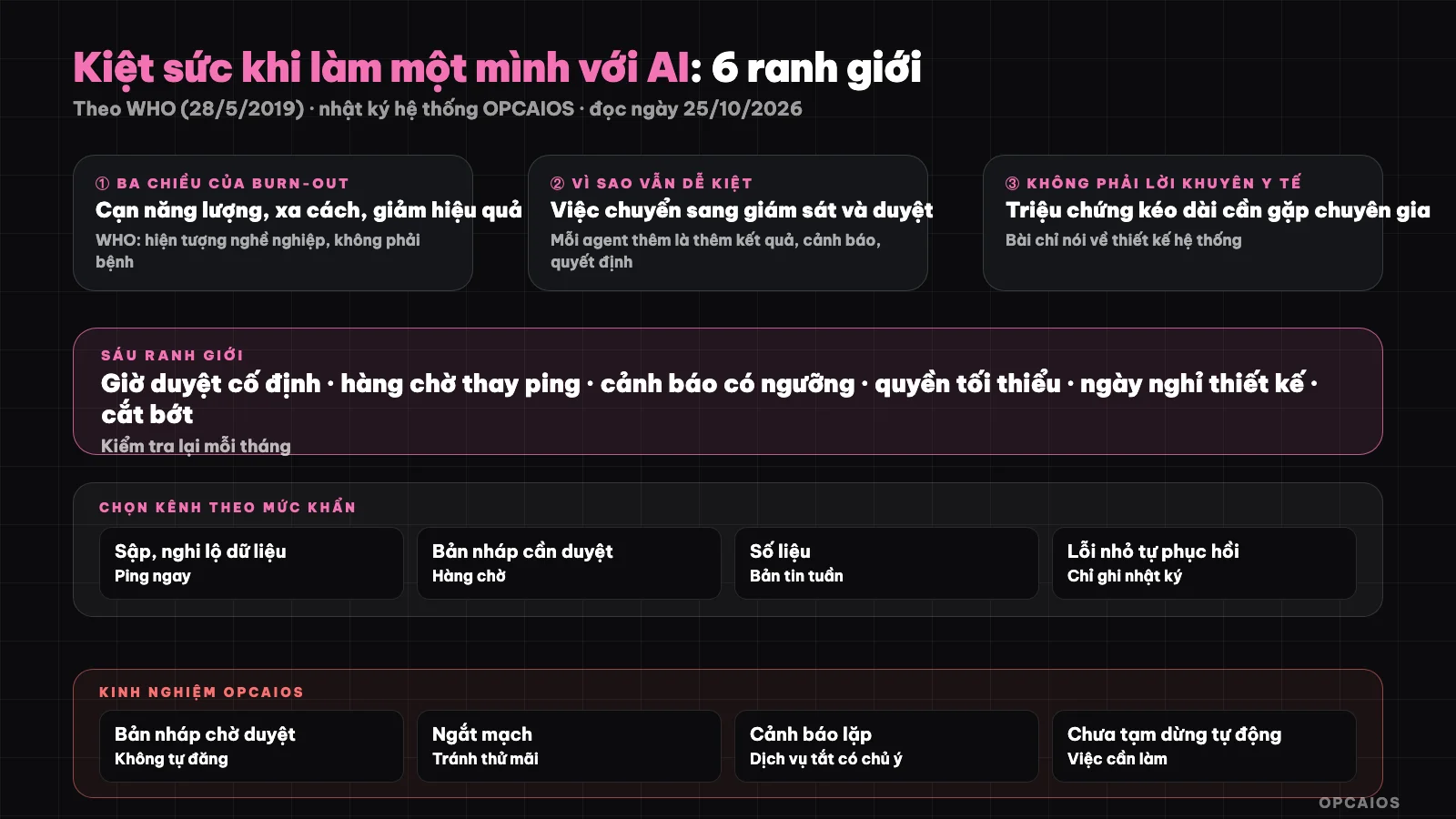
AI does the work, but you still have to review and take responsibility. Diagram: OPCAIOS.
Why Is Running AI Solo Still Prone to Burn-Out?
Because AI shifts work from "doing it yourself" to "monitoring and reviewing," and monitoring has no clock-out time. Each agent added is more results to check, more alerts to read, more decisions to be accountable for, all piling onto one person.
The three signs according to WHO's description are energy depletion, distance from work, and reduced effectiveness. For solo operators, early signs usually are: checking the system on your phone all the time, avoiding review because you're dreading it, or rushing through review just to get it done. These are practical observations, not diagnosis. If you have prolonged symptoms, see a medical or mental health professional.
The promise that "AI means doing less" also deserves caution; see why I don't trust the promise of 300% productivity boost and the lazy person using AI gets blindsided.
Boundary 1: Fixed Review Hours Instead of Continuous Review
Set two or three review windows each day and have agents pile everything needing review into a queue. Continuous review makes you work at the machine's pace; scheduled review gives you back agency.
How to do it: every output that needs human eyes (articles, reply emails, code changes) goes into a single queue. Outside your review windows, you do not open the queue. This also improves review quality because you look at batches, less interrupted.
Boundary 2: Queue Instead of Ping
By default, let information wait for you, do not push notifications for each task. Only truly urgent events (lost revenue, data breach, main page down) get a ping; everything else goes into a weekly or daily digest.
| Event type | Suggested channel |
|---|---|
| Core system down, suspected data breach | Ping immediately |
| Draft ready for review | Queue, check at review hours |
| Report metrics | Weekly digest (automated weekly report using n8n) |
| Small error self-recovering | Log only, no notification |
Boundary 3: Alerts with Threshold and Purpose
Too many alerts get ignored, repeated alerts about a known issue are worse. Each alert should answer: what action is needed, who does it, and can it go silent when the situation is accepted.
Group repeats, set thresholds (only alert if the error persists more than N minutes), and have a way to "pause monitoring" when you intentionally stop a service. Otherwise, the system keeps alerting you about something you chose to turn off.
Boundary 4: Agent Permissions and Stopping Points
The more permissions an agent has, the more you have to watch. Grant minimum permissions, put irreversible actions (sending money, deleting data, public posting) behind a human review step, and cap the number of steps or budget per run.
This both cuts risk and reduces background dread, because you know where the worst case stops. See the guide on AI Agent and errors like AI hallucination.
Boundary 5: Days Off by Design, Not by Chance
To truly rest, the system must run without you. Write an incident response process, say what can run itself, what pauses, and who (or what) gets critical alerts.
Try a "trial day off" each quarter: turn off non-critical notifications for 24 hours and see what breaks. Everything that breaks needs an SOP, see how to SOPize the business to run while you travel.
Boundary 6: Cycle checks and cutbacks
Each month ask every tool, agent, alert: does it still deserve my attention? Anything that only creates more monitoring work without creating value—turn it off or merge it.
This is in the spirit of auditing AI tool costs: count attention costs, not just money. And see where to start automation to avoid automating too many things at once.
OPCAIOS experience
Our AI-drafted blog posts always sit in pending-review status and only go live when approved; that is a proper queue. We also have a service monitor with a circuit breaker mechanism so we don't keep trying to recover a failing service.
Real lesson from system logs on 25/10/2026: when some services were intentionally stopped, the logs still showed many repeated lines of "breaker open / half-open" for the same service over hours. That is exactly the repeating alerts boundary 3 talks about. We have not verified the cause of each event, and we do not yet have a mechanism to pause monitoring automatically when a service is intentionally shut down. We do not publish working hours or health status of anyone in this post.
Frequently asked questions
Is burnout a disease?
According to WHO in ICD-11, burnout is an occupational phenomenon, not a medical condition. If you have lasting symptoms, see a healthcare professional.
Should I let agents run at night?
Yes, if it cannot cause harm when it runs wrong and the result goes to a queue instead of sending out immediately. Work with consequences should have a review step.
How do I know I am rubber-stamping reviews?
Signs: reviewing batches without opening content, error leak rate rising. Then cut the number of agents or add breaks instead of reviewing faster.
Does more automation help you rest more?
Not automatically. More automation usually brings more monitoring; it only helps when it replaces repeated work and has clear stopping points, reasonable alerts.
Where should I start cutting back?
Start by turning off non-urgent notifications and bunching them into a queue. You need to design the process for yourself; see AI application training services.
Source: WHO, "Burn-out an occupational phenomenon: International Classification of Diseases" (28/5/2019), read on 25/10/2026; OPCAIOS internal system status logs on 25/10/2026. These boundaries are OPCAIOS design practices, not yet validated in controlled study. This is not medical advice. The experience is OPCAIOS's.
Translated from Vietnamese with AI. Read the original.
Want to apply this in your business?
Book a free 30-minute call (Vietnam time, in English or Vietnamese).