


What is a lead magnet?
A lead magnet is a free resource with real value, given away in exchange for a visitor's contact information, usually an email. Compiled marketing sources (checked 25/10/2026) describe them quite similarly: ebooks, checklists, templates, cheat sheets or webinars, with general advice that the more specific the better. I need to be honest upfront: this post does not cite conversion or signup rates because I haven't found reliable sources, and we haven't measured our own numbers yet. The post explains what a lead magnet is, 7 types suited to one-person companies, how to choose, how to deliver, notes on personal data and OPCAIOS experience.
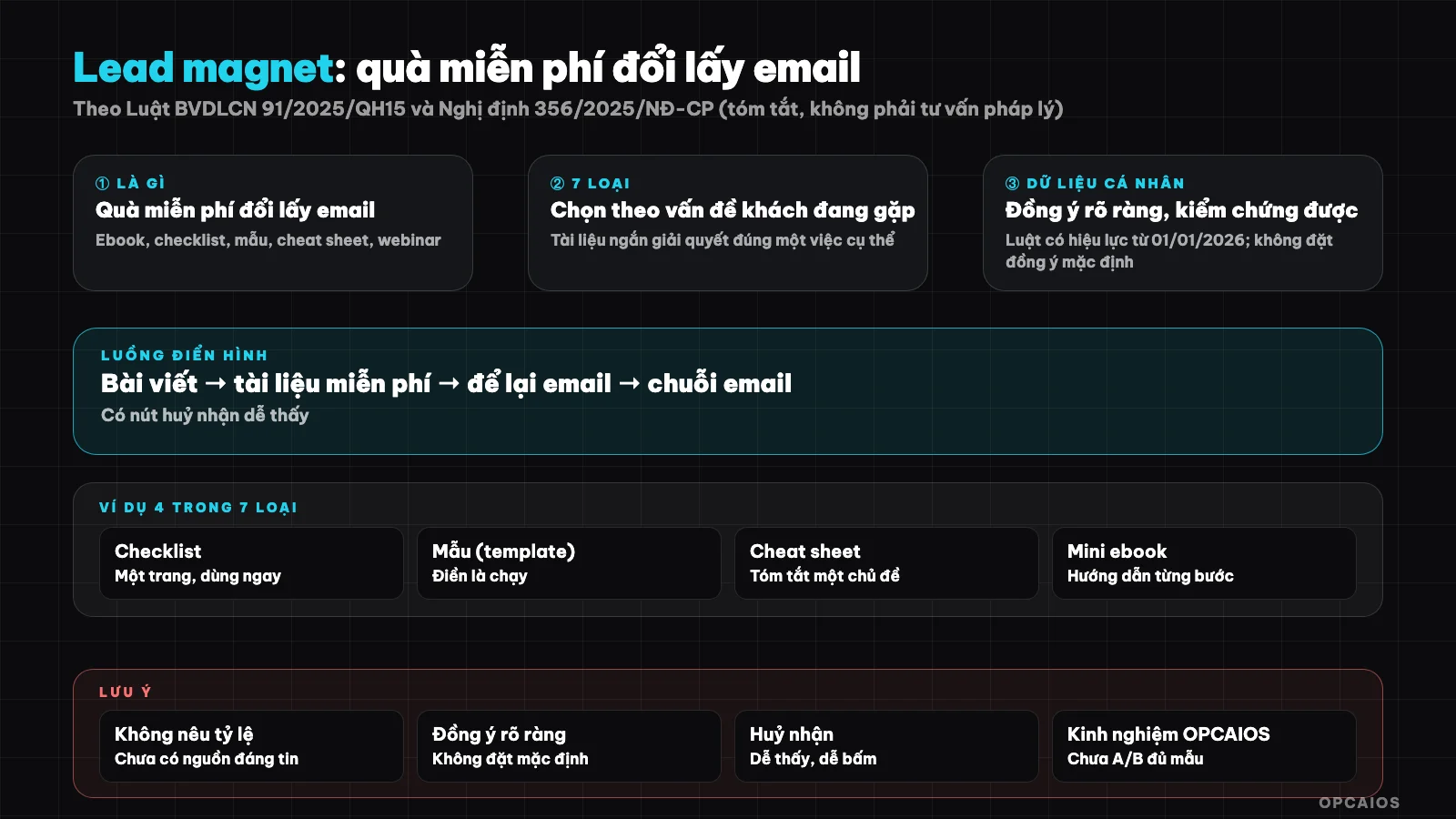
A lead magnet is the step of exchanging value for permission to contact. Diagram: OPCAIOS.
Why does a one-person company need a lead magnet?
Most customers aren't ready to buy the first time they visit your page. A lead magnet gives them a small, low-risk step: get something useful in exchange for permission to contact them again. For someone working alone, that's how you build a list of interested people without cold calling or messaging each person individually.
A lead magnet is also a way to prove your ability through an actual product rather than promises. A set of templates you can use right away shows how you think faster than a long about page. But it doesn't replace selling: if the list isn't cared for with decent email marketing, free material is just something people download and forget.
7 types of lead magnets to try
Seven common types for one-person companies are checklists, editable templates, prompt sets or scripts, short guides, spreadsheets or calculators, diagnostic quizzes and online workshops. Each takes different effort and suits different customer types.
| Type | Example for AI service | Effort | Thing to watch |
|---|---|---|---|
| 1. Checklist | "15 things to check before bringing AI into your process" | Low | Must be specific enough, avoid generic lists |
| 2. Template | Brief template, quote template, SOP template | Low to medium | Provide editable version, not just image |
| 3. Prompt set | Prompt set for a role (sales, operations) | Medium | Must test and write yourself, don't copy |
| 4. Short guide | 8 to 10 section guide on one topic | Medium to high | Long ebooks often go unfinished |
| 5. Spreadsheet or calculator | Calculate monthly AI tool costs | Medium | Formulas must be right, state assumptions clearly |
| 6. Diagnostic quiz | Answer a few questions, get matched to right group | Medium to high | Need reasonable scoring logic |
| 7. Online workshop | 45 minute webinar with Q&A | High | Takes direct time, needs fixed schedule |
The examples in the table are our suggestions, not measured results.
How to pick the right lead magnet for your customer?
Pick a lead magnet that solves a narrow problem your customer faces right now, and sits naturally before the service you sell. A customer needing a quick quote will want a quote template, not a 40 page guide. Specific titles usually beat broad ones.
The quick selection process has four steps:
- List three questions customers often ask before buying.
- Pick the question you can answer with a resource they can use within one session.
- Name it by result and audience, like "30 sales prompts for small business owners" instead of "AI Material".
- Make sure what comes next: after the resource, what service does the customer see, through email or what page.
How to deliver a lead magnet safely and neatly?
There are three ways: send a link by email after signup, show the link right on the thank you page, or put it in the customer's account. The first method both confirms the email is live and starts your email sequence. Whichever you pick, don't leave the file somewhere anyone can download if you want to keep your list.
A few practical points:
- Format. A web page or shared document is easier to update than a PDF file already sent out.
- Content must be real. If you use AI to help write, test each part yourself and read it again before giving it away. See also audit AI content before posting.
- Next step. The first email should mention how to use the resource and ask a question for the customer to answer, don't rush to sell.
Do I need consent to collect emails?
Yes. Personal data protection law 91/2025/QH15 takes effect from 01/01/2026, and according to EY Vietnam's summary (read on 25/10/2026), Decree 356/2025/NĐ-CP effective on the same date replaces Decree 13/2023. Consent must be explicit, verifiable, and not pre-checked by default. This is not legal advice.
This leads to specific actions for a document signup form:
- Don't pre-check the newsletter box. Separate "receive documents" from "receive marketing emails" if you plan to send more.
- Make clear what you will use the email for, right next to the submit button.
- Record the time and content of what the customer agreed to.
- Every email should have an unsubscribe link.
The summaries we read come from advisory firms and legal news sites, not the original articles themselves, so please check official documents or ask a lawyer. For general principles, see 5 data security rules for business when using AI.
How do I know if a lead magnet works?
Measure three things: how many people see the page, how many sign up, and how many then reply to emails or buy. Signup numbers by themselves don't tell you quality. Whether a rate is good or bad depends on your traffic source and industry, so compare it to yourself week by week, not to an average number from an article.
The minimal way to do it:
- Make the document landing page its own landing page, one goal.
- Add source parameters to the links you post, and mark signups as a conversion event in GA4.
- Record signups in your CRM with the source, so you can see who replied or bought.
- Change only one thing at a time (document name, headline, button), and record when you changed it.
Common mistakes
Common mistakes are giving away something unrelated to your service, giving away a document that is too long, hiding the unsubscribe link, and overhyping. The list below is compiled experience for self-checking, not research with data.
- Give away something broad ("AI Guide") instead of solving one narrow problem.
- The document promises more than it delivers, or copies content from others.
- Send marketing to people who only asked for a document and didn't agree to it.
- No next step: people who sign up get nothing else, and your list goes cold.
OPCAIOS experience
We have free documents in the store: five sets including prompts for sales, marketing, operations, and two guides on prompt writing and AI agents. The content is rewritten by us in Vietnamese, not translated word for word, and delivered through a document page link. To get them, customers must log in, so the login step also collects contact information. We also have separate document pages to trade documents for email, with limits on repeat signups and an unsubscribe link.
What we haven't done or measured: we haven't published download counts or signup rates, we don't have data on which document types lead to paying customers, and we haven't run A/B tests on lead magnet headlines with enough traffic to conclude. We also haven't run a webinar as a lead magnet. Requiring login may cause some people to drop off, and we haven't measured the impact.
Frequently Asked Questions
Does a lead magnet have to be free?
Usually free or very cheap to lower barriers, but the value has to be real. Low-value material that asks for email will lose your customer's trust.
Should I use PDF or a web page?
PDF is easy to save, a web page is easier to update and measure. We don't have reliable data to say which format converts better, so choose based on what you'll actually update.
How many lead magnets should a one-person company have?
Start with one that solves one narrow problem, measure it, then add more. Too many things at once dilute effort and are hard to maintain.
Can I use AI to create a lead magnet?
Yes, but AI is just a draft writer. You have to test it yourself, edit it, verify the data, and make sure you don't infringe copyright. On packaging and selling prompts and n8n templates, see packaging and selling AI prompts and n8n templates.
Where do I learn to build a customer funnel with AI?
Start with one piece of content, one landing page, one short email sequence and measure it yourself. If you want guided training, see OPCAIOS's AI application training course.
Source: summaries of lead magnet articles (hauerpower.com, digitalmarketer.com, designrr.io, thesocialcat.com, read 25/10/2026 via search results, haven't read full articles); summary of Law 91/2025/QH15 and Decree 356/2025/NĐ-CP from EY Vietnam, PwC Vietnam, LSVN, read 25/10/2026, haven't read original clauses; no conversion rate data because we couldn't find reliable sources and we haven't measured it ourselves. Experience is from OPCAIOS.
Translated from Vietnamese with AI. Read the original.
Want to apply this in your business?
Book a free 30-minute call (Vietnam time, in English or Vietnamese).