


What is LLM Dictionary?
LLM Dictionary is a plugin for Obsidian that lets you look up words using Google's large language model Gemini: you define the data fields you want to receive (definition, pronunciation, examples, synonyms...), set up your own note template, then press a hotkey to look up and save the result as a note. According to the GitHub API (read on 04/11/2026), the repository Mrntn161/LLM-Dictionary-vn has 15 stars and 3 forks, was created on 11/07/2024, the most recent code push was on 15/06/2026, the latest release is 0.2.4 (15/06/2026), and the repository has not declared a license. The lookup part uses your Gemini key; the audio reading part needs a separate key that according to the README previous version users have already purchased. This post explains what the plugin does, how to install it, costs, security risks and when you should use it.
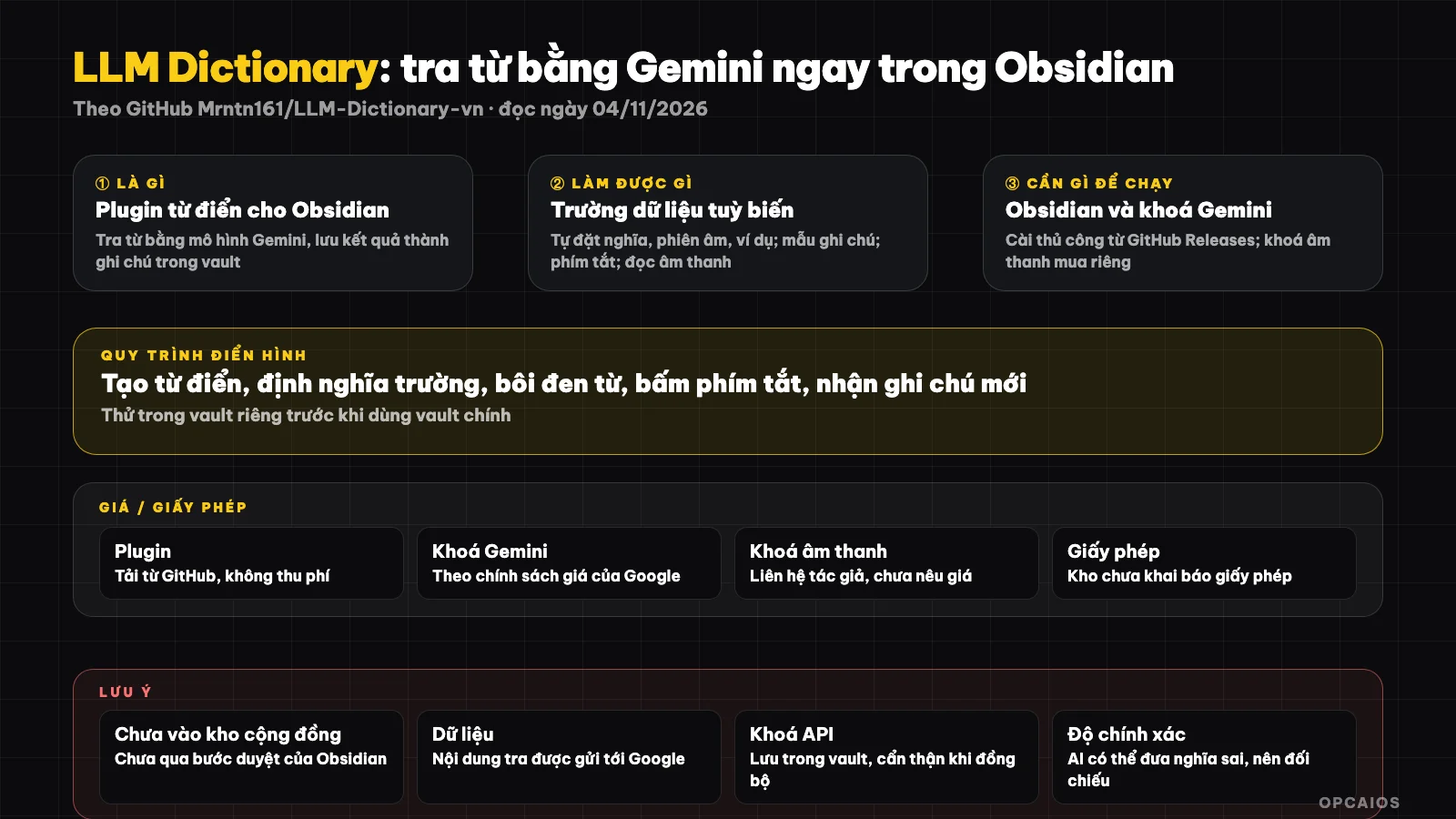
LLM Dictionary turns each word lookup into a structured note in your Obsidian vault. Diagram: OPCAIOS.
What is LLM Dictionary and who made it?
LLM Dictionary is an Obsidian plugin written by a Vietnamese author, whose name in the manifest.json file is Nguyen Thien Nghia, with the GitHub repository username Mrntn161. The README is written in Vietnamese, brief, mostly consisting of screenshots with instructions.
The plugin's idea differs from traditional dictionaries. A normal dictionary returns the same type of result for everyone. LLM Dictionary lets you decide what the result looks like: each "dictionary" you create is a set of data fields, each field has a name, description and example. The description and example are not required, but the README recommends filling them in so the AI understands what data you want and how to format it. The plugin sends a request with those fields to Gemini, receives a structured answer, then pours it into the note template you've set. According to the README (read on 04/11/2026), from version 0.2 the plugin switched to using Gemini's model; in the code of version 0.2.4 we saw the model name gemini-3.1-flash-lite-preview. Older versions, according to code still in the repository, used Groq's API.
Main features of LLM Dictionary
LLM Dictionary has four main parts: dictionary management table, customizable data fields, note template and lookup hotkey. It also has a feature to create audio for word pronunciation, using a separate key.
| Feature | Description from README and code version 0.2.4 (read on 04/11/2026) |
|---|---|
| Management table | Open via the book icon on the sidebar, manage dictionaries |
| Data fields | Each field has a name, description, example to guide the AI |
| Note template | Template decides how to save and display lookup results |
| Hotkey | Set a hotkey for the lookup command in Obsidian settings |
| Model | Gemini via Google's API, key created by you |
| Audio | Code calls Microsoft Azure text-to-speech service |
| Device | Manifest indicates not just for computers, but not verified on mobile yet |
An example (hypothetical): you're learning English, create a dictionary "IELTS Vocabulary" with fields for Vietnamese meaning, pronunciation, part of speech, two example sentences and a common phrase. When reading an article in Obsidian, you highlight "resilient", press the hotkey, and instantly get a new note in exactly that format to review later.
Price, license and limitations
LLM Dictionary is freemium: downloading the plugin is free, the lookup part uses your Gemini key, while the audio creation part needs a separate key. The README says users who bought the audio key for the old version can contact the author via Facebook to get a new key; the README does not mention the price of the key.
| Item | Details (read on 04/11/2026, subject to change, not including tax) |
|---|---|
| Plugin | Download from GitHub, no fee |
| Gemini key | Create in Google AI Studio; cost follows Google's pricing policy, we have not read the pricing page today |
| Audio key | Contact the author; README does not mention price |
| License | Repository has not declared a source code license |
| Obsidian community repository | Not yet in the official community plugin list |
The most important thing to note is the license. When a GitHub repository has no license file, by default the author retains all rights: you are allowed to view and use according to GitHub's terms, but have no clear rights to modify, redistribute or use the code in other products. For people who just want to look up words for themselves it's fine, but if you plan to repackage or use it for a group, ask the author first. The remaining hidden cost is the API key: each lookup is one Gemini call, and the content you look up is sent to Google.
How to Install and Start Using LLM Dictionary
LLM Dictionary is not yet in Obsidian's community plugin repository, so you cannot install it using the familiar Browse button. The README does not describe the installation steps; below is how to manually install a general Obsidian plugin, combined with configuration steps from the README. If you have not used Obsidian yet, first read What is Obsidian?.
- First, go to the Releases page of the repository on GitHub and download the three files from the latest version:
main.js,manifest.json,styles.css. - Create an
llm-dictionaryfolder in the.obsidian/pluginsdirectory of your vault, and copy the three files there. - Open Obsidian, go to Settings, the Community plugins section, and enable the LLM Dictionary plugin.
- Next, create an API key in Google AI Studio following the instructions in the README, and paste it into the plugin's settings.
- Click the book icon on the sidebar to open the management panel, create your first dictionary, define fields and note templates.
- Finally, set a keyboard shortcut for the lookup command, highlight a word and try it out.
Manual installation means the plugin will not auto-update through Obsidian. You have to go back to GitHub yourself and check for new versions. Some users choose the BRAT plugin to track beta versions from GitHub; the README does not mention this approach and we have not tried it.
Risks, Security, and Personal Data
The main risk of LLM Dictionary is that the plugin has not gone through Obsidian's community repository review process and the repository has no license. Obsidian plugins run with full access to your vault and can make network calls, so an unreviewed plugin needs to be examined more carefully than plugins in the official repository. We did a surface-level check of the network addresses appearing in the code as of 04/11/2026, not a full code audit. Version 0.2.4 calls Google's Gemini API and Microsoft's Azure speech service. An older main.js file located in the repository's root directory contains a key verification function: this function retrieves the machine's public IP address and sends it together with the key to a Google Apps Script for authentication. We did not see this section in version 0.2.4, but the repository still contains many JavaScript files with unclear names. This is not proof that the plugin is malicious; it is simply a reason for you to review the code yourself or use it in a vault that does not contain sensitive data.
Three additional notes:
- The word or phrase you look up is sent to Google. Do not look up content with customer information or business secrets.
- The API key is saved in the plugin's configuration inside your vault. If your vault syncs through a cloud service or a public Git repository, the key could be exposed.
- Language models can give wrong definitions or unnatural examples. For specialized terms, cross-reference a reputable dictionary. See What is LLM? to understand why models sometimes make things up.
Compared to Other Options
LLM Dictionary is strong because it lets you design the lookup results yourself; dictionary plugins are usually strong in stability and don't need an API key. The table below is a general description, not a measurement.
| Option | Strengths | Weaknesses |
|---|---|---|
| LLM Dictionary | Custom data fields, Vietnamese interface | Not in community repository, no license |
| Dictionary (phibr0), in community repository | No AI key needed, shows definitions in sidebar | Limited note formatting customization |
| Dictionary Notes, in community repository | Saves each lookup as a note following a template | Note description not manually reviewed by Obsidian |
| Ask a chatbot AI directly | Most flexible | Does not auto-save to vault in a fixed structure |
If you want an AI agent to work deeper with your vault, see also What is Obsidian Skills? and What is Obsidian Second Brain?.
When Should You Use LLM Dictionary?
Use LLM Dictionary when you are learning a foreign language or specialized terminology right inside Obsidian and want each lookup to become a structured review card of your own design.
| Situation | Recommendation |
|---|---|
| Learning English vocabulary, want cards with a fixed structure | Very suitable, create a separate dictionary for each goal |
| Building an AI and marketing terminology notebook for yourself | Suitable, add a field like "example in my work" |
| Vault contains customer data, contracts | Be careful, use a separate vault for learning |
| Need to use it for a team, repackage it | Ask the author about licensing first |
| Don't want to manage API keys | Use a dictionary plugin that doesn't need AI |
OPCAIOS Experience
Vault Obsidian is our primary knowledge repository. However, we have not yet installed LLM Dictionary. We only added the plugin to the Repo list in the Utilities section on opcaios.org after reading the README and checking that the repository is still being updated; since we have not tested it yet, this section presents criteria for consideration, not an evaluation after use.
We use four criteria. First, the repository is still being updated: version 0.2.4 was released in June 2026, which is good but not extensive. Second, license: the repository has not declared one, which is a drawback. Third, hidden costs: the Gemini key and audio key. Fourth, safety: the plugin runs inside the vault containing all our knowledge, so with our main vault we only install plugins that have gone through the community repository or that we have read the code for ourselves. If we test it, we will test it in a separate vault first. See more about how we think about knowledge repositories in What is Second Brain?.
Read more: What is Obsidian?, Obsidian as a virtual assistant for categorizing notes, What is LLM?.
Frequently Asked Questions
Is LLM Dictionary free?
LLM Dictionary is free for the plugin part and the word lookup part, if you use your own Gemini key within Google's limits. The text-to-speech feature requires its own key; the README says people who bought a key for the old version can contact the author to exchange it for a new one, but it does not state the price. The cost of calling Gemini follows Google's policy and may change; we have not read Google's pricing page as of 04/11/2026 so we cannot provide a figure. If you look up many words each day, monitor your usage level in Google AI Studio.
Can I install LLM Dictionary from Obsidian's plugin repository?
No. According to Obsidian's official community plugin list on GitHub (read on 04/11/2026), LLM Dictionary is not there yet. You must install it manually: download main.js, manifest.json and styles.css from the Releases page of the repository, copy them into the .obsidian/plugins/llm-dictionary folder of your vault, then enable the plugin in settings. This installation method does not auto-update, so you need to check for new versions on GitHub yourself. The plugin has not gone through Obsidian's review process, so you should test it in a separate vault first.
Which AI model does LLM Dictionary use?
From version 0.2 onwards, LLM Dictionary uses Google's Gemini, according to the README. In the code of release 0.2.4, we see the plugin calling the Gemini API with the model gemini-3.1-flash-lite-preview, a lightweight, fast model suited for brief word lookups. Older versions used the Groq API. The audio feature uses Microsoft Azure's text-to-speech service. The model name may change in future releases; check the plugin settings after each update.
Is it safe to use LLM Dictionary for my data?
The content you look up is sent to Google for processing, and the audio feature sends text to Microsoft. The plugin runs inside Obsidian with read-write access to your entire vault and has not gone through the community repository's review process. We scanned the code: version 0.2.4 calls Gemini and Azure; an older version in the repository once sent the key along with a public IP address to the author's server for authentication. We do not see that in version 0.2.4, but we have not done a full audit. Use a separate vault and do not look up sensitive data.
Is LLM Dictionary suitable for people who cannot code?
Yes, if you are already familiar with Obsidian. Manual installation is just downloading three files and copying them to the right folder, no command line needed. The harder part is designing the data fields: the clearer your description, the more specific your examples, the more accurate the AI's response will be. This is really a skill in writing instructions for AI, the same kind as writing prompts. If you want to learn properly how to delegate tasks to AI and build a personal knowledge repository, see OPCAIOS's AI Application Training Course.
Source: GitHub Mrntn161/LLM-Dictionary-vn (README, manifest, code of release 0.2.4, API, read on 04/11/2026), Obsidian community plugin list obsidianmd/obsidian-releases (read on 04/11/2026); not read/not verified: Google's Gemini pricing page, audio key price, testing on mobile, full code audit; star count and prices may change. This experience is OPCAIOS's.
Translated from Vietnamese with AI. Read the original.
Want to apply this in your business?
Book a free 30-minute call (Vietnam time, in English or Vietnamese).