


What is Matt Pocock Skills?
Matt Pocock Skills is a set of open-source "agent skill" commands released by Matt Pocock (author of the Total TypeScript course and founder of AI Hero) on GitHub, including commands like /grill-me, /tdd, /to-spec that help programming agents ask detailed questions about requirements, write tests first, and keep code design clean. According to the GitHub API (read on 04/11/2026), the mattpocock/skills repository was created on 03/02/2026, has around 311,600 stars, MIT license, latest code push on 01/11/2026, and newest release is v1.3.2 (29/10/2026). The aihero.dev/skills page (read on 04/11/2026) lists 27 skills in the set. This post explains what the skill set does, how to install it following the README, real costs, limitations, comparison with other process frameworks, and when to use it.
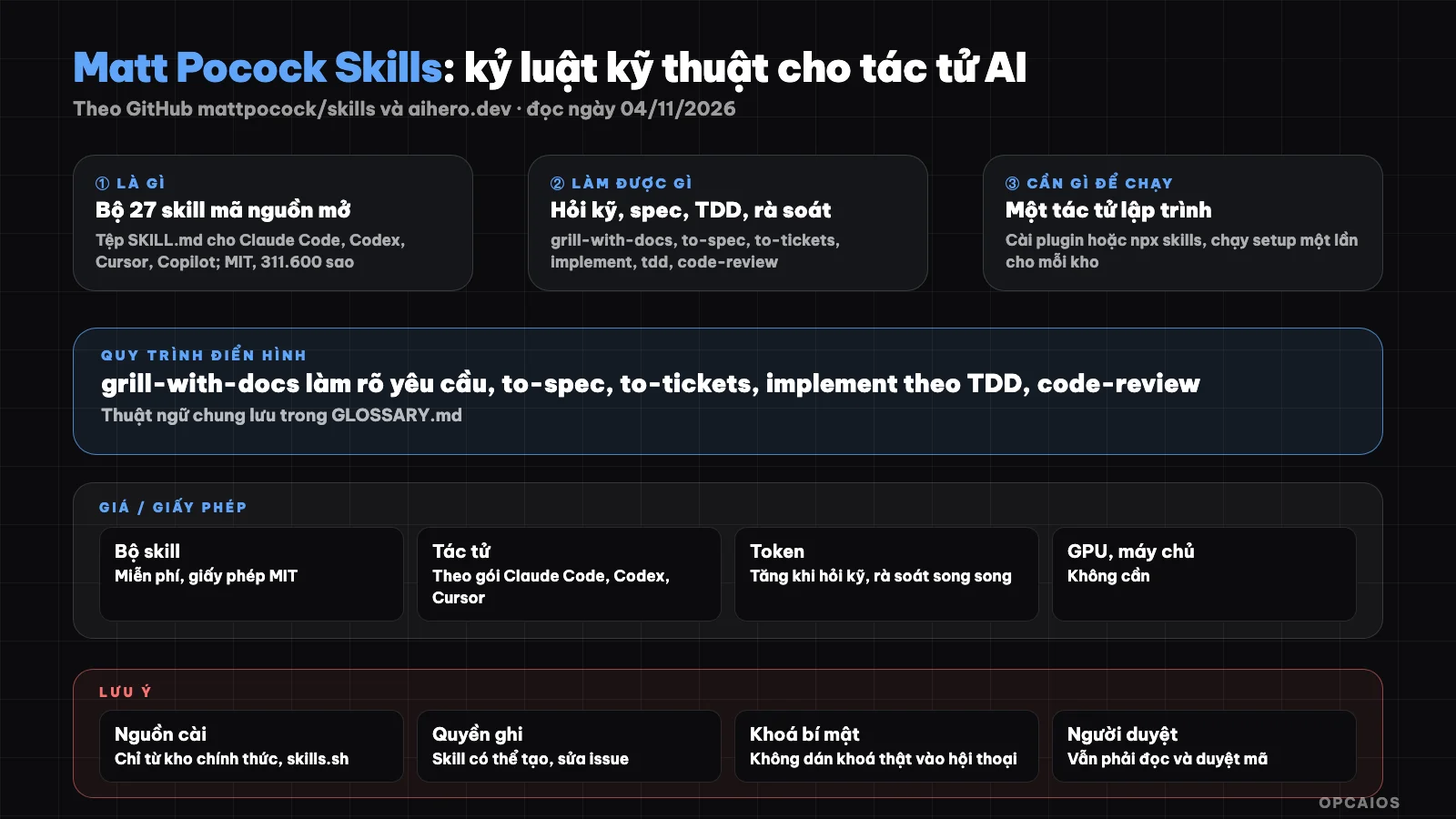
Main flow of Matt Pocock Skills: ask details, write spec, split tickets, do TDD, review. Diagram: OPCAIOS.
What is Matt Pocock Skills and who created it?
Matt Pocock Skills is a set of instruction files (SKILL.md) that a programming agent reads when you type a slash command, written by Matt Pocock from his own agent configuration directory. The goal according to the README is to serve "real engineering", not vibe coding, and work with many models.
What is a skill? A skill is a package of instructions that agents like Claude Code (Anthropic) or Codex (OpenAI) load when needed, instead of you having to paste the same prompt snippet each time. If you're not familiar with the concept, see What is a Skill?. Matt Pocock is a TypeScript programmer who according to his GitHub profile (read on 04/11/2026) worked at Vercel and Stately, and currently builds Total TypeScript and AI Hero. The README explains he wrote this set to fix four types of failures commonly encountered when working with agents: the agent doesn't do what you want, the agent is too verbose, the code doesn't run, and the source code gradually becomes a tangled mess hard to fix. The README positions the skill set against frameworks like GSD, BMAD, or Spec-Kit, which wrap the entire process; Matt Pocock chose small, easy-to-modify skills that work together, letting users keep control.
What are the main features of Matt Pocock Skills?
The skill set divides into two groups: Engineering (for code work) and Productivity (general workflow). Each skill is either called by the user or invoked by the agent when appropriate. The table below summarizes typical skills according to the README, read on 04/11/2026.
| Skill | What it does |
|---|---|
/grill-me, /grill-with-docs |
Agent interviews you until every branch of the plan is clear; docs version also records terminology and decisions |
/to-spec, /to-tickets |
Turns conversation into spec, then splits into small tickets with blocking relationships |
/implement, /implement-spec |
Works to spec, calls /tdd at agreed points, ends with review |
/tdd |
Red, green, refactor cycle: write failing test first then fix |
/diagnosing-bugs |
Hard bug diagnosis process: create feedback loop, narrow down, hypothesize, measure, fix, regression test |
/code-review |
Review on two axes: repository code standards and spec fit, runs with parallel subagents |
/improve-codebase-architecture |
Scan code for places to consolidate into deeper modules, output HTML report |
/handoff, /teach, /wait-what |
Compress conversation for next agent to continue, teach concept over multiple sessions, explain confusing sentences |
The most striking idea according to the author himself is "shared language": a GLOSSARY.md file defining project terminology so agents speak more concisely and name variables, files consistently. The benefits in tokens and speed that the README mentions come from the project's own reporting and have not been verified. Review skills run with subagents so the two evaluation axes don't interfere with each other.
Price, License, and Hidden Costs
Matt Pocock Skills is free with an MIT license on GitHub API (checked 04/11/2026), no paid tiers for the skill set itself. The real cost lies in the agent and model you use to run the skills, plus the time learning the workflow.
| Item | Cost | Notes |
|---|---|---|
| Skill set | 0 đồng | MIT, you can use, modify, redistribute, keep copyright notice |
| Programming agent | Follows Claude Code, Codex, Copilot, Cursor pricing | Before tax, subject to change; this post does not quote specific prices |
| Model tokens | Increases with number of back-and-forths and subagents | Skills ask detailed questions and review in parallel, adding extra API calls; not yet measured |
| Newsletter, email course | Free via aihero.dev | Email course 7 lessons, sign up to receive |
Limits to know: README makes no support commitment; the skill set changes fast so commands may be renamed between versions, like README changed from CONTEXT.md to GLOSSARY.md. No GPU needed, no separate API key beyond the agent account you already use.
How to Install Matt Pocock Skills
Installing Matt Pocock Skills takes about a minute with Claude Code or Codex, following the README on GitHub (checked 04/11/2026). Pick one method per agent: the plugin auto-updates, while the npx skills method copies editable files into your project and you update manually. Installing both will show each skill twice.
- First, install for your agent. With Claude Code:
claude plugin install mattpocock-skills@claude-plugins-official
With Codex:
codex plugin marketplace add mattpocock/skills
codex plugin add mattpocock-skills@mattpocock
With Cursor, OpenCode, Windsurf, and other agents, use the universal installer:
npx skills@latest add mattpocock/skills
- Next, in your agent run
/setup-matt-pocock-skillsonce per repository. The skill will ask which issue tracker you use (GitHub, GitLab, local files), which ticket labels to categorize, and where to save docs. - Finally, try the main workflow on a small change:
/grill-with-docsto clarify requirements,/to-spec,/to-tickets, then/implement.
If unsure which skill to call, /ask-matt plays router and suggests the right skill. Gemini CLI and GitHub Copilot have their own commands in the README.
Limits, Risks, and Security
The main risk of Matt Pocock Skills is not the license but that skills are instructions the agent trusts highly. SKILL.md files can ask the agent to run commands, write files, open issues on your issue tracker, so read them before install.
Four points stand out. First, install only from official sources (the mattpocock/skills repo, official marketplace, or skills.sh) because forks may inject foreign instructions. Second, skills like /to-tickets or /triage can create or edit issues on GitHub, GitLab; grant minimal permissions and review before the agent writes. Third, /wizard generates bash scripts to guide infrastructure setup or secret management, so do not paste real secrets into chat. Last, detailed questioning and TDD workflows demand the user understand code: the skill set cannot replace your reading and reviewing changes. MIT license lets you modify skills into your own version, as the author encourages.
Versus GSD, BMAD, and Spec-Kit
Matt Pocock Skills differs from workflow frameworks like GSD, BMAD, or Spec-Kit in not wrapping the whole workflow but offering small blocks you combine. The table below is general description, not measurement.
| Option | Approach | Suits |
|---|---|---|
| Matt Pocock Skills | Small skills, composable, user keeps control | Developers who want TDD discipline, modular design |
| Spec-Kit, BMAD, GSD | Full workflow framework, many roles, many steps | Teams wanting preset process |
| Emil Kowalski Skills | Skills for UI design, animation | UI makers |
| Write your own skills and AGENTS.md | Fit your exact project, cost to maintain | People who know their workflow |
You can combine: use Matt Pocock Skills for the technical workflow, put your project rules in AGENTS.md.
When Should You Use Matt Pocock Skills?
Matt Pocock Skills makes sense when you've been using a coding agent daily and notice it misunderstands requirements, writes code lacking tests, or lets code become increasingly messy. Non-coders can still use /grill-me or /teach, but the Engineering team needs to be able to read the code.
| Situation | Recommendation |
|---|---|
| Agent often gets it wrong | Start with /grill-with-docs before each change |
| Code has bugs, lacks tests | Use /tdd and /diagnosing-bugs |
| Large project, many work sessions | /wayfinder and /handoff |
| Just need to write content, no code | /grill-me, /teach; skip the Engineering team |
| Already have a stable process framework | Pick a few individual skills, don't install duplicates |
Example (hypothetical): someone at OPC wants to add an event registration page to the website; run /grill-with-docs so the agent asks about data fields, confirmation emails, seat limits, then /to-tickets to split it into three small tickets, each done with /tdd.
OPCAIOS's Experience
We added Matt Pocock Skills to the Repo list in the Tools section on opcaios.org after reading the README and checking that the repository is still maintained; we haven't run it yet, so this section lays out the criteria we use to consider it, not an evaluation after use. Four criteria are: is the repository still being updated (yes, code pushed on 01/11/2026); license (MIT, clear); hidden costs (no GPU, but extra tokens spent when asking thoroughly and reviewing in parallel); and whether it can replace skills we're writing ourselves for Claude Code. The opcaios.org website is built and operated by AI agents (Claude Code, Antigravity, Codex), so skills like /handoff and /code-review are what we'll compare it against first.
Read more: What is a Skill?, What is Codex?, Slash command, skill, plugin or MCP?, 7 Best Claude Code Skill Packs in 2026.
Frequently Asked Questions
Is Matt Pocock Skills free?
Yes. The mattpocock/skills repository uses the MIT license via GitHub API (as of 04/11/2026), so you can use, modify, and redistribute it for free, as long as you keep the copyright notice. What you still need to pay for is a package from a programming agent provider like Claude Code, Codex, or Cursor, and the model tokens consumed when running a skill. Skills that ask complex questions or review code using many parallel subagents will cost more API calls than a standard prompt; we haven't measured exact numbers. You don't need a GPU or dedicated server.
Can someone without coding knowledge use it?
Partly. The Productivity group like /grill-me (an agent that interviews you about your plan), /teach (learning a concept over multiple sessions), or /to-questionnaire (turning unanswered questions into a survey to send to stakeholders) don't require coding knowledge. The Engineering group like /tdd, /code-review, /improve-codebase-architecture assume you can read code and understand testing. If you're just starting, run /ask-matt so the agent suggests a skill for your situation, and install via plugin so you don't have to update manually.
Is it okay to install both the plugin and npx skills?
The README recommends choosing one way per agent. Plugins for Claude Code, Codex, or Copilot auto-update; while npx skills@latest add mattpocock/skills copies editable files into your project and you update them manually with npx skills@latest update. If you install both, each skill appears twice, making it easy to call the wrong version by mistake. If you want to modify a skill into your own version, choose the copy approach; if you want to always have the latest, choose the plugin. After installing, remember to run /setup-matt-pocock-skills once for each repository.
How do Matt Pocock Skills differ from Spec-Kit, BMAD, or GSD?
According to the README, Spec-Kit, BMAD, and GSD try to own the entire development process, so it's easy to lose control and hard to fix when the process breaks. Matt Pocock Skills go the opposite way: small, easy-to-tweak skills that work together and run on any model. You can take just /tdd or /grill-me without following the whole workflow. This is a general description based on the README, not an efficiency measurement; to choose a tool, try it on a small project of your own first.
Where do I learn how to use skills for an AI agent?
Start with the original docs: the README of the mattpocock/skills repository, aihero.dev/skills, and AI Hero's free 7-email course. Then read What is a Skill? and What is Claude Code? on the OPCAIOS blog to understand how skills, plugins, and MCPs differ. Try one skill on a small change, watch what the agent asks, then scale up. If you want a structured learning path to bring an AI agent into one person's or a small team's work, check out OPCAIOS's AI application training course.
Sources: GitHub mattpocock/skills (README, API, release v1.3.2, as of 04/11/2026), aihero.dev/skills (as of 04/11/2026), Matt Pocock's GitHub profile; not read/not verified: content of individual SKILL.md files, token and code quality benefits claimed by the project, agent package prices; star counts and prices may change. Experience is from OPCAIOS.
Translated from Vietnamese with AI. Read the original.
Want to apply this in your business?
Book a free 30-minute call (Vietnam time, in English or Vietnamese).