


What is Mixpost?
Mixpost is software for managing and scheduling social media posts that runs on your server, developed by the company Inovector, which describes itself as a Buffer alternative that doesn't require a subscription. The inovector/mixpost repository on GitHub is the free Lite version; according to the GitHub API (read 04/11/2026), the repository was created on 22/7/2022, has around 3,900 stars, MIT license, and the latest release 2.6.0 came out on 16/3/2026. According to the Mixpost pricing page (read on the same date), the Pro version costs 299 USD and Enterprise 1,199 USD, paid once with one year of updates included. This article explains what Mixpost does, the differences between versions, how to install it, risks with social media APIs, and when you should choose it.
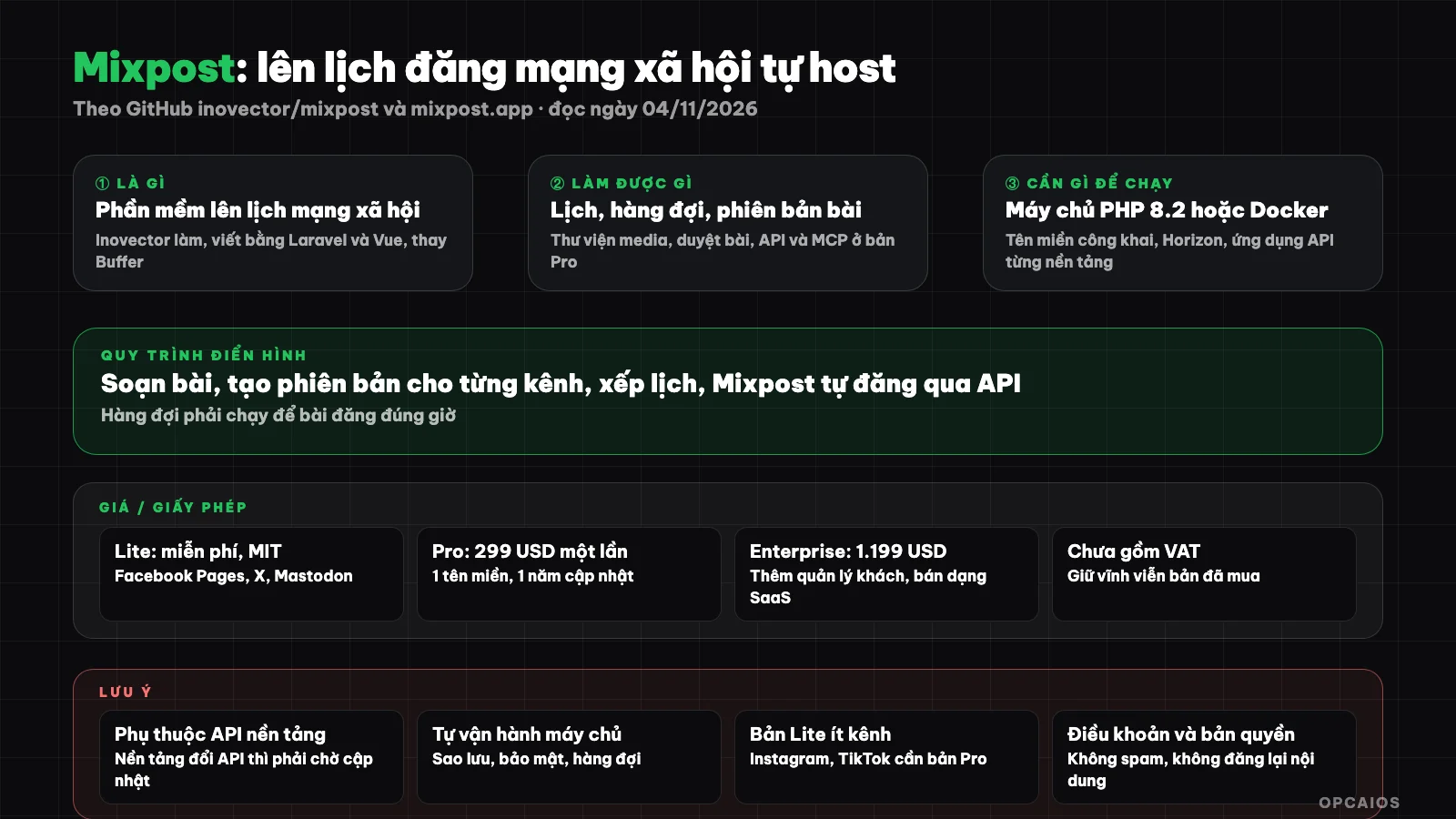
Mixpost runs on your server, maintains a posting schedule and sends posts to social networks via API. Diagram: OPCAIOS.
What is Mixpost and who made it?
Mixpost is a web application written in Laravel (PHP) for composing, scheduling, and posting to multiple social networks from one place. The developer is Inovector, with the main programmer being Dima Botezatu, according to the README and composer.json file on GitHub.
Mixpost has an "open core, paid version" model. The README on GitHub (read 04/11/2026) clearly states that this repository contains the Lite version of Mixpost Pro, a commercial product, and the features of the Lite version must be separate from the Pro version. In other words, the MIT code you see on GitHub is the free part; features like posting to Instagram, LinkedIn, or the review process are in the paid version, installed with full source code on the customer's server. According to the composer.json file, the Lite version requires PHP 8.2 or higher, runs with Laravel 10, 11 or 12, uses Laravel Horizon to handle queues and the ffmpeg library for video processing. The mixpost.app page mentions over 1,000 businesses using it; this is a number stated by the project itself, not yet verified. Besides the self-hosted version, Inovector also has Mixpost Cloud which they operate; we haven't read the Cloud pricing page.
What are Mixpost's main features?
Mixpost brings social media accounts together on one calendar, lets you compose multiple versions of posts for each platform, and manage a library of photos and videos. The table below restates the README and pricing page (read 04/11/2026), clearly noting which features belong to which version.
| Feature | Short description |
|---|---|
| Calendar and queue | Visual calendar in Lite; automatic posting time slots (Queue) in Pro |
| Post versions | Edit content separately for each social network in the same post |
| Media library | Save and reuse photos, GIFs, videos; connect to free image libraries |
| Post labels, basic analytics | Available in Lite version |
| Templates, variables, hashtag groups | Available in Pro version |
| Post review, first comment | Review process and auto-post first comment in Pro version |
| Inbox, AI assistant | Available in Pro version |
| API, MCP, webhook | Pro version, for automation and AI agents |
| Multiple workspaces | Pro version supports multi-tenant |
According to the pricing page, the Lite version posts to Facebook Pages, X, and Mastodon. The Pro version adds Instagram, LinkedIn, Threads, YouTube, TikTok, Pinterest, Bluesky, Pixelfed, and Google Business.
How much does Mixpost cost, is there a free version?
Mixpost Lite is free and open source under MIT. Pro and Enterprise are one-time payments for one domain, including one year of updates, with no per-user fees, according to the mixpost.app pricing page read on 04/11/2026.
| Version | Price (USD) | Key points |
|---|---|---|
| Lite | 0 | Facebook Pages, X, Mastodon, calendar, media library, community support |
| Pro | 299, one-time | 1 domain, 1 year updates, all platforms, post review, API, MCP |
| Enterprise | 1,199, one-time | Everything in Pro, plus customer management and billing to resell as SaaS |
| Cloud | Pricing page not read | Operated by Inovector, has a trial |
Price does not include VAT according to the page's note and may change. The pricing page says buyers keep the purchased version permanently even if they don't renew, and non-profit organizations get a 30% discount on the Pro version. Hidden costs when self-hosting include server, domain, media storage (can use S3), maintenance time, and API fees from some social networks if any; we haven't read the API pricing table for each platform.
How to Install Mixpost and Get Started?
Mixpost Lite has three installation methods according to docs.mixpost.app: Docker, manual installation via PHP, or adding it to an existing Laravel application. The README doesn't have a direct installation command but points to the documentation, so here are the general steps.
- First, prepare a public domain or subdomain pointing to your server. The documentation recommends doing this before installation, because Mixpost must communicate with social media servers.
- Next, choose your installation method. If you're familiar with containers, choose Docker; the documentation has sample Docker Compose files with or without SSL. If you're not familiar, read What is Docker? and What is VPS?.
- Fill in environment variables according to the Configuration page in the documentation, enable Horizon queue so posts are published at the right time.
- Create a developer application on each social media platform (Facebook, X, etc.) according to the OAuth Guides section, then paste the keys into Mixpost. Don't put these keys in your Git repository.
- Finally, connect your account, write a test post and schedule it to publish a few minutes later to verify.
A real-world example (hypothetical): someone selling an online course writes one post every Monday morning, uses Mixpost to create three versions for Facebook Page, X, and Mastodon, then schedules them all for the week in one sitting.
What Risks and Limitations Does Mixpost Have?
Mixpost has three groups of risks: dependence on social media APIs, the effort of self-hosting the server, and limitations of the Lite version. Self-hosted software doesn't free you from Facebook, X, or TikTok's terms of service.
The first risk is the API. Mixpost posts through official APIs, so each social media platform can change rules, require application review, or charge for API access at any time. The README acknowledges the team must constantly update integrations to ensure they work correctly. When a platform changes its API, you have to wait for an update. The next risk is operations: self-hosting means you handle backups, security, PHP updates, and the queue yourself. If the queue stops, scheduled posts won't be published. Finally, there's terms of service and content. Posting automatically in bulk, using multiple accounts to spam, or reposting other people's content can violate platform terms and copyright. When storing customer data or messages in the Pro Inbox, consider data protection regulations. This is reference information, not legal advice; we haven't cross-checked each platform's original terms in this post.
How Is Mixpost Different from Postiz, TryPost, and Buffer?
Mixpost differs from Postiz and TryPost in its Lite plus one-time Pro model, and differs from Buffer in that it's self-hosted. The table below is a general description, not a measurement; we haven't read Buffer's pricing page in this post.
| Tool | Model | Strengths | Things to Consider |
|---|---|---|---|
| Mixpost | Free MIT Lite, one-time Pro payment | No per-user fees, full code on your machine | Lite has fewer platforms |
| Postiz | Open source, has cloud version | Many platforms even in open version | Need to run many services yourself |
| TryPost | Open source, self-hosted | New option, lightweight | Smaller community |
| Buffer | Cloud service subscription | No installation, easy to use | Monthly fees, data with vendor |
When Should You Use Mixpost?
Mixpost is a good fit when you want to keep your data and social media accounts on your own server and can handle installation and maintenance yourself. If you only post to one or two channels each week, the built-in scheduling tools of the platforms might be enough.
| Situation | Recommendation |
|---|---|
| Just need Facebook, X, Mastodon | Free Mixpost Lite |
| Need Instagram, TikTok, LinkedIn | Mixpost Pro or compare with Postiz |
| Agency managing many clients | Mixpost Pro with multiple workspaces |
| Want to sell a SaaS scheduling service | Mixpost Enterprise |
| Don't want to manage a server | Mixpost Cloud or another cloud service |
| Want to connect with n8n or AI agents | Pro version's API, MCP, webhooks; see What is n8n? |
OPCAIOS's Experience
We used to self-host Postiz to schedule social media posts for opcaios.org, then we removed it. We haven't tried Mixpost or TryPost, so this section outlines the criteria we use to consider, not an evaluation after using. Mixpost is in the Repo category of the Utilities section on opcaios.org after we read the README and checked that the repository is still being maintained. Four criteria:
- Is the repository still being maintained: Lite version released 2.6.0 on 16/3/2026, no newer version as of 04/11/2026.
- License: Lite is MIT, but important features are in the paid version.
- Hidden costs: servers, maintenance time, developer applications for each platform.
- Can it replace the tool we're using: only if the number of channels and posting frequency is large enough to offset operational overhead.
Read more: What is Postiz?, What is TryPost?, What is n8n?, What is Docker?, 5 best social media scheduling tools 2026.
Frequently Asked Questions
Can Mixpost Lite post to Instagram and TikTok?
No. According to the mixpost.app pricing page (read on 04/11/2026), the free Lite version only posts to Facebook Pages, X profiles and Mastodon profiles. Instagram, TikTok, LinkedIn, YouTube, Threads, Pinterest, Bluesky, Pixelfed and Google Business are in the Pro version. If you need these channels but don't want to pay, you can compare with other open source tools like Postiz. This list may change.
Can Mixpost Pro be used forever with a one-time payment?
According to the mixpost.app pricing page (read on 04/11/2026), Pro version costs 299 USD per domain, with one year of updates and standard support included. The pricing page says each purchase comes with a perpetual license backup, meaning you keep the version you bought even if you don't renew. However, when a social network changes its API after the update period, the old version may stop being able to post to that platform. Price does not include VAT, may change.
What kind of server do you need to install Mixpost?
According to the composer.json on GitHub and docs.mixpost.app (read on 04/11/2026), Mixpost Lite requires PHP 8.2 and above, Laravel 10 to 12, Horizon queue and ffmpeg for video. The easiest way is Docker on a Linux server with a public domain pointing to it. The documentation recommends having a public domain before installation because Mixpost must communicate with social network servers. We haven't measured the minimum configuration.
Is Mixpost safe for social media accounts?
Mixpost uses official APIs and OAuth, so you don't have to give the software your social network password. Application keys and access tokens stay on your server, so security depends on how you protect your server: regular updates, use HTTPS, backups, don't push config files to Git. You still have to comply with each platform's terms; mass auto-posting or spam can get your account locked. This is not legal advice.
Can someone without coding knowledge install Mixpost themselves?
Possibly, but it's not easy. You need to rent a server, point a domain, run Docker and create developer applications for each social network. An AI assistant like Claude Code can guide you step by step and explain errors, but you still have to verify before running commands. If you don't want to worry about servers, Mixpost Cloud or Mixpost team's installation service is another option. To learn how to use AI to build and operate such tools yourself, check out OPCAIOS's AI application training course.
Sources: GitHub inovector/mixpost (README, composer.json, API, Releases page, read on 04/11/2026), mixpost.app/pricing and docs.mixpost.app (read on 04/11/2026); not read/not verified: Mixpost Cloud pricing page, Buffer pricing, terms and API fees of each social network, the 1,000+ businesses figure claimed by the project; star count and pricing may change. Experience is OPCAIOS's.
Translated from Vietnamese with AI. Read the original.
Want to apply this in your business?
Book a free 30-minute call (Vietnam time, in English or Vietnamese).