


n8n and Telegram means connecting n8n to a Telegram bot so two things happen on your phone: n8n sends you reports on a schedule, and you type a command like /report for n8n to run a workflow and return the result. This guide walks you through setting up an n8n Telegram bot from scratch: create a bot with BotFather, use Telegram Trigger and Telegram node, then build two controlled workflow templates. We don't promise how many hours you'll save (we haven't measured) and we haven't run this n8n workflow yet: the guide is based on official n8n and Telegram documentation read on 04/11/2026. The most important part is security: anyone can message a Telegram bot, so you must block strangers from the start.
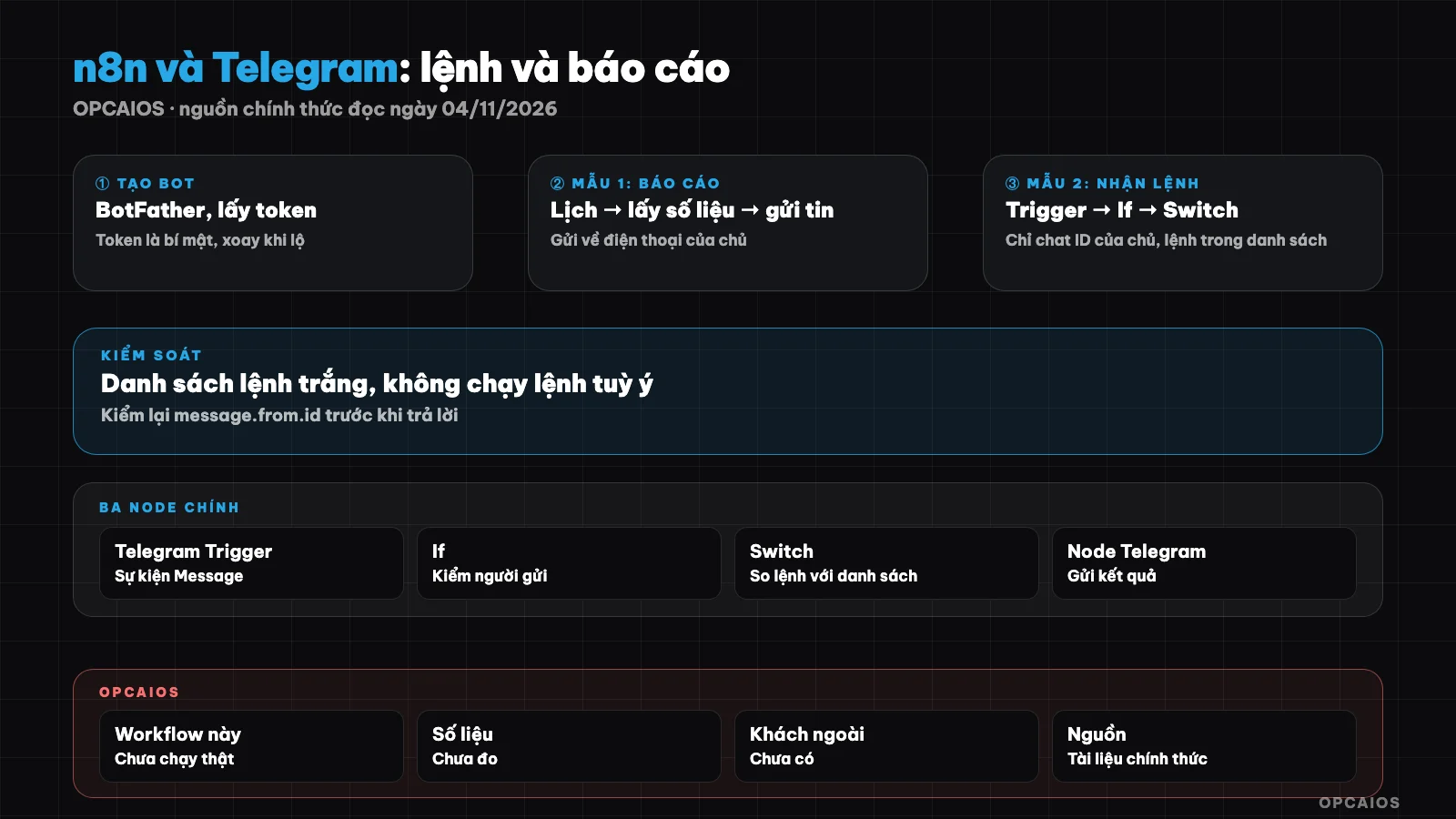
Two directions of the bot: send scheduled reports and receive controlled commands. Diagram: OPCAIOS.
How do I create a Telegram bot with BotFather to use with n8n?
Creating a Telegram bot means messaging BotFather and getting back a token, the key n8n uses to control the bot. According to n8n's Telegram authentication documentation: open a chat with BotFather, send /newbot, enter a display name (you can change this later), then enter a username 5 to 32 characters long, containing only Latin letters, numbers and underscores, ending in "bot" and cannot be changed. BotFather returns a token; paste it into the Access Token field of your Telegram credential in n8n. The background concept is in the post What is a Telegram bot. A token is as secret as a password; if exposed, Telegram documentation says use /token with BotFather to create a new token, then update your credential.
How are Telegram Trigger and n8n's Telegram node different?
Telegram Trigger starts a workflow when the bot receives an update, while Telegram node is for outgoing work: send a message, edit a message, send a file, get chat info. Trigger has many events; the one you need is Message. Two important security options are Restrict to Chat IDs and Restrict to User IDs, enter multiple values separated by commas: only updates from that list will trigger the workflow.
On how it works, Telegram Trigger uses webhooks: n8n registers its address with Telegram. According to Bot API documentation, the address must be HTTPS, port 443, 80, 88 or 8443; once you set a webhook you can't use getUpdates; undelivered updates are kept no more than 24 hours. So n8n must be reachable from the internet over HTTPS, see setting up n8n on a VPS and what is a webhook. If n8n is behind a reverse proxy, set N8N_WEBHOOK_URL to the public address (older versions use WEBHOOK_URL, documentation notes it changed from version 2.35.0 onwards).
Where do I get my chat ID?
The safest way is to run Telegram Trigger once then read the chat ID from the output data: n8n documentation says the node returns chat ID on success. For groups, the ID is a negative number. n8n documentation also mentions using @RawDataBot in a group, but we don't recommend it for groups with sensitive data because you're adding an unknown bot to the group. Write down your chat ID and user ID, you'll need both in the templates below.
Template 1: send scheduled reports to your phone
Template 1 includes Schedule Trigger, nodes to fetch your metrics, a Code node to build the text, a Telegram Send Message node. Note three things from n8n documentation. One: you must save and publish the workflow for the schedule to run. Two: timezone comes from workflow settings, if not set it uses the instance timezone, default saved is America/New York, so set Asia/Ho_Chi_Minh or your reports arrive at the wrong time. Three: text is 4096 characters maximum; the node by default adds a line "sent automatically by n8n", you can turn it off in Additional Fields.
Template block, metrics must be filled by your nodes from real sources:
REPORT [dd/mm], [time]
1. New orders: [number] (yesterday: [number])
2. Messages awaiting reply: [number], longest [number] hours ago
3. Overdue tasks: [up to 3 tasks]
4. Need decision: [up to 2 tasks]
Source: [table or system name], fetched at [time]. Not checked: [what]
The last line reminds you this is data the system pulled in, nobody's verified it yet. For a more detailed weekly report, see automatic weekly report for OPC owners with n8n.
Template 2: Receive /baocao command and run controlled workflow
Template 2 lets you type /baocao on your phone and get a report back, but only when the command comes from you and is on the whitelist. According to Telegram, commands start with /, are 32 characters max, and contain Latin letters, numbers, and underscores.
| Step | Node | Task |
|---|---|---|
| 1 | Telegram Trigger | Message event; Restrict to Chat IDs and User IDs |
| 2 | If | Check message.from.id against your ID; if no match, stop, send no reply |
| 3 | Switch | Match message.text against whitelist of commands |
| 4 | Nodes to fetch data | Read-only, shared with Template 1 |
| 5 | Telegram Send Message | Send to chat ID taken from the update itself |
Suggested whitelist of commands:
| Command | Task | Risk level | How to handle |
|---|---|---|---|
/baocao |
Send current report | Read-only | Run straight |
/trangthai |
Reply "running" and time | Read-only | Run straight |
/help |
List commands | Read-only | Run straight |
| Write or outbound command | Example: send email to client | No undo | Send and Wait for Response, you click approve |
The Switch default branch does nothing. Three principles: never run arbitrary commands, never paste chat content into Code, HTTP Request, or AI Agent with tools, and irreversible actions must go through an approval step. The Send and Wait for Response action of the Telegram node, Approval type, pauses the workflow until you click.
Security checklist for Telegram bot connected to n8n
Copy this list, tick each item before you publish:
[ ] Token lives only in n8n credential; never paste into node, note, screenshot
[ ] Restrict to User IDs and Restrict to Chat IDs are set
[ ] If checks message.from.id before every action
[ ] Whitelist of commands via Switch; default branch does nothing
[ ] Read-only commands run straight; write or outbound commands go through Send and Wait
[ ] Never paste chat text into Code, HTTP Request, or AI Agent with tools
[ ] One bot for testing, one bot for production
[ ] Have an Error Trigger workflow to report failures
[ ] Know how to make a new token and update the credential
[ ] Report does not contain sensitive customer data; group has no outsiders
The two-bot item has real reason: per n8n docs, Telegram only lets you register one webhook per bot, so switching back and forth between Test and Production overwrites each other. See also 5 data security rules when using AI.
Telegram Bot API limits you should know
Per Telegram FAQ, a bot should not send more than one message per second in one chat, max 20 per minute in a group, and around 30 per second for broadcast notifications; exceeding this may trigger error 429. A report to one person does not hit these limits. The n8n Telegram node caps text at 4096 characters; for long reports, split or send a file.
Common errors when using n8n with Telegram
| Symptom | Root cause per docs | How to fix |
|---|---|---|
| Trigger gets nothing | Workflow not published, or webhook Test and Production overwrite each other | Publish; turn workflow off when testing, or use two bots |
| "An HTTPS URL must be provided for webhook" | After reverse proxy, webhook address is wrong or not HTTPS | Set public webhook address variable, set up TLS |
| Execute node hangs | Reverse proxy does not have websocket enabled | Enable websocket in proxy |
| Report arrives at wrong time | Default timezone America/New York | Set workflow timezone |
| Forbidden: bot is not a participant of the channel | Bot not added to channel | Add bot as channel admin |
Experience from OPCAIOS
OPCAIOS self-hosts n8n, but we have not run this n8n and Telegram workflow; the guide is based on official docs, not tested on our system. What is real: the opcaios.org website has instant alerts to Telegram for the owner and a command bot for the CRM, written straight in website code, not through n8n. General choices we use: webhook has secret_token, only receive needed update types, link staff by one-time code, retry calls on slow first connection. We have no figures yet on time saved or usage count.
Frequently Asked Questions
Does n8n's Telegram Trigger need a public HTTPS address?
Yes. Telegram Trigger uses a webhook, and according to the Bot API documentation, the webhook must be an HTTPS address on port 443, 80, 88, or 8443. A machine running n8n on a home network usually doesn't meet this condition unless it has a domain name and certificate. We haven't verified the method of running a test using a tunnel on a personal machine. If you don't have HTTPS yet, set up n8n on a server with a domain name first.
How do I make sure only I can give commands to the bot?
Use two layers: set Restrict to User IDs and Restrict to Chat IDs at the Telegram Trigger, then add an If node to check message.from.id against your ID. For strangers, the wrong branch just stops and doesn't reply so the bot doesn't expose itself. Two layers is our suggestion and we haven't tested it on n8n, so please try it with a second Telegram account.
Why does the workflow only run when testing, not when published?
According to n8n documentation, Telegram only allows you to register one webhook per bot, so the Test and Production addresses overwrite each other. You can disable the workflow during testing by unpublishing and then publishing again after you're done, or use two separate bots: one for testing and one for production. Two bots is safer because it doesn't interrupt the running workflow.
Where do I get the chat ID and can I send reports to a whole group?
Run the Telegram Trigger and read the chat ID from the output data; the group ID is a negative number. You can send to a group if the bot is already in it, but all members will read the report, so don't include sensitive data. Remember Telegram's limit of 20 messages per minute in a group according to their FAQ, and use your own chat ID when testing.
Should I connect Telegram messages to an AI Agent so the bot does everything automatically?
We don't recommend it in the early stage. If the AI Agent has tools and receives raw messages, a wrong command or injection could make it do unintended work. Keep a whitelist of commands, let the AI only summarize data you provide, and use a review step for anything that can't be undone.
Next Steps
Copy the report block and checklist above, build Template 1 with a test bot and your own chat ID, run it for a week, then add more commands.
Source: n8n documentation (Telegram credentials, Telegram Trigger and Common issues, Telegram node, Schedule Trigger, webhook URL after reverse proxy), Telegram Bot API, FAQ and bot features page on Telegram, read 04/11/2026. Not verified: tunnel for running tests on a personal machine, field names in each n8n version, behavior of secret headers from webhooks registered by n8n, your specific n8n version. Not tested: workflow on OPCAIOS system; experience is OPCAIOS's.
Translated from Vietnamese with AI. Read the original.
Want to apply this in your business?
Book a free 30-minute call (Vietnam time, in English or Vietnamese).