


Notion is an all-in-one workspace application: you take notes, write documents, manage projects and store data in the same place, on pages made up of content blocks and databases that can be viewed in multiple formats. According to Notion's official pricing page (checked on 23/10/2026), the Free plan costs $0 and is available for individuals, and currently includes an AI assistant along with agents that do repetitive work automatically. For instance, for small business owners, Notion can replace scattered spreadsheets, notes scattered everywhere and separate project management tools with one unified system. The post covers: (1) pages and blocks; (2) databases; (3) pricing; (4) how to set up in 30 minutes; (5) AI and agents; (6) how to connect Notion with n8n, Zapier, Make and MCP.
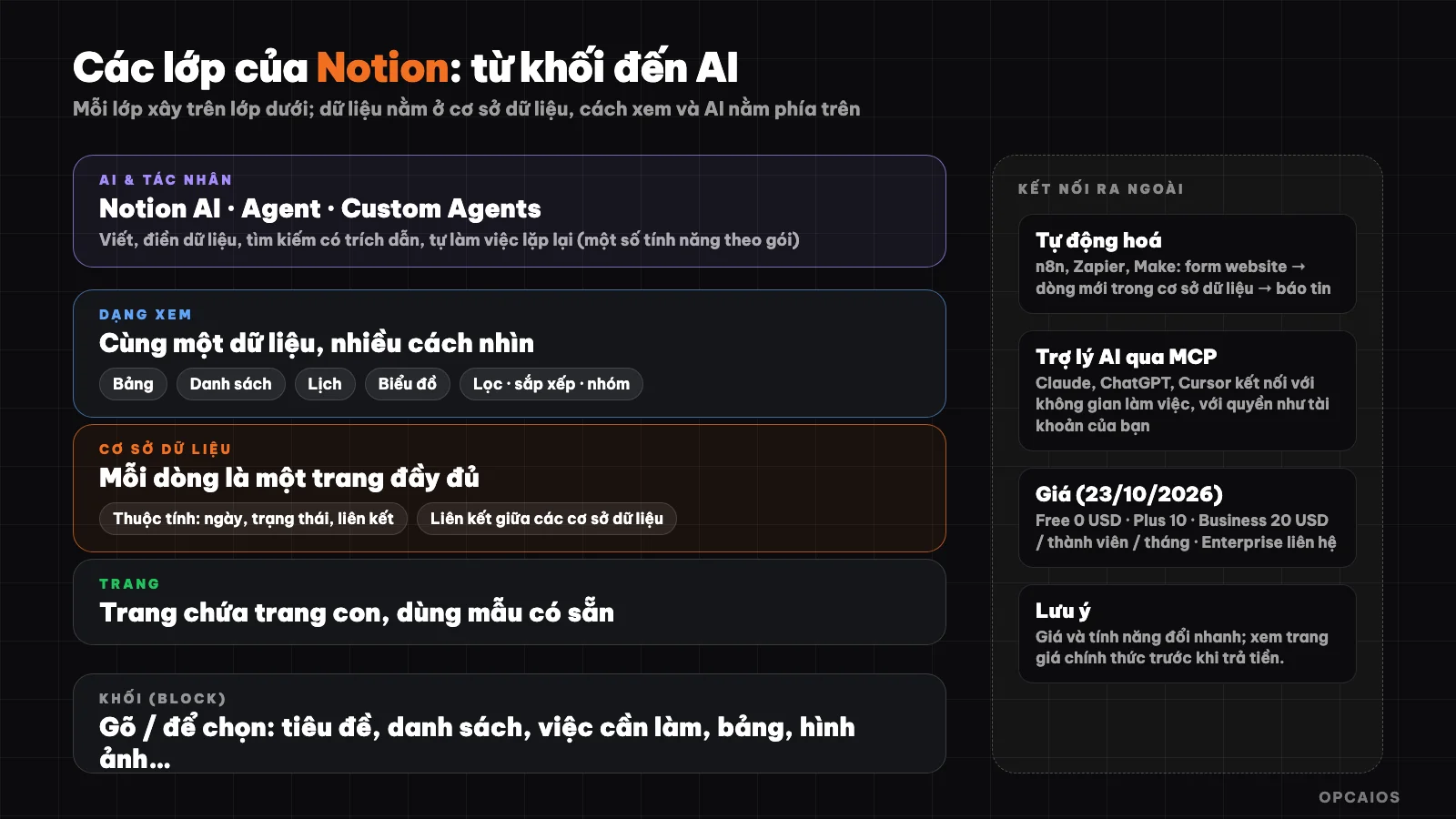
Notion's layers from bottom to top: blocks, pages, databases, views, then AI and automation. Diagram: OPCAIOS.
What is Notion?
Notion is a workspace that combines notes, documents, project management and databases in one place. The official homepage describes Notion as "an AI workspace that works for you" with three main functions: (1) gather knowledge into a single system; (2) find answers instantly with source citations; (3) automate repetitive work with AI agents running continuously.
According to figures Notion publishes on its homepage (checked on 23/10/2026), the application has over 100 million users in more than 50 countries and is used by over half of the companies in the YC program; OPCAIOS has not independently verified these figures. Notion runs on web, desktop and mobile, and has its own calendar called Notion Calendar. What makes Notion different from a regular note-taking app are three things: all content is made of blocks that can be dragged and dropped, data lives in databases instead of separate spreadsheets, and there are multiple ways to view the same data.
How do pages and blocks work in Notion?
A page is the basic unit of Notion, and each page is made up of blocks. According to the official pricing page, a block is a piece of content you add to a page, like a checkbox task, a paragraph, a list item. Type a forward slash / on an empty line to choose a block type: heading, list, table, image, database and many others.
Pages can contain sub-pages, so you can build a tree of documents: a "Company" page contains a "Processes" page, which contains a "Customer Care" page. Templates help you get started quickly: instead of starting from a blank page, you copy a project management template or content calendar template and then customize it to your needs.
What is a database in Notion?
A database is a data table where each row is a full page. According to Notion's official help center (checked on 23/10/2026), a database has three characteristics: each item is a separate page you open to add text and images; each item has customizable properties like date, status, link; and data can be viewed in multiple formats like table, list, calendar or chart.
Example: a "Tasks" database has properties like Status, Due Date and Owner. With the same data, you can view it as a table to review, as a calendar to see deadlines, and filter by owner so each person only sees their own tasks. Notion also lets you link databases together, for instance combining contacts, companies and sales opportunities into a CRM.
To create a database, create a new page and select Table, or type /database within an existing page. It displays as a table by default, but you can add as many views as you want. When creating, Notion also lets you ask AI to build the database from a description.
What Is Notion's Current Pricing?
Notion has a free plan and three paid plans. According to Notion's official pricing page (checked on October 23, 2026), pricing is per member per month: the Free plan is $0 for individuals, the Plus plan is $10 for small teams and professionals, the Business plan is $20 for growing businesses, and the Enterprise plan requires contact. Annual billing saves up to 20%. Custom Agents are free to try, then cost $10 per 1,000 Notion "credits" per month. In a typical scenario: a solo user usually gets by with the Free plan, while a team of 5 needing 30-day page history and unlimited file uploads could choose Plus. The Free plan limits file uploads to 5 MB maximum and outside guests to 10 maximum, while the $20 Business plan adds Notion Agent, single sign-on (SSO), and 90-day page history. A sensible order of consideration is to first try Free, then move to Plus as your team grows, and finally Business when you need granular permissions. Pricing and limits change over time, so check the official pricing page before making a decision.
Notion Plans Pricing and Limits Table
| Plan | Price | For | Notable Features |
|---|---|---|---|
| Free | $0 | Individuals | Unlimited pages and blocks for one person, limited with multiple members; file uploads max 5 MB; 7-day page history; max 10 outside guests; AI trial |
| Plus | $10 | Small teams and professionals | Unlimited file uploads, 30-day page history, unlimited guests |
| Business | $20 | Growing businesses | Notion Agent, AI-powered meeting notes, single sign-on (SSO), granular row-level permissions, 90-day page history |
| Enterprise | Contact sales | Large organizations | Unlimited page history and admin controls, advanced security |
How to Set Up Notion in 30 Minutes
You can build a streamlined work system in 30 minutes following six steps below, using Notion's Free plan at $0 (checked on October 23, 2026):
- Step 1, create a home page called "Hub" as your entry point, pin it to the top of the sidebar.
- Step 2, create a "To-Do" database: add Status property (Not Started, In Progress, Done), Due Date, Owner.
- Step 3, add two views: a table for reviewing and a calendar for tracking due dates.
- Step 4, create a second database for whatever you manage most, for example "Customers" or "Content".
- Step 5, link the two databases so each task connects to a customer or a piece of content.
- Step 6, embed both into the home page as filtered views, so opening Notion shows you today's work right away.
Principle for keeping your system sustainable: few databases but actually use them, name pages clearly, and clean up each week. A complex system nobody updates is worse than a simple list used every day.
How Do Small Businesses in Vietnam Use Notion?
Three common ways, all buildable with databases and the Free or Plus plan:
- Small CRM: a "Customers" database with properties Source, Status, Last Contact Date; add a status-based view to see which stage of the sales funnel each customer is at.
- Content calendar: each post or video is a page with properties Channel, Publish Date, Owner, Review Status; view as calendar to spread content evenly across weeks.
- Process wiki: instruction pages (how to quote, how to handle complaints) so new staff can look things up instead of asking each person.
If you work alone and are wondering which task to automate first, read more in What Should a Solo Worker Automate First?.
What Can Notion AI and Agents Do?
Notion AI is a set of AI features built directly into your workspace, helping you write content, fill database data, search, and automate repetitive tasks. According to Notion's official product page (checked on 23/10/2026), there are five feature groups:
- 1. Try AI is available in Free and Plus plans (create documents, auto-fill databases).
- 2. Notion Agent (Business plan) completes multi-step tasks based on context from Notion, connected apps, and the web.
- 3. Custom Agents are agents that run repetitive work on their own, free to try and then charged at $10 per 1,000 Notion credits per month according to the pricing page.
- 4. AI meeting notes and search across connected apps like Slack, GitHub (business search is currently in beta).
- 5. Page verification: badges for pages that stay updated, displayed in search results and AI citations.
AI features and bundled plans change quickly, so check the product page before paying for a specific feature. When you let AI read company data, review Notion's permission and privacy settings beforehand.
How Do I Connect Notion with Automation Tools and AI Assistants?
Notion connects with other tools in two directions, and both are officially supported by Notion. The first direction is connecting with automation tools. Tools like n8n, Zapier, and Make have Notion connections, so you can create workflows like: when a new contact form appears on your website, add a row to Notion's "Customer" database and notify staff. The part about sending data from your website uses webhooks; see the post What is Webhook?.
The second direction is connecting with AI assistants via MCP. Notion has an MCP server that lets AI apps like Claude, ChatGPT, or Cursor connect into your workspace. According to Notion's help center (checked on 23/10/2026), the MCP tool acts with full account permissions, meaning it can access everything you can access. Notion recommends starting with personal use and using clear page titles so AI understands the structure. Enterprise plan admins can choose which AI apps are allowed to connect. Details about MCP in the post What is MCP?.
Notion or Obsidian: Which Should I Choose?
Choose Notion when you need team collaboration, databases, and many view types in the cloud; choose Obsidian when you want Markdown notes stored directly on your machine and full control of your files. These two tools solve different needs, and many people use both: Notion for team work and projects, Obsidian for personal knowledge.
Notion is not a good choice when you need data stored entirely on your machine, when your team only needs a simple to-do list, or when you need complex automation workflows, in which case a specialized tool like n8n is better suited.
Frequently Asked Questions
What is Notion and what is it used for?
Notion is an all-in-one workspace for note-taking, writing documents, managing projects, and building databases like CRMs or content calendars. Content is organized using pages, blocks, and databases with multiple view types.
Is Notion free?
Yes. According to Notion's official pricing page (checked 23/10/2026), the Free plan is for individuals at $0. The Free plan limits file uploads to 5 MB maximum, page history to 7 days, and outside guests to 10 maximum. The Plus plan costs $10 and the Business plan costs $20 per member per month, with annual billing saving up to 20%. Step 1, try the Free plan. Step 2, upgrade to Plus when you need more. The Plus plan extends page history to 30 days and removes file upload limits, while the Business plan has 90 days of page history. For example (hypothetically), a freelancer working alone usually only needs the Free plan, while a team of 5 who need to review edit history longer should consider the Plus plan. Check the official pricing page for current numbers.
How does a Notion database differ from a spreadsheet?
Each row in a Notion database is a full page that can contain text and images. The same data can be viewed as a table, calendar, list, or chart, and databases can be linked together.
Is Notion AI free?
The Free and Plus plans include trials of AI features like document creation and auto-filling databases. Notion Agent is part of the Business plan, while Custom Agents are free to try then charged by credit. Check the pricing page for current details.
Where can I learn Notion quickly?
Start with a "To-do" database like the guide above, use Notion's built-in templates, and read the official help center. To build a work system and AI workflows for a small team, see OPCAIOS's AI application training course.
Source: the official home page, pricing page, and help center of Notion plus Notion MCP documentation (checked 23/10/2026). Pricing, limits, and features may change; user figures are self-reported by Notion.
Translated from Vietnamese with AI. Read the original.
Want to apply this in your business?
Book a free 30-minute call (Vietnam time, in English or Vietnamese).