


What is OpenReel? OpenReel (full name OpenReel Video) is an open-source video editor that runs right in your browser, processes video on your machine instead of uploading to a server, exports files without watermark, and has an additional desktop version currently in alpha. The repository description on GitHub calls itself an open alternative to CapCut. According to the GitHub API (read on 04/11/2026), the Augani/openreel-video repository has around 5,570 stars, MIT license, created on 19/01/2026 and the most recent code push was 17/10/2026. The latest desktop version is v1.0.0-alpha.17, released on 29/08/2026. This article explains what OpenReel can do, the actual cost, how to get started, risks to know about, and when to use it.
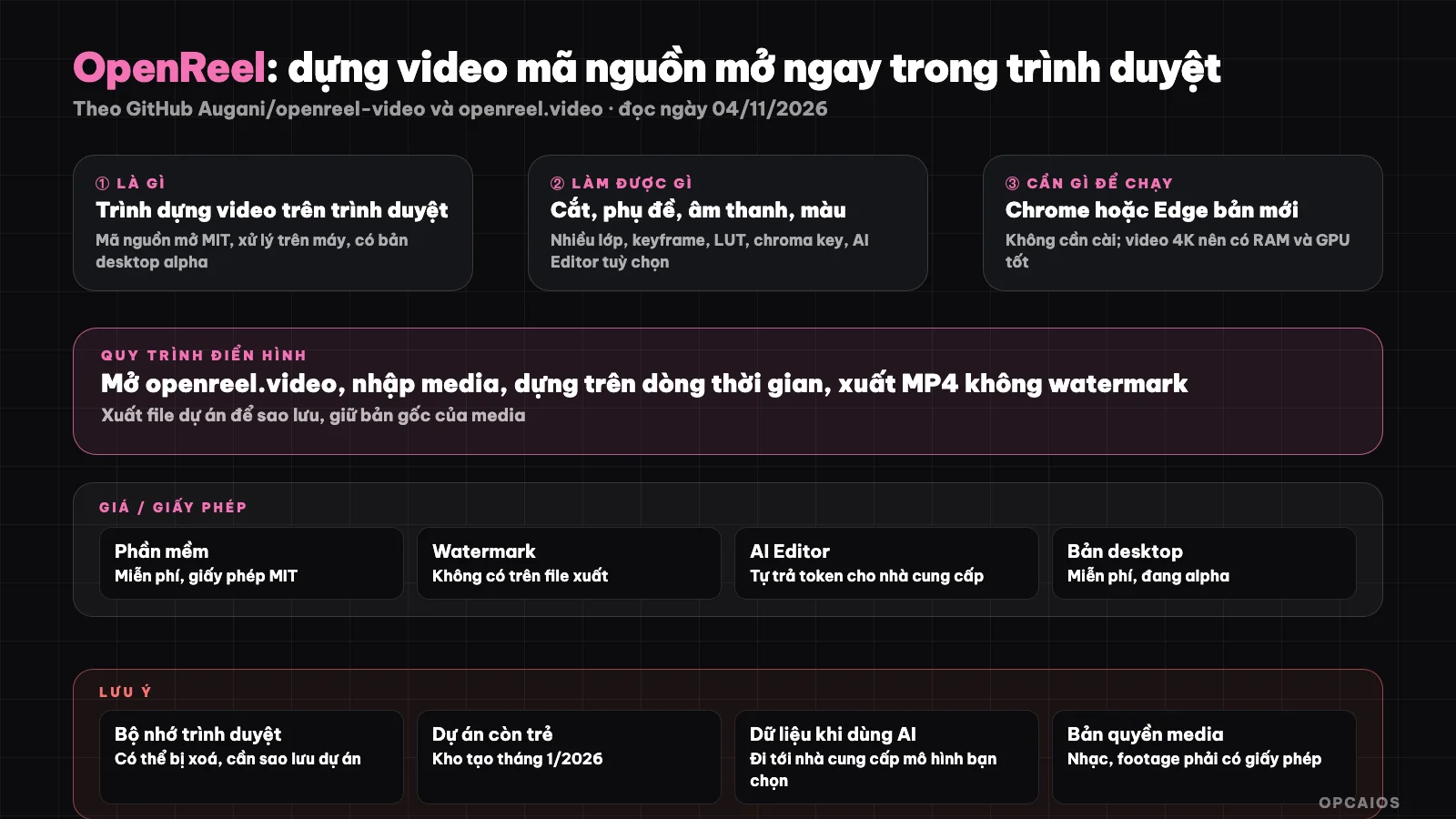
OpenReel builds and exports video right on your machine, no need to upload to a server. Diagram: OPCAIOS.
What is OpenReel and who made it?
OpenReel is a video editor with a timeline, built by developer Augustus Otu (GitHub account Augani) together with community contributors. The web version opens at openreel.video, the desktop version downloads from the Releases page on GitHub for macOS, Windows, and Linux.
According to the README on GitHub (read on 04/11/2026), OpenReel is written in TypeScript with React, Zustand, MediaBunny, WebCodecs, WebGPU, Web Audio and Three.js. WebCodecs is a browser interface that allows video encoding and decoding directly, so cutting, joining, and exporting files happen on the user's machine. The repository is split into a web app, desktop app, processing core (timeline, media, audio, rendering, export), a UI library, and a separate package for AI editing tools. The project receives funding through GitHub Sponsors. The repository was created in January 2026, so this is a young project: the desktop version still shows alpha and features change quickly with each release. If you're not yet familiar with how to read an open-source repository, see What is GitHub?.
What are OpenReel's main features?
OpenReel has all the common video editing tools: cutting, multiple layers, subtitles, audio mixing, color correction, effects, and keyframes. It also has an optional AI assistant to edit the timeline with voice commands. The table below summarizes according to the README on GitHub, read on 04/11/2026.
| Feature | Short description |
|---|---|
| Cutting and arranging | Cut, split, crop, ripple delete, reorder, change playback speed |
| Multiple layers | Stack video, audio, text, graphics; transitions; animation with keyframes |
| Subtitles | Create and format subtitles, import SRT files, animated titles |
| Audio | Waveform, volume, fade, EQ, compression, automatic background music reduction when speech is present (ducking) |
| Color and effects | Color wheel, curves, HSL, LUT, masks, chroma key |
| Frame | Landscape, portrait, square; customizable resolution, frame rate, bitrate |
| AI Editor (optional) | Connect OpenAI, Anthropic, or compatible endpoint keys to edit video via chat, with undo capability |
| MCP (desktop version) | External assistant working with projects via MCP |
Recent releases, according to the Releases page on GitHub (read on 04/11/2026), added 37 built-in effect templates and noise reduction (v0.4.0, 14/05/2026), redesigned the properties panel with tabs (v0.5.0, 30/05/2026), and improved subtitle workflow (v1.0.0-alpha.17). For MCP, see What is MCP?.
How much does OpenReel cost, what formats can you export?
OpenReel is free: code under MIT license, web version uses without installation, exported files have no watermark. Hidden costs only arise when you turn on AI Editor, because you pay tokens to the model provider. Information below read on 04/11/2026, before tax, may change.
| Item | Details |
|---|---|
| Software | Free, MIT, for personal and commercial use per README |
| Watermark | None on exported files |
| AI Editor | Optional; costs depend on the model provider you connect (your API key) |
| Hardware | Machine with enough RAM; 4K video and large projects should have a good GPU, per README |
| Export on web | MP4 H.264, WebM (depending on browser), resolution up to 4K |
| Export on desktop | FFmpeg native, ProRes and video with transparent channel |
We did not find any pricing page; the openreel.video page is a web application so when reading, it automatically only shows the title and cannot read other content. The README does not mention any paid tier.
How to Get Started Using OpenReel?
The quickest way is to open openreel.video, create a project, import video, and drag it into the timeline, no sign-up needed according to the README. For a desktop version, download the alpha build; to self-host or run it yourself, you'll need Node.js and pnpm.
- First, open openreel.video in Chrome or Edge latest version, and create a project.
- Next, import video, audio, images and drag them into the timeline.
- Cut, add subtitles, music, adjust colors, transitions.
- Finally, export video using preset templates or custom settings, then export the project file as backup.
To run the web version on your machine, the README provides these steps:
git clone https://github.com/Augani/openreel-video.git
cd openreel-video
pnpm install
pnpm dev
Then open the local address that Vite prints out. To build for deployment, use pnpm build and preview with pnpm preview. Since it's a static app running in the browser, the build can be placed on a static hosting service; we haven't tested it yet, see What is Vercel? or What is Cloudflare Pages? if you plan to self-host.
What Risks or Limitations Does OpenReel Have?
OpenReel has three groups of limitations: the project is still young and the desktop version remains alpha; projects saved in browser storage can be deleted; and when AI is enabled, content goes to the model provider. Also, you remain responsible for the copyright of video, music and images you put in the project.
- First, data loss: the README notes the browser can clear storage. Keep originals of your media and regularly export project files as backup.
- Next, stability: the desktop version clearly states it is alpha. Don't use it as your only tool for time-sensitive projects until you've tested it thoroughly.
- Next, privacy when using AI: editing and export run on your machine, but AI Editor and connected services send requests over the network; data handling depends on the provider you choose. Protect your API keys, don't paste them into shared machines.
- Finally, compatibility: support for different codecs and GPU varies between browsers and operating systems; the README recommends Chrome or Edge.
On copyright, the software doesn't handle it for you: background music, clips or images from others need appropriate licenses, and TikTok, YouTube can mute or remove videos that violate their terms. This is just reference, not legal advice.
How Does OpenReel Compare to CapCut and Other Options?
OpenReel differs from CapCut in being open source, processing on your machine and having no watermark, but it's younger and has fewer templates, fewer built-in AI editing features. Compared to other open editing tools like OpenCut, both aim at people wanting to replace CapCut. The table below is general description, not measurement.
| Criteria | OpenReel | CapCut | OpenCut |
|---|---|---|---|
| Source code | Open, MIT | Closed | Open, see separate post |
| Where it runs | Browser, desktop alpha | App and publisher's web | See separate post |
| Video processing | On user's machine | Not verified in this post | See separate post |
| Watermark | No | Depends on plan and current terms | See separate post |
| AI | Connect own OpenAI, Anthropic keys | Built-in AI | See separate post |
| Good for | Those who want to keep data, general video editing | Those needing many templates, built-in effects | Those who prefer other open projects |
If you need screen recording before editing, see What is Cap?. If you want to create video with code, see What is Remotion?. Detailed comparison with OpenCut is in What is OpenCut?.
When Should You Use OpenReel?
OpenReel suits those editing short videos for social media or instructional video, wanting a free tool, no watermark and no uploading footage to servers. Those needing professional long-form editing, multiple camera angles, or a tool that's been stable for many years should consider traditional editing software.
| Situation | Recommendation |
|---|---|
| Editing vertical clips for TikTok, Reels from your own footage | Use the web version, export vertical MP4 |
| Sensitive footage, don't want to upload to a service | OpenReel processes on your machine, remember to backup project files |
| Need to export ProRes or video with transparency throughout | Use desktop version, test thoroughly since it's still alpha |
| Want to edit video via chat commands | Turn on AI Editor with your own API keys, track token costs |
| Long project, tight deadline, need stability | Mature editing software is safer |
OPCAIOS Experience
We recently added OpenReel to the Repository list in the Utilities section on opcaios.org after reading the README and checking that the repository is still being maintained; we have not yet tested it, so this section outlines the criteria we used to consider it, not an evaluation after use. There are four criteria. First, whether the repository is still being updated: the most recent code push was 10/17/2026 and there have been many releases in 2026, meeting this criterion, but the project is not yet a year old. Next, the license: MIT is a plus, allowing commercial use and self-hosting. Next again, hidden costs: nearly none, except AI tokens if you enable AI Editor and time to back up project files. Finally, the ability to replace the tools you're already using: for short videos, OpenReel could be a candidate worth trying; for terms-of-service risk, the tool itself does not download or extract content from any platform, so the main risk lies with the copyright of the media you input.
Read more: What is OpenCut?, What is Cap?, What is Remotion?, What is MCP?.
Frequently Asked Questions
What is OpenReel?
OpenReel, full name OpenReel Video, is an open-source video editor running in the browser, developed by Augustus Otu and the community on GitHub. The editing and video export run directly on your machine thanks to WebCodecs and WebGPU, so you don't have to upload footage to a server, and the exported file has no watermark. Besides the web version at openreel.video, the project has an alpha desktop version for macOS, Windows and Linux. According to GitHub API read on 11/04/2026, the repository has about 5,570 stars and is under the MIT license.
Is OpenReel free?
Yes. OpenReel is free and under the MIT license, so it can be used for both personal and commercial purposes, the code can be seen and self-hosted, according to the README read on 11/04/2026. Exported files have no watermark attached. The only cost that might come up is when you enable AI Editor: this feature uses API keys from OpenAI, Anthropic or a compatible endpoint that you connect yourself, so you pay tokens to that provider. We don't see any paid plans in the README.
Is OpenReel safe for private videos?
OpenReel handles editing and export on your machine, so the video doesn't need to leave your computer, according to the README read on 11/04/2026. The exceptions are AI Editor and optional connected services: these send requests over the network, and how data is handled depends on the provider you choose. Another risk is that project data stored in your browser can be deleted when you clear your browser cache. Keep your original media and export your project file regularly for backups. We have not personally checked the application's network traffic.
How is OpenReel different from CapCut?
OpenReel differs from CapCut in three main ways, according to general description rather than measurement. First, OpenReel is open-source under the MIT license, while CapCut is proprietary software. Second, OpenReel processes video on the user's machine and does not attach a watermark to the exported file. Third, OpenReel is still young: the repository was created in January 2026, the desktop version is still alpha, and the number of built-in templates, effects and AI editing is less than a long-established commercial application. People needing many built-in templates may still prefer CapCut.
Can someone who doesn't know code use OpenReel?
Yes. The web version at openreel.video requires no installation: you open Chrome or Edge, create a project, input media, drag it onto the timeline and export the video. The desktop version just needs to download the installer from the Releases page on GitHub. The part that needs command line knowledge is only when you want to run or self-host the source code yourself using Node.js and pnpm. If you want to use AI Editor, you need to know how to create an API key and track costs. If you want to learn how to combine AI tools into your content workflow, see OPCAIOS's AI Application Training course.
Source: GitHub Augani/openreel-video (README, API, release list, read 11/04/2026), openreel.video (read 11/04/2026, only page title readable); not read/not verified: AI Editor guide and AGENT-GUIDE in the repository, actual network traffic of the application, current terms and features of CapCut; star count may change. Experience is OPCAIOS's.
Translated from Vietnamese with AI. Read the original.
Want to apply this in your business?
Book a free 30-minute call (Vietnam time, in English or Vietnamese).