



What is robots.txt?
robots.txt is a text file placed at the root of a website to tell crawlers which URLs they are allowed to access, mainly to manage crawl traffic such as avoiding server overload or skipping duplicate pages. According to Google Search Central documentation (read on 25/10/2026), it is not a mechanism to keep a page out of Google: blocked URLs can still appear in results, without a description, if another page links to them. This post explains what robots.txt is, what it does and doesn't do, how to handle AI crawlers, common mistakes, and OPCAIOS's experience.
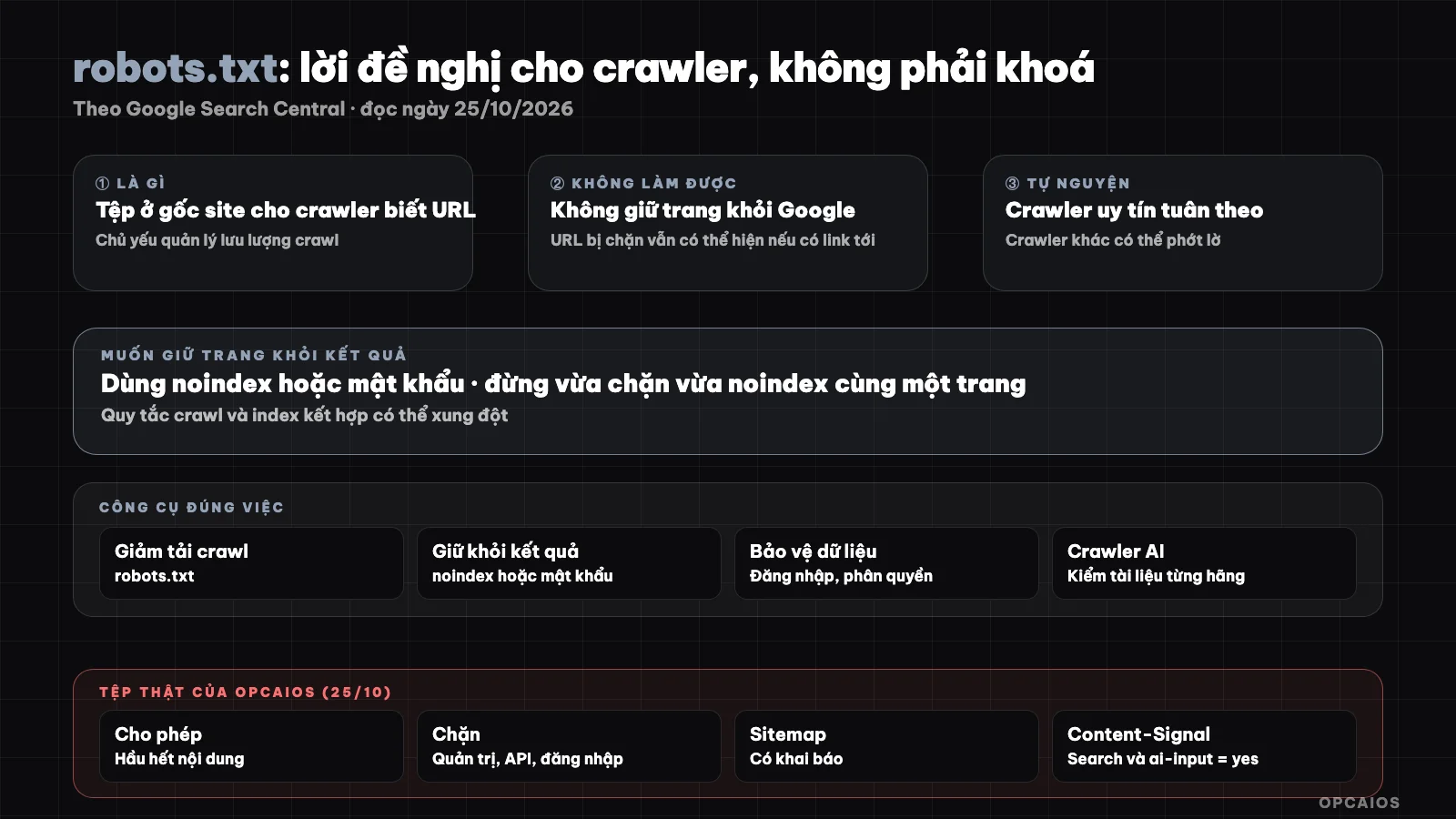
robots.txt is a request to well-behaved crawlers, not a lock. Diagram: OPCAIOS.
What is robots.txt and what is it for?
robots.txt tells crawlers which parts of a site they should and shouldn't fetch. The main purpose according to Google is to manage crawl traffic, for example to prevent server overload or avoid wasting crawl budget on unimportant pages.
With media files, robots.txt can help keep images, videos, and audio out of search results but won't prevent other sites from linking to them. The documentation also recommends blocking resource files like scripts or CSS only when the page still works normally without them. I haven't read a dedicated page on syntax so the examples below are general illustrations.
What robots.txt doesn't do
robots.txt doesn't keep pages out of Google and it's not a security mechanism. Compliance is voluntary: Googlebot and reputable crawlers follow it, but other crawlers may ignore it. To keep pages out of results, use noindex or password protection.
| Goal | Appropriate tool |
|---|---|
| Reduce crawl load, skip unimportant pages | robots.txt |
| Keep pages out of search results | noindex or password |
| Protect private data | Login, permissions, not robots.txt |
| Hide sensitive files | Don't make them public; robots.txt also exposes paths |
One dangerous mistake: blocking a page in robots.txt then adding noindex to that page, because the crawler can't read the page to see the noindex. According to the documentation, combining crawl and index rules can cause conflicts.
Basic structure of the file
The file consists of rule groups: User-agent specifies which crawler, Allow and Disallow specify paths, and optionally declare Sitemap. Example:
User-agent: *
Allow: /
Disallow: /admin
Disallow: /api/

Sitemap: https://ten-mien-cua-ban.vn/sitemap.xml
File location, size limits, and details of rule groups are not covered in the documentation page I read; check Google's specification page before deploying. The sitemap helps crawlers find content, see Google Search Console.
AI crawlers and robots.txt
Many AI companies have their own crawlers for search, for retrieval on user request, and for training. According to internal research notes from OPCAIOS (read on 24/10/2026), blocking training crawlers doesn't necessarily block citations in AI search; crawler classification and names change quickly so check each company's documentation.
This is a business decision: allowing AI to read helps content potentially get cited, but content could also be used in ways you don't expect. See What are SEO and GEO and Measure whether AI cites your website.
OPCAIOS's experience
On 25/10/2026, the public robots.txt file of opcaios.org allows crawlers into most content and blocks admin paths, APIs, login, and an old WordPress path; it declares a sitemap. The file also has one line Content-Signal saying search=yes, ai-input=yes, meaning a signal allowing use of content for search and as input for AI.
Limitation: we haven't verified which crawlers actually respect that signal line, so consider it a declaration of intent, not an enforcement mechanism. And we don't rely on robots.txt to protect the admin area: it's protected by login. See Website security audit.
Frequently Asked Questions
Does robots.txt prevent pages from appearing on Google?
Not guaranteed. According to Google, blocked URLs can still appear if there are links to them; to avoid this, use noindex or password protection.
Is robots.txt secure?
No. Compliance is voluntary, and the public file also shows others which paths you want to avoid.
Should I block AI crawlers?
It depends on your goal: if you want to be cited by AI, you should allow search crawlers in. Check documentation from each company since crawler names and roles change quickly.
Can I block CSS and JavaScript in robots.txt?
Google only recommends blocking resource files when pages still run normally without them.
Where should I start?
Open your site's /robots.txt, check you're not accidentally blocking important pages, and confirm your sitemap is declared. Need help, see AI application training services.
Source: Google Search Central, "Introduction to robots.txt" (developers.google.com), read 25/10/2026; have not read sections on file location, group syntax, size limits. robots.txt of opcaios.org loaded by OPCAIOS on 25/10/2026. Notes on AI crawlers taken from internal research on 24/10/2026. Experience is from OPCAIOS.
Translated from Vietnamese with AI. Read the original.
Want to apply this in your business?
Book a free 30-minute call (Vietnam time, in English or Vietnamese).