



Airtable is an online database platform with a spreadsheet-like interface: I store data in tables, link tables together, view the same data in multiple formats like grid, calendar, kanban, then build forms, interfaces and automated workflows right on top of it. It differs from regular spreadsheets in that each column has a clear data type and tables link together like a real database. According to Airtable's official pricing page (checked 23/10/2026), the Free plan costs $0 and the Team plan costs $20 per person per month when paid annually. For small businesses, Airtable works well for managing customers, orders, inventory or content calendars without needing to code. This article covers: (1) basic concepts; (2) pricing; (3) how to get started; (4) automation and AI integration; (5) comparison with Notion and Google Sheets.
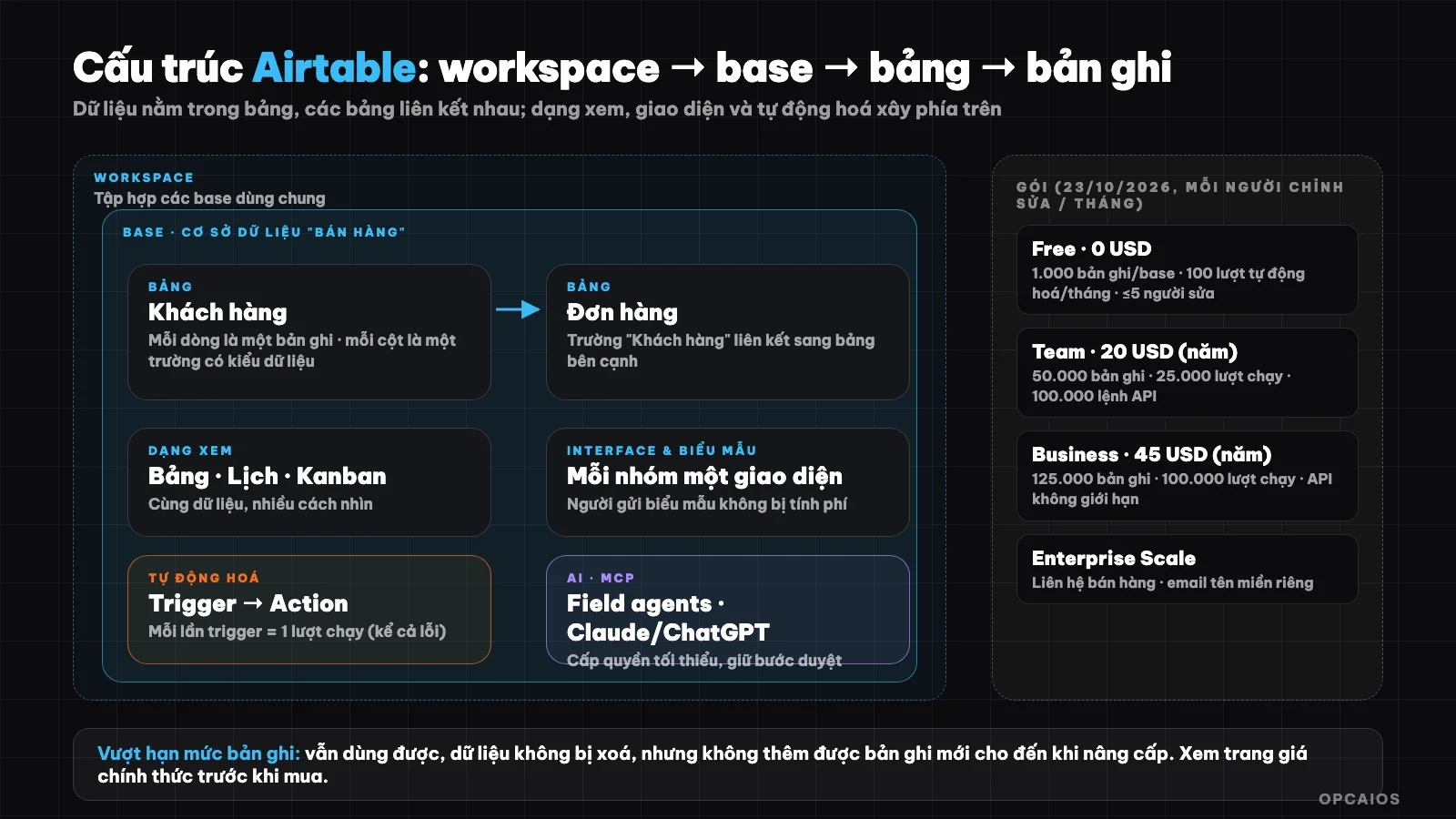
The layers of Airtable from data to interfaces and automation. Diagram: OPCAIOS.
What is Airtable?
Airtable is a platform for building applications from data: I model my work using a database, then create interfaces, reports and automated workflows on top of that same data. According to Airtable's official homepage (checked 23/10/2026), the platform is positioned as a next-generation application-building platform, with AI agents, integrations with Slack, Google Drive, Salesforce, Jira, Zendesk, and the ability to work with Claude or ChatGPT via MCP.
The simplest way to understand it: Airtable is a spreadsheet upgraded into a database. I still see the familiar rows and columns, but each column has a data type (text, number, date, select, attachment, link to another table), and any change updates for the whole team at once. For example: a team of 5 people can update a customer list together without having to send files back and forth.
What are base, table, record, field and view?
Five core concepts of Airtable, according to the terminology in the official help center, are workspace, base, table, record and field. Workspace is a collection of bases shared among multiple people. Base is a complete database made up of multiple tables. Table is a group of data of the same type, record is a row, and field is a column. View is a way of looking at and arranging data from a table, like grid view, calendar view or kanban. For example, with the same customer list, I view it as a grid to review it, or as kanban to see where customers are in the sales process. The real power of Airtable lies in linking between tables: an order links to exactly one customer, and in the customer table I immediately see all that customer's orders.
Summary table of five concepts
| Concept | Meaning | Example |
|---|---|---|
| Workspace | A collection of bases shared among multiple people | "ABC Company" |
| Base | A complete database made up of multiple tables | "Sales management" |
| Table | A group of data of the same type | "Customers", "Orders" |
| Record | A row, a unit of basic data | One specific customer |
| Field | A column, an attribute of a record | Name, phone number, contact date |
Does Airtable have a free plan and how much does it cost?
Airtable has a free plan and paid plans charged per user with editing rights. According to Airtable's official pricing page and help center (checked 23/10/2026), the Free plan costs $0 with 1,000 records per base and 100 automation runs per month. The Team plan costs $20 per person per month when billed annually ($24 when billed monthly), with 50,000 records per base. The Business plan costs $45 when billed annually ($54 when billed monthly), with 125,000 records per base. The Enterprise Scale plan requires contacting sales. The sensible order to choose a plan is first Free to try it out, then Team when you exceed the limits, and finally Business when you need more records. New accounts get a 14-day free trial of the Team plan for the first workspace. Example: a CRM with 1,200 customers has already exceeded the 1,000 record limit of the Free plan, so it needs the Team plan or a way to split data across multiple bases. Prices and limits change over time, so check the official pricing page before making a decision.
Detailed limits for each Airtable plan
| Plan | Price per person per month | Records per base | Automation runs per month (per workspace) | Version history |
|---|---|---|---|---|
| Free | $0 | 1,000 | 100 runs | 2 weeks |
| Team | $20 when billed annually ($24 when billed monthly) | 50,000 | 25,000 runs | 1 year |
| Business | $45 when billed annually ($54 when billed monthly) | 125,000 | 100,000 runs | 1 year |
| Enterprise Scale | Contact sales | As agreed | 500,000 runs | As agreed |
A few things to know:
- Free plan limits 1,000 records per base, 1,000 API calls per month for the entire workspace, 1 GB of attachments per base, maximum 5 people with editing rights (unlimited read-only users) and 500 AI points per person per month.
- Charged per editor: Team and Business plans only charge for people who have editing rights to at least one base; read-only users, form submitters and people viewing shared links are not charged.
- Hitting limits: if you exceed the record or attachment limits, you can still use the bases and data is not deleted, but you cannot add new records until you upgrade; for automation and API, the system blocks at the plan's limit.
- Business and Enterprise Scale plans require a custom domain email, you cannot use Gmail or Yahoo.
How do I get started with Airtable in 30 minutes?
Getting started with Airtable means building a small base with two linked tables. This can be done in about 30 minutes in six steps, using the example of managing small sales, and Airtable's Free $0 plan (checked 23/10/2026) is enough for the first 1,000 records with a maximum of 5 editors:
- Step 1, create a base named "Sales" and two tables: "Customers" and "Orders".
- Step 2, choose the right data type for each field: name (text), phone number, customer source (single select), contact date (date), order value (currency).
- Step 3, link the two tables: add a "Customer" field of link type in the Orders table so each order is attached to one customer.
- Step 4, create views: a table to review, kanban by order status, calendar by delivery date.
- Step 5, create a form so customers or employees can enter data directly into the table.
- Step 6, add one simple automation, for example when there is a new customer record, send a notification to the person in charge.
Principle: one data type per table, link instead of repeating entries, and choose the right field type from the start because changing it later is more work.
What are Interface and forms in Airtable?
Interface is a customized interface built from the base's data using the Interface Designer tool, so each group only sees what they need. According to Airtable's help center (checked 23/10/2026), an interface contains display components, data sources and permissions, and all collaborators on the base can access that base's interfaces. Example: a sales employee sees a page with their own customer list and a button to update status; a manager sees a dashboard with total sales figures, both reading the same data.
A form collects data from outsiders without having to invite them into the base, and form submitters are not charged. The Free plan has limitations: you cannot change the form header image and you cannot remove the Airtable label. Hypothetical case: a small shop uses a form to receive consultation requests from customers, each submission creates one new record in the Customers table.
How does automation in Airtable work?
Automation in Airtable is a pair of trigger and one or more actions that run automatically on base data. According to Airtable's official documentation (checked on 23/10/2026), triggers can occur in the base or in another integrated application; actions can update data in the base or affect other applications. About quota calculation, there are four things to remember:
- 1. Each time a trigger fires counts as one run (run), whether the action succeeds or fails. Failed runs also count toward the monthly quota.
- 2. The quota resets on the first day of each month. Free plan: 100 runs per month for the entire workspace; Team: 25,000; Business: 100,000.
- 3. Different limit on the number of automations in one base (75 on Free plan, 100 on Team, 150 on Business) and this counts automations that are turned off; only deleting them frees up space.
- 4. Free plan has no Run a script action, and the send email action can only send to collaborators in the base.
If you need more complex workflows than built-in automation, connect Airtable to external tools like n8n, Zapier or Make. When a website sends a webhook, these tools can receive it and then create a new record in Airtable; see What is Webhook?.
How does Airtable connect to AI and other systems?
Airtable has three main connection paths. First is built-in integration with popular applications like Slack, Google Drive, Salesforce, Jira and Zendesk. Second is Web API for developers to read and write data, with call limits by plan: 1,000 calls per month on Free plan, 100,000 on Team, unlimited on Business; the post What is API? explains the concept. Third is AI: according to Airtable's homepage (checked on 23/10/2026), the platform has AI agents, fields that use AI (field agents) that automatically fetch, analyze or create data at the cell level, and MCP to work with Airtable data from Claude or ChatGPT; read What is MCP? if you're unfamiliar.
When you let AI read and write real data, grant minimal permissions and keep a review step before irreversible actions. For example, give the agent only read access to one test base before opening write access to a real customer base. This principle applies to any other AI connection.
How is Airtable different from Notion and Google Sheets?
Airtable is strong with structured and linked data; Notion is strong with documents and notes; Google Sheets is strong with calculations and familiarity. If your work leans toward documents and collaboration, see What is Notion?. If you only need calculations on a few hundred rows, Google Sheets is still enough and cheapest. For example (hypothetically), a small CRM with customers, orders and linked products fits Airtable, while an internal wiki fits Notion. The table below compares the three tools briefly across four criteria: focus, linking between tables, view types and best use cases.
Comparison table of Airtable, Notion and Google Sheets
| Criterion | Airtable | Notion | Google Sheets |
|---|---|---|---|
| Focus | Relational database, spreadsheet-like interface | Documents, notes, lightweight database | Spreadsheet, formulas, charts |
| Linking between tables | Yes, it's the main strength | Yes, through linked databases | Limited, mainly through formulas |
| View types | Table, calendar, kanban, custom interface | Table, list, calendar, chart | Mainly table view |
| Best for | CRM, inventory, orders, content management with workflow | Wiki, notes, project management with documents | Calculations, quick reports, small data |
When should and shouldn't you use Airtable?
Use Airtable when your data has many types related to each other (customers, orders, products), many people update it together, and you want forms, interfaces and automation on the same platform without writing code.
Don't use it when your data is very large compared to the plan quota (especially Free plan's 1,000 records per base), when you only need a single-user spreadsheet, or when cost per editor increases quickly because many employees need edit rights. Also consider sensitive data: Airtable stores on the vendor's cloud, so review the security policy and permissions settings first.
Frequently Asked Questions
What is Airtable and what is it used for?
Airtable is an online database platform that looks like a spreadsheet, used to manage customers, orders, inventory, content calendars and to build forms, interfaces, and automation on the same data without needing to code.
Is Airtable free?
Yes. According to Airtable's official pricing page (checked 23/10/2026), the Free plan costs $0 but is limited to 1,000 records per base, 100 automation runs per month, 1 GB of attachments per base and a maximum of 5 editors. The Team plan is around $20 per person per month when paid yearly ($24 when paid monthly), with 50,000 records per base. The Business plan is around $45 per person per month when paid yearly. Example: a CRM with 1,200 customers has already exceeded the Free plan's 1,000 record limit, so it needs the Team plan or to split data across multiple bases. New accounts get 14 days of free trial on the Team plan for the first workspace. So, first count your expected number of records, next count how many people need editing access, finally compare against the pricing table. Check the official pricing page for current numbers.
How does Airtable differ from Google Sheets?
Each field in Airtable has an explicit data type, tables are linked to each other like a database, and the same data can be viewed as a table, calendar, kanban, or through a custom interface. Google Sheets is stronger in formulas and calculations.
How does Airtable charge for automation?
Airtable charges for automation by runs: each time a trigger is activated counts as one run (run), even if the action fails. According to Airtable's official pricing page and help center (checked 23/10/2026), monthly limits depend on the plan: 100 runs on Free, 25,000 on Team and 100,000 on Business, counted across the entire workspace and reset on the first day of the month. Example: a process that sends a notification each time a new customer arrives and receives 150 customers each month will exceed the Free plan's 100 run limit. The number of automations in one base is also limited: 75 on Free, 100 on Team and 150 on Business, counting both active and inactive automations. The Free plan does not have the Run a script action. So, first count your expected runs per month, next compare against your plan's limit, finally decide whether to upgrade.
Where can I learn Airtable quickly?
Start with a small base like the sales example above, and read Airtable's official help center. To build a data system and AI workflow for a small business, see OPCAIOS's AI application training course.
Source: official homepage, pricing page and help center of Airtable (plans, limits, automation, terminology; checked 23/10/2026). Prices and limits may change.
Translated from Vietnamese with AI. Read the original.
Want to apply this in your business?
Book a free 30-minute call (Vietnam time, in English or Vietnamese).