


Using Cursor AI and Lovable to Build Micro-SaaS or Landing Pages
What does it mean to build with Cursor AI and Lovable? It's describing your product in plain language so AI can write the code: Lovable builds web applications from prompts right in the browser (you can connect Supabase as the database, login, file storage), while Cursor is a programming environment with an AI agent to refine things when needed. "No need to know code" is true in the sense that you don't have to type the code yourself; but you still need to understand the product, check security, and take responsibility for user data. According to Lovable documentation (read 25/10/2026), the most important thing before launch is enabling row-level security (RLS) policies for every table in Supabase, because missing these policies is the most common reason data gets exposed. This post guides you step by step from idea to first version: pick a small job, build with Lovable, connect Supabase, check security, move code into Cursor, launch, costs, and OPCAIOS's experience.
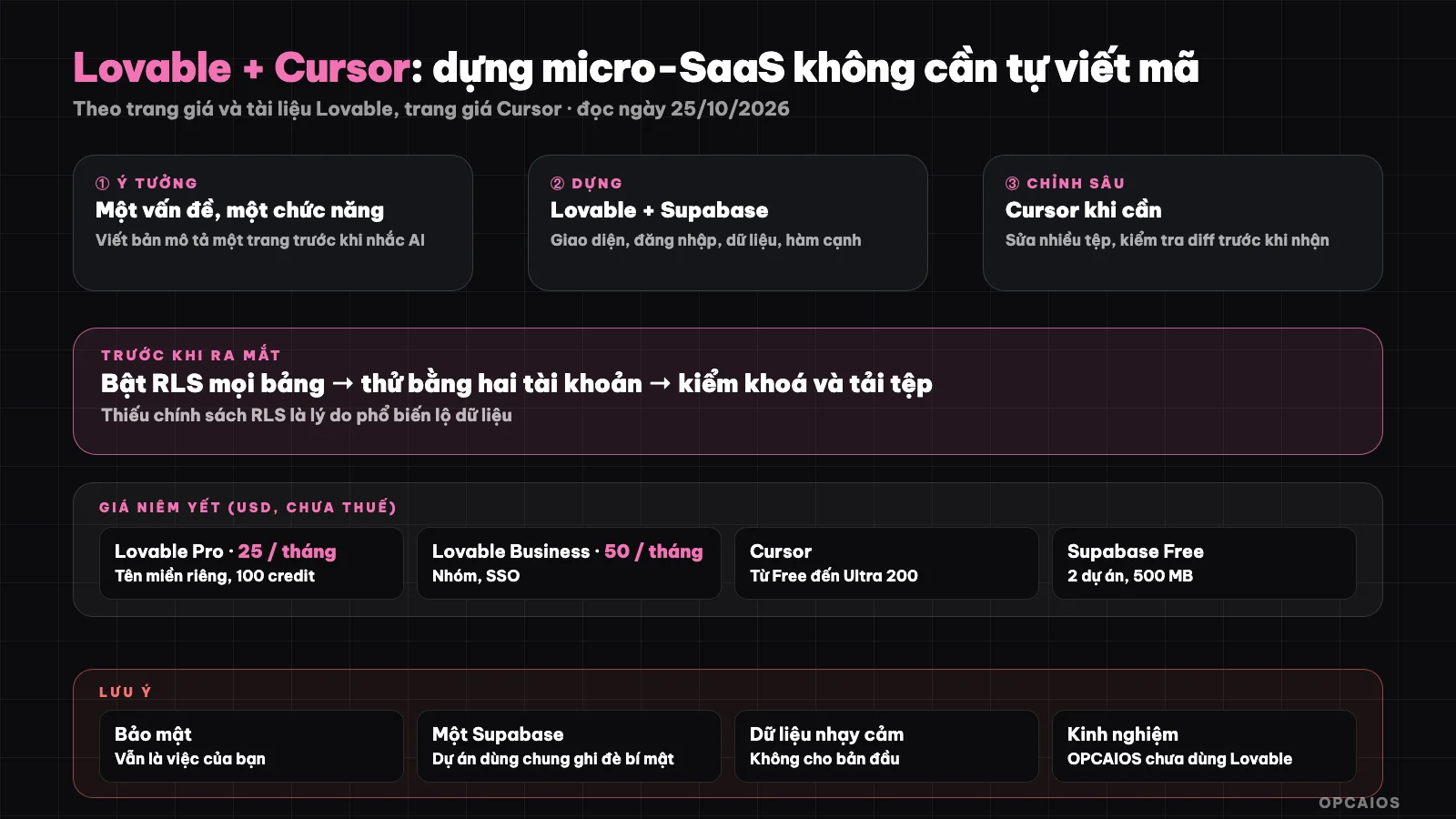
Build fast with AI but security and data are still your job. Diagram: OPCAIOS.
Steps 0 and 1: Pick What to Build and How to Write a Product Description
Step 0 is choosing the right job to build, and step 1 is writing a product description (short PRD) to give to AI. The job should have five traits:
- One problem for one group of customers (for example a quote calculator, booking page, order tracking sheet).
- One core feature, nothing extra; the goal is to get the first version working.
- Little sensitive data: the first version should not save card numbers, documents, health data.
- Ask customers first whether they're ready to use it and pay (see 30-day roadmap to building OPC).
- Simple landing page can be made with Lovable or another tool; see comparison in Top 5 Vibe Coding tools.
Then write one page with user persona, 3 to 5 main flows (for example sign up, create request, view result), screens, data to save, and what you will not do in the first version. Give this to AI instead of scattered prompts; this is the decisive factor for quality.
Step 2: Build the First Version with Lovable
Lovable is a tool for building web applications from prompts right in the browser. According to Lovable's official pricing page (USD, read 25/10/2026): Free plan has daily free credits, 5 lovable.app domains, publish by invite; Pro plan $25 per month (100 credits per month, custom domain, remove Lovable branding, roles and permissions); Business plan $50 per month (add team workspace, SSO, security hub). Credits are counted by usage, not by number of users. For example, if your project needs many edit prompts, track your monthly credit use. The process has four steps:
- First, create a project, paste your description and ask to build the framework (screens, navigation).
- Next, do each flow one at a time: short prompt, see result, fix; avoid too large prompts (wastes credits).
- Then, use the preview to test like a user; write down bugs and send them back to AI.
- Finally, keep a version history so you can go back if AI breaks something.
Step 3: Connecting Supabase—What Can It Do and What Are the Limits?
Supabase is the database and login system that Lovable connects to your project. According to Lovable documentation (read 25/10/2026), Lovable can do five things: design tables from plain language (schema changes run as migrations you review), email-password login and social login (enable providers in the Supabase dashboard), file storage, run edge functions for things like calling AI, sending email, payment, and keep API keys in the Supabase project instead of in the app code.
Connecting has three steps: the workspace owner links the Supabase organization; in the project go to Settings, General, External Supabase, click Connect and pick your project; check it under More, Supabase.
Limits according to the documentation: one Lovable project can only connect to one Supabase project at a time; there is no automatic migration from the built-in backend to a separate Supabase; projects sharing one Supabase will overwrite each other's secrets and may break features. For more on Supabase see What is Supabase?.
Step 4: Check security before letting anyone use it (required)
| Check | How to do it |
|---|---|
| RLS for every table | In Supabase, each table must have a policy; check via the dashboard; try reading another person's data with a different account |
| Write permission | Users only edit their own data |
| Keys and secrets | Don't put them in interface code; use edge function secrets |
| Input data | Test weird data, long strings, special characters |
| File upload | Limit file type and size |
| Rate limit | For AI call features, set a per-user cap to avoid costs jumping |
| Privacy policy | Have a page saying what you collect |
Lovable runs automatic checks like RLS coverage after you change the schema, but according to its own docs, you still need to confirm again in Supabase before launch.
Step 5: Refine with Cursor if needed
Cursor is an IDE with built-in AI agents (see What is Cursor?). According to Cursor's official pricing page (read 25/10/2026), plans are Free $0, Plus $8, Premium $30, Super $100, and Ultra $200 per month, with third-party models billed separately. For example, use Cursor when you need to edit many files, add integrations, or self-review code. To move code from Lovable to Cursor, the code needs to be in a Git repo; we haven't found in Lovable docs which plan supports GitHub sync, so check your plan (see What is GitHub?). When using agents: look at diffs before accepting, limit command permissions, don't put real secrets in prompts.
Step 6: Launch and measure, how much does it cost?
Launch has five tasks. First, attach a custom domain (paid plan) and turn on HTTPS. Second, invite 5 to 10 users to try and log the problems they hit. Third, add basic analytics and a feedback form. Fourth, decide whether to charge, since payment is high-risk so you need a trusted provider and expert advice. Last, track credit, token, and Supabase costs weekly. Example scenario: you invite 5 users to try for 1 week then fix 3 bugs they report.
Reference costs at list price, before tax, read 25/10/2026:
| Item | List price |
|---|---|
| Lovable | Free; Pro $25 per month; Business $50 per month |
| Cursor | From Free; Plus $8 to Ultra $200 per month |
| Supabase | Free plan has 2 projects, 500 MB database, pauses after 1 week idle; Pro from $25 per month |
| Domain | Per registrar |
Price changes; actual cost depends on usage. See also Free AI Tech Stack.
OPCAIOS experience
We haven't used Lovable for any product and haven't used Cursor (our machines have Claude and Antigravity); our website and tools are built with code agents in Git, with a test build and checks before deploy. So we can't rate code quality from Lovable. What we learned when letting AI write code: always put code in a Git repo, test security and data access with a test account, don't put secrets in prompts, and have someone review the diff before deploying. We don't have numbers on time or cost to build a micro-SaaS with these two tools.
Frequently Asked Questions
Can I build a micro-SaaS without knowing how to code?
You can build an initial version using prompts, but you still need to check security, data handling, and take responsibility for your users.
Is Lovable free?
There is a Free plan with daily credits. According to Lovable's official pricing page (accessed 25/10/2026), the Pro plan costs $25 per month with 100 credits monthly and a custom domain, while the Business plan costs $50 per month and adds team workspace, SSO, and a security hub. Credits are calculated based on usage, so your actual cost depends on how many times you ask AI to make edits.
What is the most important step before launch?
The most important step before launch is to enable and check RLS (row-level security policy) for every Supabase table. According to Lovable's documentation (accessed 25/10/2026), missing this policy is the most common cause of data leaks. First, open the Supabase dashboard and check whether each table has a policy. Next, try reading someone else's data using a different test account. Finally, check write permissions so users can only edit their own data. Lovable runs automatic checks like RLS coverage after schema changes, but you still need to confirm again in Supabase. For example, an orders table without RLS could let strangers read customer orders.
Do I need Cursor?
Not required; use it when you need deep edits or to add integrations.
Can I build a landing page this way?
Yes. A landing page introduces a product or service, so it is simpler than a micro-SaaS because it has less data and usually needs no login. For example, a booking page or email collection page can be built using Lovable on the Free plan, then attach a custom domain when you upgrade to the Pro plan at $25 per month (according to Lovable's pricing page, accessed 25/10/2026). First write a description, next build with Lovable, finally check it on mobile. Since you have a form collecting contact information, you still need a privacy policy page. To learn how to build digital products with AI safely, see OPCAIOS's AI application training course.
Source: Lovable pricing page (accessed via browser), Lovable documentation on Supabase integration, Cursor pricing page, Supabase, accessed 25/10/2026; Lovable GitHub support not yet reviewed. Prices exclude tax and may change. Experience is from OPCAIOS.
Translated from Vietnamese with AI. Read the original.
Want to apply this in your business?
Book a free 30-minute call (Vietnam time, in English or Vietnamese).