


What is an automated webinar for someone working alone?
It is an online sharing session where the repetitive parts around the session, including registration page, confirmation email, reminder before the time, replay and post-session care sequence, are built once and then run on schedule, so one person can still organize it without having to send individual messages. The part of talking to attendees is still done by a real person. This post does not promise that a webinar will bring in customers or revenue, and does not cite "industry-standard attendance rates" because we have not found a reliable source for the Vietnamese market, and OPCAIOS does not have real session data to share. The post covers how to choose a topic and promise, build a registration page, schedule reminders 1 day and 1 hour before, how to measure attendance, replay, post-session care, low-pressure sales, and verifiable conditions of Zoom, Google Meet, YouTube Live.
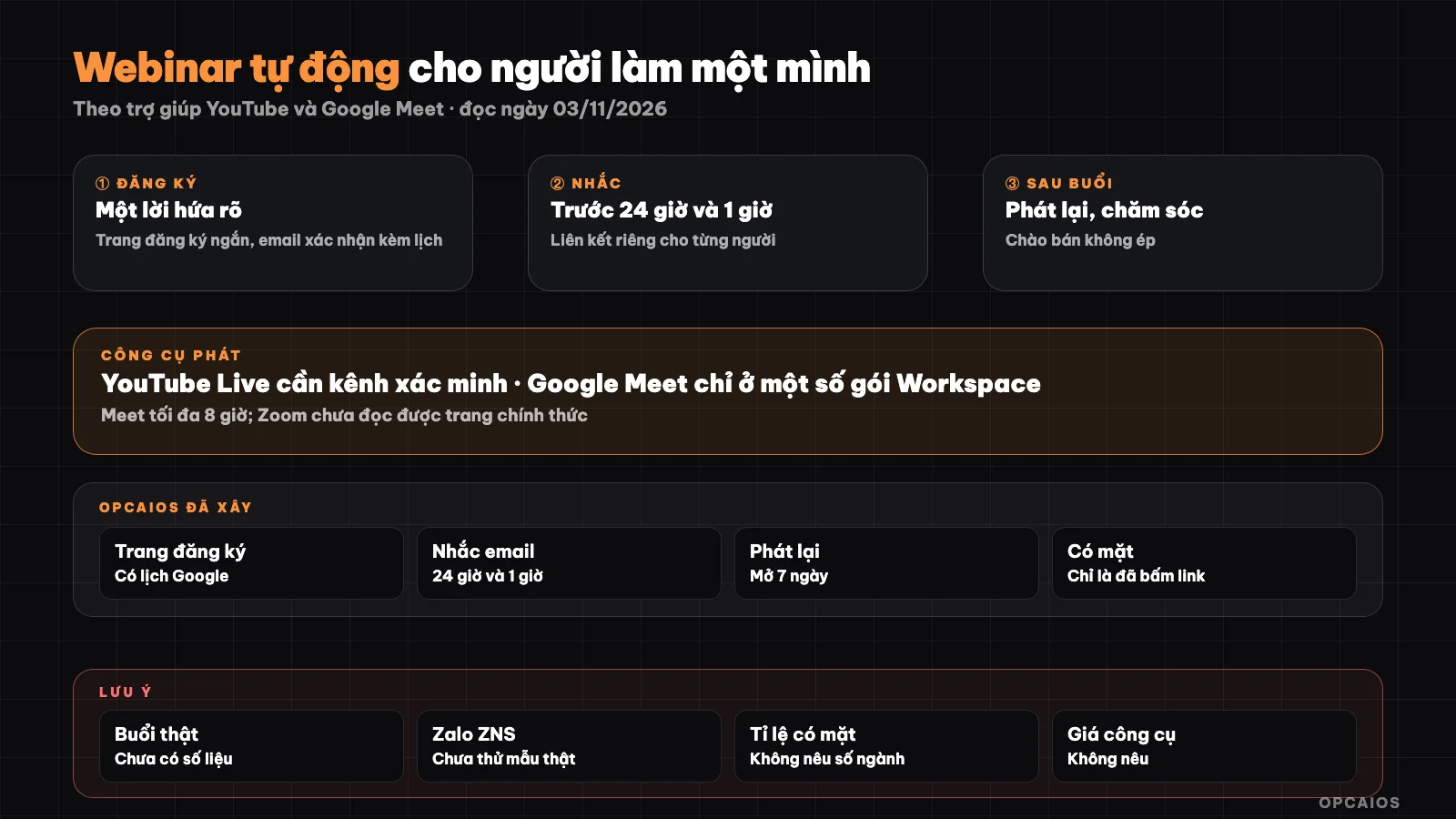
Build once, run on schedule: invite, remind, attend, replay, care. Diagram: OPCAIOS.
How do you choose a webinar topic and promise?
A good webinar topic is a specific problem that viewers can solve part of right during the session, and the promise is a clear statement of what viewers will take away after 45 to 60 minutes. For someone working alone, the topic should sit close to the product you sell, so viewers have a reason to ask more after the session, but the session content must have value even if they do not buy. A practical way to choose includes four steps:
- Take the 3 questions customers ask most often in messages, email, or recent consulting sessions.
- Pick the one that can be answered with a process, a template document, or a live sample session.
- Write the promise using small, verifiable results: "by the end of the session you have a 4-week content planning table", not "double your revenue".
- Clearly state who the session is for and who it is not for, so the wrong fit skips it on their own.
The more measurable the promise, the more right people sign up, and the easier it is for you to know if the session hit the mark.
What does a webinar registration page need?
A webinar registration page is a short page with one job only: let readers enter their name, email, and book a spot. The content should include a headline that is the promise, date and time with timezone, duration, the person sharing, 3 to 5 bullet points on what viewers take away, and a form with few fields. Only ask for a phone number if you really plan to text them on Zalo or call, and say clearly what you use the number for. Below the form, briefly note how you use email (send links, remind of time, send replay and a few related emails) and how to stop receiving messages. Attach UTM parameters for each invite channel to know where sign-ups come from; see What is UTM. To understand page structure in detail, read What is a landing page. One technical note: the form should block duplicate email sign-ups, and when there is a duplicate, do not send another email, so no one uses your form as a tool to spam someone else's inbox.
When should confirmation and reminder emails be sent?
The basic email schedule for one webinar has three messages: confirm right when they sign up, remind 1 day before, and remind 1 hour before. The confirmation email is the most important because readers just took action, so it needs all four things:
- Session name, date and time with timezone, duration.
- Attendance link, ideally a unique link for each person.
- Add-to-calendar button, for example a Google Calendar link, so their calendar reminds them.
- One sentence reminding them to check the Promotions or Spam folder if they do not see the email.
The reminder email 1 day before repeats the promise and link; the one 1 hour before needs just one sentence and the room link. If you have phone numbers and sign-ups agreed, a Zalo or SMS message before the time can help people who skip email. Do not send too many reminder emails, because sign-ups easily unsubscribe. See more background in the post What is email marketing.
What's a Good Attendance Rate?
Attendance rate is the number of people who actually showed up divided by the number of people who registered. I won't give you an industry standard here: the numbers commonly cited online usually come from reports by the webinar platforms themselves, measured on their own customer base, and I haven't found a reliable source to apply to solo workers in Vietnam. What matters more is tracking your own trend across each session. There are two ways to measure, each with limits:
- Count clicks on the attendance link: easy to do, but only tells you someone clicked—not how long they stayed.
- Pull attendance reports from the meeting platform: more accurate on time spent, but depends on your service tier and requires manual matching with your registration list.
Log each session: registrations, attendees, replays watched, follow-up questions. After three or four sessions, you'll have a baseline to compare against.
How Long Should Replay Access Stay Open?
A replay is the video link from the session, sent to people who registered after it ends, usually open for a limited time. Many people register but can't attend live, so replays are essential. A common window is a few days to one week; for example, the default in OPCAIOS's system is 7 days (adjust as your content needs). When setting a replay deadline, stick to it: if you write "open until end of Friday," close it on Friday—don't extend it and send another "last chance" email. False deadlines destroy trust faster than any benefit they bring. Send the replay email once the link is ready, state the closing date clearly, and if there's an offer, spell out the terms, code, and deadline in plain language.
What Does Post-Session Care Include?
Post-session care is a series of actions with registrants after the webinar ends, split by whether they attended or not. A simple sequence for solo workers:
- Right after: send the replay and promised materials to both attendees and no-shows.
- 1 to 2 days after: answer unanswered questions from the session, send them together in one email.
- People who attended and asked deep questions: add them to your inner contact list, message or call to explore what they care about.
- People who didn't attend and haven't opened the replay: one short reminder before replay closes, then stop.
Save all registrants to your CRM with source and attendance status so you reach the right people next time; see What is CRM and lead scoring for small business. Anyone who opted out must be removed from all automated sequences.
How to Pitch After a Webinar Without Pushing?
Non-pushy pitching is introducing a product as a next step for people who need it, with full information and a clear right to decline. Four principles to keep:
- Spend most of the session on promised content; the product intro is short, placed at the end, and flagged from the start.
- State price, what's included, refund policy if any, in writing—not just spoken.
- Any offer deadline must be real and kept; no fake countdowns, no "only 2 spots left" when there's no limit.
- Don't promise results to buyers; if you share someone's results, it must be true and have their permission. See the related post turn customer praise into content.
To connect a webinar into your overall sales funnel, see automated sales funnel for OPC.
Should I use Zoom, Google Meet, or YouTube Live?
Zoom, Google Meet, and YouTube Live can all host online sessions, but they differ in two-way interaction, number of viewers, and account requirements. I'm not listing prices because I haven't read the official pricing pages from each one at the time of writing. What I've verified or not:
| Tool | What I read from sources | Notes |
|---|---|---|
| YouTube Live | YouTube Help: channel must be verified, broadcaster must be 16+, no live stream restrictions in the past 90 days; one warning locks live streaming for 14 days | Good for large crowds, interaction through comments |
| Google Meet | Google Meet Help: live streaming only in certain Google Workspace versions (Enterprise, Business Continuity, some Education plans); session auto-ends after 8 hours | Regular meetings with small groups, need to check viewer limits per plan |
| Zoom | Haven't found the official support page; university guides say meeting registration needs a licensed account, while Zoom Webinars is a separate product | Haven't verified conditions and auto-reminder behavior |
Whatever tool you pick, you can still make your own registration page and reminder emails outside of it, just paste the room link in. See more at AI tools for the OPC model.
OPCAIOS's experience
OPCAIOS has built an event management section in the Marketing area of the admin page, read from source code on 03/11/2026. Each event has a public registration page; registrants are saved as contacts in the internal CRM, marked as consenting to receive updates, and get a confirmation email with a private attendance link plus a link to add to Google Calendar. Duplicate email registrations don't get the email sent again. A task runs every 15 minutes to send reminder emails 24 hours and 1 hour before; it can also send a Zalo message from a template if one was provided, but the Zalo part hasn't been tested with a real template. Clicking the private link counts as "present," so this number is page views, not sitting time. The replay page opens according to the set number of days (default 7) with a limited-time offer, and the replay email sends automatically once the link is pasted. The registration page closes one day after the session. I haven't found any data or notes about a webinar actually held with real attendees, so I have no real numbers: no registration count, attendance rate, or revenue to report.
Frequently Asked Questions
Should a solo worker do webinars?
Try it when you have a topic customers ask about often and a related product to introduce afterward. Webinars let you talk to many people at once, answer questions directly, and create a video you can reuse. The cost is preparation time and the risk that few people show up. If you don't yet have an email list or community to invite, do a few small sessions with current customers first, see what they ask, then invest in broader promotion.
Do you need paid webinar software?
Not required. A signup page, an email tool, and a meeting room or live stream is enough for your first session. Dedicated webinar software is convenient because it combines signups, reminder emails, and attendance reports in one place, but terms and pricing vary by plan, so read the official pricing page before buying. With small sessions, cobbling together tools helps you keep your signup list in your own system.
How many reminder emails should you send?
Three is the baseline: confirm right after signup, remind one day before, remind one hour before. If people sign up more than a week early, you can add one email in between with useful content, like questions to help them prepare. Don't add emails just to repeat the same message. Track unsubscribe rates after each email; if it rises noticeably, send fewer emails or make them shorter.
Should you record a webinar and play it like it's live?
You can use a recorded video, but say clearly it's a recording. Calling a recorded session "live," or staging fake comments and viewer numbers, misleads viewers and breaks trust when they find out. More honest is to play the recording then be present to answer questions in the chat, or invite viewers to book a follow-up call to ask questions after.
What numbers should you measure after each session?
Five numbers are enough: signups, attendance, replays watched, people who ask follow-ups or book a call, and sales within a time window you set. Write down how you measured, like "attendance means they clicked the link," so you don't mix up numbers between sessions. Only compare yourself across many sessions. To learn how to build a signup page, email sequence, and CRM for events with AI, see OPCAIOS's AI Application Training.
Source: YouTube Help on live streaming eligibility (support.google.com/youtube/answer/2474026) and Google Meet Help on live streaming (support.google.com/meet/answer/9308630) (read 03/11/2026); could not access Zoom's official support page, so Zoom information comes from a university guide and is not verified; tool prices not listed and industry attendance rates not cited; system description read from source code, no real session data yet. Experience is OPCAIOS's.
Translated from Vietnamese with AI. Read the original.
Want to apply this in your business?
Book a free 30-minute call (Vietnam time, in English or Vietnamese).