


Selling membership packages on your website
What is selling membership packages on your website? It is a model where readers pay a monthly or yearly subscription to unlock special content and benefits (in-depth articles, prompts, guides, discounts), while the rest of the website remains public. For a one-person company, the hardest part is not the pricing page but blocking content correctly: paid content must stay on the server and only be sent to people who have paid, not sent to the browser and then hidden with CSS or JavaScript. This post does not promise membership revenue; OPCAIOS does not disclose membership numbers or revenue, and we do not yet have measurable data on this model. The post will cover how to choose a model, how to block content on the server, SEO for paid content according to Google's documentation, QR payment, renewal, cancellation, refunds, and the actual state of the membership system on opcaios.org.
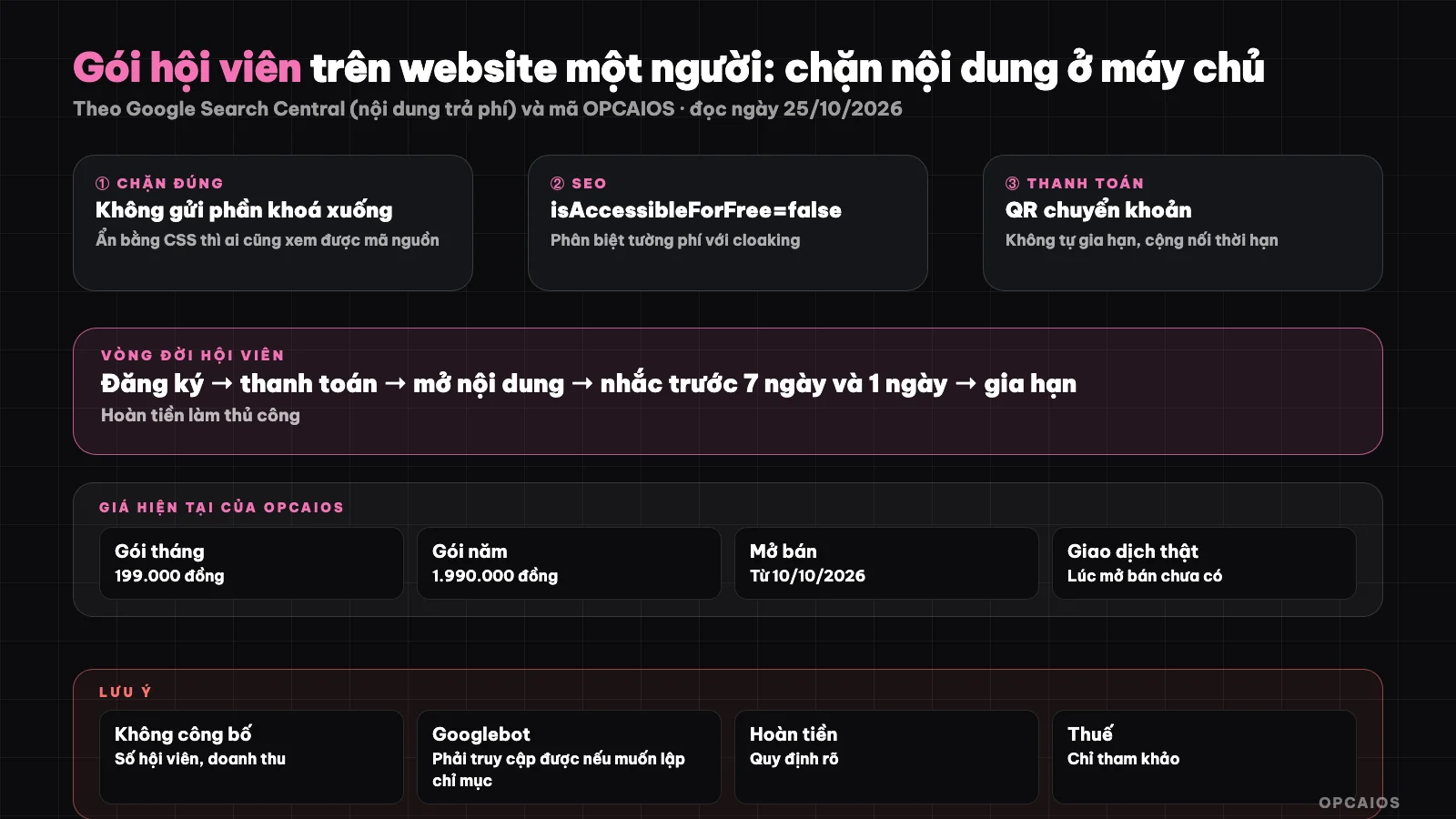
Locked content only leaves the server when the viewer is a member with an active subscription. Diagram: OPCAIOS.
Which membership model should you choose for a one-person website?
The membership model that works for a one-person website is one you can maintain a consistent content rhythm for, not the model with the most benefits. Four common types:
| Model | What the paying person gets | Risk when doing it alone |
|---|---|---|
| Content library | Locked articles, templates, prompts | Library grows stale without updates |
| Paid newsletter | Regular articles via email | Pressure to keep a publishing schedule |
| Community | Discussion group, Q&A sessions | Time-consuming moderation |
| Benefit package | Course discounts, gifts, priority support | Hard to price benefits |
Many websites mix content library with benefit packages. Paid newsletters are discussed in paid newsletter, community in micro-community for a fee; OPCAIOS does not yet run a paid community. Choosing monthly and yearly packages is enough to start; add other packages when you have actual buyers.
Why block paid content on the server instead of hiding it with CSS?
Blocking content on the server is the only way to ensure people who have not paid cannot read locked content, because everything sent to the browser can be read. If the page sends the entire article in HTML and then covers it with a blur layer using CSS, or loads the entire article into JavaScript code and only shows it after login, the viewer only needs to open "View page source", disable JavaScript, check the Network tab, or read a search engine's cached version to see everything. The correct way has three parts:
- The public page contains only the preview section (a few opening paragraphs) and an "unlock" button.
- The locked section is requested by the browser through a separate API; the API checks the login session and membership expiry on the server before returning content.
- The response sets a no-cache mode for shared caching, so intermediate servers do not keep a copy.
Check again after each edit: load the page when not logged in, find a sentence that must be in the locked section in the HTML and JavaScript files; the result must be not found.
Where else is locked content commonly leaked besides the article page?
Locked content usually leaks through side channels that the creator forgets to check, not through the main page. Here is a list to review:
- Data on listing pages: article cards or tool cards that send full detailed content instead of just name and short description.
- Shared JavaScript packages: a config file containing default content for all pages embedded in browser-side code.
- RSS feeds and files for AI like llms.txt: should only have summary or preview sections.
- Share images, description tags, and structured data: do not copy passages from the locked section into descriptions.
- Detail URLs: if the category name itself is paid information, the public URL should return 404 like a non-existent page.
These are mistakes OPCAIOS encountered and fixed on its own website; see the experience section below.
How to Do SEO for Paid Content According to Google Documentation?
SEO for paid content is based on structured data that Google describes in the "Subscription and paywalled content" page (updated 08/09/2026, read on 25/10/2026). According to this documentation, you mark the article using JSON-LD of type Article with the isAccessibleForFree property set to false, and use hasPart with cssSelector pointing to the CSS class surrounding the paid section (only accepting selectors in the form ".class-name", non-nested sections). The purpose is to help Google distinguish legitimate paywalls from cloaking, which means showing Googlebot different content than users see, a violation of spam policy. The documentation also makes clear: if you want the paid section to be indexed, Googlebot must be able to access it; if you don't want to send locked content to the browser, choose an implementation that doesn't send it down. The real tradeoff: if you block it on the server for everyone, Google only sees the preview, so the preview must be valuable enough to rank on its own.
| What to do | Why |
|---|---|
| Write the preview like a complete short article | This is the part Google and AI can read |
| Mark isAccessibleForFree: false | To avoid being misunderstood as cloaking |
| Wrap the locked section in its own CSS class | So hasPart points to the right place |
| Check with the URL Inspection tool | See what Google actually sees |
Google's "Flexible sampling" page (updated 10/12/2025) discusses allowing trial reads based on limits and opening paragraphs; that's a suggestion, not required. See What is Google Search Console and What are SEO and GEO.
How Does Charging Membership Fees Using QR Bank Transfers Work?
Charging membership fees using QR bank transfers is a way that works well with a one-person website in Vietnam because you don't need an international payment gateway. The basic flow:
- The buyer chooses a package; the system creates an order with a unique code and displays a QR code with the transfer amount and transfer content containing the order code already filled in.
- The bank reconciliation service calls a webhook to the website when money arrives.
- The website reads the order code from the transfer content, checks the amount, marks the order as paid, and adds the duration.
- Sends a confirmation email with the expiration date.
Points to be careful about: reuse a pending order when the buyer reloads the page so you don't create multiple orders, handle transfers that don't match the code manually, and verify that webhooks come from the correct service. Implementation details are in Charging for digital products using QR bank transfers.
How Should Renewal, Cancellation, and Refunds Be Designed?
Renewal, cancellation, and refunds should be designed before you start selling, because this is where buyers lose trust the fastest. With QR bank transfers, there's no automatic deduction, so the simplest and most transparent model is non-auto-renewing packages:
- Renewal: buy another package, the new duration is added starting from the old expiration date (or from today if already expired).
- Renewal reminders: one email about a week before expiration and one email a day before, each timepoint sent only once.
- Cancellation: since there's no recurring charge, the buyer just doesn't renew; unpaid orders can be cancelled.
- Expiration: the account still exists, only the membership part is locked.
- Refund: state the policy clearly on the terms page (conditions, timeframe, how to contact), when refunding return the corresponding duration and note the reason.
Refund policy and tax obligations depend on the law where you do business; this part is not legal advice, see more in Legal checklist for solopreneur registration.
OPCAIOS's Experience
I built a membership system on opcaios.org using programming agents, and the actual state is as follows. The public pricing page shows two plans: monthly membership 199,000đ and annual membership 1,990,000đ (read 25/10/2026), payment by QR bank transfer, automatic activation, no auto-renewal. The project notes confirm the website owner verified the price and turned on sales on 10/10/2026; at the moment sales launched, the system had not recorded any real transactions through webhooks, so the first real order was also a full-flow check. We do not disclose membership numbers or revenue and do not imply we already have any.
What has been done, read from the source code:
- Articles, pages, prompts and tool guides can be marked "members only"; public pages contain only a preview, the rest is fetched via an API that checks membership expiry.
- Locked articles have JSON-LD isAccessibleForFree: false and hasPart pointing to the class wrapping locked sections.
- A tool topic can lock both the name and link; the public path to that entry returns 404.
- Refunds are handled manually from the admin panel: the order changes status, the expiry is reversed, money is refunded by bank transfer outside the website.
The real lesson: the first version once leaked locked content through list page data and a shared JavaScript package; afterwards we added a step to check for locked sentences in HTML and JavaScript files after each change.
Frequently Asked Questions
Is hiding content with CSS or blurring enough?
No. Any content sent to the browser can be read via "View page source", developer tools, reader extensions or search engine archives. Blurring is only a display effect, not protection. The right way is for the public page to contain only the preview, the locked part is returned by the server after checking login session and membership expiry. After each change, load the page when not logged in and find a sentence in the locked section to make sure it is not exposed.
Does blocking content at the server hurt search ranking?
There is a trade-off. If Googlebot cannot see the locked part then Google only indexes the preview, so that part must be long and valuable enough to rank on its own. Google's "Subscription and paywalled content" documentation says that for the paid part to be indexed, Googlebot must be able to access it, along with structured data isAccessibleForFree to avoid being treated as cloaking. Small sites usually choose to keep many articles free to pull search traffic, only lock the deep practice sections, and accept that the locked part will not rank.
Do I need a payment gateway to sell memberships?
Not required. In Vietnam, QR bank transfer combined with a reconciliation service that calls webhooks to the website is enough for monthly and annual plans: each order has a unique code in the transfer note, the website matches the code and amount then activates. The trade-off is no periodic automatic deduction, so buyers must actively renew and you need to email reminders before expiry. A payment gateway works better when you sell to international customers or want automatic renewal; then you need a clear cancellation flow.
How much content should I lock?
There is no standard ratio, and we have not measured which ratio is more effective on our site. Practical suggestion: keep most concept-explaining articles free so readers find and trust you, only lock the parts that save the most time like templates, complete prompts, step-by-step guides, practice videos. Each locked article should have a preview clearly saying what readers will get after unlocking. Track the number of unlock clicks and orders to adjust gradually.
How do I handle membership refunds transparently?
Write a refund policy before opening sales and place a link right on the pricing page: conditions for refund, request deadline, how to contact, processing time. When refunding, note the reason, move the order to refunded status, reverse the corresponding expiry and transfer the money back to the buyer. With QR bank transfer, refund transfers are usually done manually via the bank. Consumer protection rules differ by business location, this is not legal advice. To learn how to build a sales system with control using AI, see OPCAIOS's AI application training course.
Source: Google Search Central, "Subscription and paywalled content" (updated 08/09/2026) and "Flexible sampling" (updated 10/12/2025), read 25/10/2026; opcaios.org pricing page read 25/10/2026; no verification of member counts or real transactions since sales launch, no revenue figures. Experience is OPCAIOS's.
Translated from Vietnamese with AI. Read the original.
Want to apply this in your business?
Book a free 30-minute call (Vietnam time, in English or Vietnamese).