


Security When Using AI to Write Code
Security when using AI to write code is a set of habits and configurations so that agents like Claude Code, Codex CLI, or Cursor don't get controlled by malicious content, don't leak secret keys, and don't do more than what you allow. The two biggest risks are prompt injection (commands embedded in data that make AI follow someone else's intent) and secret key exposure (API keys, passwords, tokens sitting in code repositories, .env files, logs, or pasted into chat windows). This post doesn't promise any configuration that stops every attack; Claude Code's own security documentation says no system is completely immune. The post covers prompt injection according to OWASP, the paths through which keys leak, overly broad permissions, suspicious dependencies, prevention methods, and a numbered checklist.
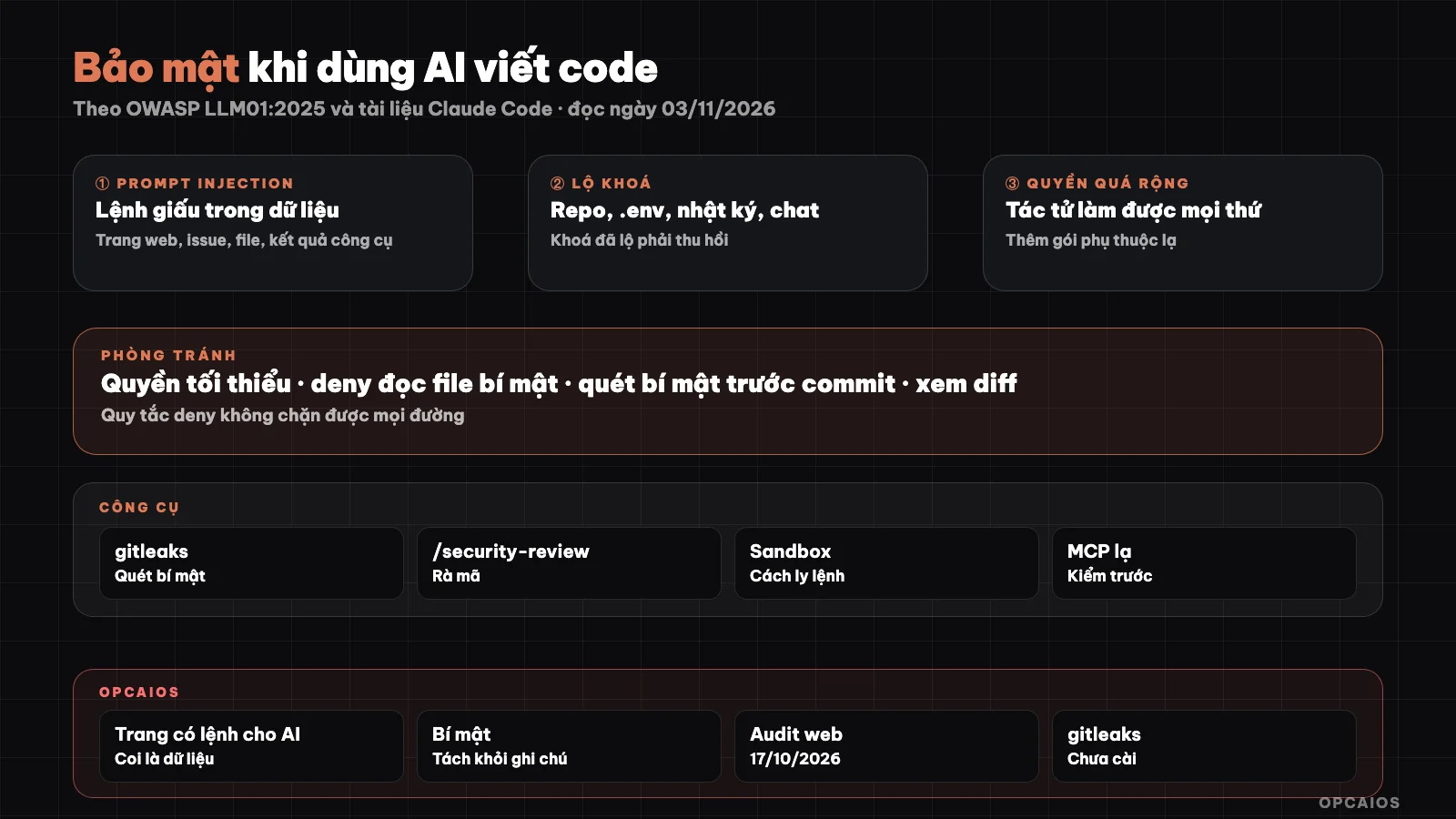
External data is data, not commands; each defense layer blocks one leak path. Diagram: OPCAIOS.
This post supplements 5 Data Security Rules When Using AI, focusing specifically on using AI to write and run code.
What is Prompt Injection?
Prompt injection is a vulnerability that occurs when a prompt or content fed into a model changes the model's behavior or output in unintended ways. OWASP ranks this vulnerability at LLM01 in the OWASP Top 10 for LLM Applications 2025 (page genai.owasp.org, accessed 03/11/2026). OWASP divides it into two types. Direct injection is when the user themselves types a prompt that shifts behavior, whether intentionally or accidentally. Indirect injection is when the model reads external content like a website or file, and that content contains instructions that make the model behave differently. OWASP also notes that embedded content doesn't need to be visible to people—only for the model to read it, for example white text on a white background or hidden comments in code. With programming agents, indirect injection is far more dangerous because the agent has permission to run commands, edit files, and make network calls: an embedded command can become a real action on your machine, not just a wrong answer.
Where Does Indirect Prompt Injection Come From?
Indirect prompt injection comes from any content the agent reads that you didn't write yourself. Common sources when writing code include:
- Websites and online documentation: the agent figures out how to use a library, reads the documentation page, and that page contains text telling the AI to call a different address or run a command.
- Issues, comments, pull requests: strangers write content into a public repository; if an automated process lets the AI read and act on it, that content becomes a command.
- Files in the repository not written by you: README, code comments, configuration files from a project you downloaded.
- Output from tools: results from an MCP server, search results, email content, or documents that a connector brings in.
The general rule: everything the agent reads from outside is data, not instruction. When you spot text aimed at the AI, stop and notify the user—don't follow it.
What Are the Leak Paths for Secret Keys?
Secret keys leak primarily through 4 paths, and AI agents are more likely to use all 4 because they read and write many files:
- Keys written straight into code and committed: the agent "makes it work" by pasting a key into a config file and committing it to the repository. Git history keeps the key even if you delete it in a later commit.
.envfile read or pushed to Git: the agent reads.envto understand configuration, that content goes into context sent to the AI service; or.gitignoreis missing the line.env.- Logs and command output: commands print environment variables, error logs contain database connection strings, results get saved or pasted back.
- Keys pasted into the chat window: the fastest way to configure, also the surest way for keys to end up in conversation history.
When you suspect a key has leaked, the right move is to revoke and create a new one immediately, not just delete it from the file.
How Dangerous Are Overly Broad Permissions and Strange Dependencies?
Overly broad permissions are when an agent is allowed to do more than what the current task needs, for example running any shell command, writing to any directory, or calling any network address. When that happens, a planted command or one misunderstanding by AI can delete data, send files outside, or push code to the main branch. Claude Code's security documentation (code.claude.com/docs, read on 03/11/2026) makes clear that the working directory boundary is just a permission prompt: a Bash command you've approved can still write anywhere your account can write, and to block it at the operating system level you have to enable sandbox. Strange dependencies are a parallel risk: AI suggests installing a library with a name close to the real one, a package that's been abandoned, or a package that doesn't exist but a bad actor could register first. Each package installed is someone else's code running on your machine, including scripts that run during installation. Before you agree, check the maintainer, the package's update date, and ask the agent why it needs it.
What Ways Defend Against Prompt Injection?
Defending against prompt injection is based on the assumption that it will happen, so the goal is to limit damage. OWASP (read on 03/11/2026) lists 7 mitigation directions, of which 4 apply directly to programming agents:
- Least privilege: only grant the tools and directories needed for the current task.
- Human review of high-risk actions: delete, send, publish, push code, run network commands.
- Separate and mark outside content: treat websites, issues, downloaded files as data.
- Check output format: don't automatically run what AI returns if it hasn't been checked.
Claude Code already has some layers according to official documentation: commands that fetch network content like curl and wget don't get auto-approved; the web reading tool runs a separate model call on the page and Claude only gets that call's answer instead of the raw page; a trust dialog appears for the directory when you open a strange folder in an interactive session. Note that the claude -p session doesn't show this dialog.
How Do You Block an Agent from Reading Secret Files?
To block an agent from reading secret files in Claude Code, use the permissions.deny rule in the settings.json file. According to the settings reference page (read on 03/11/2026), deny rules are checked before ask and allow; files matching a deny rule are excluded from search, denied on read, and blocked on edit. Example from the documentation:
{
  "permissions": {
    "deny": [
      "Read(./.env)",
      "Read(./.env.*)",
      "Read(./secrets/**)",
      "Read(./config/credentials.json)",
      "Bash(curl *)"
    ]
  }
}
Limits to know: Read rules apply to Claude's file tool and Bash commands it recognizes like cat, head, tail, but don't apply to file-reading commands that don't state the name like grep -r, or any subprocess. The Bash(curl *) rule also doesn't block /usr/bin/curl. To really block it at the operating system level, the documentation recommends enabling sandbox. The .claudeignore file has no effect, you have to switch to deny rules. See more at plan mode and permission modes in Claude Code.
What Tool Do You Use to Scan for Secrets Before Commit?
Scanning for secrets before commit is running a tool to find strings that look like API keys, tokens, passwords in changes before they go into Git history. Gitleaks is an MIT-licensed open source tool that does this (official repo github.com/gitleaks/gitleaks, read on 03/11/2026), scans Git repos (gitleaks git), directories (gitleaks dir), and pushed data (gitleaks stdin). The README shows how to use it via pre-commit with the following setup, then run pre-commit autoupdate to get the new version and pre-commit install to enable it:
repos:
  - repo: https://github.com/gitleaks/gitleaks
    rev: v8.24.2
    hooks:
      - id: gitleaks
Note: the README currently says gitleaks has enough features and only gets security patches, and the author moved to a new project called Betterleaks; we haven't evaluated that project yet. The scan tool only catches known patterns, it can't replace the habit of not putting keys in code.
Review Diffs and Check MCP Before Trusting
Reviewing diffs means reading exactly each line the agent changed, instead of trusting the summary. When reading, watch for these signs: new strange network addresses, new dependencies, changes to permission config files, CI or hooks, printing environment variables to logs. Claude Code has a /security-review command to audit the security of changes on the current branch, but that's an extra layer, it doesn't replace the person reading. With MCP, Claude Code's documentation recommends writing the server yourself or only using servers from trusted providers, and it's clear that Anthropic doesn't audit the security of any MCP servers. See more at What is MCP.
Security checklist when using AI to write code
- Put your project in Git, work on a separate branch, don't let the agent push directly to the main branch.
- Add
.envand secret folders to.gitignorebefore the agent touches the project. - Add deny rules for
.env, secret folders, and credential files. - Don't paste API keys, passwords, or customer data into the chat window.
- Turn on secret scanning before committing.
- Keep permissions narrow, don't approve commands you don't understand; use a sandbox or virtual machine with unfamiliar repositories.
- Treat websites, issues, and downloaded files as data; if you see instructions aimed at the AI, stop and report.
- Check each new dependency package before installing.
- Only use MCP servers from trusted sources, and only enable the server you need for the current task.
- Read the diff before committing; for automation, see the post running Claude Code automatically each day.
- If you suspect a key is exposed, revoke it and create a new one immediately.
OPCAIOS experience
OPCAIOS uses a programming agent to build and operate the website opcaios.org. Once the agent encountered an outside documentation page containing an instruction aimed at the AI agent, telling it to call a different address; we handled it by treating that as data, not following it, and reporting back to the owner. Secrets (keys, passwords, environment config files) were once mixed into the Obsidian note repository synced to the cloud; we moved them to a separate folder outside the note repository. On 17/10/2026, we audited the website's security and fixed several points: check Origin to block write requests from other pages, enable Content Security Policy, use a shared rate-limiting function for public APIs. We don't yet have a hook to block dangerous commands in Claude Code and haven't installed gitleaks for the website repository, so those two tasks in the checklist are still things we need to do ourselves.
Frequently asked questions
Can prompt injection be blocked completely?
No. Both OWASP and Claude Code documentation don't promise that, because models read instructions and data in the same text stream. The realistic goal is to limit damage: least privilege, human review of high-risk actions, sandbox or virtual machine with unfamiliar content, and read diffs before accepting changes. If the agent doesn't have permission to send data out, an embedded instruction telling it to send won't work.
Should I let AI read the .env file to configure itself?
No. The content of files the AI reads goes into the context sent to the AI service. Instead, write a template file like .env.example with only variable names, no values, have the AI read the template file, and you fill in the real values yourself. Add a deny rule for .env so the agent doesn't read it by mistake. Remember this rule doesn't block all shell commands, so you still need to watch the commands you approve.
If I accidentally commit a key to GitHub, what do I do?
Revoke the key immediately on the provider's website and create a new one, then think about cleaning up Git history. Deleting the key from the next commit isn't enough, because history still holds the old version, and public repositories may have already been scanned within minutes. Then check the usage logs of the old key, add secret scanning before commit so you're blocked early next time. This part is technical advice, not legal counsel about data incidents.
Are MCP servers from the community safe?
Not by default. Claude Code documentation states that Anthropic does not audit security of any MCP server, including connectors in the directory which are only reviewed by listing criteria. Before installing, check who maintains it, whether the source code is public, what permissions the server needs, where it sends data. Only enable the server you need for the current task, and turn it off when done.
Where should beginners start with security?
Start with three things in one session: put your project in Git and add .env to .gitignore, add deny rules for secret files, and build the habit of reading diffs before committing. Then move on to secret scanning, sandboxes, hooks. Read more about the safe process for using a programming agent. If you want hands-on guidance, check out OPCAIOS's AI application training course.
Source: OWASP GenAI Security Project, page "LLM01:2025 Prompt Injection"; Claude Code documentation at code.claude.com/docs, pages "Security", "Configure permissions", "Settings reference"; README of repository github.com/gitleaks/gitleaks (read on 03/11/2026); have not verified the Betterleaks project and have not tested pre-commit configuration in this post; experience is from OPCAIOS.
Translated from Vietnamese with AI. Read the original.
Want to apply this in your business?
Book a free 30-minute call (Vietnam time, in English or Vietnamese).